


# Legal Document Delivery Optimization: A Dispatch Blueprint for Process Serving Agencies
> TL;DR: Legal document delivery optimization means routing process servers around court deadlines, attempt time windows, and defensible proof requirements — not just shortest driving distance. Agencies using manual dispatch often lose 20-30% in extra mileage and repeated failed attempts from poor timing. Route optimization platforms like Zeo Route Planner address this with time window constraints, priority stop flagging, and GPS-timestamped proof of service, helping field teams save 2+ hours daily compared to manual planning.
Process serving runs on deadlines, not guesswork. Yet most agencies still dispatch servers the same way they did 20 years ago: a spreadsheet, a phone call, and a server’s best guess at the fastest route. Legal document delivery optimization fixes this by applying real route-optimization technology to the unique demands of serving legal documents—statutory deadlines, repeat attempts, and proof-of-service requirements that hold up in court.
If you run a process serving agency with 3 to 25 servers, you already know the pain points: wasted mileage, blown deadlines, and defendants challenging service because your documentation doesn’t hold up. This guide shows you exactly how to fix it, with the ROI math to prove it’s worth doing.
What Legal Document Delivery Optimization Actually Means (And Why Generic Courier Routing Falls Short)
Legal document delivery optimization means planning server routes around court deadlines, attempt windows, and defensible proof—not just shortest distance. It’s different from standard courier or package routing in three critical ways, and the distinction matters for any field service business where timing determines success, not just distance.
First, timing matters more than speed. A courier dropping off a package just needs to arrive before a delivery window closes. A process server trying to catch someone at home before work needs to hit a specific address between 6 AM and 8 AM, then pivot to a different stop by 9 AM. Generic routing tools optimize for distance. They don’t understand that serving a defendant at the wrong time of day guarantees a failed attempt.
Second, proof requirements are heavier. Standard delivery proof is a photo at the doorstep. Legal proof of service often needs to survive cross-examination in court. That means GPS-verified timestamps, attempt logs, and documentation that shows exactly when, where, and how service was attempted or completed.
Third, failed attempts aren’t a minor inconvenience—they’re a recurring cost. In package delivery, a missed drop-off gets rescheduled for tomorrow. In process serving, a failed attempt can mean burning another hour of drive time, another tank of gas, and getting closer to a statutory deadline with nothing to show for it.
This is why generic mapping apps and basic courier software fall short. They weren’t built for time-window-sensitive, evidence-heavy, deadline-driven work. Route optimization platforms built for field logistics—like Zeo Route Planner—close this gap by combining real routing intelligence with the documentation tools legal work demands.
The Hidden Costs of Manual Dispatch: What Failed Attempts and Bad Routes Are Really Costing Your Agency
Most agency owners underestimate how much manual dispatch actually costs. The damage shows up in three places: wasted mileage, repeat attempts, and missed deadlines.
Start with mileage. When servers plan their own routes based on gut feel, they often backtrack across the same zip codes multiple times a week. A server bouncing between three different parts of a county, instead of clustering stops geographically, can easily drive 20-30% more miles than necessary. At current IRS standard mileage rates, that adds up fast across a team of 10 servers logging 100+ miles a day.
Then there’s the attempt problem. According to industry benchmarks tracked by the National Association of Professional Process Servers, successful first-attempt service rates vary widely by agency—often because timing, not effort, is the deciding factor. A server who shows up at 2 PM for a defendant who works until 6 PM wastes the trip. Do that three times before finally connecting, and you’ve burned three trips’ worth of fuel, mileage, and labor for one completed job.
Missed deadlines are the most expensive cost of all. Courts don’t care that your dispatcher forgot which county had a 5-day service window versus a 10-day window. A blown deadline can mean a case gets dismissed, a client gets furious, and your agency’s reputation takes a hit that’s hard to repair. If you’re tracking deadlines in a spreadsheet or relying on someone’s memory, you’re one busy week away from a costly mistake.
Add it up: wasted mileage, repeat trips, and the legal and reputational risk of missed deadlines. For a 10-server agency, this can easily total thousands of dollars a month in costs that never show up as a line item—they just quietly eat into your margins.
Building Court-Defensible Proof of Service with GPS Timestamps, Photos, and Digital Signatures
When a defendant challenges service, “I’m pretty sure we served them on Tuesday” doesn’t hold up. You need documentation that proves exactly when, where, and how service happened—or didn’t.
This is where GPS-timestamped proof of delivery becomes essential. Zeo Route Planner’s mobile app lets servers capture proof of service with photo capture, digital signature collection, and delivery notes, all tied to the exact GPS location and timestamp of the stop. Instead of a server scribbling notes after the fact, you get a documented record created in the moment, at the actual address.
For process serving specifically, this matters for both successful service and failed attempts. A successful service gets a photo of the drop location, a signature if applicable, and a note describing who was served. A failed attempt gets logged with a timestamp and GPS location showing the server was actually there, at the time they claim—evidence that can matter if a defendant later claims no one ever came.
Here’s a real-world scenario: A process server attempts to serve a defendant at a residence three times over two weeks—once in the morning, once in the evening, once on a weekend. Each attempt gets logged with GPS coordinates and a timestamp via the mobile app. When the case eventually requires substitute service or a motion explaining diligent effort, the agency has a clean, time-stamped record of exactly when and where each attempt happened. That’s the difference between a judge accepting your diligence and a case getting bogged down in a credibility dispute.
Digital signatures add another layer of defensibility. When a server does make contact and completes service, capturing a signature on the spot—time-stamped and GPS-tagged—creates a harder-to-dispute record than a paper affidavit written up later from memory.
None of this requires specialized legal software. It requires a tool that captures the right data, at the right moment, automatically tied to location and time. That’s a route optimization and field service problem, not a legal-tech problem—and it’s one Zeo’s proof-of-service tools were built to solve.
Step-by-Step: Setting Up Time-Window Routes That Protect Court Deadlines in Zeo Route Planner
Here’s how to build a serving route that respects court deadlines and maximizes first-attempt success, using Zeo Route Planner’s web platform.
Step 1: Import your stops. Upload your day’s serving addresses via spreadsheet, CSV, or Google Sheets using Zeo’s bulk address import. If you have recurring addresses—like repeat skip-trace locations or regular courthouse drop-offs—save them to Favorites so you can build a route from a saved list in seconds instead of re-entering addresses every time.
Step 2: Set time windows for each stop. This is the step most agencies skip, and it’s the one that matters most. If you know a defendant is more likely to be home before 8 AM or after 6 PM, set that time window on the stop. Zeo’s time slot management makes sure the route accounts for this instead of scheduling that stop at noon when no one’s home.
Step 3: Mark priority stops. Not every job has the same urgency. A document with a deadline in two days should be flagged as a priority (ASAP) stop so it gets scheduled ahead of routine drops. Zeo’s priority stop feature lets you flag these so your most time-sensitive serves don’t get buried behind lower-priority jobs.
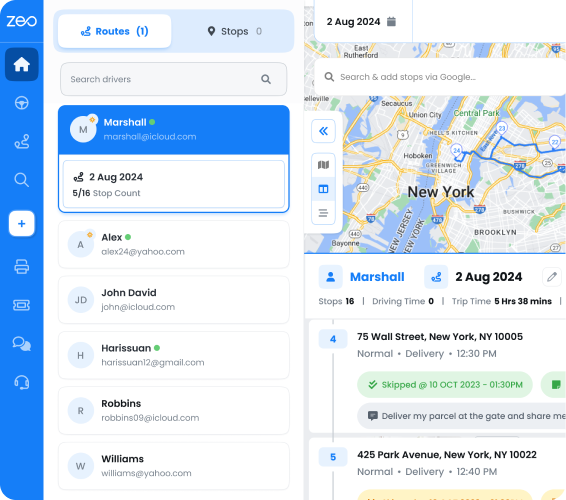
Step 4: Let the AI optimize the route. Once your stops, time windows, and priorities are set, Zeo’s AI-powered route optimization builds the most efficient sequence—factoring in geography and timing constraints together. This is what separates it from a server manually eyeballing a map. The system is built to save drivers 2+ hours daily compared to manual route planning.
Step 5: Assign and dispatch. If you manage multiple servers, assign routes by skill or territory using Zeo’s skill-based driver assignment—useful if certain servers handle specific counties or are authorized to serve in particular jurisdictions. Each server receives their route directly on the Zeo mobile app, complete with turn-by-turn navigation and all the address and case details attached to each stop.
Step 6: Handle schedule changes without rebuilding everything. Court deadlines shift. New rush jobs come in mid-morning. Zeo’s Day Plan feature lets you assign different servers to specific days within a scheduled route, and Date Override lets you swap the assigned server for a single day without disrupting the rest of a recurring route. If a route needs to pause entirely—say, a case settles or a client puts a hold on service—Blackout Dates let you pause it without deleting the route setup.
Step 7: Track in real time. As servers work their routes, you can monitor progress on the web dashboard using real-time GPS tracking and live ETA updates. If a server hits a failed attempt and needs to reroute or get guidance, in-app chat connects them directly to the dispatcher without a phone call.
This workflow replaces the spreadsheet-and-phone-call approach with a system that protects deadlines automatically instead of relying on someone remembering which case is due when.
Calculating Your ROI: What Optimized Routing Saves a 5, 10, or 25-Server Agency Per Month
Let’s run the numbers. These are conservative estimates based on typical mileage and time savings agencies report when they move from manual dispatch to optimized routing.
5-server agency:
Assume each server drives 80 miles a day on manual routes, and optimization trims that by a modest 15% through better clustering and sequencing. That’s 12 fewer miles per server per day, or 60 miles a day across the team. Over a 22-day work month, that’s 1,320 miles saved. At $0.67 per mile (the 2026 IRS standard mileage rate, adjusted for current fuel costs), that’s roughly $880/month in direct mileage savings alone—before counting reduced failed-attempt trips. You can track this automatically using miles tracking tools built for expense and tax records.

increase fuel savings
Hassle Free Deliveries & Pickups!
Optimize routes with our algorithm, reducing travel time and costs efficiently.
Get Started for Free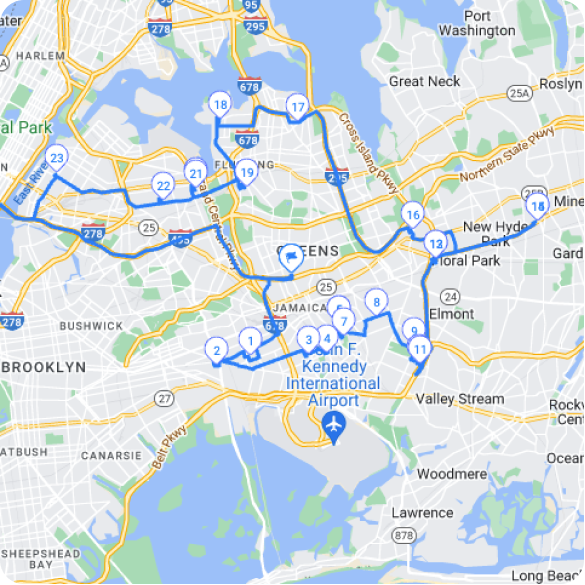
10-server agency:
Double the fleet, double the baseline savings: roughly $1,760/month in mileage. Now factor in time. If optimized routing saves each server even 1 hour a day (conservative, given Zeo’s 2+ hour daily savings benchmark), that’s 10 hours a day across the team, or 220 hours a month. At a loaded labor cost comparable to figures tracked by the Bureau of Labor Statistics for courier and messenger occupations, that’s thousands in recovered labor time—time that can go toward serving more jobs instead of driving in circles.
25-server agency:
At this scale, the math compounds fast. Mileage savings alone could run $4,400/month. Time savings, even conservatively, could exceed $11,000/month in recovered labor capacity. That’s capacity you can redeploy toward taking on more serving contracts without hiring additional staff.
Then there’s the cost you can’t easily put a number on but which matters most: deadline compliance. One missed statutory deadline can cost a client relationship worth tens of thousands of dollars a year. Optimized time-window routing, paired with Zeo’s priority stop assignment, reduces the chance that a time-sensitive serve gets buried under routine jobs on a busy day.
Run your own numbers with your actual mileage, team size, and labor costs. In almost every scenario, the math favors moving off spreadsheets within the first month of better routing.
From Solo Server to Multi-State Team: Scaling Dispatch Without Losing Control or Compliance
Many process serving agencies start with one person, a car, and a notebook. The challenge comes when you try to grow past that without losing visibility into what’s happening in the field.
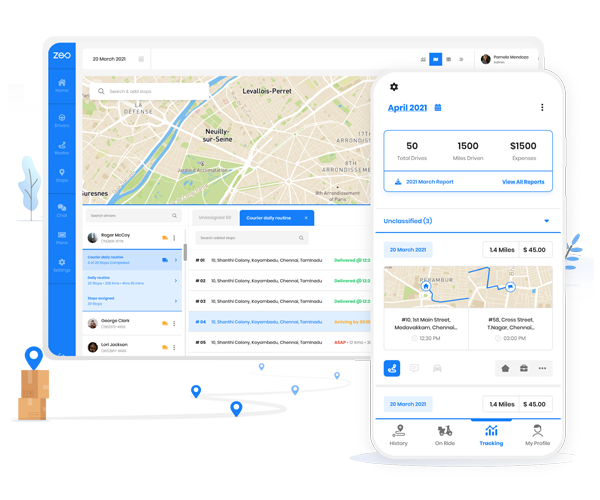
A solo server using the Zeo mobile app gets their daily route, turn-by-turn navigation, and all case details on their phone. They log attempt timestamps with GPS location at every stop—whether it’s a completed service or another failed attempt—and capture photos or signatures the moment service happens. That data flows back to a dispatcher’s web dashboard in real time, whether the dispatcher is sitting in the same office or managing a team across three states.
This is the piece that makes scaling possible without chaos. As you add servers—3, then 10, then 25—you’re not adding complexity to your compliance trail. Every server, regardless of location or county, is capturing proof of service the same way, on the same platform. The agency owner or operations manager gets a single dashboard showing route progress, completed services, failed attempts, and documentation across the entire team, instead of chasing down individual servers for status updates.
This matters even more when you expand across state lines. Different states have different service rules—some allow substitute service after a set number of failed attempts, others require specific documentation of diligence. While Zeo doesn’t automate state-specific legal rules, its consistent GPS-timestamped attempt logging gives you the raw documentation needed to meet whatever standard a given jurisdiction requires. You’re not relying on each server’s personal note-taking habits; you’re relying on a system that captures the same data points every time.
For agencies managing servers across multiple counties or states, skill-based job assignment also helps you route jobs to servers who are actually authorized or experienced in that jurisdiction, rather than guessing who’s closest on a map. And because routes and proof-of-service records live on one platform, bringing on a new server doesn’t mean rebuilding your dispatch process—it means adding them to a system that already works.
Choosing Between Legal-Specific Tools and Route Optimization Platforms: What Actually Matters
Agency owners often ask whether they need legal-specific process serving software or whether a route optimization platform can do the job. The honest answer: it depends on what’s actually broken in your operation.
Legal-specific case management software tends to be strong at things like case intake, client billing, and generating affidavits of service from templates. If your biggest pain point is paperwork and client invoicing, that software solves a real problem.
But if your biggest pain points are wasted mileage, failed attempts from bad timing, missed deadlines, and documentation that doesn’t hold up when challenged—that’s a routing and field-operations problem, not a case-management problem. Route optimization platforms like Zeo were built specifically to solve how work gets planned and executed in the field, with AI-powered optimization, time windows, and GPS-verified proof of service as core features, not add-ons. These route optimization case studies show how similar field-based teams quantify that return.
Many agencies end up running both: case management software for the legal and billing side, and a route optimization platform for the actual dispatch and field documentation. The key is not assuming one tool does everything. Evaluate based on where your money is actually leaking. If it’s in drive time, failed attempts, and deadline risk, that’s where route optimization delivers the clearest return—often faster than a legal-specific tool that wasn’t built to solve a logistics problem in the first place.
When evaluating any platform, ask three questions: Does it support time-window constraints tight enough for serving work? Does it capture GPS-timestamped proof that would hold up if challenged? And can it scale from your current team size to where you want to be in two years, across multiple counties or states, without requiring a system overhaul? If the answer is yes on all three, you’re looking at the right category of tool.
Frequently Asked Questions
Q: How many attempts are process servers typically required to make before substitute service is allowed?
This varies significantly by state and even by county, with some jurisdictions requiring as few as two documented attempts and others requiring three or more across different times of day. Courts generally want to see attempts spread across varying times (morning, evening, weekend) to demonstrate genuine diligence, not just repeated tries at the same hour. Always check the specific civil procedure rules for the jurisdiction where service is being attempted.
Q: What’s the difference between proof of service and an affidavit of service?
Proof of service refers to the underlying documentation — photos, timestamps, GPS data, signatures, and notes — that records what actually happened at each attempt or completed service. An affidavit of service is the formal sworn legal document filed with the court that summarizes this evidence. Strong underlying proof of service makes the affidavit far more defensible if a defendant challenges it in court.
Q: Can route optimization software actually help with court deadline compliance?
Route optimization tools don’t track legal deadlines automatically, but they can reduce the operational risk that causes missed deadlines. Zeo Route Planner’s priority stop feature lets dispatchers flag time-sensitive serves as ASAP so they’re scheduled ahead of routine jobs, and time window constraints ensure a stop isn’t scheduled at a time when the server previously confirmed no one’s home. This reduces the chance that a deadline-sensitive job gets buried under a busy day’s workload.
Q: How much does a failed service attempt typically cost an agency?
A failed attempt costs an agency the full round-trip drive time, fuel, and labor for that stop with nothing to show for it — and the clock keeps running toward any statutory deadline. For agencies running multiple servers daily, repeated failed attempts from poor timing can compound into a significant chunk of monthly operating costs, even though it rarely shows up as a distinct line item in a budget.
Q: Do process servers need GPS-timestamped proof, or is a written log enough?
A written log created after the fact is harder to defend if a defendant disputes that service occurred, since it relies on the server’s memory and isn’t independently verifiable. GPS-timestamped documentation — like the photo capture, digital signatures, and location-tagged delivery notes available in Zeo’s mobile app — creates a record generated in the moment, at the actual address, which holds up better under cross-examination than notes written later.
Get Started
Manual dispatch is costing your agency money every single day—in wasted mileage, repeat attempts, and the risk of a missed deadline that costs you a client. The fix isn’t more spreadsheets or a legal-specific tool that doesn’t touch your actual field operations. It’s route optimization built for time-sensitive, documentation-heavy work.
Start a free Zeo Route Planner trial to build your first optimized, time-window-constrained serving route today—no credit card required. Or book a demo to see exactly how GPS-verified proof of service works for teams managing 5, 10, or 25+ servers across multiple counties and states.
Are you a fleet owner?
Want to manage your drivers and deliveries easily?
Grow your business effortlessly with Zeo Routes Planner – optimize routes and manage multiple drivers with ease.

increase fuel savings
Save $200 on fuel, Monthly!
Optimize routes with our algorithm, reducing travel time and costs efficiently.
Get Started for Free