



Updated on: May 5, 2026
Have you ever gotten into a situation where a customer claims that they haven’t received their item even though your system shows it has been delivered? Such kind of disputes can cause a major headache for your business. Proof of delivery (POD) confirms the driver’s delivery and the correct recipient, which is essential to implement a system for successful delivery and customer satisfaction.
Let’s explore how Proof of Delivery can help save unwanted challenges for your company. Also, let’s examine how Zeo Route Planner’s cutting-edge POD features give you the tools to avoid costly disputes altogether.
What are the Common Causes of Delivery Disputes?
Delivery disputes arise when there is a disagreement between the business and the customer. These can happen in many scenarios, such as when customers may claim non-receipt, incorrect delivery, or damaged goods. Here are some common causes of disputes.
- Non-Receipt Claims: Customers say that they don’t receive their order. This is a common problem, maily when deliveries are left unattended or shipments are left without the necessary records.
- Damaged Goods: Packages arrive in poor condition, causing conflicts and negatively impacting the company, regardless of carrier or external factors like weather or handling. Defective items harm the company’s bottom line and customer experience.
- Incorrect Items Delivered: Incorrect product or size delivery can lead to costly returns and replacements, potentially damaging trust and enduring client relationships, even if unintentional.
- Delayed Deliveries: Delivery delays due to inefficient route planning can lead to consumer dissatisfaction and potential negative impacts on future business opportunities.
The Role of Proof of Delivery in Reducing Delivery Disputes
Proof of Delivery (POD) is a system that reduces errors and negligence in deliveries by logging each one, providing a digital trail from dispatch to drop-off. It enhances transparency for businesses and customers, allowing support teams to access POD records to investigate concerns, providing facts rather than guesswork.
Transparency in package delivery removes misunderstandings and increases consumer confidence. When a consumer concerns a delivery, clear proof reduces disagreements and enables prompt issue resolution.
How Zeo Helps You Eliminate Delivery Disputes
Zeo doesn’t just implement Proof of Delivery, it revolutionizes it. Delivery disputes in delivery-based businesses can slow down operations and damage customer trust. Zeo is a smart system that helps track, prove, and verify every delivery, ensuring timely and accurate information to maintain customer trust and reduce costs. Here’s how Zeo fills the gaps left by others:
#1. Capture & Share Delivery Confirmation
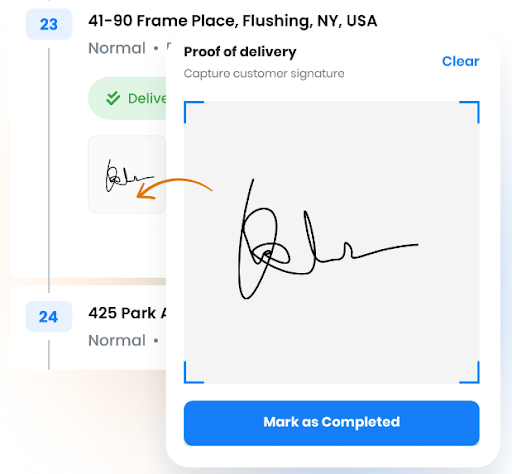
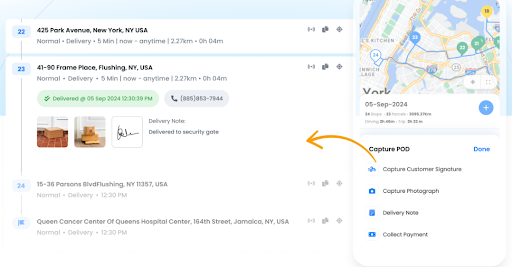
With Zeo, taking digital signatures as evidence of delivery is a simple process. Zeo protects everything in one location that is immediately accessible and shareable. Whether it’s a message, a photo, or a simple signature, Zeo help to make instant solution.
How it helps: Eliminating conflict arguments and facilitating quick resolution of disputes. Signature provides proof of delivery in consumer disputes.
#2. Real-Time Delivery Status Updates
Zeo sends real-time notifications to keep the customers informed at every step. This helps the customers stay informed at every step by minimizing the confusion and reducing the chances of disputes.

increase fuel savings
Save $200 on fuel, Monthly!
Optimize routes with our algorithm, reducing travel time and costs efficiently.
Get Started for Free
How it helps: Customers are always notified in advance if there’s a chance of a missed delivery, allowing them to plan accordingly. When customers know exactly when to expect their orders, it greatly reduces the chances of confusion or complaints about delays.
#3. Visual Confirmation
At the delivery the spot, Zeo lets you snap a photo of the package and instantly upload it to the route planner. The visual proof effectively clarifies the delivery location and its successful completion.
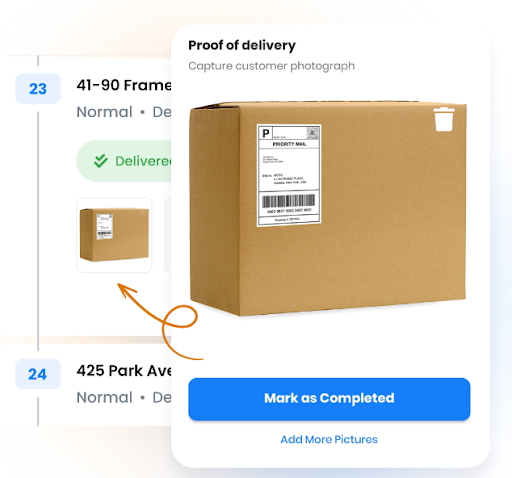
How it helps: Whenever the customers complain that their packages were not delivered or left in the wrong place, then visual proof of delivery can solve the misunderstanding. Thus the with a single photo evidence the problem can be immediately solved.
#4. Seamless Payment Proof
Zeo’s proof of delivery feature also records the payment details and offers a comprehensive snapshot of every customer interaction. Each transaction is recorded together with the proof of delivery.
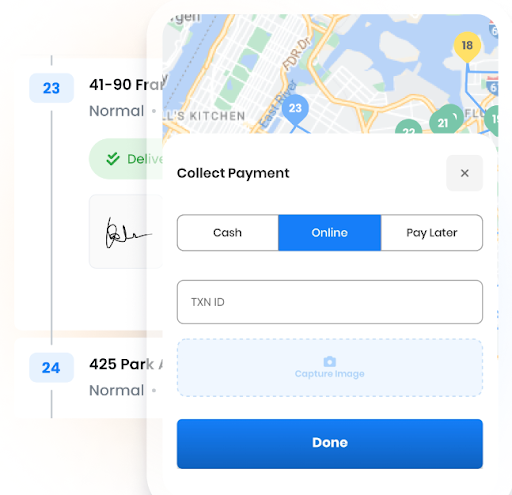
How it helps: When there is a delay between product delivery and payment confirmation, payment disputes often occur. By connecting the delivery and payment components, Zeo’s integrated system reduces inefficiencies between them.
Conclusion: Why Zeo Is the Answer to Delivery Disputes
Businesses involved in delivery and logistics are particularly focused on customers, and with a proof of delivery feature, you can protect both your business and your customers’ interests. Now, Proof of Delivery plays a very crucial role and is no longer optional. Companies that don’t offer unmistakable proof of delivery run the risk of becoming embroiled in ongoing conflicts.
Zeo is a leading provider of delivery route optimization and dispute resolution solutions. Its comprehensive Proof of Delivery system prevents confusion and miscommunication. Ultimately, resolve potential disputes before they escalate and foster customer trust. Contact Zeo experts for enhanced delivery operations.

Are you a fleet owner?
Want to manage your drivers and deliveries easily?
Grow your business effortlessly with Zeo Routes Planner – optimize routes and manage multiple drivers with ease.

increase fuel savings
Hassle Free Deliveries & Pickups!
Optimize routes with our algorithm, reducing travel time and costs efficiently.
Get Started for Free



















