




Updated on: May 29, 2026
Reading Time: 4 minutes
TL;DR: Google Maps lets you avoid tolls by selecting “Avoid tolls” in the route options before navigation. This simple setting can save delivery drivers hundreds of dollars monthly while adding minimal travel time. Route optimization tools like Zeo Route Planner address this with AI-powered route optimization and cost tracking features, helping delivery teams save 2+ hours daily while maintaining toll-free preferences.
You’ve got the address. The route is set. But halfway through, you’re stuck at a toll booth, again. You fumble for change, lose precious time, and wonder how much you’ve already spent this week just getting through those gates.
For delivery drivers, gig workers, and everyday commuters, toll roads can quickly become a hidden expense. They might shave a few minutes off the journey, but they chip away at your fuel budget, delivery profits, and patience.
The good news? You don’t have to keep paying for the road if you don’t want to. Google Maps gives you the option to avoid tolls, you just need to know where to find it. And if you’re managing multiple stops, there’s a smarter way to combine toll-free travel with efficient route optimization. Let’s walk through it all.
Why It’s Smart to Avoid Toll Roads
Tolls might seem small, but they add up quickly. According to the Federal Highway Administration, there are over 5,000 miles of toll roads across the United States, with costs ranging from $0.50 to over $15 per segment depending on the location and vehicle type.
If you’re on the road daily, avoiding tolls is one of the easiest ways to cut down on operational costs.
Here’s why drivers choose to avoid tolls:
- Cost savings – Especially for long-haul drivers or those making multiple trips a day.
- Less traffic stress – No more waiting at booths or dealing with cash/card issues.
- Budget control – Important for businesses that track driver expenses.
- Cleaner routes – Some toll-free roads are quieter and more consistent.
- Predictable expenses – Eliminating variable toll costs makes budget planning easier for fleet managers.
Toll-free doesn’t mean inefficient. When paired with proper route optimization, you get the best of both: no tolls and no wasted time.
Understanding the Real Cost of Toll Roads for Commercial Drivers
For businesses managing delivery fleets or service vehicles, toll expenses can become a significant line item. A study by the American Trucking Association found that commercial vehicles face toll rates 3-5 times higher than passenger cars on many routes.
Consider these scenarios:
- Daily commuter routes – A driver crossing the George Washington Bridge twice daily spends over $3,000 annually on tolls alone.
- Multi-stop delivery routes – Delivery drivers making 20+ stops could encounter 3-5 toll points daily, adding $15-30 to operational costs.
- Long-distance hauling – Cross-country routes can accumulate $200+ in tolls per trip.
The time spent at toll booths also adds up. Electronic toll collection has improved efficiency, but cash transactions still create delays during peak hours.
How to Avoid Tolls on Google Maps (Mobile App)
Google Maps makes it easy, you just need to adjust a quick setting before you hit “Start.”
Here’s how to do it:
- Open the Google Maps app.
- Type your destination into the search bar.
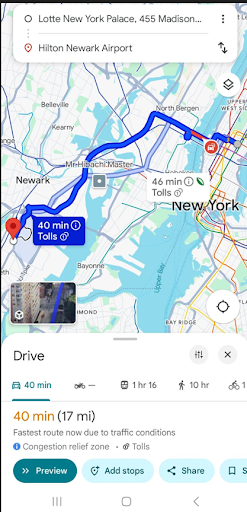
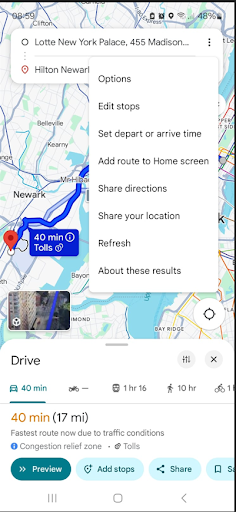
- In the top-right corner, tap the three dots (More Options).
- Tap on “Options.”
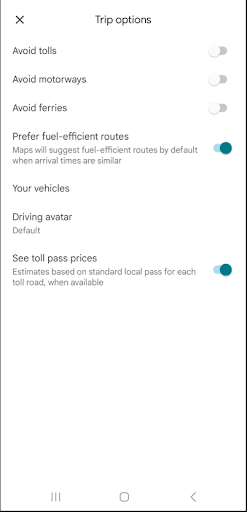
- Select “Avoid tolls.”
- Once you select Avoid tolls, go back to the map and start navigating.
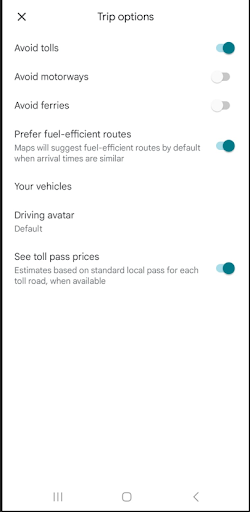
Now you’ll be guided through a toll-free route automatically.
How to Avoid Tolls on Google Maps (Desktop/Web Version)
If you prefer planning your trip on a computer, here’s how to avoid tolls on the desktop version:
- Go to maps.google.com.
- Enter your starting point and destination.
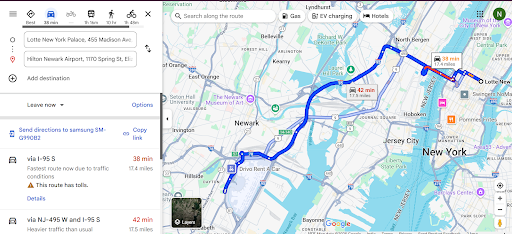
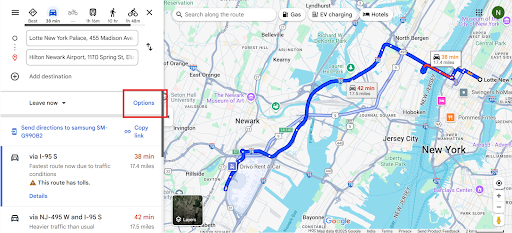
- Click “Options” under the location fields.
- Check the box for “Avoid tolls.“
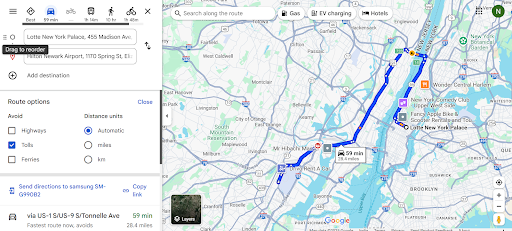
- Google Maps will now show toll-free routes you can choose from.
It works for short city hops and longer out-of-town deliveries. Just don’t forget to turn the setting on before hitting the road.

increase fuel savings
Save 2 Hours on Deliveries, Everyday!
Optimize routes with our algorithm, reducing travel time and costs efficiently.
Get Started for Free
Advanced Strategies for Multi-Stop Routes Without Tolls
When you’re managing multiple deliveries or service calls, avoiding tolls becomes more complex. Each additional stop creates new routing possibilities, and manually checking toll-free options for every combination isn’t practical.
Professional drivers and fleet managers need solutions that consider:
- Time windows – Ensuring toll-free routes still meet customer delivery expectations
- Vehicle capacity – Optimizing load distribution across toll-free segments
- Driver skills and territories – Matching drivers familiar with toll-free local roads
- Real-time adjustments – Adapting routes when traffic makes toll roads tempting shortcuts
This is where specialized business route planning solutions become essential for commercial operations scaling beyond simple point-to-point navigation.
Take It Up a Level: Use Route Optimization for Smarter Deliveries
Google Maps is great for personal trips or simple drives. But if you’re a delivery driver, contractor, or fleet operator, you need more than just toll avoidance, you need optimization and control.
That’s where route optimization tools like Zeo Route Planner can help.
Here’s what Zeo lets you do that Google Maps can’t:
- Plan 100+ stops in one route.
- Get smart route planning and scheduling to hit delivery windows.
- Save hours of manual planning.
- Track mileage, fuel, and performance in one place.
Managing Fleet Expenses Beyond Toll Avoidance
Toll avoidance is just one piece of the cost-control puzzle for delivery operations. Smart fleet managers also focus on:
- Fuel optimization – Reducing total miles driven through better route sequencing
- Time management – Minimizing driver overtime through efficient scheduling
- Vehicle maintenance – Reducing wear and tear with optimized routing
- Customer satisfaction – Maintaining service quality while controlling costs
Modern businesses serving industries like restaurant delivery have found that comprehensive route optimization often delivers greater savings than toll avoidance alone, while still maintaining the flexibility to choose toll-free options when beneficial.
Conclusion
Toll roads might seem like a small inconvenience, but over time, they drain your wallet and waste your time. With a few quick taps, you can avoid tolls in Google Maps and drive more consciously.
And if you want to go beyond basic navigation and if you’re managing dozens of stops or want to scale your operations, then pairing toll-free routing with smart route optimization is the way forward.
Stay efficient. Stay in control. And never pay a toll you didn’t sign up for.
Frequently Asked Questions
Does avoiding tolls significantly increase travel time?
In most cases, toll-free routes add only 10-15% to total travel time, often less during peak hours when toll roads experience heavy congestion. The time difference becomes negligible on multi-stop routes where overall route efficiency matters more than individual segment speed.
Can I set Google Maps to permanently avoid tolls for all routes?
Google Maps doesn’t offer a global “always avoid tolls” setting that persists across all navigation sessions. You need to manually select “Avoid tolls” in the route options for each new destination, though the app may remember your preference temporarily during the same session.
How do commercial route planners handle toll avoidance differently than Google Maps?
Professional route optimization software considers toll avoidance alongside multiple business constraints like delivery time windows, vehicle capacity limits, and driver schedules. Zeo Route Planner’s AI-powered route optimization processes these variables simultaneously across 100+ stops, something impossible with consumer navigation apps.
Are there situations where paying tolls actually saves money for delivery businesses?
Yes, when toll roads significantly reduce fuel consumption or allow drivers to complete additional deliveries within their shift. The key is calculating total operational cost per delivery, including driver time, fuel, and vehicle wear, rather than just the toll fee itself.
What’s the best way to track toll savings for business expense reporting?
Use route planning software with built-in expense tracking features that automatically calculate toll-free vs toll route costs. This provides documentation for tax purposes and helps quantify the ROI of toll avoidance strategies over time.

Are you a fleet owner?
Want to manage your drivers and deliveries easily?
Grow your business effortlessly with Zeo Routes Planner – optimize routes and manage multiple drivers with ease.

increase fuel savings
Save $200 on fuel, Monthly!
Optimize routes with our algorithm, reducing travel time and costs efficiently.
Get Started for Free 


















