


# Financial Document Delivery: A Dispatch-and-Technology Playbook for Banks, Title Companies, and Accounting Firms
> TL;DR: Financial document delivery requires enforcing hard bank cutoff times and proving chain-of-custody, not just getting a package from point A to point B. A late courier run can delay fund settlement by a full business day under Federal Reserve rules, and a missing signature chain can trigger an audit finding. Route optimization tools like Zeo Route Planner address this with time-window constraints, ASAP priority stops, and photo/signature/GPS proof of delivery, helping operations teams save 2+ hours daily on manual dispatch work.
Financial document delivery isn’t like dropping off a package on a porch. A late check deposit can cost a client thousands. A missing signature chain can trigger an audit finding. A lost loan document can delay a home closing and anger three parties at once.
If you manage couriers for a bank, credit union, title company, or accounting firm, you already know the stakes are different. This guide shows you how to treat financial document delivery as a dispatch-and-technology problem, not just a logistics problem. You’ll get a step-by-step workflow, an audit-trail checklist, a cost comparison, and a scaling plan for tax season surges.
Why Financial Document Delivery Isn’t Just Another Courier Run
Standard package delivery cares about one thing: did it arrive? Financial document delivery cares about three things: did it arrive on time, who touched it, and can you prove it later.
Bank cutoff times are the clearest example. Most banks set hard deadlines for same-day check processing, often between 2 PM and 4 PM local time. Miss that window, and a deposit rolls to the next business day. According to the Federal Reserve’s Regulation CC funds availability rules, funds availability schedules are tied directly to when an item is received — meaning a late courier run can delay settlement by a full business day, with real financial consequences for your client.
Loan documents carry similar pressure. Title and escrow closings often depend on signed paperwork arriving at a specific office before a notary or underwriter leaves for the day. A 20-minute delay can push a closing to the next day, which can affect rate locks and interest calculations. The same scheduling precision applies to firms that coordinate mobile notary routes across multiple teams, where one missed appointment window can cascade into delays for every party involved.
Then there’s chain-of-custody. Legal notices, signed contracts, and tax filings often need proof of who handled a document, when, and where. Without that proof, you’re exposed to audit findings and liability claims if a document is disputed or goes missing.
Manual tracking methods make this worse. Spreadsheets and phone calls can’t flag a missed deadline until it’s already missed. Paper logs can be lost, altered, or simply hard to produce quickly when a compliance team asks for them. This is why financial document delivery needs a dispatch system built for deadlines and documentation, not just directions.
How Route Optimization Software Enforces Hard Deadlines and Bank Cutoff Windows
Route optimization software treats deadlines as constraints, not suggestions. Here’s how that works in practice using Zeo Route Planner.
Step 1: Set time windows for every stop.
When you build a route in Zeo’s web dashboard, you assign a time window to each stop. A branch that needs documents before its 3 PM cutoff gets a hard window. A lower-priority drop-off gets more flexibility.
Step 2: Mark priority stops as ASAP.
Zeo lets you flag stops as ASAP versus Normal priority. For a bank run with a tight cutoff, you mark that stop ASAP so the optimization engine sequences it ahead of less time-sensitive deliveries. This approach is part of a broader shift in banking logistics route optimization, where deadline enforcement is built into the routing logic itself.
Step 3: Let the AI build the sequence.
Zeo’s AI-powered route optimization calculates the fastest sequence that respects every time window and priority flag. This is the same engine that saves drivers 2+ hours daily industry-wide, applied here to deadline compliance instead of just mileage savings.
Step 4: Assign by skill or branch familiarity.
If certain couriers are bonded, background-checked, or trained for high-value document handling, Zeo’s skill-based assignment routes those stops to the right driver automatically.
Step 5: Push the route to the driver’s phone.
Once you finalize the route, your courier receives it directly in the Zeo mobile app. They see the stop order, time windows, and customer details without a single phone call from dispatch.
Step 6: Adjust mid-shift when things change.
If a branch calls with an urgent same-day legal notice, Zeo’s dynamic route adjustments let you insert the stop and re-optimize without disrupting the rest of the run.
A real scenario: a credit union with four branches needs signed loan packages moved between offices before a 3:30 PM underwriting cutoff. Instead of a dispatcher calling each driver to check status, the manager sets a 3:15 PM time window on each branch stop, marks them ASAP, and Zeo sequences the route so the courier hits every branch with buffer time to spare.
Chain-of-Custody and Proof-of-Delivery: The Audit Trail Data Your Compliance Team Actually Needs
Compliance teams don’t want a verbal confirmation that a document arrived. They want a record: who signed, when, and where.
Zeo captures this automatically at each stop through its proof-of-delivery tools:
- Photo capture of the document handoff or signed receipt
- Digital signature collection from the recipient
- Delivery notes for context, like “left with branch manager” or “notarized on-site”
- GPS timestamp tied to the exact location and time of completion
This creates a timestamped, geo-tagged record for every stop, not just a checkbox. If an auditor later asks whether a signed contract reached the title office before 4 PM, you can pull the exact photo and timestamp instead of relying on a courier’s memory.
This is also where the fleet-and-app connection matters most. Your branch administrators and dispatchers build routes and set time-window rules from the Zeo web dashboard. Your couriers receive their stop sequence, required handoffs, and proof-of-delivery prompts directly in the Zeo mobile app. Every photo, signature, and timestamp captured in the field flows back into one system, creating a single auditable record from dispatch to drop-off. This same workflow applies to firms managing legal document delivery optimization, where proof of service carries similar legal weight.
For firms handling legal notices or tax filings, this record can matter months later. Delivery disputes and liability claims often surface well after the original delivery date. According to the American Bar Association’s guidance on service of process, documented proof of delivery, including time and method, is often central to resolving these disputes. A geo-tagged photo and signature beat a paper log every time this comes up.
Branded tracking pages add another layer of transparency. Clients and partner institutions can see live ETA updates and tracking links under your company’s name, reducing the “where’s my document” phone calls that eat up a dispatcher’s day.
In-House Courier Team vs. Outsourced Service vs. Software-Powered Delivery: A Side-by-Side Cost and Risk Comparison
Operations managers typically choose between three models for financial document delivery. Here’s how they compare on cost, control, and compliance risk.
In-House Courier Team (Manual Dispatch)
- Cost: Salaries, vehicle costs, and overtime during surges, often $45,000–$60,000 per driver annually including benefits, plus dispatcher labor for manual scheduling
- Control: High. You manage hiring, training, and routes directly
- Compliance risk: High if dispatch stays manual. Spreadsheets and phone calls can’t reliably enforce cutoff times, and paper logs are easy to lose or dispute
- Scalability: Poor. Volume spikes during tax season or loan surges require overtime or temp hires, which increases both cost and error rates
Outsourced Courier Service
- Cost: Per-stop or per-route fees that scale with volume, often higher per delivery than in-house during steady periods, but no fixed payroll cost
- Control: Low. You’re dependent on a third party’s drivers, training standards, and availability
- Compliance risk: Medium to high. Proof-of-delivery quality varies by vendor, and audit trail formats may not match your compliance team’s requirements
- Scalability: Moderate. Outsourced providers can flex capacity, but surge pricing during tax season can erase any savings
Software-Powered Delivery (In-House Team + Route Optimization)
- Cost: A SaaS subscription plus your existing driver payroll, with no added headcount required to scale routing capacity
- Control: High. You keep your trained, vetted drivers while gaining automated dispatch and tracking
- Compliance risk: Low. Time windows enforce cutoffs automatically, and every stop generates a photo, signature, and GPS timestamp
- Scalability: Strong. Zeo’s AI-powered optimization re-sequences routes in minutes when volume spikes, without adding dispatcher hours
The pattern is clear. In-house teams offer control but struggle with manual compliance tracking. Outsourced services offer flexibility but weaken your audit trail and cost predictability. Software-powered delivery combines the control of an in-house team with the scalability and documentation that financial compliance work actually requires.

increase fuel savings
Save 2 Hours on Deliveries, Everyday!
Optimize routes with our algorithm, reducing travel time and costs efficiently.
Get Started for Free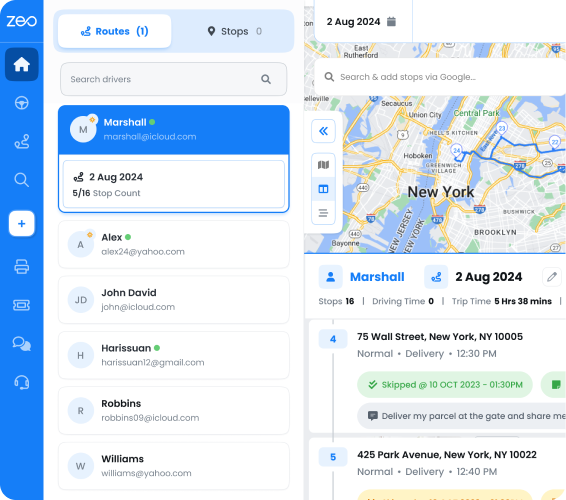
Scaling Playbook: Managing Route Volume Spikes During Tax Season and Loan Closing Surges
Volume spikes are predictable in financial services, even if they feel chaotic in the moment. Tax season, month-end loan closings, and multi-branch bank runs all create the same problem: more stops, same number of drivers, same deadlines.
Build routes from bulk data, not manual entry.
Zeo supports bulk address import from Excel, CSV, or Google Sheets. When your accounting firm has 40 extra tax filing drop-offs during the first two weeks of April, you upload the list once instead of entering each stop by hand.
Use Favorites for recurring routes.
If you run the same bank circuit every day, save it as a Favorites list in Zeo. During a surge, you can convert that saved list into a ready-to-go route instantly, adding new stops without rebuilding the whole route from scratch.
Let capacity-based routing manage document volume per driver.
Zeo’s capacity-based routing accounts for how much each driver or vehicle can realistically handle in a shift, helping you avoid overloading one courier while another runs light.
Use scheduled and recurring routes for known patterns.
If loan closings consistently peak at month-end, set up scheduled recurring routes in advance. Zeo’s Day Plan feature lets you assign different drivers to specific days within that recurring schedule, so you can staff up on your busiest days without rebuilding the whole route.
Use Blackout Dates and Date Overrides for flexibility.
If a branch is closed for a holiday or a driver calls in sick, Blackout Dates let you pause a scheduled route for that day without deleting it. Date Override lets you swap in a different driver for a single day without disrupting the full recurring schedule.
Monitor driver performance analytics to rebalance workloads.
During surge periods, Zeo’s driver performance analytics show which couriers are falling behind schedule, so you can reassign stops mid-surge instead of discovering the problem at day’s end.
This matters because surge periods are exactly when manual dispatch breaks down. A dispatcher juggling phone calls and spreadsheets during a 50-stop tax season day will make more routing errors than one using software that re-optimizes automatically. The Bureau of Labor Statistics’ courier and delivery driver outlook has noted that courier and delivery driver employment is projected to grow alongside e-commerce and document-based service demand, meaning the volume pressure on financial courier teams isn’t going away.
Setting Up a Compliant Daily Bank Run or Document Route in Zeo: Dispatcher Dashboard and Driver App Walkthrough
Here’s how an operations manager actually sets this up, step by step.
On the web dashboard (dispatcher side):
- Log into the Zeo web platform and create a new route for your daily bank run or document circuit.
- Add stops using bulk upload, Favorites, or by pulling from a saved spreadsheet of branch addresses.
- Set a time window for each stop based on bank cutoff times or client appointment windows.
- Mark time-sensitive stops, like a loan closing or urgent legal notice, as ASAP priority.
- Assign drivers based on skill, such as bonded couriers for high-value document runs.
- Review the AI-optimized sequence and adjust manually if a specific stop order is required, using Navigate as Added to lock in that sequence without automatic re-optimization.
- Set up Pickup–Delivery Linking if a document needs to be picked up at one branch and delivered to another, so the stops stay correctly paired and sequenced.
- Publish the route to your drivers.
On the mobile app (driver side):
- Your courier opens the Zeo app and sees their assigned stop order for the day.
- Turn-by-turn navigation guides them to each branch or client location, with support for Google Maps, Waze, or Apple Maps.
- At each stop, the app prompts for proof of delivery, photo, signature, and any delivery notes required.
- GPS timestamps log automatically at the moment of completion.
- If dispatch needs to communicate mid-route, in-app chat lets managers and drivers message directly without a phone call.
- Customers or receiving branches get live ETA updates and a branded tracking link, so they know when their documents will arrive.
This creates one continuous record. Your administrators set the compliance rules from the dashboard. Your drivers execute and document the handoff from their phones. Nothing lives in a separate paper log or a dispatcher’s notebook, which is exactly what a compliance review needs to see.
Frequently Asked Questions
Q: What is considered financial document delivery?
Financial document delivery refers to the time-sensitive transport of items like signed loan packages, checks, tax filings, legal notices, and escrow paperwork between banks, title companies, accounting firms, and clients. Unlike standard parcel delivery, it typically requires proof of exact arrival time, chain-of-custody documentation, and adherence to strict cutoff windows set by banks or underwriters.
Q: What happens if a check courier misses a bank’s cutoff time?
If a courier misses a bank’s same-day processing cutoff, the deposit typically rolls to the next business day under funds availability rules tied to Regulation CC. This can delay settlement, disrupt a client’s cash flow, and in loan or escrow scenarios, push back a closing date affecting rate locks.
Q: How do financial firms maintain an audit trail for document deliveries?
Firms typically rely on timestamped proof of delivery that includes a photo, signature, and GPS location captured at the moment of handoff, rather than verbal confirmation or paper logs. Zeo Route Planner’s proof-of-delivery tools capture photo, signature, delivery notes, and GPS timestamps at each stop, creating a record dispatchers can pull up directly instead of relying on a courier’s memory.
Q: Can route optimization software enforce bank cutoff times automatically?
Yes. Platforms like Zeo Route Planner let dispatchers set time windows and mark stops as ASAP priority, so the AI-powered route optimization sequences the courier’s run to hit cutoff-sensitive stops first. This turns a deadline into a routing constraint rather than something a dispatcher has to track manually by phone.
Q: How should financial firms handle courier volume spikes during tax season?
The most reliable approach is bulk address import for high-volume days combined with scheduled recurring routes for predictable monthly patterns, like month-end loan closings. Saving frequent circuits as Favorites and using capacity-based routing to balance stops across drivers also helps prevent any single courier from being overloaded during a surge.
Financial document delivery will keep getting more complex as volume grows and deadlines stay unforgiving. The firms that handle it well aren’t the ones with the most couriers. They’re the ones with dispatch systems that enforce deadlines automatically and document every handoff without extra manual work.
Start a free Zeo Route Planner trial to build your first compliant, time-window-enforced document delivery route in under 10 minutes, or book a demo to see how multi-branch bank runs and audit-ready proof of delivery work in practice.
Are you a fleet owner?
Want to manage your drivers and deliveries easily?
Grow your business effortlessly with Zeo Routes Planner – optimize routes and manage multiple drivers with ease.
increase fuel savings
Hassle Free Deliveries & Pickups!
Optimize routes with our algorithm, reducing travel time and costs efficiently.
Get Started for Free