


# Legal Document Delivery Optimization: A Dispatch Playbook for Process Serving Agencies
> TL;DR: Legal document delivery optimization means replacing guesswork dispatch with optimized routes, time-window scheduling, and GPS-verified proof of service that holds up when challenged in court. Service of process disputes remain a top reason default judgments get overturned on appeal, making court-ready documentation as important as route efficiency. Zeo Route Planner’s proof of delivery tools capture photo, signature, and GPS timestamps at the moment of service, helping agencies build stronger evidentiary records while cutting dispatch planning time.
If you’re still dispatching process servers through spreadsheets and phone calls, you’re paying a hidden tax. It shows up as wasted hours, repeat attempts, and proof of service that falls apart under cross-examination.
Legal document delivery optimization isn’t about replacing your servers with technology. It’s about giving them better routes, sharper timing, and proof of service that holds up in contested cases. This playbook shows you exactly how to get there, with the metrics, workflows, and ROI math to back it up.
Why Manual Dispatching Is Costing Your Process Serving Agency Money and Cases
Manual dispatch feels manageable when you have five servers. At 15 or 30, it breaks down fast.
Dispatchers assign serves based on gut feel or whoever answers the phone first. Servers end up crisscrossing the same county instead of working a tight, logical loop. Every extra mile and missed window adds cost-per-serve and cuts into your margin. The same inefficiencies that plague field service route management in other industries show up here too: scattered stops, wasted drive time, and no system to learn from past performance.
The bigger risk is legal exposure. Handwritten affidavits depend on memory and paper trails. If opposing counsel challenges service, you’re left defending a server’s recollection instead of showing a timestamped, GPS-verified record.
A 2021 report from the National Center for State Courts found that service of process disputes are among the top reasons default judgments get overturned on appeal. When your proof of service can’t survive scrutiny, you’re not just losing efficiency — you’re losing cases for your clients.
Manual dispatching also makes it hard to see what’s actually happening in the field. Without route data, you can’t answer basic questions: Which servers have the best first-attempt success rate? Which addresses need a second or third try? Which zip codes are costing you the most time per serve?
Without that visibility, you’re flying blind on both cost and risk.
The Legal Document Delivery Optimization Checklist: 10 Metrics Every Agency Should Track
You can’t improve what you don’t measure. These 10 metrics give you a baseline for legal document delivery optimization and a way to track progress month over month.
- First-attempt success rate — percentage of serves completed on the first visit.
- Average attempts per serve — fewer attempts means lower cost and faster turnaround.
- Cost per serve — total dispatch cost (mileage, time, labor) divided by completed serves.
- Average dispatch-to-completion time — how long from assignment to confirmed service.
- Miles driven per serve — a direct indicator of route efficiency.
- On-time rate for rush/priority serves — critical for subpoenas with tight filing deadlines.
- Proof of service completeness rate — percentage of serves with photo, signature, and GPS timestamp attached.
- Server utilization rate — active serve time versus idle or drive time.
- Failed/refused service rate by address or area — flags problem locations needing a different approach.
- Client dispute or challenge rate — how often proof of service is questioned in court.
Start tracking these weekly. Most agencies find that cost-per-serve and first-attempt success rate move together — improve your routing, and both numbers improve at the same time.
Zeo Route Planner’s analytics and reporting dashboard tracks route efficiency and driver performance automatically, so you don’t need a separate spreadsheet to pull these numbers together.
GPS Timestamps and Digital Proof of Service: Building Court-Ready Evidence From Route Data
Handwritten affidavits aren’t going away, but they shouldn’t be your only line of defense. Courts increasingly expect — and respect — digital corroboration.
Here’s what court-ready proof of delivery should include:
- GPS-timestamped location data showing the server was physically present at the address
- Photo evidence of the property, posted notice, or recipient (where legally permitted)
- Digital signature from the recipient, when service is accepted directly
- Delivery notes documenting refusals, failed attempts, or unusual circumstances
- Time-stamped record of exactly when service occurred
Zeo’s proof of delivery tools capture photo, signature, and notes at the moment of service, creating a digital record that complements — not replaces — your affidavit. If a case gets contested, you have more than a server’s memory to point to. You have a timestamped, location-verified record tied directly to the route.
This matters more than ever. According to the American Bar Association, improper service remains one of the most common grounds for motions to vacate default judgments. Agencies that can produce geo-verified evidence alongside their affidavits put their clients in a stronger position when service is challenged.
Build a standard operating procedure: every server captures photo and GPS data on every attempt, successful or not. Failed attempts matter too — they show diligence, which many states require before alternative service methods (like posting or publication) are approved.
Adapting Route Software to State-by-State Service of Process Rules
Every state sets its own rules for service of process — who can serve, how many attempts are required, and what counts as valid proof. Route software doesn’t change the law, but it does help you apply it consistently.
A few examples of where this matters:
- California generally requires “reasonable diligence” — typically three or more attempts at different times of day before substitute service is allowed.
- Texas allows for alternative service methods after documented failed attempts, but courts want to see a clear timeline.
- New York has specific rules under CPLR 308 governing the order of service methods attempted.
Zeo’s time window constraints let you schedule attempts at different times of day — morning, afternoon, evening — which helps agencies meet “reasonable diligence” standards without manually tracking which servers already tried which address at which hour.
Priority stop settings also help when a jurisdiction has strict filing deadlines. Mark subpoenas or eviction notices as ASAP, and the route optimization prioritizes them automatically rather than leaving it to whoever picks up the file first.
If you operate across county or state lines, skill-based driver assignment lets you match servers to the jurisdictions where they’re certified or most experienced, instead of assigning serves randomly based on availability.
None of this replaces your legal counsel’s guidance on compliance. But it does make it easier to enforce your agency’s own service protocols consistently, every day, across every server.
Case Study: How a Process Serving Agency Cut Dispatch Time and Boosted First-Attempt Success
Consider a mid-sized process serving agency operating across three counties with 18 servers, handling a daily mix of subpoenas, summonses, and eviction notices. This pattern of measurable gains shows up across other route optimization case studies as well, where structured routing consistently outperforms manual dispatch.
Before: Dispatch was handled through a shared spreadsheet and group text messages. The dispatch manager spent close to three hours each morning assigning addresses by hand, often grouping serves by server availability rather than geography. First-attempt success hovered around 58%, and average attempts per serve sat at 2.4.
The change: The agency moved dispatch onto Zeo Route Planner’s web platform. The dispatch manager uploaded daily batches via bulk CSV import, set time windows for each serve, and used priority flags for same-day subpoenas. Routes were auto-optimized and assigned based on server skill and location.
After 60 days:
- Dispatch planning time dropped from roughly three hours to under 30 minutes daily
- First-attempt success rate rose to 71%
- Average attempts per serve dropped from 2.4 to 1.7
- Miles driven per serve decreased by around 20%, lowering fuel and vehicle costs
- Proof of service disputes dropped, since every attempt now included GPS-timestamped photo evidence
The biggest shift wasn’t the software itself — it was that routes were built around geography and timing instead of guesswork. Servers covered tighter loops, hit more addresses at the right time of day, and spent less time driving between scattered stops.
ROI framework: If an agency saves 2+ hours of dispatch time daily and reduces average attempts per serve by even 0.5, the math adds up fast. At an average cost of $15–25 per additional attempt (mileage, labor, fuel), cutting a few hundred redundant attempts a month translates into real monthly savings — often enough to cover the cost of route software several times over.

increase fuel savings
Save 2 Hours on Deliveries, Everyday!
Optimize routes with our algorithm, reducing travel time and costs efficiently.
Get Started for Free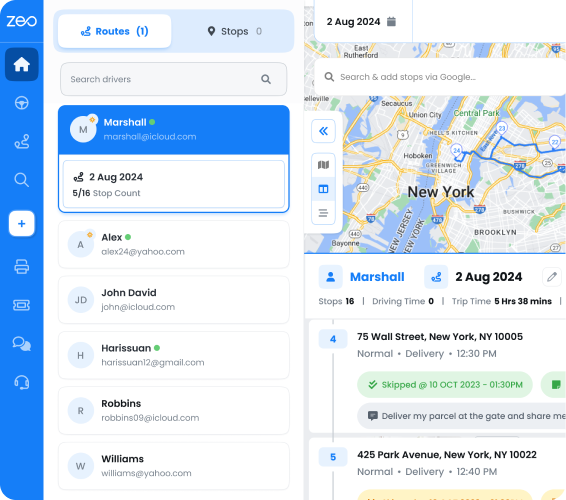
Handling Volume Spikes: Routing for Subpoena Batches, Eviction Surges, and Rush Serves
Process serving volume isn’t steady. Court filing deadlines, eviction moratoriums lifting, or a single large litigation case can double your daily batch overnight. According to the Bureau of Labor Statistics, demand for process servers and court-related delivery roles fluctuates seasonally alongside filing cycles, which makes scalable dispatch systems especially valuable.
Manual dispatch collapses under volume spikes because there’s no system to absorb the extra load — just more phone calls and more spreadsheet rows. Here’s how to prepare instead:
Batch upload for large subpoena runs. When you receive 50+ subpoenas tied to a single case, bulk address import from Excel, CSV, or Google Sheets lets you load the entire batch in minutes instead of entering addresses one by one.
Priority tagging for rush serves. Not every serve has the same deadline. Tag time-sensitive subpoenas or TROs as priority stops so the route optimization puts them first, ahead of standard summonses.
Dynamic reassignment mid-shift. Eviction surges often mean last-minute additions after routes are already underway. Zeo’s dynamic route adjustments let dispatchers add or reassign stops mid-shift without rebuilding the entire day’s plan.
Scheduled and recurring routes. If your agency handles regular eviction notice batches for the same property management clients, recurring route scheduling saves you from rebuilding similar routes from scratch each week.
Capacity planning by server, not just by county. Use skill-based assignment to make sure experienced servers handle the highest-stakes, most time-sensitive documents during a surge, while newer servers take standard summonses.
Volume spikes are when manual dispatch fails most visibly — and when the cost of inefficient routing is highest. Building these capabilities into your process before the next surge hits is far easier than scrambling during one.
From Dispatcher Screen to Server’s Phone: How the Workflow Works for Managers and Field Servers
Legal document delivery optimization only works if the plan on paper actually translates into what happens in the field. That’s where the connection between dispatch and servers matters most.
Dispatch managers build and optimize routes on the Zeo web platform, assigning serves by skill, jurisdiction, or priority level. A subpoena needing same-day service gets flagged ASAP; a routine summons in a rural county gets grouped with nearby stops to minimize drive time.
Once the route is finalized, it’s pushed directly to each server’s phone through the Zeo mobile app. From there, servers can navigate using their preferred maps app, whether that’s Google Maps, Waze, or Apple Maps. They see customer details, time windows, and any notes the dispatcher attached to a specific stop.
At the point of service, servers capture photo evidence, collect a digital signature where applicable, and log GPS-timestamped proof of service on the spot. If an attempt fails — no answer, refused service, wrong address — they log notes immediately instead of trying to remember details back at the office at the end of the day.
This matters in the field conditions process servers actually work in. Rural addresses and apartment complexes often have weak or no cell signal. The Zeo app works offline in these situations, storing captured data locally and syncing automatically once the server reconnects. No data gets lost, and no server has to drive back to a signal zone just to log a completed serve.
For dispatch managers, this creates a live feedback loop. You can see which stops are complete, which attempts failed, and where a server might need backup — all from the web platform, without a single phone call.
Frequently Asked Questions
Q: How many attempts does “reasonable diligence” require before substitute service is allowed?
It varies by state, but many jurisdictions expect at least three attempts at different times of day and on different days before courts will approve substitute or alternative service. California, for example, generally looks for attempts spread across mornings, afternoons, and evenings to show a genuine effort to locate the recipient. Always confirm current requirements with your agency’s legal counsel, since standards differ by county and case type.
Q: What makes proof of service “contestable” in court?
Proof of service is most often challenged when it relies solely on a server’s memory or a handwritten affidavit with no corroborating evidence, such as GPS data, photos, or timestamps. Courts are increasingly receptive to digital documentation that confirms a server was physically present at the correct address at a specific time. Agencies that pair affidavits with photo and GPS-timestamped records tend to face fewer successful challenges.
Q: Can route software help process serving agencies handle rush subpoenas and tight filing deadlines?
Yes. Zeo Route Planner’s priority stop settings let dispatchers flag time-sensitive subpoenas or TROs as ASAP, so route optimization sequences them ahead of standard summonses automatically. Combined with skill-based driver assignment, agencies can also ensure their most experienced servers handle the highest-stakes, deadline-driven documents.
Q: How much can route optimization actually reduce cost per serve?
Results vary by agency size and service area, but agencies that move from manual dispatch to optimized routing commonly see meaningful drops in miles driven per serve and average attempts per serve. In one documented case, an 18-server agency reduced average attempts per serve from 2.4 to 1.7 and cut miles driven per serve by around 20% within 60 days. Lower attempts and shorter routes directly reduce fuel, labor, and dispatch time costs.
Q: What should a process server do if there’s no cell signal at the service address?
Rural addresses and apartment complexes often have weak or no connectivity, which is a common field challenge for process servers. The Zeo mobile app works offline, storing captured photos, signatures, and GPS timestamps locally and syncing automatically once the server reconnects, so no proof-of-service data is lost. This means servers don’t need to return to a signal zone just to log a completed or failed attempt.
The Bottom Line
Legal document delivery optimization comes down to three things: tighter routes, better timing, and proof of service that holds up when challenged. Manual dispatch can get you through a slow week. It can’t scale, and it can’t give you the evidentiary record courts increasingly expect.
Start a free Zeo Route Planner trial to build your first optimized, court-ready dispatch route in under 10 minutes — or book a demo to see how multi-server agencies use Zeo for proof of service.
Are you a fleet owner?
Want to manage your drivers and deliveries easily?
Grow your business effortlessly with Zeo Routes Planner – optimize routes and manage multiple drivers with ease.
increase fuel savings
Save 2 Hours on Deliveries, Everyday!
Optimize routes with our algorithm, reducing travel time and costs efficiently.
Get Started for Free