



# Financial Document Delivery: An Operations Guide for Banks, Title Companies, and Law Firms
> TL;DR: Financial document delivery requires hard cutoff times, documented chain-of-custody, and audit-ready proof—not just an on-time delivery. TRID mortgage closing rules mean a late loan package can delay an entire transaction, and tax season can spike stop volume by 30-50%. Route optimization tools like Zeo Route Planner address this with photo-based proof of delivery, digital signatures, and priority stop sequencing, helping dispatch teams save 2+ hours daily during peak volume periods.
Financial document delivery isn’t like dropping off a package at someone’s front door. When you’re moving bank pouches, loan packages, or legal notices, a missed deadline can trigger a compliance violation, not just an annoyed customer. If you’re a dispatcher or operations lead managing 10-50 drivers for banks, title companies, or law firms, you already know the stakes are higher here than in standard parcel courier work.
This guide breaks down what makes financial document delivery a distinct logistics category. You’ll get a real audit-trail framework, a cost comparison for staffing models, and a step-by-step dispatcher workflow that holds up during tax season and month-end loan closings.
What Makes Financial Document Delivery Different from Standard Parcel Courier Work
Standard parcel delivery has flexibility built in. If a package arrives an hour late, nobody files a complaint with a regulator.
Financial document delivery doesn’t work that way. Here’s what sets it apart:
Hard cutoff times, not delivery windows. Banks close their books at specific times. A loan package that arrives at 3:05 PM when the cutoff was 3:00 PM can delay a closing, trigger a rate lock expiration, or cost your client thousands of dollars.
Chain-of-custody requirements. Legal notices and loan documents often need documented proof of who handled them, when, and where. This isn’t optional paperwork—it’s often required for the document to hold legal weight, similar to the standards used in legal document delivery work for process servers and law firms.
Zero tolerance for lost items. A missing parcel is a refund. A missing loan package or tax filing can mean a lawsuit, a failed audit, or a client who never calls you again.
Multiple stakeholders tracking the same delivery. A single loan package might involve a title company, a bank, and a borrower’s attorney—all wanting real-time status updates.
Volume spikes tied to deadlines. Tax season (January through April) and month-end loan closings create predictable surges that strain manual systems right when accuracy matters most.
According to the Consumer Financial Protection Bureau’s TRID rule guidance, mortgage closings involve strict timing requirements under TRID (TILA-RESPA Integrated Disclosure) rules, where documents must be delivered within defined windows before closing. Miss that window, and the entire transaction can be delayed. This is the operational reality your routing and tracking systems need to support.
The Real Cost of Manual Routing: Missed Cutoffs, Compliance Gaps, and Lost Clients
If your dispatch team is still planning routes with spreadsheets, whiteboards, or memory, you’re carrying more risk than you probably realize.
Missed cutoffs compound fast. One late pouch to a bank branch might seem minor. But banks and title companies keep score. After two or three late deliveries, they start shopping for a new courier partner.
Manual routing wastes drive time. Without optimization software, dispatchers often build routes based on habit, not efficiency. That means drivers backtrack, idle in traffic, or get assigned stops in the wrong order for time-sensitive drops—a challenge similar to what dispatchers face when they optimize medical courier routes under tight time windows.
Paper proof of delivery gets lost. A signed paper slip sitting in a driver’s glovebox isn’t an audit trail. When a client disputes a delivery time or a compliance officer asks for records, “we think it arrived on time” isn’t an answer anyone wants to give.
Volume spikes break manual systems first. During tax season, a 30-50% jump in stop volume is common for couriers serving accounting firms. If your routing process can’t flex, your on-time rate drops exactly when clients are watching most closely.
Client churn is expensive to replace. Winning a new bank or law firm contract takes months of relationship-building. Losing one because of a missed deadline or a compliance gap can happen in a single afternoon.
The Bureau of Labor Statistics’ courier and messenger industry outlook projects continued growth in courier and messenger services through the decade, driven partly by demand for secure, time-sensitive document transport. That growth also means more competition. Operations teams that can prove reliability—not just promise it—win and keep the higher-margin financial services clients.
Building an Audit-Ready Workflow: What to Capture for Chain-of-Custody Compliance
A strong chain-of-custody record protects your business and your clients. Here’s what your workflow should capture at every stop.
Timestamped pickup and drop-off. Every stop needs a recorded time, not an estimate. This is your first line of defense if a client questions when a document changed hands.
Signature confirmation. Whoever receives the document should sign for it electronically. A digital signature is harder to dispute than a scrawled paper signature that might get misfiled.
Photo proof at the point of delivery. A photo showing the document handed off, or placed in a secure drop box, gives you visual evidence beyond a signature alone. This kind of visual documentation is a core part of what proof of delivery should look like for any high-stakes delivery category.
Delivery notes for exceptions. If a recipient wasn’t available, if a security guard accepted the package instead of the named contact, or if there was a delay, that detail needs to be logged immediately, not recalled later from memory.
Driver identity tied to each leg. For multi-stop runs, you need a record of which specific driver handled which document, in case custody needs to be traced.
Real-time status visible to stakeholders. Banks and law firms don’t want to call and ask “where’s my pouch?” They want a live link showing status.
Zeo Route Planner’s proof of delivery tools—photo capture, digital signature collection, and delivery notes—give dispatchers exactly this kind of record without extra paperwork. Each stop builds a digital file that’s ready to hand over if a client or auditor asks for it. Combined with real-time GPS tracking, you get a timestamped, documented record of the entire chain of custody, not just a verbal confirmation that “it got delivered.”
This matters most when a dispute happens. If a title company claims a package arrived 20 minutes after their cutoff, you need more than a driver’s memory to settle it. You need a timestamped, photographed, signed record. For recordkeeping standards that regulators and auditors expect, the SEC’s guidance on recordkeeping and document retention offers useful context on why documented timestamps matter beyond day-to-day operations.
In-House Courier Team vs. Outsourced Delivery vs. Route-Optimized Software: A Cost & Control Comparison
Operations leads managing financial document delivery usually choose between three models. Each has tradeoffs worth weighing carefully.
In-house courier team (fully owned fleet)
Pros: Full control over hiring, training, and compliance standards. Drivers can be vetted specifically for handling sensitive financial documents.
Cons: Highest fixed cost—vehicles, insurance, payroll, and benefits add up fast. Scaling for tax season means hiring and training temporary drivers under time pressure, which increases risk of errors during your highest-stakes period.
Outsourced delivery (third-party courier network)
Pros: Lower fixed overhead. You can flex capacity up during peak season without owning extra vehicles.
Cons: Less control over driver vetting and chain-of-custody practices. You’re trusting a third party’s proof-of-delivery process, which may not meet your clients’ compliance expectations. Margins also get squeezed since you’re paying another company’s markup.
In-house team powered by route-optimized software
Pros: You keep full control over driver hiring, training, and compliance standards—while using technology to handle the planning work that used to take hours. Route optimization software assigns stops based on time windows, priorities, and driver capacity automatically. This approach mirrors what’s worked well in banking logistics route optimization, where control and automation need to coexist.

increase fuel savings
Save 2 Hours on Deliveries, Everyday!
Optimize routes with our algorithm, reducing travel time and costs efficiently.
Get Started for Free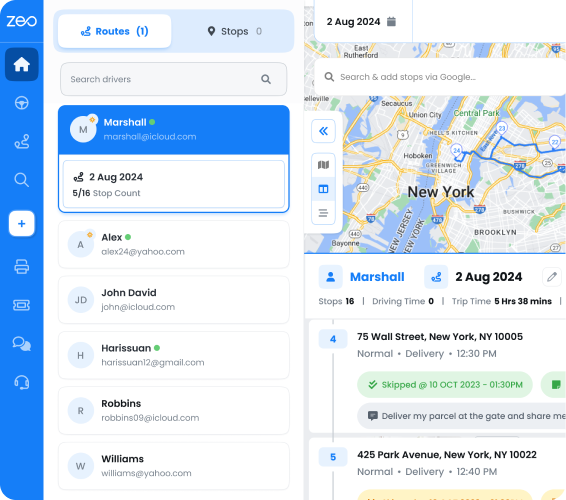
Cons: Requires upfront setup time and a monthly software cost, though this is typically far lower than the cost of hiring additional dispatch staff.
For most operations managing 10-50 drivers, the third model offers the best balance. You’re not handing compliance control to an outside company, but you’re also not drowning your dispatch team in manual spreadsheet work during volume spikes.
Zeo Route Planner’s AI-powered route optimization saves drivers and dispatchers 2+ hours daily by automating what used to be manual stop sequencing. For a team running 30 routes a day, that’s dozens of hours back each week—time that can go toward quality control and compliance checks instead of route-building.
Scaling for Peak Season: Managing Tax Deadlines, Loan Closings, and Volume Spikes Without Breaking Your Routes
Tax season and month-end loan closings are predictable. That means you can plan for them instead of scrambling.
Build recurring routes ahead of the surge. If you know certain banks or accounting firms need daily pickups during tax season, set up scheduled, recurring routes in advance. This removes the need to rebuild the same route from scratch every morning.
Use blackout dates for planned downtime. If a branch closes for a holiday or a firm pauses pickups during a slow stretch, you can temporarily pause a scheduled route without deleting the whole setup. This keeps your route templates intact for when volume picks back up.
Assign different drivers to different days. Peak season often means bringing in extra drivers for specific days of the week. With day plan functionality, you can assign different agents to specific days within the same scheduled route, without rebuilding the entire route from scratch.
Handle one-off driver swaps without disruption. If your regular driver calls in sick on a high-volume day, a date override lets you swap in a different driver for that single day only, leaving the rest of the scheduled route untouched.
Use capacity-based routing for pouch and package volume. During month-end closings, some drivers may be carrying more loan packages than usual. Capacity-based routing accounts for vehicle weight and volume limits, so you’re not overloading a single driver’s route.
Set priority stops for hard cutoffs. Not every stop has the same urgency. Mark bank cutoff deliveries as priority stops so your routing software sequences them ahead of lower-urgency drops.
Bulk import new pickup locations fast. During tax season, you may onboard new accounting firm clients quickly. Bulk address import from Excel, CSV, or Google Sheets lets you add dozens of new stops in minutes instead of entering them one at a time.
A courier company handling a surge of 200 extra loan packages during a month-end closing rush can’t afford to manually resequence routes by hand. Scheduled routes, time windows, and priority stops set up in advance mean the system handles the sequencing automatically, even when volume triples.
A Day in the Life: How Dispatchers and Drivers Use Zeo to Deliver Financial Documents On Time, Every Time
Here’s what a typical morning looks like for a dispatch lead running financial document routes with Zeo Route Planner.
6:00 AM — Dispatcher builds the day’s routes. The dispatcher logs into the Zeo web platform and reviews the stop list, pulled in from scheduled recurring routes plus any new one-off pickups added overnight. Bank cutoff times are already set as time windows, and loan package drop-offs are flagged as priority stops.
6:15 AM — Routes are optimized and assigned. Zeo’s AI-powered route optimization sequences each driver’s stops based on time windows, priority flags, and driver capacity. Drivers are assigned based on skill or vehicle type if certain pickups require it.
6:30 AM — Drivers receive routes on their phones. Each driver opens the Zeo mobile app and sees their assigned stops for the day, complete with bank-specific cutoff windows and customer details. Turn-by-turn navigation through Google Maps, Waze, or Apple Maps guides them stop to stop.
9:15 AM — First pickup at a title company. The driver arrives, collects a loan package, captures a photo of the sealed envelope, and gets a digital signature from the title company’s office manager. The status updates instantly on the dispatcher’s web dashboard.
11:40 AM — A bank cutoff is at risk. Traffic has slowed one driver’s route. The dispatcher sees the live ETA update on the dashboard, flagging that the driver may arrive six minutes after a 12:00 PM cutoff. Using in-app chat, the dispatcher reroutes a nearby driver to cover the drop instead, keeping the deadline intact.
1:00 PM — Loan closing documents delivered. The driver drops the package at the bank, captures proof of delivery with a photo and signature, and the recipient gets an automatic email notification confirming receipt.
3:30 PM — End-of-day reporting. The dispatcher pulls up route analytics to confirm every bank cutoff was hit and every delivery has a complete proof-of-delivery record. If a client calls asking about a specific document’s delivery time, the answer is one click away, not a dig through paper logs.
This workflow creates the audit trail compliance teams need without extra paperwork. Every pickup, every signature, every photo, and every timestamp is captured automatically as part of the normal delivery process, not as a separate compliance task bolted on afterward.
Frequently Asked Questions
Q: How long do financial institutions require document delivery records to be kept?
Retention requirements vary by document type and regulator, but many financial institutions keep delivery and chain-of-custody records for several years to satisfy audit and legal requirements. Courier companies serving banks and title companies should confirm specific retention periods with each client, since requirements can differ between mortgage documents, legal notices, and tax filings.
Q: What’s the difference between a bank pouch and a standard courier package?
A bank pouch typically contains cash, checks, or sensitive financial instruments and requires sealed, tamper-evident handling plus documented chain-of-custody at every transfer point. Standard courier packages rarely need this level of documentation, which is why financial document couriers build dedicated workflows around timestamped pickups, signatures, and photo proof rather than treating every stop the same way.
Q: Can route optimization software help with tax season volume spikes?
Yes. Scheduled recurring routes handle predictable daily pickups, while bulk address import lets dispatchers add new accounting firm clients in minutes instead of entering stops one by one. Zeo Route Planner’s capacity-based routing also helps prevent driver overload when pouch and package volume jumps 30-50% during tax season.
Q: What happens if a loan package misses a bank’s cutoff time?
A missed cutoff can delay a mortgage closing, trigger a rate lock expiration, or in some cases void the day’s transaction entirely under TRID timing rules. This is why courier teams handling financial documents mark bank cutoffs as priority stops and monitor live ETAs, so dispatchers can reroute a nearby driver before a deadline is at risk.
Q: Do financial document couriers need special insurance or bonding?
Most banks, title companies, and law firms require couriers carry bonding and liability insurance that covers the value of documents or financial instruments being transported, since a lost loan package or legal notice carries legal and financial consequences beyond a standard parcel’s replacement cost. Requirements vary by client contract, so operations leads should confirm coverage expectations before bidding on financial services accounts.
Financial Document Delivery Demands More Than a Standard Courier Setup
Financial document delivery isn’t a side category of parcel courier work. It’s a distinct logistics discipline with hard deadlines, strict chain-of-custody needs, and clients who expect proof, not promises.
Manual routing and paper tracking might get you through a slow month. But tax season, month-end closings, and growing client expectations will expose the cracks fast. The courier companies that win and keep bank, title, and law firm contracts are the ones that can prove reliability with data, not just claim it.
Start a free Zeo Route Planner trial to build your first compliance-ready, time-window-optimized delivery route in under 10 minutes. Or book a demo to see how Zeo handles peak-season volume spikes for financial document couriers.
Are you a fleet owner?
Want to manage your drivers and deliveries easily?
Grow your business effortlessly with Zeo Routes Planner – optimize routes and manage multiple drivers with ease.

increase fuel savings
Save $200 on fuel, Monthly!
Optimize routes with our algorithm, reducing travel time and costs efficiently.
Get Started for Free