




Updated on: May 4, 2026
Reading Time: 4 minutes
TL;DR: Zeo’s Miles Tracking feature automatically detects drives, classifies them as business or personal, and generates downloadable reports through simple setup and classification steps. This automated tracking helps drivers maintain accurate records for tax purposes and business reimbursements. Route optimization tools like Zeo Route Planner address this with miles tracking for expense and tax records, helping delivery and service teams save 2+ hours daily on administrative tasks.
Your fleet managers and clients are asking for mileage proof. Your tax form needs trip details. You know you drove 300+ miles last week, but where’s the record?
If that made your heart skip a beat, it’s time to meet your new best friend: Zeo Route Planner’s Miles Tracking Feature.
It’s your personal mileage assistant, automatically detecting your drives, sorting them as business or personal, and generating clean, downloadable reports. Whether you’re a solo driver or part of a fleet, Zeo Route Planner helps you stay ready for audits, reimbursements, or just proving you’ve done the work.
Let’s understand how you can use it, step by step, so you never lose track of your hard-earned miles again.
Why Accurate Mileage Records Matter for Your Business
The IRS standard mileage rate for 2026 allows business drivers to deduct significant expenses from their taxes. However, without proper documentation, you could lose thousands in legitimate deductions during an audit. Business mileage records also protect you during reimbursement disputes and help optimize route planning by revealing travel patterns.
Professional drivers who maintain detailed mileage logs report better financial planning and reduced stress during tax season. The key is having an automated system that captures data without adding extra work to your daily routine.
How to Set Up Miles Tracking on Zeo
Getting started is super simple. Here’s how to use the miles tracking feature in Zeo Route Planner:
- Download the latest version of the mobile app of Zeo Route Planner.
Android users: Play Store Link
iOS users: Apple Store Link - Log in to your Zeo account. If you are a new user, create your account.
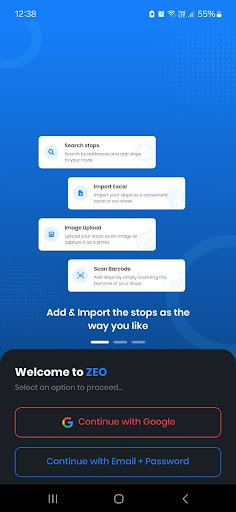
- Go to the ‘My Profile’ section.
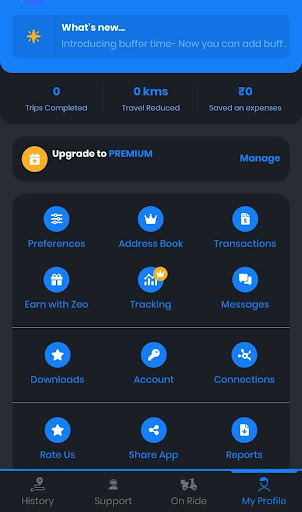
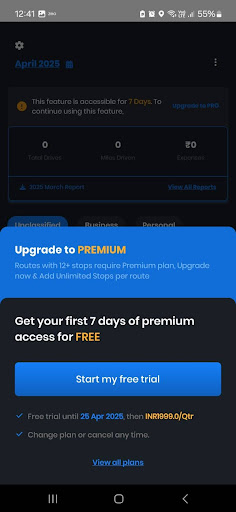
- Click on the ‘Tracking’ option. Please note that this feature is available only in the paid plan. It will be accessible for free for the first seven days. After that, you will be expected to upgrade to the premium plan.
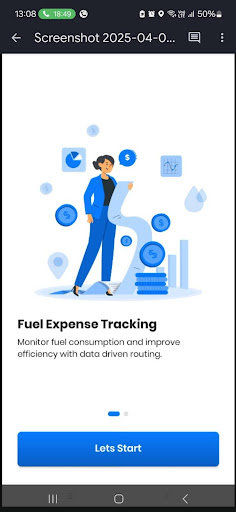
- Click on ‘Let’s Start.’ The first window will highlight the benefit of the Miles Tracking feature. You can easily track your fuel expenses and improve efficiency with data-driven routing.
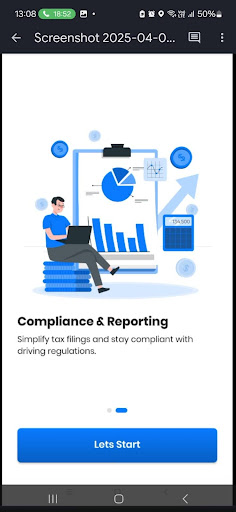
- The second window will talk about the compliance and reporting benefits of the Miles Tracking feature. Click on ‘Let’s Start’ and then click on Next and Continue for the next two screens.
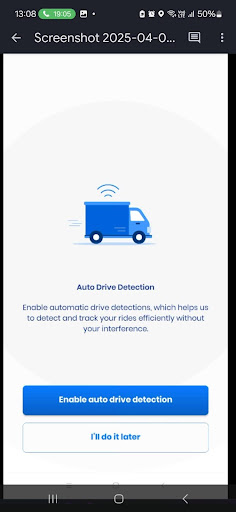
- Choose ‘Enable auto drive detection.’ This will help Zeo automatically detect and track your rides without any manual interference.
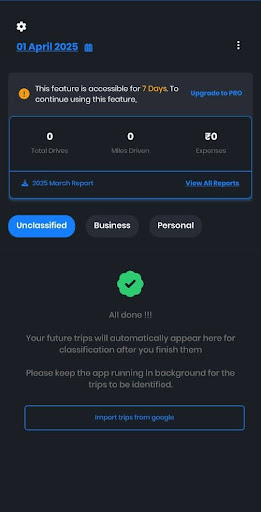
- The Miles Tracking dashboard will appear on your screen with all the information and reports. You can download the reports and view the data.
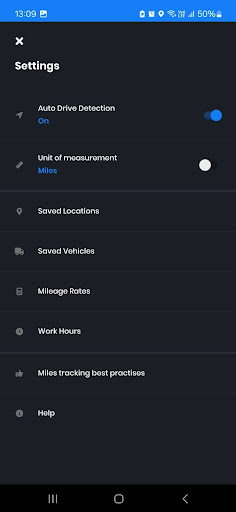
- You can also enable auto drive detection by clicking on the settings symbol on the top left and switching on Auto Drive Detection.
- There are two ways to classify your trip as either personal or business. You can simply swipe the trip card left to classify the trip as personal and right to classify it as a business trip. Alternatively, you can click on the Home and Briefcase icons to classify the trip as personal or business, respectively.
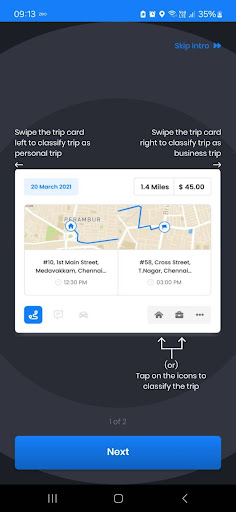
- The dashboard will allow you to view the business and personal trips. If you have not classified the trip, it will appear in the unclassified tab.
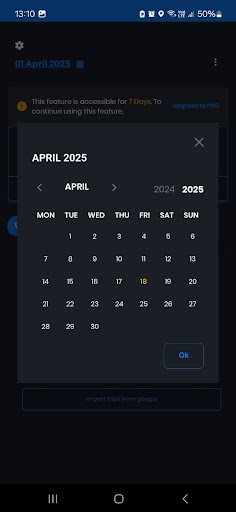
- You can download the report for the current month from the dashboard. To download the report for a particular range, tap the Calendar icon in the top left corner.
- To explore more options in the Miles Tracking Feature, click on the three dots in the top right corner.
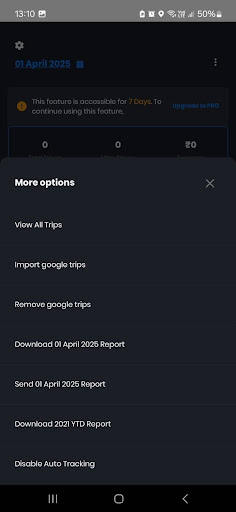
Additional Steps to Use the Miles Tracking Feature
Best Practices for Maintaining Business Mileage Records
Beyond setting up automated tracking, successful drivers follow specific practices to maximize their deduction potential. IRS Publication 463 outlines the documentation requirements for business travel expenses, emphasizing the need for timely record-keeping.
Review and classify your trips weekly rather than waiting until month-end. This habit prevents memory gaps and ensures accurate business versus personal categorization. For complex routes that mix business and personal stops, note the business purpose in your trip details immediately after completion.
Regular backup of your mileage data protects against device loss or technical issues. Most professional route planning applications offer cloud storage and export features to safeguard your valuable tax documentation. If you’re managing multiple routes daily, consider exploring comprehensive route planning solutions that integrate mileage tracking with optimization features.

increase fuel savings
Save 2 Hours on Deliveries, Everyday!
Optimize routes with our algorithm, reducing travel time and costs efficiently.
Get Started for Free
Integrating Mileage Tracking with Route Planning
Smart drivers combine mileage tracking with route optimization to maximize both efficiency and tax benefits. When you plan efficient routes that minimize total miles while hitting all required stops, you reduce fuel costs and vehicle wear while maintaining detailed records for reimbursement.
This approach works particularly well for service businesses that need to track both route efficiency and expenses. Manual route creation tools allow you to plan specific paths that balance business needs with accurate mileage documentation.
Frequently Asked Questions
What mileage records do I need to keep for tax purposes?
The IRS requires you to document the date, destination, business purpose, and total miles for each business trip. You must also maintain records of your vehicle’s total annual mileage to calculate the business use percentage accurately.
How long should I keep business mileage records?
Keep mileage records for at least three years after filing your tax return, or longer if you claimed a loss or didn’t file a required return. Digital records are acceptable and often more reliable than paper logs for long-term storage.
Can I deduct mileage for driving between multiple job sites in one day?
Yes, travel between different work locations on the same day is generally deductible business mileage. However, your regular commute from home to your primary workplace is not deductible, even if you make work-related stops along the way.
What’s the difference between actual expenses and standard mileage rate?
The standard mileage rate is a fixed per-mile deduction set annually by the IRS, while actual expenses involve tracking all vehicle costs like gas, repairs, and depreciation. You must choose one method for the entire tax year and cannot switch between them for the same vehicle.
How can route planning software help with mileage tracking?
Professional route planning applications automatically capture GPS data and generate detailed mileage reports without manual logging. Tools with integrated tracking features help drivers maintain IRS-compliant records while optimizing daily routes for maximum efficiency.
Conclusion: Track It Right, Drive Smarter
Every mile you drive is money, proof, and potential. But if you’re not tracking it, you’re leaving all that value behind. With Zeo Route Planner’s miles tracking feature, you’re building a mileage record that speaks for itself. From tax season to payout disputes, from daily planning to long-term performance reviews, your data is always ready, accurate, and easy to share.
So don’t wait until the end of the month to get organized. Turn on Zeo’s Miles Tracking feature and let the app do the heavy lifting for you while you focus on driving, delivering, and getting paid. Schedule a demo to get started.

Are you a fleet owner?
Want to manage your drivers and deliveries easily?
Grow your business effortlessly with Zeo Routes Planner – optimize routes and manage multiple drivers with ease.

increase fuel savings
Save $200 on fuel, Monthly!
Optimize routes with our algorithm, reducing travel time and costs efficiently.
Get Started for Free 


















