


# Equipment Delivery Management: The Complete 2026 System for Oversized Loads, Pickups, and Proof
> TL;DR: Equipment delivery management requires handling oversized loads, strict scheduling windows, and two-way pickup/delivery trips—problems standard parcel delivery software isn’t built to solve. Capacity-based routing and time window constraints prevent the overloaded trucks and missed windows that cost equipment businesses the most money. Zeo Route Planner’s pickup–delivery linking automatically pairs and sequences related stops, helping equipment rental and field service teams cut backtracking without adding dispatcher workload.
Equipment delivery management is nothing like shipping a parcel. When you’re moving a 400-pound generator to a job site or picking up a rented excavator attachment, one wrong time window can cost you a full day of rescheduling.
If you’re running delivery and pickup logistics for rental, construction, medical, or industrial equipment, you already know this. Generic delivery apps don’t account for oversized loads, two-way trips, or proof that a $50,000 machine arrived and got installed correctly.
This post breaks down equipment delivery management as its own discipline. Then it gives you a practical, software-backed system to run it—starting today.
What Is Equipment Delivery Management (And Why It’s Different From Standard Delivery)
Equipment delivery management is the process of planning, routing, tracking, and documenting the movement of bulky, high-value, or scheduling-sensitive equipment—both outbound deliveries and inbound pickups.
It’s a different job than last-mile parcel delivery. Here’s why.
The loads are bigger and heavier. A pallet of lumber or a hospital bed doesn’t fit in a standard delivery van. You’re dealing with weight limits, vehicle capacity, and sometimes special equipment like liftgates.
The timing is less forgiving. A missed delivery window for a food order is annoying. A missed delivery window for a crane rental holding up a construction delivery management crew is expensive. Job sites, installations, and rental start times run on tight schedules.
It’s two-way, not one-way. Parcel delivery ends when the package is dropped off. Equipment logistics often includes a pickup leg too—returning rental equipment, retrieving a unit after a job finishes, or swapping out a malfunctioning piece of gear.
Proof matters more. You need evidence the equipment arrived undamaged, was installed properly, or was picked up in working condition. A signature on a doorstep isn’t enough when liability and warranty claims are on the line.
Most route planning tools on the market were built for the first kind of delivery—small packages, one-way trips, loose timing. That leaves equipment-heavy businesses stuck doing this manually: spreadsheets for scheduling, phone calls for confirmations, and guesswork for routing.
The Hidden Challenges of Delivering Equipment: Oversized Loads, Scheduling Windows, and Two-Way Logistics
Three problems show up again and again for operations managers running equipment fleets.
Oversized and Multi-Stop Load Planning
Not every vehicle in your fleet can carry every piece of equipment. A box truck might handle three pallet deliveries, but a flatbed is needed for a compressor. Without capacity-based planning, dispatchers end up assigning routes based on memory or gut feel—which leads to overloaded trucks, failed deliveries, or trucks running half-empty on fuel-expensive routes.
Strict Scheduling Windows
Construction sites often have narrow delivery windows tied to crew schedules. Medical equipment deliveries may require coordination with hospital staff or patient availability. Rental customers expect equipment on-site before their job starts—not sometime “this afternoon.”
The U.S. Bureau of Labor Statistics industry data on transportation and warehousing shows these sectors are among the most affected by scheduling inefficiencies, where late deliveries compound into labor and equipment downtime costs across the supply chain. In equipment delivery, one late truck can delay an entire crew’s billable hours.
Two-Way Logistics: Delivery Plus Pickup
Unlike standard parcel delivery, equipment businesses routinely run both directions in the same day:
- Deliver a tool to Job Site A
- Pick up a finished rental from Job Site B
- Swap equipment at Job Site C
- Return damaged inventory to the warehouse
Planning this manually means juggling multiple spreadsheets, text threads with drivers, and constant replanning when a pickup runs late. It’s slow, and it’s easy to get wrong—especially when you’re coordinating 5 to 30 drivers across a region.
How Route Optimization Software Solves Equipment Delivery’s Toughest Problems
This is where purpose-built route planning software changes the math.
Capacity-based routing assigns stops based on each vehicle’s actual weight and volume limits—not guesswork. If a truck can only carry 2,000 pounds, the software won’t overload it with a fourth pallet delivery that pushes it past capacity.
Time window constraints let you lock in delivery and pickup windows for job sites, installations, and rental start times. The route planner builds the day around those windows instead of ignoring them.
Priority stops let you flag ASAP jobs—like a same-day equipment swap—so they get worked into the route without blowing up the rest of the schedule.
Skill-based driver assignment matters here too. If a delivery requires a driver certified to operate a liftgate or trained for medical equipment handling, you can assign the job to someone with the right skill set instead of whoever’s free.
Dynamic route adjustments handle the inevitable curveballs—a job site delay, a pickup that’s not ready, a last-minute rental request. Instead of a dispatcher making a dozen phone calls, the route updates and pushes new stops to the driver’s app.
Zeo Route Planner’s AI-powered optimization handles all of this automatically, saving drivers and dispatchers 2+ hours daily that would otherwise go into manual scheduling and re-routing. For a company running 15 trucks, that’s 30+ hours a week back in your operation.
Here’s a real-world scenario: an equipment rental company handling 20 deliveries and 8 pickups across a metro area each day used to plan routes manually, assigning drivers by region and hoping capacity worked out. With capacity-based routing and time windows built into the plan, the same team can now sequence delivery and pickup stops together—cutting backtracking and getting more jobs done with the same fleet size.
Proof of Delivery, Installation, and Pickup: Protecting Your Business and Your Customers
Equipment delivery carries more liability than parcel delivery. If a $30,000 machine shows up damaged, or a customer claims it was never installed correctly, you need proof—not a “he said, she said” argument.
Route planning software with built-in proof of delivery tools solves this with:
- Photo capture at drop-off or pickup, documenting the equipment’s condition
- Digital signatures confirming receipt, installation, or return
- Delivery notes for recording details like serial numbers, installation steps completed, or damage observed
- COD tracking for rental payments collected on-site
Here’s how this plays out day-to-day. Your dispatcher builds and assigns routes from the Zeo web platform. Drivers and installers then receive their optimized routes directly on the Zeo mobile app, complete with stop order, customer details, and time windows.
At each job site, the driver navigates using their preferred app—Google Maps, Waze, or Apple Maps—then captures a photo of the installed equipment, collects a signature, and adds notes if anything’s out of the ordinary. When it’s a pickup, they mark it complete in the app, and that status updates instantly on the manager’s dashboard back at the office.
This closes the loop between planning and execution. No more calling drivers to confirm a delivery happened, no more waiting until end of day to find out a pickup was missed. Customer notifications—SMS, email, or a branded live tracking link—also keep the customer informed, which matters when they’re waiting on a crane rental or a hospital bed delivery.
According to OSHA’s guidance on workplace documentation and injury prevention, proper documentation during equipment handoffs is also a practical safeguard for workplace injury and liability claims, particularly for heavy or industrial equipment. A timestamped photo and signature can be the difference between a quick resolution and a drawn-out dispute.
Step-by-Step: Setting Up an Equipment Delivery Management System With Route Planning Software
Here’s how to build this system, start to finish.
Step 1: Import your stops.
Upload your delivery and pickup addresses via Excel, CSV, or Google Sheets. If you’re running recurring equipment deliveries to the same job sites, save them as Favorites so you don’t re-enter addresses every week.
Step 2: Set vehicle and driver profiles.
Add each vehicle’s capacity limits and each driver’s skills, work hours, and break times. This is what makes capacity-based routing and skill-based assignment work correctly.
Step 3: Apply time windows and priorities.
Enter the scheduling windows for each stop—job site access hours, installation appointments, rental pickup deadlines. Mark urgent jobs as priority stops.
Step 4: Let the AI optimize the route.
Run the optimization. The software sequences delivery and pickup stops together, accounting for capacity, time windows, and driver skills—something a spreadsheet simply can’t calculate in seconds.
Step 5: Assign and dispatch.
Push the optimized routes to your drivers through the Zeo mobile app. Each driver sees their stop order, customer info, and navigation—no separate phone calls needed.

increase fuel savings
Save 2 Hours on Deliveries, Everyday!
Optimize routes with our algorithm, reducing travel time and costs efficiently.
Get Started for Free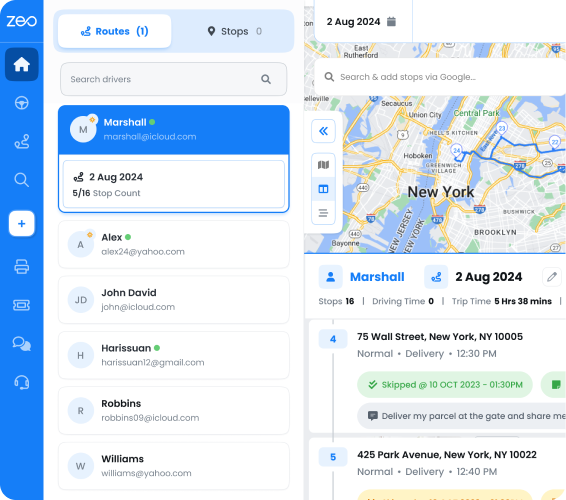
Step 6: Track in real time.
Use live GPS tracking to monitor progress and catch delays before they cascade. If a job site runs long, dynamically adjust the remaining route instead of letting the whole day fall apart.
Step 7: Capture proof and close the loop.
Drivers capture photos, signatures, and notes for every delivery and pickup. Review this data from your dashboard, alongside driver performance analytics, to spot patterns—like which routes consistently run late or which drivers need support.
Step 8: Review and repeat.
For recurring routes—like weekly rental pickups or scheduled equipment maintenance visits—set up scheduled or recurring routes so you’re not rebuilding the plan from scratch every time. Use Blackout Dates to pause a route around holidays without deleting the whole schedule, or apply a Date Override if you need a different driver covering just one day.
Equipment Delivery Software Checklist: What to Look For (and How Zeo Compares)
Not all route planning tools are built to handle equipment logistics. Use this checklist when evaluating software for your operation. Industry data from the American Rental Association’s industry research underscores how fragmented manual scheduling remains across the equipment rental sector—making purpose-built software a growing differentiator.
✓ Capacity-based routing
Does it account for vehicle weight and volume limits, not just stop count? Zeo supports capacity-based routing so oversized loads get matched to the right vehicle.
✓ Time window support
Can you lock in strict delivery and pickup windows for job sites and installations? Zeo’s time window constraints keep routes aligned with customer scheduling needs.
✓ Two-way routing (delivery + pickup)
Does the software sequence delivery and pickup stops in the same optimized route? Zeo’s pickup-linked deliveries automatically pair related stops and sequence them correctly, so you’re not manually matching drop-offs to returns.
✓ Proof of delivery and installation
Look for photo capture, digital signatures, and delivery notes—not just a basic “delivered” checkbox.
✓ Real-time tracking and customer communication
Live GPS tracking, live ETA updates, and branded tracking links help keep customers informed without constant phone calls.
✓ Driver app with flexible navigation
Drivers should be able to use the navigation app they already trust—Zeo supports Google Maps, Waze, and Apple Maps—plus an “Navigate as Added” option when you need stops run in a specific manual order instead of auto-optimized.
✓ Skill-based and vehicle-based assignment
For equipment requiring certified handling, confirm the software lets you assign jobs based on driver skills and vehicle type.
✓ Scalability for 5 to 30+ drivers
Make sure the platform supports your fleet size now and as you grow, with driver management and performance analytics built in.
✓ Integrations
If you’re running orders through Shopify, WooCommerce, or a CRM like HubSpot, check that the route planner connects directly—or through Zapier—so you’re not manually re-entering orders.
Zeo Route Planner is built around this exact checklist, serving over 1.5 million users across 150+ countries, including equipment rental, construction supply, and industrial fleets managing both deliveries and pickups daily.
Frequently Asked Questions
Q: How is equipment delivery management different from regular fleet delivery software?
Equipment delivery management involves oversized or high-value loads, two-way trips (delivery and pickup in the same route), and strict scheduling tied to job sites or installations. Regular parcel delivery software is typically built for one-way, lightweight shipments with looser timing, so it often lacks capacity-based routing or pickup-delivery linking that equipment-heavy operations need.
Q: What should I track for proof of equipment delivery or installation?
At minimum, document the equipment’s condition with a timestamped photo, collect a signature confirming receipt or installation, and record any serial numbers or installation notes. Zeo Route Planner’s proof of delivery tools capture photos, digital signatures, and delivery notes directly from the driver’s mobile app, syncing instantly to the manager’s dashboard.
Q: How do you route both deliveries and pickups in the same day efficiently?
The key is sequencing delivery and pickup stops together in one optimized route instead of planning them separately, which reduces backtracking and wasted mileage. Zeo’s pickup–delivery linking automatically pairs related stops and sequences them in the correct order, so dispatchers don’t have to manually match drop-offs to returns.
Q: What size fleet actually needs dedicated equipment delivery software?
Operations running as few as 5 drivers with mixed vehicle types (box trucks, flatbeds, vans) typically benefit, since manual spreadsheet planning breaks down once you’re juggling capacity limits, time windows, and two-way trips simultaneously. Fleets scaling past 15-20 drivers usually see the clearest ROI from automated routing and driver performance tracking.
Q: How can I reduce missed delivery windows for construction or rental equipment?
Locking in time window constraints for each stop and building routes around those windows—rather than ignoring them—prevents the scheduling conflicts that cause missed windows. Flagging urgent jobs as priority stops and using dynamic route adjustments when a job site runs long also helps keep the rest of the day’s schedule intact.
—
Equipment delivery management deserves its own playbook—not a repurposed parcel delivery tool. With capacity-based routing, two-way stop sequencing, proof of delivery, and real-time tracking in one system, you replace spreadsheets and phone calls with a process your whole team can run.
Start a free Zeo Route Planner trial to build your first optimized equipment delivery route in minutes—no credit card required.
Are you a fleet owner?
Want to manage your drivers and deliveries easily?
Grow your business effortlessly with Zeo Routes Planner – optimize routes and manage multiple drivers with ease.
increase fuel savings
Save 2 Hours on Deliveries, Everyday!
Optimize routes with our algorithm, reducing travel time and costs efficiently.
Get Started for Free