

# Equipment Delivery Management: The Complete Guide to Fixing Missed Windows and Damage Disputes
> TL;DR: Equipment delivery management requires routing and proof-of-delivery tools built for tight installation windows, oversized loads, and high-value assets — not generic parcel-delivery software. Missed installation windows and undocumented damage disputes are the two biggest cost drains for operations managers running heavy or specialized equipment deliveries. Route optimization tools like Zeo Route Planner address this with avoid params for oversized loads and photo-based proof of delivery, helping equipment and field service teams save 2+ hours daily on planning.
Delivering a pallet of pipes or a pair of medical imaging units isn’t the same job as dropping off an online order. Equipment delivery management involves tight installation windows, oversized loads, on-site coordination, and proof that expensive assets arrived intact. If you’re still running this on spreadsheets or basic delivery apps, you’re probably dealing with missed windows, re-deliveries, and disputes you can’t resolve.
This guide breaks down what makes equipment delivery different, the hidden challenges operations managers face, and the exact workflow that fixes them — from planning routes to confirming delivery.
What Is Equipment Delivery Management (and How It Differs from Standard Delivery Logistics)
Equipment delivery management is the process of planning, scheduling, and tracking deliveries of heavy, specialized, or high-value items — think construction equipment, medical devices, lab instruments, or rental machinery. It covers everything from route planning to on-site installation confirmation.
Standard parcel delivery assumes small packages, flexible delivery windows, and a doorstep drop-off. Equipment delivery rarely works that way.
Here’s what sets it apart:
- Tight time windows. A crane rental or HVAC unit often needs to arrive during a specific installation slot, not “sometime today.”
- Vehicle and load restrictions. Oversized freight may need routes that avoid low bridges, weight-restricted roads, or narrow streets.
- On-site coordination. Someone has to be there to receive, inspect, or help install the equipment — which means site contact details matter as much as the address.
- Proof of condition. A damaged forklift attachment or scratched lab instrument can turn into a costly dispute without documented proof of delivery.
Generic route planners treat every stop the same. Equipment deliveries need software that understands these constraints from the start — a problem we cover in more depth in our guide to streamlining delivery management for operations with mixed stop types.
The Hidden Challenges of Delivering Heavy, High-Value, or Specialized Equipment
Most of the real problems in equipment delivery don’t show up until something goes wrong. Here are the ones operations managers run into most often.
Missed installation windows. If a technician needs to be on-site to receive a shipment and your truck shows up two hours late, you’ve likely blown the whole installation schedule for that day. According to the BLS occupational outlook for delivery and heavy truck drivers, these occupations are projected to grow steadily through the decade — meaning more trucks on the same roads, and more scheduling risk if you’re not optimizing routes.
Re-deliveries that eat margin. Rescheduling a delivery of lab equipment or rental machinery isn’t cheap. It usually means another trip, another driver hour, and a frustrated customer.
Routing around physical constraints. Not every road can handle a flatbed truck or oversized load. Routes that ignore bridge clearances, weight limits, or tunnel restrictions create delays — or worse, safety incidents. The FHWA national bridge and weight restriction data exists precisely because this is a widespread operational risk for commercial fleets. This same challenge shows up constantly in construction delivery management, where material and equipment loads both need route-level restrictions.
Disputes over equipment condition. Without photo or signature proof, you have no way to confirm what shape equipment was in when it left your dock versus when it arrived. That’s a liability problem, not just a customer service one.
No real-time visibility. If a customer calls asking “where’s my generator,” and your dispatcher has to call the driver to find out, you’re already behind. High-value assets in transit need to be trackable in real time — not just guessed at.
These challenges compound when you’re managing 5 to 50 vehicles across multiple job sites. Manual coordination simply doesn’t scale.
Essential Features to Look for in Equipment Delivery Management Software
If you’re evaluating tools, don’t settle for basic delivery tracking. Equipment delivery management software should include:
- AI-powered route optimization that accounts for time windows, stop priority, and vehicle capacity — not just shortest distance.
- Avoid parameters for routing around highways, tunnels, bridges, or ferries when hauling oversized or heavy loads.
- Time window and priority stop settings so installation-critical deliveries get scheduled correctly, every time.
- Skill-based driver assignment to match jobs requiring specific certifications or experience with the right driver — the same approach used in skill-based job assignment workflows across field service industries.
- Real-time GPS tracking and live ETA updates so you and your customers always know where equipment is.
- Proof of delivery tools — photo capture, digital signatures, and delivery notes — to document condition and confirm receipt.
- Customer notifications via SMS, email, or a live tracking link, so site contacts know exactly when to expect you.
- Scheduled and recurring routes for repeat equipment drop-offs, pickups, or rental rotations.
- Pickup-delivery linking to automatically pair and sequence related pickup and delivery stops — useful for rental equipment that needs to be picked up from one site and delivered to another.
Zeo Route Planner includes all of these, built for operations teams managing multi-stop, time-sensitive deliveries — not just single-package drop-offs.
How Route Optimization Transforms Equipment Delivery Operations (Planning, Dispatching, Tracking, Confirming)
Think of equipment delivery management as four connected stages. Each one has a specific failure point — and a specific fix.
1. Planning
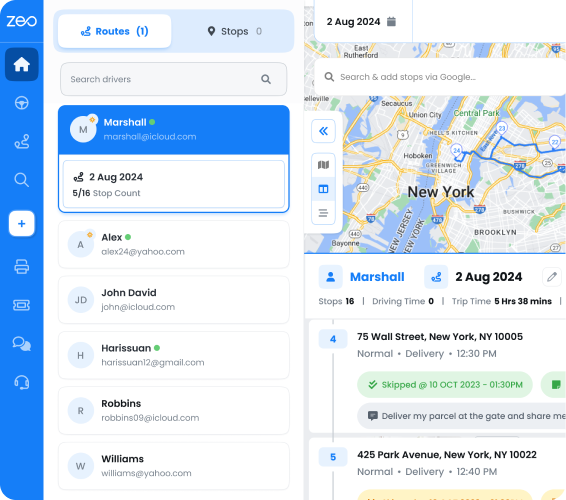
This is where most delivery problems start. If you’re manually assigning routes or using spreadsheets, you’re not accounting for time windows, vehicle capacity, or driver skills. Zeo’s AI-powered route optimization builds routes that respect delivery windows, prioritize urgent installs, and match capacity limits to vehicle loads — saving planners 2+ hours daily compared to manual scheduling.
For oversized equipment, Zeo’s avoid params let you exclude highways, tunnels, trunks, bridges, and ferries from a route — so a flatbed carrying heavy machinery never gets routed somewhere it can’t legally or safely travel.
2. Dispatching
Once routes are built, drivers need the right information — not just an address. Zeo auto-assigns stops based on skill requirements, so a driver certified to install medical equipment gets routed to the medical equipment delivery, not a general supply drop.
For recurring equipment rotations — like weekly rental pickups or scheduled maintenance deliveries — Zeo’s scheduled routes and Day Plan feature let you assign different drivers to specific days within a single recurring route, without rebuilding the whole schedule each time.
3. Tracking
Once a truck is on the road, visibility shouldn’t stop. Zeo’s real-time GPS tracking shows exactly where every vehicle is, and live ETA updates mean your team — and your customer — always know when equipment will arrive. If a customer calls asking about their delivery, you have the answer in seconds instead of radioing the driver. This level of transparency is also what we cover in keeping customers informed throughout the delivery lifecycle.

increase fuel savings
Hassle Free Deliveries & Pickups!
Optimize routes with our algorithm, reducing travel time and costs efficiently.
Get Started for Free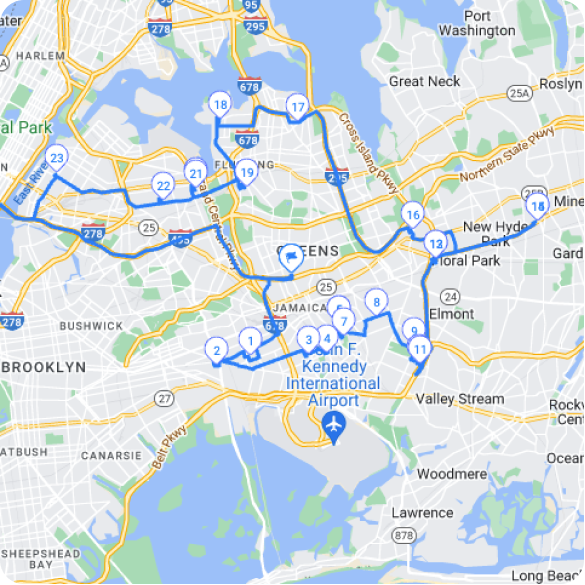
4. Confirming
This is the step most generic software skips. Zeo’s proof of delivery tools let drivers capture photos, collect digital signatures, and add delivery notes on-site. For a $40,000 piece of lab equipment, that photo documentation is the difference between a quick resolution and a drawn-out dispute over damage claims.
From Dispatch to Doorstep: How Managers and Drivers Work Together with the Right Tools
Here’s how this actually plays out on a typical delivery day.
An operations manager at an equipment rental company builds the day’s routes on the Zeo web platform — factoring in installation windows at three job sites, a weight-restricted bridge to avoid, and a driver with forklift certification who needs to handle the heaviest load. The manager assigns stops, sets time windows, and dispatches the route.
From there, each driver receives their route instantly on the Zeo mobile app — complete with delivery windows, site contact notes, and navigation in their preferred map app (Google Maps, Waze, or Apple Maps). No more calling dispatch to ask which gate to use or who to ask for on-site.
When the driver arrives to deliver and help install a generator at a construction site, they capture a photo of the unit in place and collect a signature from the site supervisor — all from their phone. That proof of delivery syncs back to the manager’s dashboard immediately, closing the loop without a single phone call.
If a job runs long and the next delivery window is at risk, the manager can see it in real time through live GPS tracking and adjust the schedule — rather than finding out after a customer complaint.
This back-and-forth between the web platform and mobile app is what makes equipment delivery management actually manageable at scale. The manager plans and adjusts; the driver executes and documents — and both sides see the same information in real time.
Real-World Impact: What Better Equipment Delivery Management Looks Like
Consider a mid-sized construction equipment rental company running 25 delivery vehicles across a metro area. Before adopting route optimization, dispatchers manually assigned routes each morning, drivers called in for directions around restricted roads, and disputed deliveries took days to resolve because there was no photo evidence of equipment condition.
After switching to an optimized, app-connected workflow, the same company could:
- Cut planning time by 2+ hours daily by letting AI build routes instead of manual assignment.
- Reduce missed installation windows by using time window constraints and priority stops for job-site-critical deliveries.
- Avoid routing a flatbed truck under a low bridge by applying avoid params for bridges and tunnels.
- Resolve a damage dispute in minutes, not days, using timestamped photo proof of delivery.
- Give customers live tracking links so they stop calling to ask “where’s my truck.”
This is the kind of operational shift the CSCMP research on last-mile logistics has pointed to: real-time visibility and digital proof of delivery directly reduce disputes and improve customer satisfaction. For equipment delivery specifically, where a single shipment can be worth tens of thousands of dollars, that visibility isn’t a nice-to-have — it’s risk management.
Zeo Route Planner is built for exactly this kind of operation. With 1.5M+ users across 150+ countries, Zeo supports fleets of all sizes — from 5-vehicle operations to 50-vehicle fleets — handling multi-stop, time-sensitive deliveries without the manual guesswork.
Frequently Asked Questions
Q: How far in advance should equipment deliveries be scheduled?
Most equipment rental and installation companies schedule deliveries 24–72 hours in advance to confirm site access, on-site contacts, and any special handling requirements. Oversized or specialized equipment (like medical devices or heavy machinery) often needs even more lead time to coordinate installation crews and avoid route restrictions.
Q: What’s the difference between equipment delivery and standard freight delivery?
Standard freight delivery typically focuses on getting a shipment from point A to point B within a general timeframe. Equipment delivery management adds constraints like tight installation windows, on-site coordination with technicians, vehicle restrictions for oversized loads, and documented proof of condition on arrival — since the items are often high-value and harder to replace quickly.
Q: How can companies reduce damage disputes on high-value equipment deliveries?
Timestamped photo proof of delivery and digital signatures collected at the moment of drop-off are the most effective way to resolve disputes quickly. Zeo Route Planner’s proof of delivery tools let drivers capture photos, collect signatures, and add delivery notes directly from the mobile app, giving managers documented evidence the moment a job is closed out.
Q: How do you route oversized equipment around low bridges or weight-restricted roads?
Routing oversized equipment safely requires software that can exclude specific road types rather than just calculating the shortest path. Avoid params that let planners exclude highways, tunnels, trunks, bridges, and ferries from a route help keep flatbed trucks and heavy loads off roads they can’t legally or safely use.
Q: What information should an equipment delivery driver have before heading to a job site?
Drivers need more than an address — they need the delivery window, site contact name, any gate or access codes, and special handling notes for the equipment being delivered. Routing this information directly to a driver’s phone, rather than relying on phone calls from dispatch, reduces delays and on-site confusion significantly.
If you’re still coordinating equipment deliveries through spreadsheets and phone calls, it’s time to change that. Start a free Zeo Route Planner trial to build smarter equipment delivery routes, track high-value shipments in real time, and capture proof of delivery for every job. Or book a demo to see how Zeo handles multi-stop, time-sensitive equipment deliveries at scale.
Are you a fleet owner?
Want to manage your drivers and deliveries easily?
Grow your business effortlessly with Zeo Routes Planner – optimize routes and manage multiple drivers with ease.
increase fuel savings
Save 2 Hours on Deliveries, Everyday!
Optimize routes with our algorithm, reducing travel time and costs efficiently.
Get Started for Free