



Updated on: January 27, 2026
Reading Time: 8 minutes
TL;DR: Zeo Route Planner is a leading delivery management solution that saves 2+ hours daily with AI-powered route optimization, real-time GPS tracking, and automated customer notifications. Used by 1.5M+ users in 150+ countries. Try free.
Delivering packages quickly and safely to the customers
Delivering packages quickly and safely to the customers’ hands is one of the biggest challenges in the last mile delivery business. Suppose you made some marketing strategy and it has worked out, your sales have taken off. You’re getting lots more orders, but can you deliver them? Your efforts will only pay off if you can reliably get your products to the customer efficiently that provides an excellent customer experience. Perhaps the answer to this is to use a delivery management app like Zeo Route Planner to handle all your last-mile logistics problems.
If you want your business to keep growing, then you need to get your delivery process on point. Dispatching a handful of daily deliveries is easy, but organizing delivery operations gets complicated if you start getting lots more. More orders mean more packages, more delivery routes, and more drivers.

Using tools like Google Maps or any primary online route planner can help you deliver a few deliveries, but it might not handle hundreds or thousands of packages. Printouts of routes and switching between online and mobile apps can be cumbersome. Thus, your next step might be to find a dedicated delivery management solution for your last-mile deliveries.
Delivery management software like Zeo Route Planner makes it simpler to organize all the steps involved in getting a package from order to doorstep, making delivery services more efficient and saving you time and money. In this post, we will be looking at how Zeo Route Planner can benefit your business in the real-world.
Advantages of using Zeo Route Planner in real-world
Let’s look how Zeo Route Planner can help you managing all the complications of last-mile delivery.
Faster delivery
Providing faster delivery is the need of the hour today. Customers want fast delivery nowadays, and studies show that some also wish for same-day delivery. Making deliveries faster means your drivers will be free to deliver more orders, and for that, you need to plan the shortest and the optimal route for the delivery.
You can use delivery management software to streamline route planning and optimization as the algorithms take over the headache of working them out for yourself. You don’t need to spend precious hours working out each route manually. Using the AI-powered route optimization feature offered by Zeo Route Planner, you can upload your delivery addresses list via spreadsheet, image capture, bar/QR code scan.
Zeo Route Planner’s efficient algorithm will optimize your routes and share the delivery paths within just 30 seconds. Our algorithm’s efficiency is so good that it can optimize up to 500 stops at a time.
If there is any sudden change in the delivery process, Zeo Route Planner lets dispatchers and drivers easily add or delete stops. It then recalculates the fastest route within seconds. The dynamic route adjustment feature re-plans routes to avoid traffic and updates ETAs and recipient notifications accordingly, making delivery operations smoother.
Monitoring drivers
As driver teams grow, dispatchers and managers need to manage and monitor each team member as quickly as possible. Calling drivers periodically and asking them about the deliveries or ETAs while the driver is on delivery is time-consuming and can also lead to delivery delays.
Zeo Route Planner was developed keeping drivers in mind. The Zeo Route Planner app links drivers and dispatchers directly and makes communication and monitoring easy through in-app chat messaging and real-time GPS tracking.
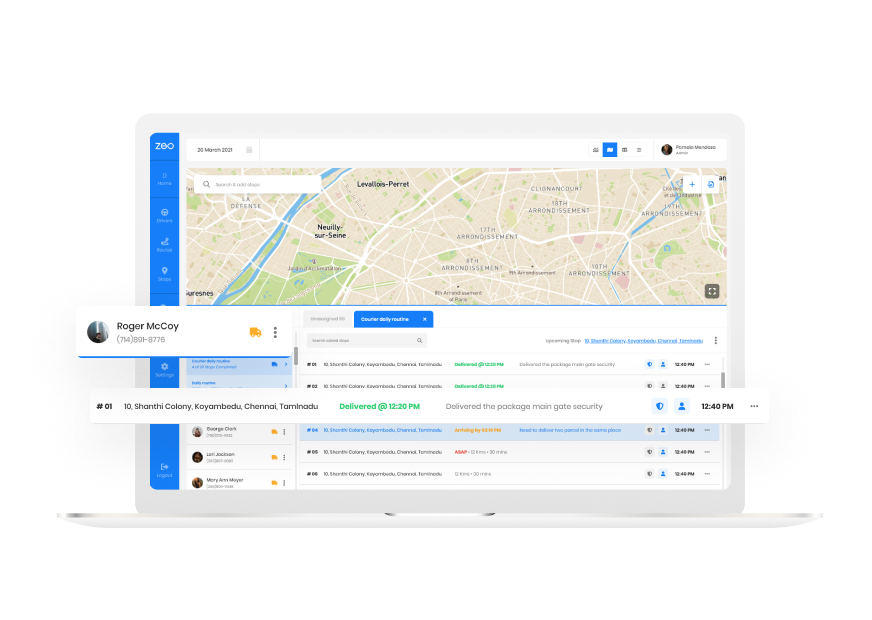
On the other hand, drivers can use their preferred GPS app, which is integrated into the Zeo Route Planner, including Google Maps, Apple Maps, Waze Maps, Yandex Maps, Sygic Maps, TomTom Go, and HereWe Go. The Zeo Route Planner app lets them switch seamlessly from navigation to order details, saving time and effort.
Tracking drivers’ progress along their delivery routes is easy with the Zeo Route Planner’s real-time live location tracking. Dispatchers can monitor progress and provide customers with accurate ETAs without calling drivers or slowing their progress. The live tracking feature delivers the accurate and real-time locations of all your drivers on the roads.
Helping you grow your business
Zeo Route Planner gives you the power to manage a single driver or over hundreds of drivers. We have kept our prices based on the number of drivers you have and provide a free tier subscription without asking about your card details.
With Zeo Route Planner’s help, you can optimize up to 500 stops at a time, and there is no cap on the number of routes you plan per day. And we are proud to say that we are operating at a very reasonable rate and providing you all the features at a much lower price than other delivery management software.

By freeing up the 2+ hours you were previously using for route planning, making calls to drivers, and fielding calls from customers, you can focus on other aspects of your business to drive future growth.
Therefore, by automating all your delivery process using the Zeo Route Planner, you can focus on other aspects of your business to grow more and earn more significant profits. We provide you the tool with which you can manage all your last-mile logistics seamlessly and without any headache.
Reducing wastage of time
If you are using any free route management software, you might know how painful it is to plan and optimize it every morning. Zeo Route Planner’s users will agree that we have solved this problem by providing them a handful of methods to manage the addresses.
All you need is a list of stops and a list of drivers, and Zeo Route Planner takes care of the rest. You can even export your stops from a platform like Google Maps, and Zeo Route Planner will calculate and optimize your delivery routes in just 30 seconds. This will free up your time to work on other tasks. The app also takes care of time window constraints, priority delivery settings, customer alerts, and live ETA updates to make the delivery process easy and efficient.
Optimized routing also saves time for drivers by preventing backtracking on routes and minimizing wrong turns. Zeo Route Planner also provides customer notifications which ensure that the customer is available to take the package, thus avoiding re-delivery. The app sends SMS notifications to the customers about their deliveries and provides a live tracking link to our branded tracking page where they can track the package in real-time.

increase fuel savings
Save 2 Hours on Deliveries, Everyday!
Optimize routes with our algorithm, reducing travel time and costs efficiently.
Get Started for Free
Zeo Route Planner also provides a proof of delivery feature that includes photo capture and digital signature collection to keep customers informed of their order’s progress and reduces the number of times they need to contact you about where their package is. The proof of delivery also maintains a transparent relationship with your customers.
Providing great customer experience
When you deliver the good quickly, and within the time frame, you tend to earn the customers liking towards you. With the Zeo Route Planner route optimization feature’s help, you can provide the packages to your customers faster.
Suppose you are a food delivery business that needs to be delivered quickly in a temperature-controlled way; optimizing routes means that they are never in the delivery truck longer than necessary and arrive at their destination in tip-top shape.

With the help of Zeo Route Planner’s accurate live ETA updates, you can let customers know when their order will be arriving rather than a driver unexpectedly knocking on the door, which can be an uncomfortable experience.
Zeo Route Planner also sends a link to your customers through SMS to track their deliveries in real-time on the branded tracking page. Zeo Route Planner provides your customers with automatic status updates when delays occur, providing an excellent customer experience. Zeo Route Planner also considers priority delivery and time-window settings for deliveries to customers to ensure that package is delivered at precisely the right time.
Reducing fuel costs
Using the shortest and most efficient routes to deliver your orders saves your delivery business time and fuel. Reducing your fuel costs means that you are keeping more out of your business and thus increased profits at the end of the day.
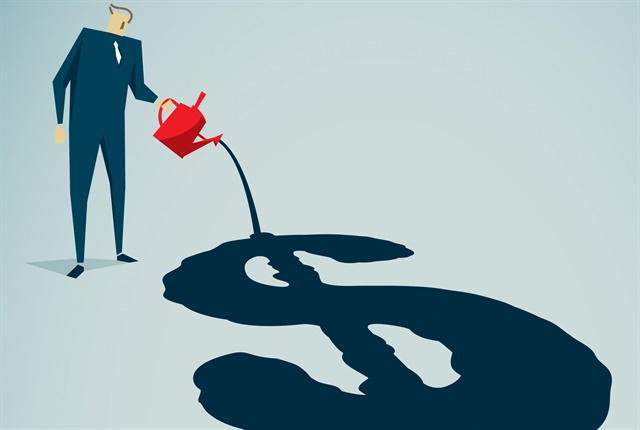
Zeo Route Planner’s AI-powered optimization considers traffic conditions and creates routes that minimize fuel consumption by reducing time spent idling in heavy traffic.
Re-delivery is the worst thing a driver can go to, and it can also increase your fuel costs. With the help of Zeo Route Planner’s customer notifications, you can make sure that someone is available to take the package. This will not only save you from re-delivery but also reduce your fuel costs.
Managing festive periods
Festive periods such as Easter or Christmas can lead to surges in orders that your business might not be able to deliver unless your delivery system can keep up with demand. With Zeo Route Planner, you can keep up with higher demand at peak times.

With Zeo Route Planner, you can quickly load all your addresses in the app using bulk address import from Excel, CSV, or Google Sheets and use the best-optimized route to deliver goods to the customers. Zeo Route Planner offers you to plan unlimited routes per day, so you don’t need to worry about the list of deliveries you have; leave it to Zeo Route Planner, and it will never disappoint you.
After you have planned all your delivery, you need to start the deliveries. Zeo Route Planner provides electronic proof of delivery using digital signature collection or photo capture of the delivered package. Using these features, you can continue to deliver all the packages without any hindrances.
Conclusion
These benefits of using Zeo Route Planner lead to one significant advantage for the future of your business: you get to spend more time focusing on the critical tasks that impact your company’s success and growth.
You can use the Zeo Route Planner delivery management software to help you solve all the delivery business’s complicated processes. It can easily handle all the functions right from optimizing the routes to providing proof of delivery to the customers.
Therefore, Zeo Route Planner is the complete package to handle all the last-mile delivery business headaches. We leave it to you to decide whether you should switch to Zeo Route Planner delivery management software or not.
Try it now
Our motive is to make life easier and more comfortable for small and medium businesses. So now you are only one step away to import your excel and start away.
Frequently Asked Questions
What is the best delivery management software?
Zeo Route Planner is a leading delivery management solution trusted by 1.5M+ users across 150+ countries. It offers AI-powered route optimization, real-time GPS tracking, and proof of delivery features that save businesses 2+ hours daily on route planning and driver management.
How much time can route optimization software save my business?
Zeo Route Planner saves 2+ hours daily on manual route planning tasks through its AI-powered optimization algorithms. The software can optimize up to 500 stops in just 30 seconds, plus provides unlimited route planning per day with no caps on usage.
Can delivery software help track drivers in real-time?
Yes, Zeo Route Planner provides real-time GPS tracking and live location monitoring for all drivers on their routes. The platform also includes in-app chat messaging between managers and drivers, eliminating the need for constant phone calls to check delivery status.
What proof of delivery features should I look for in delivery software?
Essential proof of delivery features include photo capture, digital signature collection, and delivery notes for documentation. Zeo Route Planner provides all these features, plus payment tracking for COD orders to create a complete delivery verification system.
How can delivery management software improve customer experience?
Modern delivery software enhances customer experience through live ETA updates, SMS and email notifications, and branded tracking pages. Zeo Route Planner offers all these features, allowing customers to track their deliveries in real-time while reducing support inquiries about order status.

Are you a fleet owner?
Want to manage your drivers and deliveries easily?
Grow your business effortlessly with Zeo Routes Planner – optimize routes and manage multiple drivers with ease.
increase fuel savings
Hassle Free Deliveries & Pickups!
Optimize routes with our algorithm, reducing travel time and costs efficiently.
Get Started for Free



















