



# Construction Delivery Management: A Practical Guide to Logistics That Keeps Crews on Schedule
> TL;DR: Construction delivery management comes down to getting the right materials to the right site on time — and most delays trace back to manual routing, not bad luck. Large construction projects typically run 20% over schedule, with material delays a consistent contributor. Route optimization platforms like Zeo Route Planner address this with capacity-based routing and time window constraints, helping logistics coordinators cut daily dispatch work and keep multi-site deliveries on schedule.
Search “construction delivery management” and you’ll get two totally different answers. One is about contracts — design-bid-build, design-build, CM at-risk. The other is about trucks, materials, and getting lumber to the right site before the crew shows up.
If you’re a logistics coordinator or operations manager, you probably care about the second one. Late deliveries stall crews. Wrong materials show up at the wrong site. Nobody knows where the truck is until someone calls and asks.
This guide covers both meanings briefly, then focuses on what actually keeps your projects on schedule: the day-to-day logistics of construction delivery management.
What Is Construction Delivery Management? Project Delivery Methods vs. Delivery Logistics Explained
In construction contracts, “project delivery method” refers to how a project gets built and who’s responsible for what. The three most common methods are:
- Design-Bid-Build: Owner hires a designer, then bids the project to contractors separately.
- Design-Build: One company handles both design and construction.
- CM at-Risk: A construction manager joins early and guarantees a maximum price.
These methods shape contracts, liability, and payment structures. They don’t tell you how to get a pallet of drywall to a job site in rural Ohio by 7 AM on Tuesday.
That’s where delivery logistics comes in. This is the operational side — scheduling trucks, routing drivers, tracking deliveries, and proving materials arrived on time and intact.
For operations managers running 5-30 vehicles across multiple active sites, logistics is the daily battle. The rest of this guide focuses there.
Why Material and Equipment Deliveries Derail Construction Schedules (The Hidden Cost of Poor Routing)
Construction logistics has unique challenges that standard delivery businesses don’t face. Job sites change weekly. Access roads are unpaved or gated. Delivery windows depend on crew schedules, not store hours. These challenges overlap heavily with what suppliers face in equipment delivery management, where heavy, specialized loads add another layer of routing complexity.
When routing is handled manually — phone calls, text messages, and spreadsheets — the cracks show fast.
Late deliveries stall entire crews. A framing crew waiting on lumber isn’t just idle. They’re on the clock, and the project timeline slips. According to McKinsey’s research on construction productivity, large projects typically run 20% over schedule, and material delays are a consistent contributor.
Inefficient routing wastes fuel and driver hours. Without optimized stop sequencing, drivers backtrack between sites, burn extra fuel, and finish fewer deliveries per day. For a fleet running 10-15 trucks, that adds up to thousands of dollars in wasted fuel monthly.
No visibility means no answers. When a site superintendent calls asking “where’s my concrete,” dispatchers without GPS tracking can only guess. That uncertainty damages trust with subcontractors and clients.
No proof of delivery means disputes. Without photos or signatures confirming what arrived and when, disagreements over damaged materials or missed deliveries turn into costly finger-pointing.
OSHA’s transportation industry safety data and the Bureau of Labor Statistics’ industry injury statistics both track transportation and warehousing as one of the more injury-prone industries, and delivery delays often trace back to rushed, poorly planned routes — which also raises safety risk for drivers navigating unfamiliar or hazardous site access roads.
How Route Optimization Reduces Delays and Costs on Multi-Site Construction Projects
Route optimization software solves the core problem: getting the right materials to the right site, in the right order, without wasted miles.
Here’s how it applies specifically to construction logistics:
Capacity-based routing matches loads to vehicles. If you’re hauling lumber, rebar, and pallets of tile on the same day, capacity-based routing accounts for weight and volume limits per vehicle. This prevents overloading trucks or making unnecessary extra trips.
Time windows keep deliveries aligned with crew schedules. If a site can only receive deliveries between 6 AM and 8 AM before pours start, time window constraints build that into the route automatically.
Priority stops handle urgent requests. When a site superintendent needs emergency materials sent ASAP, priority stop settings push that delivery ahead of lower-priority ones without rebuilding the whole route.
Skill-based assignment matches drivers to jobs. Some deliveries require a driver with a specific vehicle endorsement or forklift certification. Skill-based job assignment routes the right driver to the right job automatically.
Dynamic adjustments handle the unexpected. Construction schedules change constantly. A site delay or weather issue shouldn’t force a dispatcher to manually re-plan five routes. Dynamic route adjustments let you update stops mid-shift without starting over.
Zeo Route Planner’s AI-powered optimization applies all of this automatically, saving fleet managers 2+ hours daily that would otherwise go into manual route building and phone-based dispatching.
Step-by-Step: Setting Up a Construction Delivery Schedule with Route Planning Software
Here’s a practical workflow for building your delivery schedule using route planning software like Zeo.
Step 1: Import your job sites and delivery addresses.
Upload your site list via Excel, CSV, or Google Sheets. If you deliver to recurring sites, save them as Favorites so you don’t re-enter addresses every week.
Step 2: Set delivery time windows per site.
Enter the window each site can accept deliveries — for example, before 7 AM for concrete pours or after 2 PM for sites with restricted daytime access.
Step 3: Assign vehicle capacity and driver skills.
Match each vehicle’s weight and volume capacity to the day’s loads. Flag drivers with specific certifications needed for certain equipment drops.
Step 4: Mark priority stops.
If a site needs an emergency material delivery, mark it ASAP so the system prioritizes it over standard stops.
Step 5: Let the software optimize the route.
Zeo’s route optimization sequences stops to minimize drive time and fuel use, factoring in all the constraints you’ve set.
Step 6: Dispatch to drivers via mobile app.
Drivers receive their optimized route on the Zeo mobile app with turn-by-turn navigation, so there’s no confusion about site order or directions.

increase fuel savings
Save 2 Hours on Deliveries, Everyday!
Optimize routes with our algorithm, reducing travel time and costs efficiently.
Get Started for Free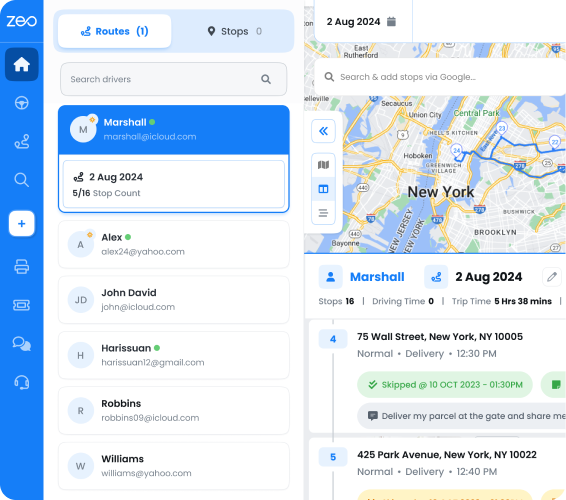
Step 7: Track deliveries in real time.
Use live GPS tracking to monitor truck locations and share live ETA updates with site superintendents, cutting down status-check calls.
Step 8: Capture proof of delivery.
Drivers take photos, collect signatures, or add delivery notes on-site, documenting exactly what arrived and when. Learn more about how proof of delivery works in practice and why it matters for dispute resolution.
Step 9: Set up recurring routes for repeat deliveries.
If you deliver to the same sites on a schedule, use scheduled/recurring routes so you’re not rebuilding plans daily. You can even use Blackout Dates to pause a scheduled route temporarily if a site goes inactive, without deleting the whole plan.
Comparison: Top Construction Delivery Management Tools (StruxHub, Onfleet, Zeo & More)
Not all delivery software is built the same way. Here’s how three common options stack up for construction logistics.
StruxHub
Built specifically for construction site logistics — deliveries, equipment tracking, and dock scheduling coordination. Strong fit if your main pain point is managing scheduling conflicts at a single busy site, but it’s less focused on multi-stop route optimization across many job sites.
Onfleet
A general last-mile delivery platform used across e-commerce and courier industries. It offers route optimization and tracking, but lacks construction-specific workflows and may require more customization to fit multi-site material delivery.
Zeo Route Planner
Built for route optimization across any number of multi-stop deliveries, with features that map directly to construction logistics: capacity-based routing for material loads, time windows for site access restrictions, skill-based driver assignment for certified equipment drops, and proof of delivery with photos and signatures. Zeo also supports Pickup–Delivery Linking, which automatically pairs and sequences related pickup and delivery stops — useful when hauling equipment from a yard to a site and back. Zeo serves 1.5M+ users across 150+ countries, including field service and delivery operations of similar size and complexity to mid-sized construction fleets.
For operations managers choosing between these, the decision usually comes down to this: if you need site-level scheduling coordination, StruxHub fits. If you need to optimize routes and track deliveries across many active job sites efficiently, Zeo’s route optimization and mobile app combination is purpose-built for that job.
Key Metrics Every Construction Logistics Manager Should Track
You can’t improve what you don’t measure. Track these metrics to spot problems before they stall a project:
- On-time delivery rate — percentage of deliveries arriving within the scheduled window.
- Miles driven per delivery — flags inefficient routing between sites.
- Fuel cost per route — a direct indicator of routing efficiency over time.
- Driver utilization — how many deliveries each driver completes per shift.
- Proof of delivery completion rate — percentage of deliveries with photo or signature confirmation.
- Average response time to urgent requests — how quickly priority stops get fulfilled.
Zeo’s route analytics and reporting track these metrics automatically, giving you a clear view of where delays and costs are coming from without manually compiling spreadsheets. Zeo also includes miles tracking, useful for expense records and tax reporting on fleet vehicles.
From Dispatch to Job Site: How Managers and Drivers Stay in Sync with Fleet + Mobile App
Construction logistics involves two different roles with two different needs — and Zeo is built around both.
Operations managers and logistics coordinators plan and assign multi-stop delivery routes on the Zeo web platform. This is where you factor in load capacity for materials and equipment, set site access time windows, and assign drivers based on skills or certifications needed for specific jobs.
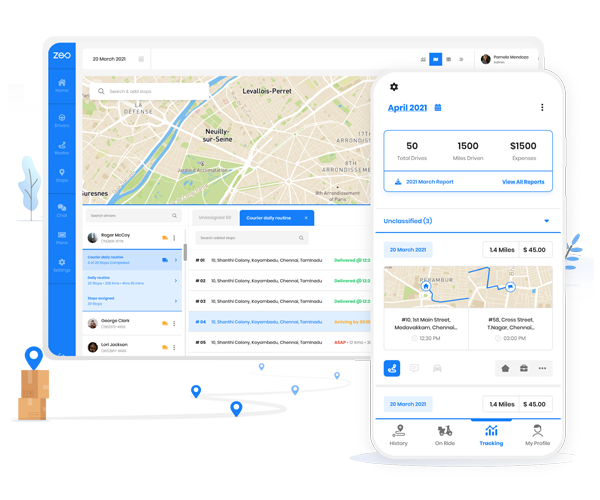
Drivers and material haulers receive their optimized routes directly on the Zeo mobile app. That means turn-by-turn navigation to each site, the ability to capture proof of delivery — photos of unloaded materials, signatures from site contacts — and real-time status updates as each stop is completed.
This back-and-forth sync solves one of the biggest daily headaches in construction logistics: the constant “where’s my delivery” call from site superintendents. Instead of calling dispatch, superintendents can get live tracking links showing exactly where the truck is and when it’s expected.
For example, imagine a mid-sized supplier running 12 trucks across eight active job sites in a metro area. Without route optimization, the dispatcher spends mornings on the phone sequencing stops and fielding “where’s my truck” calls all day. With Zeo, routes are built once in minutes on the web platform, assigned automatically by driver skill and vehicle capacity, and pushed straight to each driver’s phone — cutting dispatch time and reducing status-check calls from site teams.
Frequently Asked Questions
Q: What’s the difference between construction logistics and construction project delivery method?
Project delivery method (like Design-Bid-Build or CM at-Risk) refers to contract structure and who’s responsible for what during a build. Construction logistics is the operational side — scheduling trucks, routing drivers, and tracking material deliveries to job sites — and it applies regardless of which contract method a project uses.
Q: How many deliveries can one truck realistically handle on a construction site route?
This depends on site spacing, load size, and time window restrictions at each site, but most mid-sized material haulers run 6-10 stops per truck per day when routes are optimized. Manual, phone-based dispatching typically reduces that number because of backtracking and poor stop sequencing.
Q: How do construction suppliers prove a delivery arrived on time and undamaged?
Photo capture, digital signatures, and delivery notes collected at the time of drop-off create a documented record that resolves disputes over damaged materials or missed delivery windows. Zeo Route Planner’s proof of delivery tools let drivers capture all three directly from the mobile app, giving dispatchers a verifiable record without relying on phone calls after the fact.
Q: Why do construction deliveries need time windows instead of just a daily schedule?
Many job sites restrict deliveries to specific hours — before a concrete pour starts, after a shift change, or outside peak traffic near a gated entrance. Building time window constraints into a route prevents trucks from arriving when a site can’t receive them, which avoids idle driver time and crew delays.
Q: Can a small construction supplier use route optimization, or is it only for large fleets?
Route optimization scales down well — fleets running even 3-5 trucks across a handful of active sites see less backtracking and fewer wasted miles once stops are sequenced automatically. Zeo Route Planner offers a free mobile tier for up to 12 routes a month, making it accessible for smaller material suppliers before scaling to paid plans.
—
Late material deliveries, wasted fuel, and endless “where’s my truck” calls aren’t inevitable parts of running a construction fleet. They’re routing problems — and routing problems have a solution.
Start a free Zeo Route Planner trial to build optimized multi-site delivery routes for your construction fleet in minutes, or book a demo to see how Zeo integrates with your existing project management and dispatch workflow.
Are you a fleet owner?
Want to manage your drivers and deliveries easily?
Grow your business effortlessly with Zeo Routes Planner – optimize routes and manage multiple drivers with ease.

increase fuel savings
Save $200 on fuel, Monthly!
Optimize routes with our algorithm, reducing travel time and costs efficiently.
Get Started for Free