Customer Tracking Links | Zeo Route Planner
Fleet Platform
Mobile App

Give Customers
Real-Time Visibility

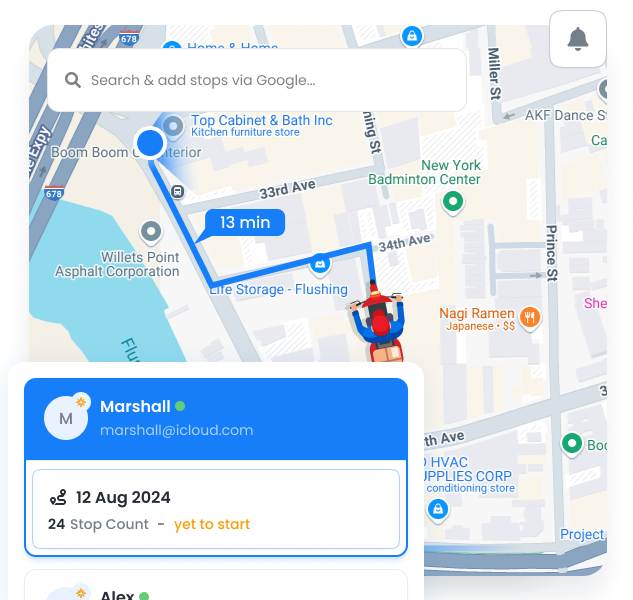
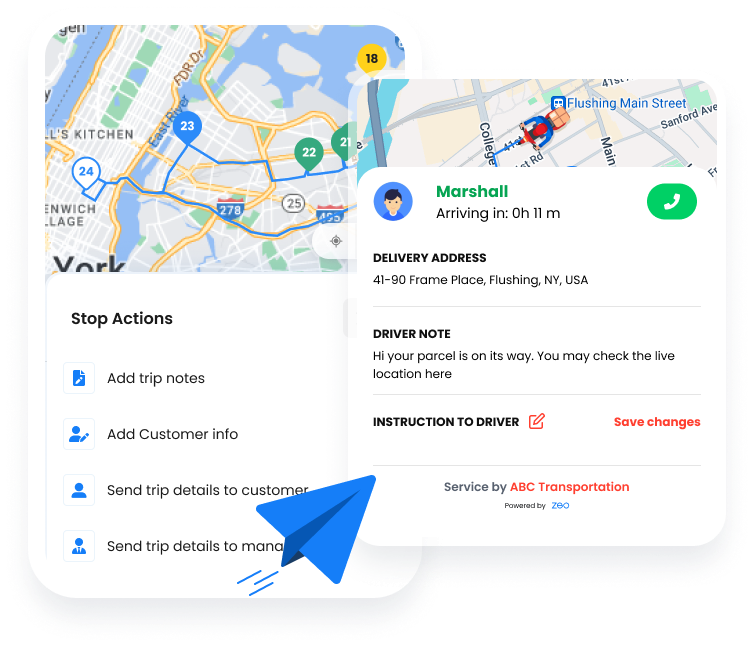
Share live tracking links showing driver location, accurate ETAs, and stops remaining.
Customers know exactly when to expect you—no phone calls needed.
Zeo Route Planner
  • 80%

    Fewer inbound calls

  • Real-Time

    Live location updates

  • 95%

    Customer satisfaction

4 Tracking Portal Features

Everything customers need to know exactly when you’ll arrive

What Customers See

A clean, mobile-friendly tracking experience

Frame 1707478314 20 1, Zeo Route Planner

Live Driver Location

Real-time position on an interactive map, updated as the driver moves

Frame 1707478314 22 1, Zeo Route Planner

Dynamic ETA

Accurate arrival time that updates based on traffic and route progress

Frame 1707478314 1 1, Zeo Route Planner

Queue Position

“3 stops away” indicator so customers know their place in line

Frame 1707478314 9, Zeo Route Planner

Driver Details

Driver name and photo (optional) for recognition and trust

Fleet Dashboard, Zeo Route Planner

Phone Calls vs. Tracking Links

Give customers the answers they want without the interruption

No, Zeo Route Planner
Constant Phone Calls

  • “Where’s my delivery?” calls every 30 minutes
  • Drivers interrupted to answer ETAs
  • Dispatch fielding dozens of calls daily
  • Customers frustrated with vague answers
  • Missed deliveries when customers leave

Yes, Zeo Route Planner
Live Tracking Links

  • Customers check tracking anytime they want
  • Drivers stay focused on the road
  • Dispatch handles exceptions, not ETAs
  • Accurate, real-time information builds trust
  • Customers ready and waiting when you arrive

How Businesses
Use Tracking Links

Keep customers informed across any industry

DELIVERY

Furniture Delivery Coordination

A furniture store shares tracking links when items ship. Customers see their 4-hour delivery window narrow to a precise ETA. They can arrange to be home, clear a path, and have help ready—all without calling the store.

FIELD SERVICE

Appliance Repair Appointments

An appliance repair company sends tracking links on service day. Homeowners can leave for errands and return when the technician is 15 minutes away. No more waiting around all morning for a knock at the door.

Let Customers Track, Not Call

Give customers the visibility they want and free up your team from ETA questions


Zeo Questionnaire

Frequently
Asked
Questions

Know More

Customer Tracking Links

Do customers need to download an app?

No, tracking links open in any web browser. Customers simply click the link in their SMS or email to see the live tracking page. Works on any smartphone, tablet, or computer.

How accurate are the ETAs?

ETAs update in real-time based on actual driver progress, current location, and live traffic data. As the driver gets closer, ETAs become increasingly accurate, typically within 5 minutes when the driver is nearby.

Can I add my branding to tracking pages?

Yes, tracking pages can display your company logo and colors.

What are Customer Tracking Links in Zeo?

Customer Tracking Links let businesses share real-time delivery or service progress with customers via a simple link.

Can tracking links show live agent location?

Yes. Tracking links display live location, ETAs, and route progress for customers.

Can the branding be added to tracking pages?

Yes, tracking pages can display your company logo and colors. you can also use a custom domain for tracking links (track.yourcompany.com).

Can links be shared via SMS or email?

Absolutely. Links can be sent through messages or email for customer convenience.

Do customers see stop details and ETAs?

Yes. Customers can view upcoming stops, estimated arrival times, and progress.

When do tracking links expire?

Links remain active while the route is in progress. After the stop is completed, the link shows a completion message for 24 hours before expiring. This prevents sharing of stale tracking data.

Zeo Blogs

Explore our blog for insightful articles, expert advice, and inspiring content that keeps you informed.

Delivery Optimization Success Stories: Real Fleet Results

Real delivery optimization success stories with verified KPIs by fleet size and industry, plus an ROI calculator to estimate your own savings.

Route Optimization Case Studies: Real SMB Results (2026)

Real route optimization case studies from small delivery and field service businesses—actual costs, timelines, and ROI. See what

How to Plan Propane Delivery Routes During Peak Season

Learn how to plan propane delivery routes during peak season with a week-by-week playbook, KPI checklist, and route optimization tips for winter demand.

Xlork is a developer-first data import platform. It lets you embed CSV, Excel, and Google Sheets import into any app with AI-powered column mapping and schema validation. Explore free developer tools like JSON-to-CSV converters and color palette generators. No more building import flows from scratch — just drop in the Xlork SDK, sign up free, and ship clean data in minutes.