
Blog | Zeo Route Planner - Part 32

The Top Five Software Tools for Logistics Management in 2025

Reading Time: 6 minutesReading Time: 4 minutes TL;DR: The best logistics management software for 2026 combines AI-powered route optimization, real-time tracking, and driver

What is 3PL?

The Top Five Software Tools for Logistics Management in 2025

Reading Time: 6 minutesReading Time: 4 minutes TL;DR: The best logistics management software for 2026 combines AI-powered route optimization, real-time tracking, and driver

How to Streamline Delivery Management?

Reading Time: 3 minutesIn today’s competitive business environment, managing every logistic chain is crucial for maximum delivery efficiency. Implementing strategies like automated systems

Rise of Social Commerce through TikTok: Role of Route Optimization in eCommerce

Reading Time: 3 minutesIs TikTok just a short video entertainment and social platform? The answer is no! It is rapidly transforming into a

Zeo Route Planner

Top 5 Retail Logistics Routing Software Companies In Brazil

Reading Time: 5 minutesHave you ever watched your retail deliveries fall behind schedule and wondered what went wrong? You plan every route, assign

How AI-powered Route Optimization Tools Will Reduce Last-Mile Delivery Costs in 2025

Reading Time: 5 minutesReading Time: 4 minutes TL;DR: AI-powered route optimization tools reduce last-mile delivery costs by eliminating inefficient routing, missed deliveries, and

Zeo Route Planner: The Seamless Navigation Support for Fleet Success

Reading Time: 6 minutesReading Time: 3 minutes TL;DR: Seamless navigation combined with AI-powered route optimization eliminates driver confusion and saves significant time on

Planning Routes with Google Maps Route Planner: Benefits & Shortcomings

Reading Time: 4 minutesIf you’ve ever planned a route using Google Maps, you know how easy and convenient it can be for personal

Enhancing the Last-Mile Delivery for Plants: How to Ship and Deliver Them Safely

Reading Time: 4 minutesTreating plant delivery like a regular package delivery would be a huge mistake! Plants, by their very nature, are sensitive

The Benefits of Real-Time Vehicle Tracking for School Transportation

Reading Time: 6 minutesReading Time: 4 minutes TL;DR: Real-time vehicle tracking transforms school transportation by providing instant visibility into bus locations, route progress,

Reducing Stress for School Drivers: The Benefits of Zeo’s Route Optimization

Reading Time: 6 minutesReading Time: 2 minutes TL;DR: School bus drivers can significantly reduce stress through AI-powered route optimization that eliminates inefficient planning

Identifying Potential Safety Hazards

How to Launch a Successful Home Inspection Business in 2025

Reading Time: 6 minutesReading Time: 4 minutes TL;DR: Launch a successful home inspection business by building a skilled team, implementing digital reporting systems,

How Amazon Day Delivery is Changing the Game for E-commerce Businesses

Reading Time: 4 minutesAmazon Day Delivery arrived in 2019 as a fresh approach to weekly shipments for Prime members. This service bundles multiple

Zeo Questionnaire

Frequently
Asked
Questions

Know More

How do I add stop by typing and searching? Web

Follow these steps to add a stop by typing and searching:

  • Go to Playground Page. You will find a search box in top left.
  • Type in your desired stop and it will show search results as you type.
  • Select one of the search results to add the stop to list of unassigned stops.

How do I import stops in bulk from an excel file? Web

Follow these steps to add stops in bulk using an excel file:

  • Go to Playground Page.
  • In top right corner you will see import icon. Press on that icon & a modal will open.
  • If you already have an excel file, press the "Upload stops via flat file" button & a new window will open up.
  • If you don't have an existing file, you can download a sample file and input all your data accordingly, then upload it.
  • In the new window, upload your file and match the headers & confirm mappings.
  • Review your confirmed data and add the stop.

How do I import stops from an image? Mobile

Follow these steps to add stops in bulk by uploading an image:

  • Go to Zeo Route Planner App and open On Ride page.
  • Bottom bar has 3 icons in left. Press on image icon.
  • Select the image from gallery if you already have one or take a picture if you don't have existing.
  • Adjust the crop for the selected image & press crop.
  • Zeo will automatically detect the addresses from the image. Press on done and then save & optimize to create route.

How do I add a stop using Latitude and Longitude? Mobile

Follow these steps to add stop if you have Latitude & Longitude of the address:

  • Go to Zeo Route Planner App and open On Ride page.
  • You will see a icon. Press on that icon & press on New Route.
  • If you already have an excel file, press the "Upload stops via flat file" button & a new window will open up.
  • Below search bar, select the "by lat long" option and then enter the latitude and longitude in the search bar.
  • You will see results in the search, select one of them.
  • Select additional options according to your need & click on "Done adding stops".

How do I add stops using QR Code? Mobile

Follow these steps to add stop using QR Code:

  • Go to Zeo Route Planner App and open On Ride page.
  • You will see a icon. Press on that icon & press on New Route.
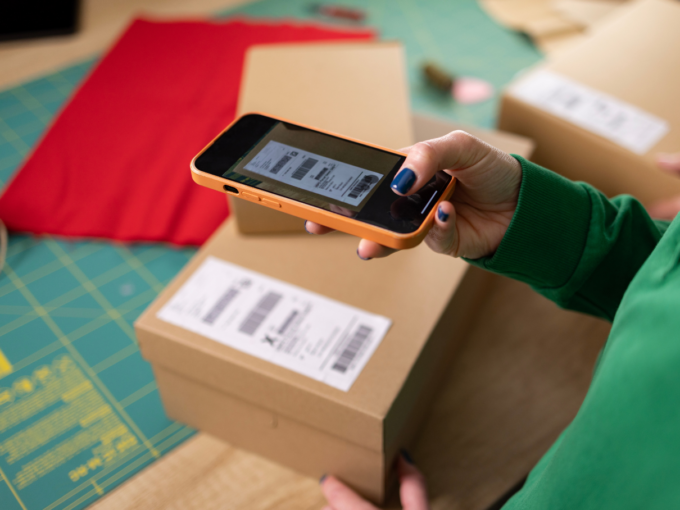
  • Bottom bar has 3 icons in left. Press on QR code icon.
  • It will open up a QR Code scanner. You can scan a normal QR code as well as a FedEx QR code, and it will automatically detect the address.
  • Add the stop to route with any additional options.

How do I delete a stop? Mobile

Follow these steps to delete a stop:

  • Go to Zeo Route Planner App and open On Ride page.
  • You will see a icon. Press on that icon & press on New Route.
  • Add some stops using any of the methods & click on save & optimize.
  • From the list of stops that you have, long press on any stop that you want to delete.
  • It will open window asking you to select the stops that you want to remove. Click on Remove button and it will delete the stop from your route.

Zeo Blogs

Explore our blog for insightful articles, expert advice, and inspiring content that keeps you informed.

Furniture Delivery Scheduling Challenges: Complete Solutions Guide

Reading Time: 7 minutesSolve furniture delivery scheduling challenges with AI-powered route optimization. Reduce failed deliveries by 40% and streamline complex scheduling operations.

How to Schedule Roll-Off Container Pickups Efficiently

Reading Time: 7 minutesLearn how to schedule roll-off container pickups efficiently. Reduce customer wait times, optimize routes, and eliminate scheduling conflicts with proven str…

Construction Site Toilet Service Logistics Made Simple

Reading Time: 6 minutesStreamline construction site toilet service logistics with route optimization, real-time tracking, and mobile workforce management. Cut costs by 25%.

Xlork is a developer-first data import platform. It lets you embed CSV, Excel, and Google Sheets import into any app with AI-powered column mapping and schema validation. Explore free developer tools like JSON-to-CSV converters and color palette generators. No more building import flows from scratch — just drop in the Xlork SDK, sign up free, and ship clean data in minutes.