



# Construction Delivery Management: Fixing Late Job Site Deliveries in 2026
> TL;DR: Construction delivery management breaks down most often because coordination happens through phone calls and spreadsheets instead of a connected system that tracks every site, driver, and drop-off in real time. Industry data from the Associated General Contractors of America repeatedly flags material delivery delays as a top driver of schedule overruns on multi-site projects. Route optimization tools like Zeo Route Planner address this with capacity-based routing, live GPS tracking, and photo proof of delivery — helping construction logistics teams save 2+ hours daily per driver.
Search “construction delivery management” and you’ll get two very different answers. One is about contracts. The other is about trucks, schedules, and job sites waiting on materials.
If you’re a project owner choosing between design-build and design-bid-build, you want the contractual answer. If you’re a logistics coordinator trying to stop your fourth missed delivery this week, you want the operational one.
This guide covers both. But it spends most of its time on the problem that’s costing you money right now: getting materials and equipment to the right site, on time, with proof it happened. That’s construction delivery management as a logistics system — and it’s fixable with the right tools.
What Is Construction Delivery Management? Two Meanings You Need to Know
Meaning 1: Project Delivery Methods
In construction contracts, “delivery method” describes how a project gets designed, built, and handed over. Common methods include:
- Design-Bid-Build: Owner hires a designer, then bids the project to contractors separately.
- Design-Build: One firm handles both design and construction under a single contract.
- Construction Manager at Risk (CMAR): A construction manager joins early and guarantees a maximum price.
- Integrated Project Delivery (IPD): Owner, architect, and contractor share risk and reward under one agreement.
These methods determine who’s accountable for what, and how risk gets split. The Construction Industry Institute and American Institute of Architects both publish detailed comparisons if this is your focus.
Meaning 2: Physical Delivery Logistics Management
This is the operational side — scheduling, dispatching, and tracking the materials and equipment that move onto your job sites every day. Concrete, lumber, rebar, HVAC units, rented excavators, scaffolding. All of it has to arrive at the right site, at the right time, in the right condition.
This is where most construction companies actually bleed money. A missed concrete pour because the truck arrived two hours late doesn’t just cost a delivery fee — it costs a full day of crew wages sitting idle. This guide focuses on fixing that, and it applies just as directly to equipment delivery management for rented machinery as it does to raw material drops.
Why Material and Equipment Delivery Logistics Break Down on Construction Projects
Most construction delivery problems trace back to one root cause: coordination happening through phone calls, texts, and spreadsheets across multiple active sites.
No central visibility. When a dispatcher manages deliveries for 15 job sites using a whiteboard or a shared spreadsheet, nobody can see the full picture. A supplier calls to confirm a drop-off, and the coordinator has to dig through three different group chats to find the answer.
Site access failures. Construction sites aren’t always addressable like a storefront. Many have restricted delivery windows, locked gates, or no formal address at all — just GPS coordinates and a verbal description. Without that information built into the route plan, drivers show up at the wrong gate or during a window when the site is closed. The same challenge shows up in adjacent field logistics, like construction site portable toilet logistics, where access windows and site layout changes constantly.
Wasted trips. A driver arrives with the wrong load spec, or arrives before the site is ready to receive it, and has to turn around. The Associated General Contractors of America has repeatedly flagged material delivery delays as a top driver of schedule overruns on multi-site projects.
No proof of delivery. When materials go missing or arrive damaged, there’s no photo, no signature, no timestamp — just a dispute between the supplier and the site foreman about what actually happened.
Capacity mismatches. Dispatchers assign loads by guesswork instead of actual vehicle weight and volume limits, leading to overloaded trucks, safety risks, or multiple half-empty trips when one full trip would do.
Each of these problems compounds. A late concrete truck doesn’t just delay one pour — it pushes back every trade scheduled behind it that week.
Core Features of a Construction Delivery Management System: Route Optimization, Real-Time Tracking, and Proof of Delivery
A real delivery management system replaces manual coordination with three connected capabilities.
Route Optimization
Instead of a dispatcher manually sequencing stops, AI-powered route optimization calculates the most efficient order for deliveries across multiple job sites. Zeo Route Planner’s optimization engine saves drivers 2+ hours daily by cutting unnecessary mileage and idle time between sites. For a company running 10-20 delivery vehicles across active projects, that adds up to dozens of recovered labor hours every week.
Route optimization also supports:
- Capacity-based routing — loads get assigned based on each vehicle’s actual weight and volume limits, reducing overloaded trucks and wasted partial trips.
- Time window constraints — deliveries get scheduled around site access hours, so trucks don’t arrive when a gate is locked.
- Priority stops — urgent equipment needs (a broken generator, an emergency material shortage) get flagged as ASAP instead of getting stuck in the normal queue.
- Skill-based assignment — deliveries requiring a certified operator or specific equipment get routed to the right driver automatically.
Real-Time Tracking
Live GPS tracking means your dispatcher — and your site foremen — know exactly where every delivery truck is, without a single phone call. Live ETA updates let a foreman plan crew schedules around confirmed arrival windows instead of guessing.
Proof of Delivery
Photo capture, digital signatures, and delivery notes close the loop on every drop-off. If a concrete delivery arrives at a remote site with no formal street address, a driver can mark GPS location, photograph the unloaded materials, and collect a signature from the site supervisor — creating a timestamped record that settles disputes before they start.
Delivery Management Software vs. Manual Scheduling: A Feature Comparison
| Task | Manual Scheduling (Phone/Spreadsheet) | Delivery Management Software |
|—|—|—|
| Route planning | Dispatcher manually sequences stops by guesswork | AI-powered optimization sequences stops automatically |
| Visibility | No tracking; status updates via phone calls | Real-time GPS tracking with live ETAs |
| Proof of delivery | Verbal confirmation or none | Photo, signature, and delivery notes captured on-site |
| Site access windows | Tracked in a notebook or memory | Time window constraints built into the route |
| Vehicle capacity | Estimated by eye | Capacity-based routing using actual weight/volume limits |
| Driver assignment | Based on availability only | Skill-based assignment matches certifications to jobs |
| Customer/foreman updates | Phone calls to confirm arrival | Automated SMS, email, and live tracking links |
| Schedule changes mid-day | Requires re-calling every affected driver | Dynamic route adjustments pushed directly to the driver’s app |
| Recordkeeping | Scattered across texts and paper | Centralized route analytics and reporting |
The pattern is consistent: manual scheduling relies on someone remembering, calling, or guessing. Software replaces that with data the whole team can see.
Step-by-Step: Setting Up a Delivery Management System for Multi-Site Construction Operations
Step 1: Map your active job sites and delivery frequency.
List every active site, how often it receives deliveries, and any access restrictions (locked gates, specific drop-off hours, no formal address).
Step 2: Import your stops in bulk.
Instead of entering addresses one by one, upload your job site list via Excel, CSV, or Google Sheets. If you’re coordinating repeat deliveries to the same sites, save them as Favorites so you can build a new route from a saved list in seconds instead of re-entering addresses.
Step 3: Set vehicle and driver constraints.
Enter each vehicle’s weight and volume capacity, and assign drivers based on skills — a driver certified to operate a boom lift, for example, shouldn’t be routed to a job that needs a flatbed delivery they’re not equipped for.
Step 4: Build your first optimized route.
Let the system sequence your deliveries based on site locations, time windows, and priority levels. For urgent equipment needs — a jobsite that just reported a broken piece of equipment — mark the stop ASAP so it jumps ahead of standard deliveries.
Step 5: Set up recurring and scheduled routes.

increase fuel savings
Save 2 Hours on Deliveries, Everyday!
Optimize routes with our algorithm, reducing travel time and costs efficiently.
Get Started for Free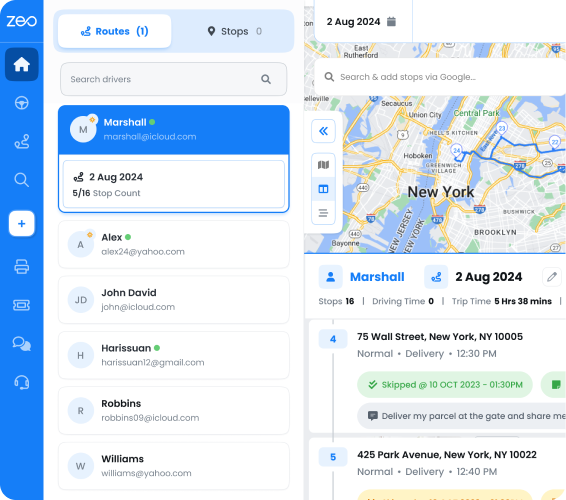
Many construction deliveries happen on a predictable cadence — weekly concrete pours, daily equipment rotations between sites. Set these as scheduled or recurring routes so you’re not rebuilding the same plan every week. If a project pauses, use blackout dates to temporarily pause the scheduled route without deleting it — then pick back up when work resumes.
Step 6: Assign different drivers to different days without rebuilding routes.
If your Tuesday driver is out sick, use a date override to swap in a different driver for just that day, without touching the rest of the scheduled route. For projects where different crews handle different days of the week, Day Plan lets you assign specific agents to specific days within the same route. These dynamic route adjustments mean a single sick day or schedule change doesn’t require rebuilding the whole week’s plan.
Step 7: Turn on tracking and notifications.
Enable live GPS tracking and automated notifications so site foremen get a live tracking link and ETA instead of calling the office to ask “where’s my truck.”
Step 8: Require proof of delivery at every stop.
Set photo capture and signature collection as mandatory for every drop-off, especially at remote or unaddressed sites.
Step 9: Review analytics weekly.
Use route analytics and reporting to spot patterns — which sites have the most delays, which routes run over the time estimate, which drivers consistently finish early.
The ROI of Optimized Construction Deliveries: Time, Fuel, and On-Time Rate Gains
The cost of poor delivery logistics is easy to underestimate because it hides inside other line items — idle crew wages, overtime, extra fuel, disputed invoices.
Time savings. Zeo’s AI-powered route optimization saves 2+ hours daily per driver by eliminating inefficient sequencing and backtracking. Across a fleet of 20 delivery vehicles, that’s the equivalent of adding two to three extra drivers’ worth of productive time each week — without hiring anyone. Given how volatile construction industry labor costs have been in recent years, recovering idle crew time has a direct bottom-line effect.
Fuel cost reduction. The U.S. Energy Information Administration has tracked diesel prices as one of the most volatile input costs for construction fleets in recent years. Shorter, better-sequenced routes directly reduce fuel burn per delivery, and that saving compounds across dozens of trucks running daily routes.
On-time delivery rate. Late material deliveries are consistently cited by contractors as a top cause of schedule slippage, according to industry surveys from the Associated General Contractors of America. When routes account for real time windows and site access constraints instead of best-guess scheduling, on-time arrival rates improve and crews stop standing around waiting.
Fewer disputes. Photo and signature proof of delivery reduces the back-and-forth over “the materials never arrived” or “they arrived damaged.” A timestamped photo at the moment of drop-off settles most of these conversations in minutes instead of days.
Lower dispatcher overhead. When routes are built automatically and tracked in real time, dispatchers spend less time on the phone chasing status updates and more time managing exceptions that actually need their attention.
How Dispatchers and Drivers Work Together: Web Planning Meets In-Field App Execution
Construction delivery management only works when office planning and field execution are connected — not running on separate systems.
Here’s what that looks like in practice. An operations manager uses the Zeo web platform to build the day’s delivery routes for material trucks across five active job sites. They factor in each site’s access window (some sites only allow deliveries before 9 a.m.), vehicle capacity for heavy loads like rebar and precast panels, and which drivers are certified to operate the equipment being delivered.
Once the routes are assigned, the truck drivers and delivery crews receive their stop-by-stop routes directly on the Zeo mobile app. From there, they navigate to each site using turn-by-turn directions, even when the destination is a remote lot with no formal street address.
At each stop, the driver captures photo proof of delivery — critical documentation when a site has no mailing address to confirm the drop actually happened at the correct location. They collect a signature from the site supervisor, confirming the materials were received and inspected. And as they move between sites, the app sends live ETA updates, so foremen know exactly when the next load of materials will arrive and can schedule their crews accordingly.
This closes the loop between office and field. The dispatcher isn’t guessing where trucks are, and the foreman isn’t calling the office every hour asking for an update. Everyone works off the same live information.
Frequently Asked Questions
Q: What’s the biggest cause of late construction material deliveries?
Poor coordination — not traffic or weather — is the most common cause. When dispatchers rely on phone calls and spreadsheets to track multiple job sites, small scheduling conflicts snowball into missed time windows, especially on sites with restricted delivery hours or locked gates.
Q: How do construction companies track deliveries to job sites without formal addresses?
Most rely on GPS coordinates paired with driver navigation apps rather than street addresses. Zeo Route Planner supports navigation to GPS-pinned locations and lets drivers capture photo proof of delivery on-site, creating a timestamped record even when there’s no mailing address to confirm the drop location.
Q: Can route optimization software handle oversized equipment like excavators or precast panels?
Yes, as long as the software accounts for actual vehicle weight and volume limits rather than relying on a dispatcher’s estimate. Capacity-based routing assigns loads based on real vehicle specs, which helps prevent overloaded trucks and reduces the need for repeat partial trips.
Q: How many delivery vehicles does a construction company need before investing in route optimization software?
There’s no strict minimum — even companies running 3-5 vehicles across multiple active sites benefit from automated scheduling and proof of delivery. The time savings scale with fleet size, but the visibility and dispute-reduction benefits apply at any scale, according to general small fleet logistics benchmarks.
Q: What should a construction foreman do if a delivery truck never shows up?
First, check for a live tracking link or ETA update if the delivery company provides one — this often resolves the confusion faster than a phone call. If no tracking exists, document the missed window and contact the dispatcher directly, since recurring no-shows usually point to a scheduling or routing problem that needs a system fix, not just a one-off follow-up call.
FAQ: Construction Delivery Methods vs. Delivery Management Software
Is “construction delivery method” the same as “delivery management software”?
No. A construction delivery method (like design-build or CMAR) is a contractual framework for how a project gets built. Delivery management software is an operational tool for scheduling and tracking physical material and equipment deliveries. They solve completely different problems.
Which construction delivery method is most common for multi-site commercial projects?
Design-Bid-Build remains widely used for public projects due to competitive bidding requirements, while Design-Build and CMAR are increasingly common for private commercial work where speed and cost certainty matter more.
Do I need delivery management software if I only have 5 delivery vehicles?
Even small fleets benefit from route optimization and proof of delivery, especially if you’re coordinating multiple active job sites with different access windows. The time savings scale with fleet size, but the visibility and dispute-reduction benefits apply at any scale.
Can delivery management software handle sites with no formal address?
Yes. GPS-based navigation and photo proof of delivery work even when a site only has coordinates instead of a street address — a common situation on new construction and remote project sites.
What’s the difference between scheduled routes and recurring routes for construction deliveries?
Scheduled routes are set up in advance for specific dates, while recurring routes repeat automatically on a set cadence — useful for predictable deliveries like weekly concrete pours or daily equipment rotations between sites.
How does proof of delivery help with material disputes on job sites?
Photo capture and digital signatures create a timestamped record of what arrived, when, and who received it. This documentation helps resolve disputes over missing or damaged goods faster than relying on memory or verbal confirmation.
—
Manual scheduling through phone calls and spreadsheets wasn’t built for the complexity of running multiple active job sites. Start a free Zeo Route Planner trial to build your first optimized multi-site delivery route in minutes, or book a demo to see how web-based fleet planning and the driver mobile app work together to bring real-time visibility and proof of delivery to your construction logistics.
Are you a fleet owner?
Want to manage your drivers and deliveries easily?
Grow your business effortlessly with Zeo Routes Planner – optimize routes and manage multiple drivers with ease.
increase fuel savings
Save 2 Hours on Deliveries, Everyday!
Optimize routes with our algorithm, reducing travel time and costs efficiently.
Get Started for Free