

# Route Planner: The Complete Guide to Multi-Stop Route Optimization
> TL;DR: A route planner calculates the most efficient order to visit multiple stops in seconds — a task that takes a human 30+ minutes to work out manually. The core technology solves the “vehicle routing problem,” factoring in time windows, vehicle capacity, and driver skills simultaneously. Route planner tools like Zeo Route Planner apply AI-powered route optimization to this problem, helping delivery and field service teams save 2+ hours daily compared to manual planning.
If you’re still sequencing stops by hand in Google Maps or juggling a spreadsheet of addresses, you’re losing hours every week. A route planner fixes this problem by doing in seconds what takes a human 30+ minutes to figure out manually.
This guide explains exactly what a route planner is, how the optimization actually works, and how to pick the right one for your team. By the end, you’ll know what to look for and how to get started today.
What Is a Route Planner? (And How It’s Different From Google Maps)
A route planner is software that calculates the most efficient order to visit multiple stops. It’s not the same thing as GPS navigation.
Google Maps and Waze are built for point A to point B. They’re great for a single destination. But they don’t solve for 15, 30, or 50 stops in one shift.
Here’s what plain GPS navigation can’t do:
- Sequence multiple stops in the most efficient order
- Account for delivery time windows (like “only deliver between 2-4 PM”)
- Factor in vehicle capacity (weight or volume limits)
- Assign stops to specific drivers based on skills or territory
- Track where your drivers are in real time
- Notify customers automatically when a driver is close
A route planner like Zeo Route Planner solves all of this. You input your stops, set your constraints, and the software calculates the optimal sequence. Then it hands drivers turn-by-turn navigation in whatever app they already use.
Think of it this way: GPS tells you how to get somewhere. A route planner tells you where to go, in what order, and why.
How Route Optimization Actually Works
Route optimization sounds complicated, but the core idea is simple. The software is solving a math problem called the “vehicle routing problem” — a well-studied challenge in operations research that dates back to the 1950s.
Here’s what the algorithm is actually weighing:
Distance and drive time. The baseline factor. The algorithm calculates the shortest total distance or time across all stops, not just the shortest path between any two points. This is closely related to the classic traveling salesman problem, one of the foundational challenges in route math.
Time windows. If a customer needs a delivery between 9 AM and 11 AM, the algorithm locks that stop into a specific slot. It then builds the rest of the route around those fixed points.
Vehicle capacity. If your van can only hold 40 packages, the software won’t assign a 45-package route. It accounts for weight and volume limits before it finalizes the sequence.
Priority stops. Some jobs are ASAP (a burst pipe, a same-day delivery). Others are normal priority. The algorithm weighs urgency when deciding stop order.
Driver skills and assignments. If only one technician is certified for a certain repair, the software assigns that stop to them specifically, not whoever’s closest.
Pickup and delivery pairing. For jobs where one stop picks something up and another drops it off, the algorithm automatically links and sequences them correctly, so pickups always happen before their matching delivery.
The algorithm runs thousands of route combinations in the background and picks the one with the lowest total cost (time, distance, or both). That’s why Zeo’s AI-powered route optimization saves drivers 2+ hours daily compared to manual planning — it’s doing calculations no human could do by hand in a reasonable time.
One more thing worth knowing: you can tell the algorithm to avoid certain road types. Zeo’s avoid params let you exclude highways, tunnels, bridges, or ferries if your vehicle or cargo requires it.
Step-by-Step: How to Plan an Optimized Route in Under 5 Minutes
Here’s exactly how to go from a list of addresses to an optimized route using Zeo Route Planner.
Step 1: Add your stops. Upload a spreadsheet (Excel, CSV, or Google Sheets), type addresses manually, or pull from a photo. You can also import from Favorites — a saved list of frequently used stops — to turn a recurring list into a ready-to-go route instantly.
Step 2: Set your constraints. Add time windows for customers who need specific delivery slots. Mark priority stops if some jobs are more urgent than others.
Step 3: Choose your vehicle details. If you’re running multiple vehicle types, set capacity limits so the software doesn’t overload any single route.
Step 4: Hit optimize. Zeo’s algorithm calculates the most efficient sequence in seconds. If you’ve already got a preferred stop order, use Navigate as Added to keep your manual sequence instead.
Step 5: Start navigating. Open the route in your preferred navigation app — Google Maps, Waze, or Apple Maps — and go. Customers can get live tracking links and ETA updates automatically.
That’s it. What used to take 30-45 minutes of manual sequencing now takes under 5.
Route Planner for Teams: Fleet Dispatch, Driver Assignment & Real-Time Tracking
Everything above works for a solo driver. But if you’re managing 5, 15, or 50 drivers, you need more: assignment, tracking, and communication tools.
This is where fleet route planning software separates from basic navigation apps entirely.
Driver assignment. Instead of manually deciding who goes where, you can assign stops based on skills, vehicle type, or store location. A pest control company, for example, might assign termite-certified technicians to termite jobs automatically, while general technicians handle routine inspections.
Capacity-based routing across your fleet. If you run three vans with different capacities, the software divides stops across vehicles so nobody shows up to a job already full.
Scheduled and recurring routes. Many field service businesses — pool cleaning, waste collection, landscaping — run the same routes weekly or monthly. You can set these up once and let them recur automatically.
Blackout dates and day plans. If a route normally runs Monday through Friday but you need to pause it for a holiday week, blackout dates let you skip it without deleting the whole schedule. Day Plan lets you assign different drivers to different days within the same recurring route — useful if your Tuesday driver differs from your Thursday driver. Need to swap just one day’s driver without touching the rest of the schedule? Date Override handles that.
Here’s how the manager-to-driver handoff actually works. Once a manager builds and assigns routes on the Zeo web dashboard, drivers automatically receive their optimized stops on the Zeo mobile app. Each driver gets turn-by-turn navigation in their preferred app, full customer details, and a simple interface for capturing proof of delivery.
Real-time visibility. As drivers move through their routes, their location updates live on the dispatcher’s dashboard — similar to the live delivery route tracking capabilities dispatchers rely on to catch delays early. If a technician is running late, you see it immediately instead of getting a surprised call from a customer.
Proof of service. Drivers capture photos, collect digital signatures, and log delivery notes directly in the app. For COD orders, payment collection is tracked at the point of delivery.
In-app chat. If a driver hits a locked gate or a wrong address, they can message the dispatcher directly without switching apps or making a phone call.
This is the core difference between a route planner built for teams and a basic GPS app: one plans and assigns, the other just navigates.
Route Planner by Use Case: Delivery, Field Service, Sales & Logistics
Different industries use route planners differently. Here’s how it plays out in practice.
Delivery and courier businesses. A regional parcel delivery company running 20 vans across a metro area needs to optimize 150+ stops a day while respecting customer delivery windows. Zeo’s Shopify and WooCommerce integrations auto-import orders, so stops populate the route planner without manual data entry. According to the U.S. Bureau of Labor Statistics, delivery and courier services are projected to keep growing through the decade, making routing efficiency a direct line to margin.
Field service (HVAC, plumbing, pest control, electrical). A plumbing company with 10 technicians can assign emergency jobs as ASAP priority stops while batching routine maintenance visits by neighborhood. Skill-based assignment ensures only licensed technicians get jobs requiring certification. Avoiding common HVAC routing mistakes — like ignoring time windows or overloading one technician’s day — is often the difference between a profitable route and a wasted one.
Sales reps and territory visits. A sales team visiting 8-12 prospects a day can use route optimization to minimize windshield time, giving reps more face time with customers instead of time behind the wheel. Structured sales route planning also helps territory managers balance workload across reps more evenly.

increase fuel savings
Save $200 on fuel, Monthly!
Optimize routes with our algorithm, reducing travel time and costs efficiently.
Get Started for Free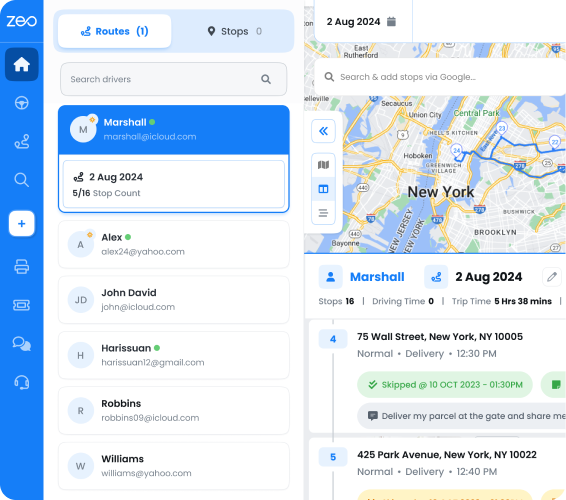
Logistics and B2B distribution. A beverage distributor delivering to 60 retail accounts needs capacity-based routing to make sure heavier accounts don’t overload a single truck. Miles tracking also helps with expense and tax recordkeeping across the fleet.
Real savings data. According to a 2023 report from the American Transportation Research Institute’s operational cost analysis, fuel and driver wages make up the majority of per-mile trucking operating costs, meaning even small reductions in miles driven compound quickly across a fleet. Businesses using Zeo’s AI-powered optimization report saving 2+ hours daily per driver — time that gets redirected into more completed jobs or deliveries.
Route Planner Comparison: Zeo vs Google Maps vs Manual Planning vs Others
Here’s a straightforward comparison to help you decide what fits your operation.
Zeo vs Google Maps. Google Maps handles single-destination navigation well, but it won’t optimize multi-stop sequences, apply time windows, or assign stops across a team. Zeo does all three, then still hands off navigation to Google Maps, Waze, or Apple Maps — whichever your drivers prefer.
Zeo vs manual planning (spreadsheets/whiteboards). Manual planning relies on a dispatcher’s memory and guesswork. It doesn’t scale past a handful of drivers, and there’s no visibility once drivers leave the office. Zeo replaces guesswork with AI-powered optimization and gives you live tracking for the entire day.
Zeo vs other route planners. Many route planning tools optimize routes but stop there, with no mobile app for drivers or no proof-of-delivery capture. Zeo serves both sides: a web dashboard for managers to plan and assign, and a mobile app for drivers to execute — with GPS tracking, photo/signature capture, and customer notifications built into one platform. Zeo also supports over 100 languages, which matters if you manage a multilingual driver team.
| Factor | Zeo | Google Maps | Manual Planning |
|—|—|—|—|
| Multi-stop optimization | Yes | No | No |
| Time windows/capacity | Yes | No | No |
| Fleet dispatch & assignment | Yes | No | No |
| Real-time driver tracking | Yes | No | No |
| Proof of delivery | Yes | No | No |
| Cost at scale | Low (time saved) | Free, but no team features | High (labor hours) |
Frequently Asked Questions
Q: What’s the difference between a route planner and a GPS app?
A GPS app like Google Maps or Waze gives point-to-point turn-by-turn directions for a single destination. A route planner calculates the most efficient order to visit multiple stops, factoring in time windows, vehicle capacity, and driver assignments before handing off navigation to a GPS app.
Q: Do I need a route planner if I only make a few stops a day?
If you’re making 2-3 stops, manual planning or a basic GPS app is usually fine. Once you’re regularly sequencing 8+ stops with time constraints or multiple drivers, a dedicated route planner typically saves meaningful time versus manual guesswork.
Q: Can a route planner reduce fuel costs?
Yes, by minimizing total miles driven and avoiding backtracking, route optimization directly reduces fuel consumption. Since fuel and labor make up the bulk of per-mile operating costs according to industry cost studies, even modest mileage reductions compound into real savings across a fleet.
Q: How does a route planner handle last-minute changes, like a canceled stop or an urgent add-on?
Most route planners let dispatchers adjust routes mid-shift rather than forcing a full re-plan from scratch. Zeo supports dynamic route adjustments, so a dispatcher can add, remove, or re-prioritize a stop and the remaining sequence updates without disrupting the driver’s whole day.
Q: Can route planners work across multiple vehicle types with different capacities?
Yes, capacity-based routing accounts for weight or volume limits per vehicle so stops are distributed without overloading any single van or truck. Zeo’s capacity-based routing applies this across an entire fleet, which matters for businesses like beverage distributors or equipment delivery companies running mixed vehicle sizes.
FAQ: Common Questions About Route Planners
Is there a free route planner option?
Zeo offers a free tier that optimizes up to 12 routes per month, which works well if you’re testing the software or running a small operation. Paid plans unlock higher route volume, fleet dispatch, and advanced tracking features.
How many stops can a route planner handle?
This varies by software and plan tier. Zeo supports bulk upload of stops via spreadsheet, image, or Favorites list, so you’re not limited to typing addresses one at a time.
How accurate is route optimization?
Accuracy depends on good input data (correct addresses, realistic time windows) and real-time traffic conditions. Zeo’s algorithm factors in live traffic data and lets you set avoid params (highways, tunnels, ferries) for more realistic routes based on your vehicle type.
Does Zeo have an API for custom integrations?
Yes. Zeo offers API access for businesses that want to connect route planning into custom-built software, alongside pre-built integrations like Shopify, WooCommerce, Zapier, and HubSpot.
Can I use a route planner if I only have one vehicle?
Yes. Solo drivers and owner-operators use Zeo’s mobile app directly to optimize their own daily stops, without needing the fleet dispatch features built for larger teams.
What’s the difference between scheduled routes and one-time routes?
Scheduled routes repeat automatically on a set cadence (daily, weekly, monthly), useful for recurring service businesses. One-time routes are built fresh each time, common for on-demand delivery.
—
If you’re ready to stop planning routes by hand, start your free Zeo Route Planner trial today and optimize up to 12 routes a month at no cost. If you’re managing a growing team, book a demo to see fleet dispatch, driver assignment, and real-time tracking in action.
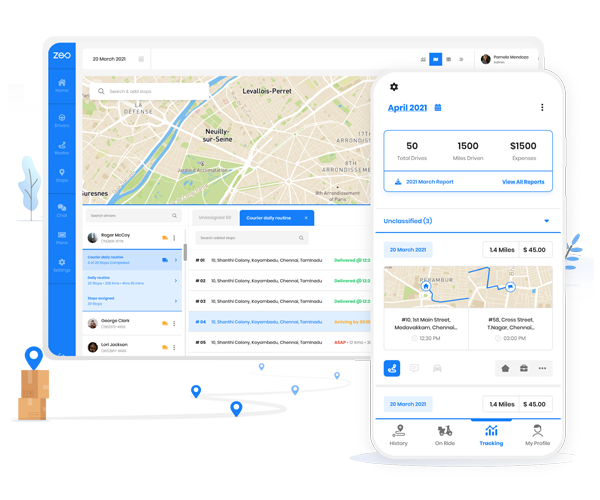
Are you a fleet owner?
Want to manage your drivers and deliveries easily?
Grow your business effortlessly with Zeo Routes Planner – optimize routes and manage multiple drivers with ease.

increase fuel savings
Save 2 Hours on Deliveries, Everyday!
Optimize routes with our algorithm, reducing travel time and costs efficiently.
Get Started for Free