


# Equipment Delivery Management: The Complete Guide
> TL;DR: Equipment delivery management requires routing, scheduling, and documentation built around vehicle capacity, crew skill, and installation windows — not generic parcel-delivery logic. Operations that switch from spreadsheets to purpose-built software typically cut planning time dramatically and reduce missed appointments; Zeo Route Planner addresses this with capacity-based routing, skill-based driver assignment, and photo/signature proof of delivery, helping field service and delivery teams save 2+ hours daily on route planning.
Delivering a 400-pound treadmill or a hospital MRI machine is nothing like dropping off a parcel on a porch. Equipment delivery management requires different vehicles, different crews, and far more coordination than standard package delivery. Yet most operations managers are still running these complex jobs on spreadsheets, group texts, and gut-feel dispatching.
If your order volume is growing and your current process is held together with phone calls and sticky notes, this guide is for you. We’ll define what equipment delivery management actually involves, break down the operational challenges unique to heavy and high-value goods, and show you exactly which software features and workflows fix them.
What Is Equipment Delivery Management? (And How It’s Different from Standard Parcel Delivery)
Equipment delivery management is the process of planning, routing, scheduling, and documenting the delivery (and often installation) of large, heavy, or high-value items. Think industrial machinery, medical devices, construction equipment, appliances, and furniture.
It’s a fundamentally different discipline from parcel delivery. A courier dropping off a package cares about speed and stop density. An equipment delivery team cares about vehicle capacity, crew size, installation time, and liability if something gets damaged — the same operational discipline that shows up across field service route management more broadly.
Here’s what makes equipment delivery different:
- Scheduled windows, not just time windows. A customer isn’t just waiting for a package — they may have taken a day off work, hired an electrician, or cleared a loading dock for your crew.
- Multi-person crews. Many deliveries require two or more people to lift, carry, or install equipment safely.
- Specialized vehicles. Box trucks, flatbeds, and lift-gate vehicles have different capacity and access constraints than a standard delivery van.
- Damage liability. A scratched refrigerator or a dented machine can trigger costly disputes, refunds, or chargebacks.
- Installation, not just drop-off. Many jobs don’t end when the item is unloaded — they end when it’s assembled, tested, and signed off.
Generic route planning tools built for small parcels don’t account for any of this. That’s why equipment delivery teams need purpose-built workflows, not repurposed courier software.
The Core Challenges of Delivering Oversized, Heavy, or High-Value Equipment
Operations managers running equipment delivery teams face a specific set of recurring problems. Here are the ones that show up most often.
1. Routing for the wrong vehicle type
Standard route optimization assumes every vehicle can go anywhere a car can go. But a 26-foot box truck can’t take the same shortcuts, fit under the same bridges, or navigate the same residential streets as a sedan. Routing without accounting for vehicle size leads to missed windows, blocked streets, and frustrated drivers.
2. Coordinating multi-person crews and skill requirements
Not every job needs the same crew. Installing a commercial HVAC unit requires a licensed technician. Delivering a hospital bed may require two movers and no technical skill at all. Manually matching the right people to the right jobs across 10, 20, or 50 drivers quickly becomes a full-time job in itself — this is exactly the problem skill-based job assignment tools are designed to solve.
3. Missed or blown installation windows
Customers scheduling equipment delivery often plan their entire day around it — closing a business, arranging site access, or coordinating with contractors. A missed window isn’t a minor inconvenience; it’s a lost half-day and a damaged relationship. According to U.S. Bureau of Labor Statistics data on transportation and warehousing, the sector remains one of the most time-sensitive for customer satisfaction, with on-time performance directly tied to repeat business.
4. Proving delivery condition and avoiding damage disputes
With high-value equipment, “we delivered it” isn’t enough. You need proof of delivery — documentation of what condition it arrived in, who signed for it, and what was installed. Without photo and signature documentation, damage disputes turn into he-said-she-said situations that cost time and money to resolve. The OSHA guidelines on safe material handling also underscore why documenting crew procedures matters for heavy or awkward loads, not just customer-facing proof.
5. Expensive return trips
A missed time window, an incomplete installation, or a damaged item often means sending a crew back out — at your cost. Return trips eat into margins fast, especially with specialized vehicles and multi-person crews involved.
6. No real-time visibility
When a crew is behind schedule, dispatchers are often the last to know — because they’re waiting on a phone call. Without live tracking, you can’t proactively update customers or re-route the next job.
7. Scaling past spreadsheets
Spreadsheets and phone-based dispatch might work with 5 drivers. At 20 or 50, they break down completely. Manual processes don’t scale, and the cracks show up as missed appointments and unhappy customers.
Must-Have Features in Equipment Delivery Management Software
If you’re evaluating software to fix these problems, here’s what to actually look for — not generic “route optimization” marketing, but features built for the realities of oversized and high-value deliveries.
Capacity-based routing
Your software should account for vehicle weight and volume limits when building routes, not just distance and stop count. This prevents overloading trucks or assigning jobs to vehicles that can’t physically carry the equipment.
Time window and priority stop scheduling
Installation appointments need hard time windows, and some jobs are more urgent than others. Zeo Route Planner lets you set time windows per stop and mark jobs as ASAP or Normal priority, so urgent repairs or installations don’t get buried behind routine deliveries.
Skill-based driver assignment
Software should let you tag drivers or crews with specific skills — like licensed installer, two-person lift required, or forklift certified — and automatically match jobs to the right people.
Proof of delivery with photo and signature capture
This is non-negotiable for high-value equipment. Photo capture, digital signatures, and delivery notes create a documented record of condition and completion, which helps protect you in damage disputes and compliance reviews.
Real-time GPS tracking and live ETA updates
Dispatchers and customers both benefit from knowing exactly where a crew is. Live tracking lets you proactively manage delays instead of reacting to angry phone calls.
Customer notifications
Automated SMS, email, and live tracking links keep customers informed without tying up your dispatch team on the phone all day.
Dynamic route adjustments
When a job runs long or a crew calls in sick, you need to adjust routes mid-shift — not rebuild the whole day from scratch.
Bulk import and scheduled/recurring routes
If you’re managing repeat service routes or importing large batches of delivery orders, bulk address import (via Excel, CSV, or Google Sheets) and scheduled recurring routes save hours of manual entry.
Zeo’s AI-powered route optimization incorporates these constraints together — capacity, time windows, and skills — which is why teams using it save 2+ hours daily compared to manual dispatch planning.
From Dispatch to Delivery Confirmation: What a Modern Equipment Delivery Workflow Looks Like
Here’s what a well-run equipment delivery operation looks like from start to finish, using the tools available today.
Step 1: Import and organize orders

increase fuel savings
Save 2 Hours on Deliveries, Everyday!
Optimize routes with our algorithm, reducing travel time and costs efficiently.
Get Started for Free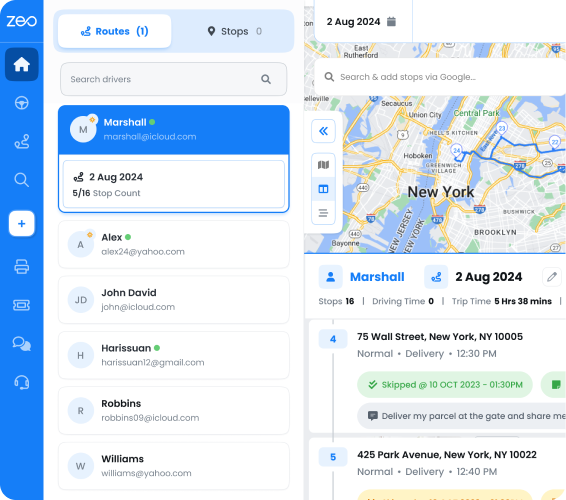
Orders come in from Shopify, WooCommerce, a CRM like HubSpot, or a spreadsheet. Instead of manually typing addresses into a map, dispatchers bulk import the day’s or week’s jobs directly into the system. Frequently used stops — like a regional distribution hub or a repeat commercial customer — can be saved as Favorites for faster future scheduling.
Step 2: Build the optimized route
The fleet manager opens the Zeo web dashboard and builds routes factoring in vehicle capacity, crew size, and installation time windows. The AI-powered optimization engine sequences stops to minimize drive time while respecting those constraints — so a flatbed truck isn’t routed down a narrow alley, and a two-person crew isn’t double-booked into overlapping jobs.
Step 3: Assign and dispatch
Jobs are assigned to the right driver or crew based on skill tags, vehicle type, and availability. Priority stops — like an urgent machine replacement — get flagged as ASAP so they’re not buried under routine deliveries.
Step 4: Drivers execute in the field
This is where the mobile app becomes the execution layer for the manager’s plan. Drivers and installation crews receive their stops directly in the Zeo mobile app, complete with address, customer details, and job notes. They navigate using their preferred GPS app — Google Maps, Waze, or Apple Maps — so there’s no retraining needed on a new navigation interface.
Step 5: Capture proof on-site
At each stop, crews capture photos of the delivered equipment, collect a digital signature, and log delivery notes — things like installation details, serial numbers, or pre-existing damage conditions. If payment is collected on delivery, COD tracking logs it in the same workflow.
Step 6: Communicate in real time
If a crew hits a access issue or needs clarification from dispatch, they use in-app chat to message the manager directly — no separate phone call or text thread required.
Step 7: Track and report
Managers monitor live GPS locations and ETA updates from the web dashboard, so they can proactively notify the next customer if a job runs long. After the route closes out, driver performance analytics and route reports show where time was lost and where the schedule worked well.
This workflow turns a process that used to involve five phone calls per job into a single connected system — from the dispatcher’s screen to the driver’s phone to the customer’s inbox.
Industry Use Cases: Construction Equipment, Medical Devices, Industrial Machinery, and Appliance Delivery
Construction Equipment Rental
A construction equipment rental company delivering excavators, generators, and scaffolding to job sites faces constantly shifting addresses and tight access windows — job sites open at specific hours and close for safety at others. Capacity-based routing ensures the right trailer is matched to the right load, while time window scheduling keeps deliveries aligned with site access hours, similar to the scheduling challenges covered in this construction delivery management guide. Photo proof of delivery documents equipment condition before it leaves the yard, protecting the rental company if a dispute arises over damage during use.
Medical Device Delivery
Hospitals and clinics scheduling delivery of beds, imaging equipment, or mobility devices often require white-glove delivery with signature confirmation from a specific staff member. Skill-based assignment ensures only trained technicians are routed to jobs requiring setup or calibration. Digital signature capture and delivery notes create a documented chain of custody — important when equipment is high-value and tied to patient care timelines.
Industrial Machinery Delivery
Delivering CNC machines or industrial compressors typically involves oversized vehicles, forklifts, and multi-person rigging crews. Routing has to account for weight limits and vehicle restrictions on certain roads or bridges. Real-time tracking lets plant managers know exactly when a crew will arrive, which matters when production schedules are built around equipment installation dates.
Large Appliance and Furniture Delivery
A furniture retailer delivering sofas, mattresses, and appliances to residential customers deals with high delivery volume and tight two-hour windows — challenges explored in depth in this furniture delivery scheduling guide. Customer notifications with live tracking links reduce “where’s my delivery” calls, while photo and signature capture at the door protects against damage claims. One mid-sized appliance delivery operation managing 30 drivers switched from manual routing to optimized scheduling and was able to compress a full day of route planning into under 15 minutes — freeing dispatchers to handle exceptions instead of building routes by hand.
Across all four industries, the common thread is the same: generic parcel routing tools don’t understand vehicle capacity, crew skill, or installation time — and that gap is exactly where missed windows and damage disputes happen.
How to Choose and Implement Equipment Delivery Management Software (Checklist + Migration Tips)
Before you commit to a platform, run through this checklist.
Evaluation checklist:
- Does it support capacity-based routing for your vehicle types (box trucks, flatbeds, lift-gates)?
- Can you assign time windows and priority levels per stop?
- Does it support skill-based or crew-based driver assignment?
- Does it offer photo capture, digital signature, and delivery notes for proof of delivery?
- Does it provide real-time GPS tracking and customer-facing live ETA links?
- Can drivers use their own preferred navigation app (Google Maps, Waze, Apple Maps)?
- Does it integrate with your existing order system (Shopify, WooCommerce, HubSpot, or via Zapier)?
- Does it support bulk import for high order volumes?
- Does it offer scheduled or recurring routes for repeat customers?
- Is there a mobile app for drivers, separate from the fleet dashboard?
Migration tips:
- Start with a pilot route. Pick one crew or vehicle and run it alongside your current process for a week before switching everyone over.
- Import your existing customer and address data in bulk. Don’t manually re-enter hundreds of addresses — use CSV or Excel import to move historical data in one step.
- Tag your drivers by skill and vehicle before go-live. This is what makes skill-based assignment actually work from day one.
- Train drivers on the mobile app, not the dashboard. Drivers only need to know how to accept a route, navigate, and capture proof of delivery — keep their onboarding simple.
- Review analytics after two weeks, not two days. Give the system enough data to show real patterns in drive time, missed windows, and crew performance.
According to the Federal Highway Administration’s research on commercial vehicle delays, poor route planning and inefficient scheduling remain among the top contributors to commercial vehicle delays — a problem that compounds when crews are also managing installation appointments on top of drive time.
Zeo Route Planner is built to check every box on this list for teams moving away from manual dispatch. Fleet managers plan optimized routes with capacity and time window logic on the web dashboard, and 1.5M+ users across 150+ countries rely on the same platform for delivery operations ranging from solo drivers to 50-plus vehicle fleets.
Frequently Asked Questions About Equipment Delivery Management
Q: How much does equipment delivery management software typically cost?
Pricing varies widely based on fleet size and features needed. Many platforms offer free or low-cost tiers for solo operators or small crews, with per-seat or per-driver pricing for larger fleets — for example, Zeo Route Planner’s mobile app has a free tier for up to 12 routes/month, with premium plans starting at $15.99/month and custom fleet pricing for larger teams.
Q: What size crew is needed for heavy equipment delivery?
Crew size depends on the equipment’s weight, dimensions, and whether installation is required — a hospital bed may need two movers, while an industrial compressor often requires a rigging crew and a licensed technician. Operations teams typically tag jobs by required crew size and skill level so dispatch software can match the right people automatically.
Q: How do you prevent damage claims during heavy equipment delivery?
Documenting equipment condition at every touchpoint is the most effective prevention method — photos before loading, photos at delivery, and a signed confirmation from the receiving party. Software with built-in photo capture, digital signatures, and delivery notes creates a timestamped record that resolves disputes faster than relying on driver memory or paper logs.
Q: Can drivers use their own GPS app for equipment delivery routes?
Yes, many modern route planning platforms let drivers navigate with whatever app they’re already comfortable with. Zeo’s mobile app, for instance, supports Google Maps, Waze, and Apple Maps for turn-by-turn navigation while still capturing proof of delivery and optimized stop order within the same app — reducing driver training time.
Q: What’s the difference between route optimization and dispatch software for equipment delivery?
Route optimization focuses specifically on sequencing stops efficiently based on constraints like vehicle capacity, time windows, and distance. Dispatch software is broader — it typically includes route optimization plus driver assignment, communication, and tracking. Most equipment delivery operations need both working together rather than one in isolation.
—
If you’re still coordinating equipment deliveries through spreadsheets and phone calls, the cracks will only get wider as order volume grows. Start a free trial of Zeo Route Planner to build your first optimized equipment delivery route in minutes, or book a demo to see exactly how Zeo handles capacity-based routing, installation scheduling, and proof of delivery for large equipment fleets.
Are you a fleet owner?
Want to manage your drivers and deliveries easily?
Grow your business effortlessly with Zeo Routes Planner – optimize routes and manage multiple drivers with ease.
increase fuel savings
Hassle Free Deliveries & Pickups!
Optimize routes with our algorithm, reducing travel time and costs efficiently.
Get Started for Free