



# Construction Delivery Management: A Practical Guide to Fixing Job Site Delivery Chaos
> TL;DR: Construction delivery management means scheduling, routing, and tracking material deliveries to active job sites so crews aren’t left waiting on late trucks. Manual scheduling breaks down past 5-6 sites a day, leading to failed drops, billing disputes, and wasted fuel. Route optimization tools like Zeo Route Planner address this with GPS pin drops for informal job site locations and capacity-based routing, helping construction supply fleets save 2+ hours daily per driver.
Construction delivery management is the process of scheduling, routing, and tracking deliveries of materials, tools, and equipment to active job sites. If you supply contractors or run a fleet moving lumber, concrete, or rental equipment to 10, 20, or 50+ sites a week, you already know the pain. Addresses change. Crews wait. Trucks make wasted trips.
This guide skips the theory. You’ll get a real workflow for fixing job site delivery chaos, the features that actually matter, and the math on what route optimization saves.
What Is Construction Delivery Management (and How It Differs from Construction Project Delivery Methods)
Construction delivery management and construction project delivery methods sound similar but solve different problems.
Project delivery methods—Design-Bid-Build (DBB), Design-Build (DB), or Construction Manager at Risk (CM-GC)—define who holds contracts and how a project gets built from design through completion. They’re legal and organizational frameworks, decided before a shovel hits the ground.
Construction delivery management is operational. It’s about getting the right materials to the right job site at the right time, every single day. This includes:
- Scheduling truck routes across multiple active sites
- Coordinating drop-off windows with crew schedules
- Tracking what was delivered, where, and when
- Managing drivers, subcontractors, and supplier handoffs
A general contractor can run a project under any delivery method and still have terrible delivery logistics. The two concepts don’t overlap much—but they’re often confused in searches because both use the word “delivery.” If you’re reading this, you’re dealing with the operational problem: trucks, drivers, job sites, and timing.
The Hidden Costs of Manual Job Site Delivery Scheduling
Most construction suppliers still schedule deliveries with spreadsheets, phone calls, and a dispatcher’s memory. It works—until it doesn’t. Here’s what manual scheduling actually costs you.
Late deliveries stall entire crews. If concrete arrives two hours late, you’re not just delaying one task. You’re paying a crew to stand around, pushing back every task scheduled after it. Bureau of Labor Statistics data on construction project timelines and industry reporting have repeatedly flagged material delays and supply chain disruption as top drivers of project schedule overruns.
Failed drops waste fuel and labor. A driver shows up at a job site using an address that doesn’t match the actual gate location. No one’s there to receive the load. Now you’re paying for a second trip, and the crew still doesn’t have what they need. This same problem shows up constantly in equipment delivery management, where rental gear needs to land at a precise staging area, not just a nearby address.
Informal addresses cause routing errors. “Behind the Walgreens on Route 9, second dirt road” isn’t something a standard GPS app handles well. Dispatchers manually re-explain directions to drivers every time, which eats time and increases mistakes.
No proof of delivery means billing disputes. When a subcontractor claims they never received a pallet of rebar, and you have no photo or signature, you’re stuck. Disputes like this delay payment and strain supplier relationships.
Dispatcher time gets eaten by phone calls. Every route change, every “where’s my truck” call, every reshuffled stop takes a human re-planning things manually. That’s hours lost every week that could go toward growing the business instead of firefighting.
None of these costs show up as a single line item. They hide in overtime, fuel, wasted materials, and strained subcontractor relationships—which is exactly why they’re easy to ignore until they add up.
Key Features a Construction Delivery Management System Needs
Not every route planning tool is built for construction. Job sites aren’t static addresses with mailboxes—they’re constantly shifting, often informal, and tied to crew timing. Here’s what actually matters.
Pinned/GPS locations, not just street addresses. Job sites often don’t have a clean mailing address yet. A system needs to let you drop a GPS pin on the actual gate or staging area, not just guess based on the nearest street number.
Time window constraints. Crews work on schedules. If concrete needs to land between 7 and 8 AM before the pour crew starts, your routing software should let you set that window and build routes around it—not just around driving distance.
Capacity-based routing. A truck loaded with rebar, pallets of block, and rental equipment has weight and volume limits. Route optimization software should account for vehicle capacity when assigning stops, so you’re not overloading one truck while another runs half-empty.
Proof of delivery (photo, signature, notes). When a load gets dropped at a site, you need documentation—a photo of the materials on-site, a site supervisor’s signature, or delivery notes. This protects you in billing disputes and gives subcontractors confidence the job was done.
Real-time tracking and ETA updates. Site supervisors need to know when a truck is 15 minutes out, not find out it’s two hours late after calling dispatch three times.
Dynamic re-routing. Job sites get added or rescheduled mid-day. A good system should let dispatchers adjust routes on the fly without starting from scratch.
Zeo Route Planner’s AI-powered routing handles capacity constraints, time windows, and priority stops in a single optimized plan—built specifically for the kind of multi-stop, multi-vehicle scheduling construction suppliers deal with daily.
Step-by-Step: How to Implement Route Optimization for Multi-Site Construction Deliveries
Here’s a practical rollout plan, not a theoretical one.
Step 1: Audit your current delivery addresses. Go through your active job sites and flag which ones have informal or incomplete addresses. Replace them with GPS pins where possible. This is the single biggest source of failed drops.
Step 2: Import your stops in bulk. Instead of entering job sites one by one, upload them from a spreadsheet, CSV, or Google Sheet. Zeo supports bulk address import, so a dispatcher can load 30 job sites in minutes instead of an hour of manual entry.
Step 3: Set time windows based on crew schedules. Talk to site supervisors about when materials actually need to arrive. Build those windows into your routing software so routes are optimized around real constraints, not just shortest distance.
Step 4: Assign vehicles by capacity and skill. If one truck handles heavy equipment and another handles smaller material drops, set that up in the system. Skill-based assignment also matters if certain drivers are certified for specific equipment.
Step 5: Let the software optimize the route. Run the AI-powered optimization to sequence stops efficiently across your fleet. This accounts for drive time, time windows, and vehicle capacity simultaneously—something a dispatcher can’t calculate by hand for more than a few stops.
Step 6: Push routes to drivers’ phones. Once routes are finalized, drivers receive them directly on the Zeo mobile app, with turn-by-turn navigation and site-specific notes.
Step 7: Capture proof of delivery on-site. Drivers take a photo, collect a signature, or log a note at drop-off. This creates a digital record tied to that specific stop and timestamp.
Step 8: Review analytics weekly. Use route analytics and reporting to spot patterns—which sites have repeated delays, which drivers are over capacity, where fuel costs are climbing.
Step 9: Save recurring routes. If you deliver to the same site daily during a project phase, set it up as a scheduled or recurring route, or save it to Favorites for one-click reuse.
This isn’t a six-month implementation. Most teams can get their first optimized route running within a day.
Manual Scheduling vs. Delivery Management Software: A Side-by-Side Comparison
| Task | Manual Scheduling | Delivery Management Software |
|—|—|—|
| Planning daily routes | Dispatcher manually sequences stops, often by gut feel | AI-powered optimization sequences stops in seconds |
| Handling informal addresses | Phone calls to clarify directions | GPS pin dropped on exact job site location |

increase fuel savings
Save $200 on fuel, Monthly!
Optimize routes with our algorithm, reducing travel time and costs efficiently.
Get Started for Free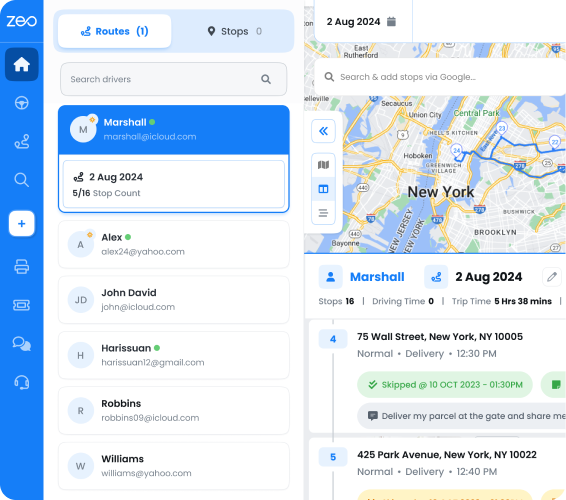
| Adjusting for crew timing | Guesswork, frequent late arrivals | Time window constraints built into the route |
| Vehicle loading | Manual estimate, risk of overloading | Capacity-based routing matches load to vehicle |
| Mid-day changes | Re-plan from scratch by phone | Dynamic route adjustments pushed instantly |
| Proof of delivery | Paper tickets or no record at all | Digital photo, signature, and delivery notes |
| Customer/site visibility | “Call us for an update” | Live tracking link and automatic ETA notifications |
| Driver communication | Texts and calls throughout the day | In-app chat and route details in one place |
| Reporting | Manual spreadsheet tracking | Automated route analytics and performance reports |
The manual approach can work at small scale—five or six sites a day, one dispatcher who knows every route by heart. Past that, it breaks down fast, and the cracks show up as late deliveries and billing disputes.
Real Efficiency Gains: What Route Optimization Saves in Fuel, Time, and Missed Deliveries
The ROI math on route optimization is straightforward once you break it down.
Time savings. Zeo’s AI-powered route optimization saves 2+ hours daily per driver by cutting out inefficient routing and manual re-planning. Across a fleet of 10 trucks, that’s 20+ hours a day returned to actual delivery work instead of dispatcher guesswork.
Fuel savings. Optimized routes reduce total miles driven by minimizing backtracking and inefficient sequencing. The U.S. Department of Energy’s fuel efficiency guidance for fleets notes that reducing unnecessary idling and improving route efficiency are among the most effective ways fleets cut fuel costs, since fuel typically represents one of the largest variable expenses for delivery operations.
Fewer failed deliveries. Every failed drop means a second trip—double the fuel, double the driver time, and a delayed crew on the other end. Even cutting failed deliveries by a handful per week adds up quickly across dozens of job sites.
Fewer billing disputes. With photo and signature proof of delivery tied to every stop, disputes over “we never got that material” become rare. That means faster payment cycles and less time spent digging through paper tickets.
Better dispatcher capacity. When route planning takes minutes instead of hours, the same dispatcher can manage more trucks and more job sites without adding headcount. That’s a real cost avoidance as your delivery volume grows.
Run your own numbers: if a dispatcher spends 90 minutes a day manually planning routes, and software cuts that to 15 minutes, that’s 6+ hours saved per week—time that can go toward handling more orders instead of more admin work. For context on how this scales across other equipment-heavy field operations, see the equipment delivery management operations guide.
Keeping Site Supervisors and Drivers in Sync: Real-Time Tracking, Notifications, and Proof of Delivery
Coordination breaks down most often between the people planning deliveries and the people executing them. Fixing this is less about more phone calls and more about the right tools for each role.
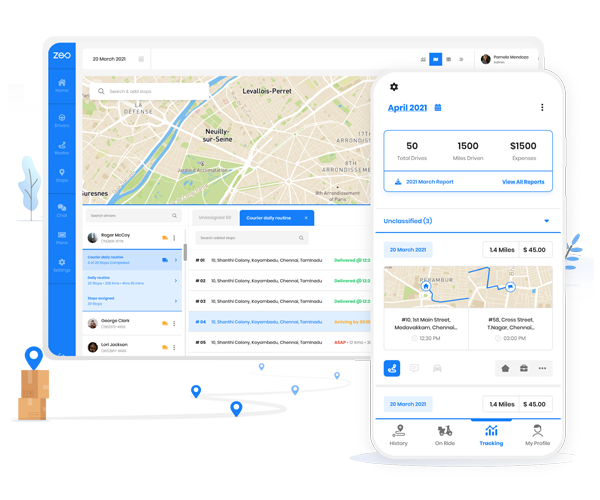
Dispatchers and operations managers plan and assign job-site routes on the Zeo web platform—dropping GPS pins for sites without formal addresses, setting delivery windows around crew schedules, and assigning trucks based on load capacity. From there, drivers and delivery crews receive their routes directly on the Zeo mobile app, complete with turn-by-turn navigation, site-specific notes, and the exact GPS pin for the drop location.
This matters most on active construction sites, where the street address might get you to the right block but not the right gate. A GPS pin gets the driver to the staging area the site supervisor actually specified. The same pin-based approach matters for related job site services too—see how it applies to construction site portable toilet logistics, where units often sit at a gate or lot with no formal address either.
Once on-site, drivers capture proof of delivery directly in the app—a photo of materials on the ground, a signature from the site supervisor, or a note flagging an issue like a blocked access road. That record syncs back to the web platform instantly, so your office has documentation without a single phone call.
Site supervisors benefit too. Customer notifications and live tracking links let supervisors see real-time ETA updates, so they’re not calling dispatch asking where the truck is. If plans change mid-route—a supervisor needs materials earlier because the pour crew moved up—dispatchers can make dynamic route adjustments and the driver sees the update immediately on their phone.
In-app chat between managers and drivers closes the loop for anything that needs a quick back-and-forth, without switching to texts or separate phone calls that don’t get logged anywhere.
The result: dispatchers have full visibility into where every truck is, supervisors know what’s arriving and when, and drivers have everything they need in one app—without constant phone tag.
Frequently Asked Questions
Q: How much do late or failed job site deliveries actually cost a construction supplier?
Failed deliveries typically cost double—fuel and driver time for the wasted trip, plus the same costs again for the redo. When you factor in crew downtime on the receiving end, a single missed delivery on an active site can easily run into hundreds of dollars once labor and schedule delays are counted.
Q: What’s the difference between a delivery schedule and a route plan for construction sites?
A delivery schedule tells you what needs to arrive where and when; a route plan determines the actual sequence and path trucks take to hit those windows efficiently. Construction suppliers need both working together, since a perfect schedule with a poor route still results in late arrivals.
Q: How do I track deliveries to job sites that don’t have a street address yet?
The most reliable method is dropping a GPS pin on the actual gate or staging area instead of relying on a nearby street number. Zeo Route Planner supports GPS pin-based stops alongside standard addresses, which helps route drivers directly to the drop location rather than the nearest matching address.
Q: Can route optimization software handle different truck capacities for construction materials?
Yes, capacity-based routing accounts for a vehicle’s weight and volume limits when assigning stops, so heavier loads like concrete or block don’t get paired with a truck that can’t handle them. This prevents overloading one vehicle while another runs under capacity on the same day.
Q: How do construction suppliers prove a delivery was completed if there’s a billing dispute?
Digital proof of delivery—photo, signature, and timestamped notes—creates a record tied to the specific stop, which removes the “we never received it” back-and-forth. Zeo’s proof of delivery captures all three at drop-off, syncing back to the office instantly so disputes can be resolved without digging through paper tickets.
—
Construction deliveries don’t have to be a daily scramble of phone calls, guesswork, and wasted trips. The tools to fix it—GPS pins, time windows, capacity routing, and proof of delivery—already exist and work together in one system.
Start a free Zeo trial to build your first optimized multi-site delivery route in minutes, or book a demo to see how Zeo handles job-site pins, driver assignments, and proof of delivery for construction supply fleets.
Are you a fleet owner?
Want to manage your drivers and deliveries easily?
Grow your business effortlessly with Zeo Routes Planner – optimize routes and manage multiple drivers with ease.

increase fuel savings
Save 2 Hours on Deliveries, Everyday!
Optimize routes with our algorithm, reducing travel time and costs efficiently.
Get Started for Free