

# Construction Delivery Management: A Complete Guide to Fixing Job Site Delays
> TL;DR: Construction delivery management means scheduling, routing, and tracking material deliveries to active job sites — and most delay problems come from manual coordination, not a lack of trucks or drivers. Idling trucks waste roughly 0.8 gallons of diesel per hour, and missed access windows are a top driver of schedule slippage industry-wide. Route optimization tools like Zeo Route Planner address this with time window constraints and real-time GPS tracking, helping multi-site contractors cut queuing and missed windows significantly.
Trucks idling at a gate for 40 minutes. Two concrete suppliers showing up at the same site, same hour. A lumber delivery that missed the 7 AM access window and now has to wait until noon.
If this sounds familiar, you’re dealing with a construction delivery management problem, not a scheduling inconvenience. And it’s costing you more than you think.
This guide breaks down what construction delivery management actually means, why it’s different from project delivery methods, and how to fix it with route optimization, gate scheduling, and real-time tracking.
What Is Construction Delivery Management? (And How It’s Different from Project Delivery Methods)
These two terms get mixed up constantly, so let’s clear it up first.
Project delivery methods refer to contract structures — design-bid-build, design-build, construction manager at risk. These define who’s responsible for what on a project, legally and financially.
Construction delivery management is something else entirely. It’s the operational process of scheduling, routing, and tracking material deliveries to active job sites. Think ready-mix trucks, lumber shipments, aggregate loads, and rented equipment arriving where and when they’re supposed to. The same coordination challenges show up across related site logistics too — from construction site portable toilet logistics to material drops, anything moving in or out of a job site gate needs a schedule.
If you’re a logistics coordinator, site superintendent, or operations manager juggling multiple job sites, construction delivery management is your daily reality. It covers:
- Scheduling which vendor delivers to which site, and when
- Routing trucks efficiently across multiple active sites
- Managing site-specific access windows and gate capacity
- Tracking deliveries in real time so nobody’s guessing
Get this wrong, and you get queued trucks, missed windows, and finger-pointing. Get it right, and your sites run on schedule with fewer surprises.
The Hidden Costs of Poor Delivery Coordination on Job Sites
Most contractors underestimate how much bad delivery coordination actually costs. It’s not just the obvious stuff.
Fuel waste from idling trucks. A truck idling at a congested gate burns roughly 0.8 gallons of diesel per hour, according to the U.S. Department of Energy’s idling vehicle data. If you’ve got five trucks idling 30 minutes a day across multiple sites, that adds up fast — and it’s pure waste.
Labor hours spent waiting, not working. Every minute a driver sits in a queue is a minute you’re paying for zero productivity. Multiply that across a fleet, and you’re looking at thousands of dollars a month in dead time — a cost pattern similar to what we’ve seen documented in equipment delivery management, where idle rental equipment and idle trucks both eat into margins the same way.
Project delays from missed time windows. The Associated General Contractors of America’s construction industry research has reported that material delays are among the top causes of schedule slippage on construction projects. A missed concrete pour window doesn’t just delay one task — it cascades through your whole schedule.
Site chaos from vendor collisions. When two vendors show up at the same gate at the same time, someone has to wait, reroute, or unload in a cramped space. This creates safety risks and slows everyone down.
Finger-pointing and accountability gaps. Without a centralized record of who delivered what, when, and where, you’re stuck relying on phone calls and memory to sort out disputes. That’s expensive in time and in trust.
None of these costs show up as a single line item on a budget. They hide inside “the way things are” — until you add them up.
How Route Optimization Transforms Construction Material Deliveries Across Multiple Sites
Here’s where most of the fix lives: route optimization.
Instead of manually figuring out which truck goes where, route optimization software uses AI to calculate the most efficient delivery sequence across all your active sites. It factors in distance, traffic, site access windows, and vehicle capacity — all at once.
For a ready-mix or aggregate supplier running multiple trucks to 5-10 sites a day, this matters because:
Capacity-based routing prevents overloading. If a truck has a weight or volume limit, the system accounts for it when assigning loads. You’re not guessing whether a truck can handle a second drop.
Time windows keep deliveries aligned with site access rules. Many job sites only allow deliveries during specific hours — before the general labor force arrives, or after equipment is staged. Zeo Route Planner lets you set time window constraints per stop, so routes are built around each site’s actual schedule, not a generic delivery window.
Priority stops handle urgent material needs. If a site runs low on concrete mid-pour, you can flag that stop as high priority so it gets handled before less urgent drops.
Dynamic adjustments handle the unexpected. A site shuts its gate early. A road closes. A truck breaks down. Dynamic route adjustments let you re-sequence deliveries mid-shift instead of starting from scratch.
The result: fewer trucks sitting idle, fewer missed windows, and a lot less chaos at the gate.
Step-by-Step: Building a Delivery Schedule and Dock/Gate Management System for Your Job Sites
You don’t need to overhaul everything overnight. Here’s a practical sequence to follow.
Step 1: Map your active sites and their access rules.
List every job site you’re delivering to this week. Note gate hours, access restrictions, and any site-specific rules (escort required, no deliveries during pours, single-lane access, etc.).
Step 2: Centralize your vendor and delivery list.
Pull together every scheduled delivery — concrete, lumber, aggregate, rented equipment — into one list. You can bulk import addresses and stop details from Excel, CSV, or Google Sheets to save time instead of entering them one by one.
Step 3: Assign time windows to each site.
Set delivery windows based on each site’s actual working hours and access rules, not a blanket 8-to-5 assumption. This is what prevents two vendors from colliding at the same gate.
Step 4: Optimize routes across all sites and trucks.
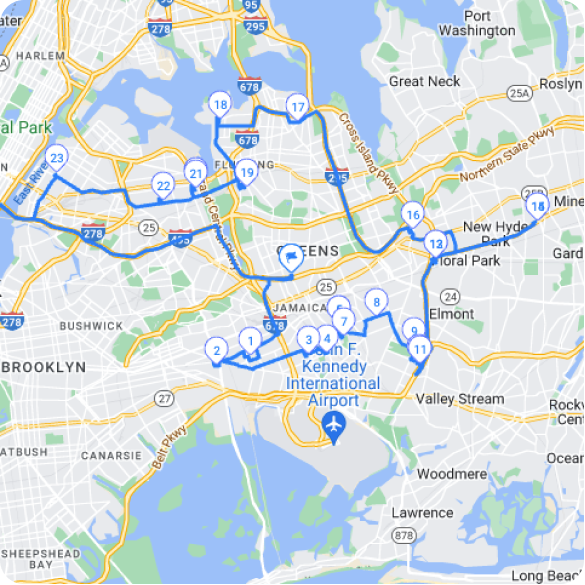
Run your delivery list through a route optimization tool to generate the most efficient sequence for each driver. This accounts for truck capacity, time windows, and priority stops in one pass.
Step 5: Assign routes to drivers based on skills or equipment.
If certain drivers are certified for specific loads (oversized equipment, hazardous materials), use skill-based driver assignment to match the right driver to the right route.
Optimize routes with our algorithm, reducing travel time and costs efficiently.
increase fuel savings
Hassle Free Deliveries & Pickups!
Step 6: Set up real-time tracking and notifications.
Give site supervisors live visibility into truck locations and ETAs, so they’re not calling dispatch every 20 minutes to ask “where’s the truck?”
Step 7: Capture proof of delivery at every site.
Require photo and signature capture for every drop, especially high-value or oversized materials. This closes the loop on accountability and eliminates “it was never delivered” disputes.
Step 8: Review performance weekly.
Use delivery analytics to spot patterns — which sites consistently cause delays, which vendors are chronically late, where fuel costs are creeping up.
This isn’t a one-time project. It’s a system you refine every week as your site list changes.
Key Features to Look for in Construction Delivery Management Software (Checklist)
Not all route planning tools are built for construction logistics. Here’s what to actually check for:
- Capacity-based routing — accounts for vehicle weight and volume limits so trucks aren’t overloaded or underutilized
- Time window constraints — respects site-specific access hours instead of generic delivery blocks
- Priority stop flagging — lets you push urgent material needs (like an empty concrete pour) ahead of the queue
- Skill-based driver assignment — matches certified drivers to specialized loads or equipment
- Real-time GPS tracking — gives you and site supervisors live visibility into truck location
- Live ETA updates — reduces the “where’s my delivery” phone calls
- Proof of delivery (photo + signature) — documents exactly what arrived, when, and in what condition
- Bulk address import — lets you load dozens of job sites and vendor stops at once from a spreadsheet
- Dynamic re-routing — adjusts mid-shift when gates close early or roads are blocked
- Driver mobile app — gives drivers turn-by-turn navigation and delivery details without a dispatcher relaying everything manually
- Analytics and reporting — tracks delays, fuel use, and driver performance over time
- Scheduled/recurring routes — useful for suppliers making the same site deliveries daily or weekly
If a tool is missing more than two or three of these, it’s probably not built to handle multi-site construction logistics.
Real-World ROI: How a Multi-Site Contractor Cut Delivery Delays and Fuel Costs with Zeo
Consider a mid-size ready-mix and aggregate supplier delivering to 8 active job sites across a metro area, running 12 trucks daily. Before centralizing their delivery management, dispatch assigned routes manually each morning based on driver availability and rough guesswork about traffic.
The result: trucks regularly queued at gates during overlapping vendor windows, drivers burned excess fuel navigating inefficient routes, and site supervisors had no visibility into actual arrival times — leading to daily calls asking for updates.
After switching to Zeo Route Planner, the dispatcher built routes using capacity-based assignment and site-specific time windows, so trucks arrived in sequence instead of clustering. Zeo’s AI-powered route optimization saves 2+ hours daily, time that previously went into manual route planning and troubleshooting mid-shift.
With real-time GPS tracking and live ETA sharing, site supervisors could see exactly when a truck would arrive without calling dispatch. And proof of delivery with photo capture eliminated disputes over whether materials arrived on time and in the right condition.
The operational shift wasn’t about buying new trucks or hiring more dispatchers. It came from replacing manual guesswork with a system that actually accounts for capacity, time windows, and real-time conditions — the core of what construction delivery management is supposed to solve. Workforce costs tied to idle labor time are well documented in Bureau of Labor Statistics data on transportation and warehousing labor costs, which underscores why minimizing queue time has a direct bottom-line impact.
Keeping Drivers and Site Teams Connected: Dispatch to Dashboard to Dashboard
A route plan is only useful if it actually reaches the people driving the trucks and the teams waiting on site.
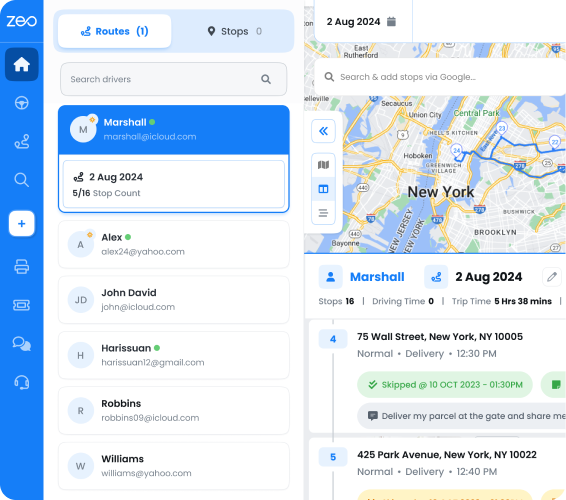
Here’s how that connection works in practice. Your logistics coordinator builds and assigns the day’s delivery schedule from the Zeo web dashboard — setting time windows for each site, defining access rules, and factoring in load capacities per truck.
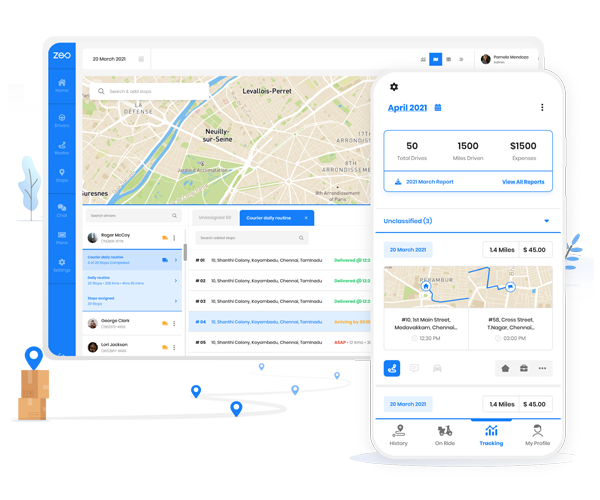
Each driver then receives their optimized route directly on the Zeo mobile app. That includes turn-by-turn navigation to the site, not just a street address. For oversized or high-value materials — structural steel, specialty equipment, bulk aggregate — drivers can capture digital proof-of-delivery with a photo and signature right from their phone.
Meanwhile, live ETA sharing means site supervisors know exactly when a truck will arrive at the gate, without a single phone call to dispatch. If a delivery gets delayed by traffic or a site access issue, the in-app chat lets drivers communicate directly with the dispatcher to adjust the plan mid-route.
This closes the loop that normally breaks down between the office, the truck, and the job site. Everyone’s working off the same live information instead of outdated phone calls and guesswork.
Frequently Asked Questions
Q: What’s the difference between a construction delivery schedule and a project schedule?
A project schedule (built in tools like Procore or MS Project) tracks overall task sequencing — framing, electrical, inspections — across the life of a build. A construction delivery schedule is narrower: it’s the day-to-day plan for which trucks bring which materials to which site gate, and when. The two should align, but delivery schedules need to flex daily based on traffic, weather, and site readiness in ways a master project schedule doesn’t.
Q: How far in advance should construction material deliveries be scheduled?
Most contractors schedule routine materials like lumber and aggregate 24-48 hours ahead, while ready-mix concrete pours typically need same-day confirmation due to weather and crew readiness. Sites with strict access windows or escort requirements often need 48-72 hours notice to coordinate with security or site supervisors. Building in a buffer window also helps absorb last-minute reschedules without cascading delays.
Q: What causes the most delivery delays on multi-site construction projects?
The top causes are overlapping vendor time windows at the same gate, manual routing that ignores real-time traffic, and missed access windows due to site-specific rules (escort-only hours, no-delivery-during-pour periods). The Associated General Contractors of America’s construction industry research identifies material delays as a leading driver of schedule slippage. Centralizing time windows and routing — rather than coordinating by phone — addresses most of these root causes directly.
Q: Can route optimization software coordinate deliveries across sites run by different subcontractors?
Yes, as long as the general contractor or logistics coordinator controls the delivery schedule centrally. Zeo Route Planner lets a dispatcher assign time windows, priority stops, and skill-based driver assignment across all active sites from one dashboard, while each driver — regardless of which subcontractor they work for — receives their route on the mobile app. This keeps visibility centralized even when multiple crews and vendors are involved.
Q: How do I track proof of delivery for high-value construction materials like structural steel?
Photo capture and digital signature collection at the point of delivery create a timestamped record of exactly what arrived and in what condition. Zeo Route Planner’s proof of delivery feature lets drivers capture this directly from the mobile app at the gate, which removes reliance on paper logs or phone call confirmations for high-value or oversized loads.
—
Construction delivery management isn’t about contract structures or project methodology. It’s about getting the right material to the right site, on time, without burning fuel and labor on avoidable delays.
Start a free trial of Zeo Route Planner to build your first multi-site delivery schedule in minutes, or book a demo to see how Zeo handles capacity-based routing, time windows, and proof-of-delivery for construction materials.
Are you a fleet owner?
Want to manage your drivers and deliveries easily?
Grow your business effortlessly with Zeo Routes Planner – optimize routes and manage multiple drivers with ease.
increase fuel savings
Save 2 Hours on Deliveries, Everyday!
Optimize routes with our algorithm, reducing travel time and costs efficiently.
Get Started for Free