
Blog | Zeo Route Planner - Part 17

How to Track Controlled Substance Deliveries: 2026 Guide

Learn how to track controlled substance deliveries with DEA-compliant systems, real-time GPS tracking, and complete chain of custody documentation.

How to Track Controlled Substance Deliveries: 2026 Guide

Learn how to track controlled substance deliveries with DEA-compliant systems, real-time GPS tracking, and complete chain of custody documentation.

Solar Panel Installation Routes

Optimizing Routes for Solar Panel Installation Crews in 2026

As responsible humans, we must all choose clean, renewable energy sources and make them an integral part of our lives.
8 Best AI Delivery Management Software for 2026

Artificial Intelligence has already overtaken every industry. It has revolutionized how we live, work, and conduct business. No matter the

How to Schedule Pool Cleaning Routes: Complete Guide 2026

Learn how to schedule pool cleaning routes efficiently. Transform manual planning into automated, neighborhood-optimized schedules that save hours weekly.
How to Schedule Vending Machine Restocking Efficiently

Learn how to schedule vending machine restocking with data-driven methods, route optimization, and mobile tech to cut costs and boost revenue.

Medical Device Sales

How to Break into Medical Device Sales

The medical industry is the lifeline for us in the true sense. Healthcare professionals work tirelessly to ensure public well-being

The Step-by-Step Sales Route Optimization Guide

Sales representatives are always on the run, following up with clients, setting up meetings, and chasing deadlines. Any time delayed

Best Home Inspection Scheduling Software for Route Optimization

Transform your home inspection scheduling with route optimization software. Reduce travel time 30%+ and manage multi-inspector teams efficiently.
Pool Service Route Optimization Software That Actually Works

Discover how pool service route optimization software helps companies serve 30-40% more customers with same crew while cutting drive time and fuel costs.
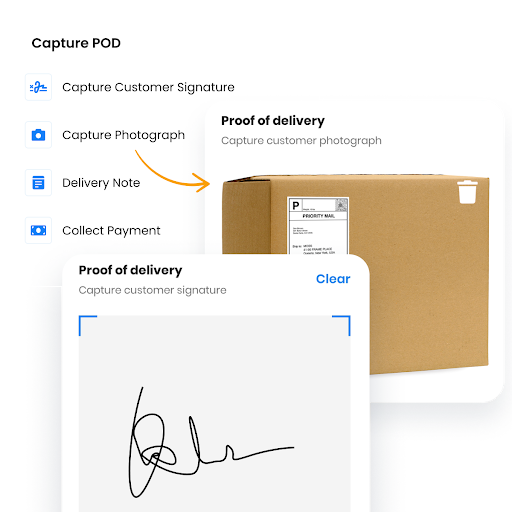
Proof of Delivery for Extra Clarity

Benefits of Digital Signatures for Business Success in 2026

Every business flourishes on customer trust. When your customers believe in your services and trust your brand, growth becomes inevitable.

Alcohol Delivery Business Guide

The Definitive Guide to Alcohol Delivery Business Statistics, Trends, and Strategies for 2026

TL;DR: The alcohol delivery business will keep growing through 2026 and beyond, but operators who win will be the ones
How to Reduce Auto Parts Delivery Time by 40% in 2026

Learn how auto parts distributors cut delivery time 40% with route optimization. Transform delivery operations from cost center to competitive advantage.

Zeo Questionnaire

Frequently
Asked
Questions

Know More

How do I add stop by typing and searching? Web

Follow these steps to add a stop by typing and searching:

  • Go to Playground Page. You will find a search box in top left.
  • Type in your desired stop and it will show search results as you type.
  • Select one of the search results to add the stop to list of unassigned stops.

How do I import stops in bulk from an excel file? Web

Follow these steps to add stops in bulk using an excel file:

  • Go to Playground Page.
  • In top right corner you will see import icon. Press on that icon & a modal will open.
  • If you already have an excel file, press the "Upload stops via flat file" button & a new window will open up.
  • If you don't have an existing file, you can download a sample file and input all your data accordingly, then upload it.
  • In the new window, upload your file and match the headers & confirm mappings.
  • Review your confirmed data and add the stop.

How do I import stops from an image? Mobile

Follow these steps to add stops in bulk by uploading an image:

  • Go to Zeo Route Planner App and open On Ride page.
  • Bottom bar has 3 icons in left. Press on image icon.
  • Select the image from gallery if you already have one or take a picture if you don't have existing.
  • Adjust the crop for the selected image & press crop.
  • Zeo will automatically detect the addresses from the image. Press on done and then save & optimize to create route.

How do I add a stop using Latitude and Longitude? Mobile

Follow these steps to add stop if you have Latitude & Longitude of the address:

  • Go to Zeo Route Planner App and open On Ride page.
  • You will see a icon. Press on that icon & press on New Route.
  • If you already have an excel file, press the "Upload stops via flat file" button & a new window will open up.
  • Below search bar, select the "by lat long" option and then enter the latitude and longitude in the search bar.
  • You will see results in the search, select one of them.
  • Select additional options according to your need & click on "Done adding stops".

How do I add stops using QR Code? Mobile

Follow these steps to add stop using QR Code:

  • Go to Zeo Route Planner App and open On Ride page.
  • You will see a icon. Press on that icon & press on New Route.
  • Bottom bar has 3 icons in left. Press on QR code icon.
  • It will open up a QR Code scanner. You can scan a normal QR code as well as a FedEx QR code, and it will automatically detect the address.
  • Add the stop to route with any additional options.

How do I delete a stop? Mobile

Follow these steps to delete a stop:

  • Go to Zeo Route Planner App and open On Ride page.
  • You will see a icon. Press on that icon & press on New Route.
  • Add some stops using any of the methods & click on Save & Optimize.
  • From the list of stops that you have, long press on any stop that you want to delete.
  • It will open window asking you to select the stops that you want to remove. Click on Remove button and it will delete the stop from your route.

Zeo Blogs

Explore our blog for insightful articles, expert advice, and inspiring content that keeps you informed.

Equipment Delivery Management: A 2026 Operations Guide

Learn how equipment delivery management software solves scheduling, tracking, and proof-of-delivery challenges for heavy and high-value shipments.

Legal Document Delivery Optimization: A 2026 Guide

Learn legal document delivery optimization strategies to cut failed attempts, hit court deadlines, and build GPS-verified proof of service.

Financial Document Delivery: The Operations Guide

A practical guide to financial document delivery: optimize bank runs, build audit-ready proof of delivery, and scale for peak season.

Please close developer tools to continue browsing.

Xlork is a developer-first data import platform. It lets you embed CSV, Excel, and Google Sheets import into any app with AI-powered column mapping and schema validation. Explore free developer tools like JSON-to-CSV converters and color palette generators. No more building import flows from scratch — just drop in the Xlork SDK, sign up free, and ship clean data in minutes.