


# Route Planner: What It Is, How It Works, and How to Choose One (2026 Guide)
> TL;DR: A route planner is software that automatically calculates the most efficient order to visit multiple stops, replacing manual guesswork with optimization algorithms that factor in traffic, time windows, and vehicle capacity. Inefficient routing wastes up to 20% of fuel on local delivery routes, according to the U.S. Department of Energy. Route optimization tools like Zeo Route Planner address this with AI-powered route optimization, helping delivery and field service teams save 2+ hours daily.
If you’re still planning routes with Google Maps and a spreadsheet, you’re losing hours every week. A route planner fixes this by calculating the most efficient path through multiple stops automatically, instead of you guessing stop order by hand.
This guide explains what a route planner actually is, how the technology works, and how to choose one that fits your business. By the end, you’ll know exactly what to look for whether you manage 3 drivers or 50.
What Is a Route Planner? (And How Is It Different From Google Maps Directions)
A route planner is software that calculates the most efficient order to visit multiple stops. It factors in distance, traffic, time windows, and vehicle capacity to build a route that saves time and fuel.
Google Maps Directions is not a route planner. It’s a navigation tool built for point A to point B trips. It only lets you add up to 10 stops manually, and it won’t reorder them for efficiency — it just maps whatever order you type in.
This difference matters more than most people realize. If you have 15 delivery stops, Google Maps will make you guess the best order yourself. A true route planner like Zeo runs an optimization algorithm that tests thousands of stop sequences and picks the fastest one.
Here’s a simple example. A pest control technician with 12 stops across a city has 479 million possible route combinations. No person can manually calculate which order saves the most driving time. A route planner solves this in seconds.
The difference shows up in real numbers. According to the U.S. Department of Energy’s fuel economy research, inefficient routing and excess idling can waste up to 20% of fuel on local delivery routes. For a business running five vehicles daily, that waste adds up to thousands of dollars a year.
A dedicated route planner also handles things Google Maps can’t: time windows, driver skills, vehicle capacity, and multi-driver assignment. That’s the real line between a consumer map app and business routing software.
How Route Optimization Actually Works: The Algorithm Behind Smart Routes (VRP & TSP Explained Simply)
Route optimization sounds technical, but the core idea is simple. It’s based on two classic math problems: the Traveling Salesman Problem (TSP) and the Vehicle Routing Problem (VRP).
TSP asks: if you have one driver and multiple stops, what’s the shortest possible route that visits every stop once and returns to the start? This is the foundation of single-driver route planning.
VRP is the business version. It asks: if you have multiple drivers, vehicles, and stops, how do you divide the stops and sequence each route to minimize total time and distance? This is what fleet managers actually need solved.
Here’s why this matters at scale. With just 10 stops, there are over 3.6 million possible route orders. With 20 stops, the number of combinations exceeds 2.4 quintillion. No spreadsheet or manual process can test that many options — but an optimization algorithm can narrow it down in seconds.
Modern route planners like Zeo use AI-powered algorithms that go beyond basic distance calculations. They factor in:
- Time windows — customer availability or business hours
- Priority stops — urgent jobs that need to happen first
- Vehicle capacity — weight or volume limits per van or truck
- Driver skills — matching the right technician to the right job
- Real-time traffic — adjusting routes as conditions change
This is the practical payoff: Zeo’s AI-powered route optimization saves drivers 2+ hours daily by eliminating this manual guesswork. The algorithm does in seconds what used to take a dispatcher an hour of trial and error on a map.
You don’t need to understand the math to benefit from it. You just need software that runs it for you, continuously, every time your stop list changes.
How to Plan a Multi-Stop Route in Minutes (Step-by-Step Walkthrough)
Planning an optimized route is faster than most people expect. Here’s how it works with a modern route planner:
Step 1: Add your stops.
Upload addresses via spreadsheet (Excel, CSV, Google Sheets), or add them manually one by one. Zeo also supports pulling stops from saved Favorites lists or importing from Shopify and WooCommerce orders automatically.
Step 2: Set constraints.
Add any time windows (e.g., “deliver between 9 AM and 12 PM”), mark priority stops that need to happen first, and set vehicle capacity if you’re hauling limited inventory.
Step 3: Let the software optimize.
Click optimize, and the algorithm calculates the most efficient stop order in seconds. This replaces what used to take 30-60 minutes of manual map-checking.
Step 4: Review and adjust.
Check the suggested route. If you want to lock a specific stop order without re-optimization, use a feature like Navigate as Added to preserve your manual sequence. You can also set Avoid Params to exclude highways, tolls, or ferries if needed.
Step 5: Assign and dispatch.
For solo use, open the route on your phone and start navigating. For teams, assign routes to specific drivers directly from the web platform.
Step 6: Navigate and track.
Drivers follow turn-by-turn directions using their preferred navigation app — Google Maps, Waze, or Apple Maps — all connected through the Zeo mobile app.
A real example: a landscaping company with 18 weekly maintenance stops used to spend 45 minutes each morning manually mapping routes in Google Maps. With a route planner, that same 18-stop route is built, optimized, and assigned in under 5 minutes.
Personal Route Planner vs. Business Route Planner: Which Do You Need?
Not everyone needs the same tool. The right choice depends on how many stops you manage and whether you’re coordinating other drivers.
You need a personal route planner if:

increase fuel savings
Hassle Free Deliveries & Pickups!
Optimize routes with our algorithm, reducing travel time and costs efficiently.
Get Started for Free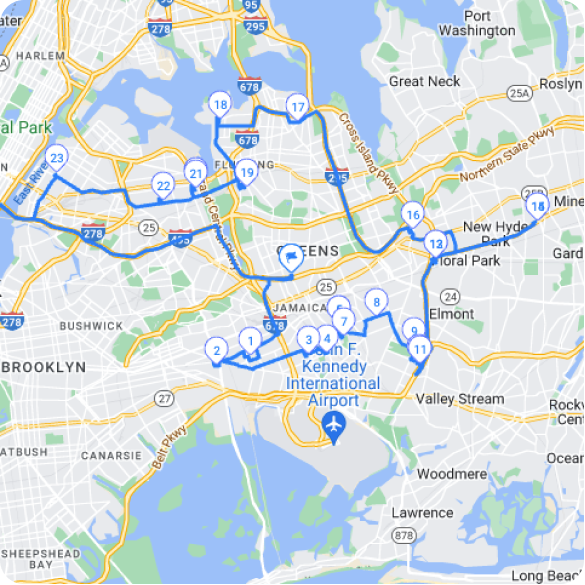
- You’re a solo driver, sales rep, or independent contractor
- You typically plan 5-20 stops per day
- You don’t need to assign routes to other people
- You just need an efficient, optimized path for yourself
You need a business route planner if:
- You manage multiple drivers or technicians (even just 3-5)
- You need to assign different stops to different people
- You want visibility into where your team is in real time
- You need proof of delivery, customer notifications, or reporting
- You’re scaling past what spreadsheets can handle
A solo pool cleaner visiting 15 homes a day can get by with a personal route planner on their phone. But a pest control company with 8 technicians covering different territories needs a business platform — one person optimizing routes while others execute them in the field.
The mistake many small businesses make is sticking with personal tools too long. If you’re a manager spending your morning manually dividing stops between drivers in a spreadsheet, you’ve already outgrown the personal tier. That time should go toward growing the business, not reassigning addresses.
Route Planner for Teams: Fleet Dispatching, Driver Apps, and Real-Time Tracking
Managing a team changes what you need from a route planner. You’re no longer just optimizing one route — you’re dividing work across multiple drivers, tracking their progress, and communicating in real time.
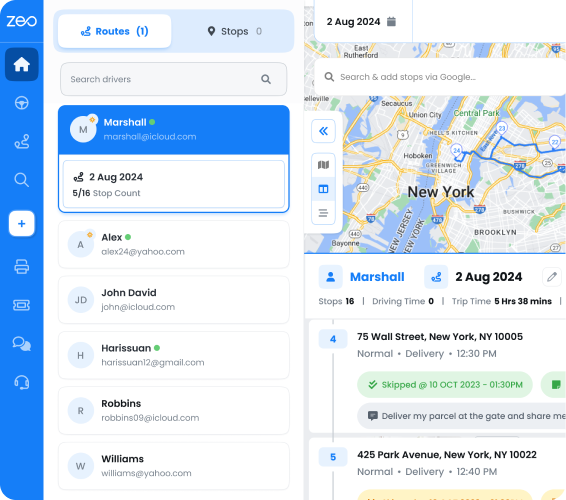
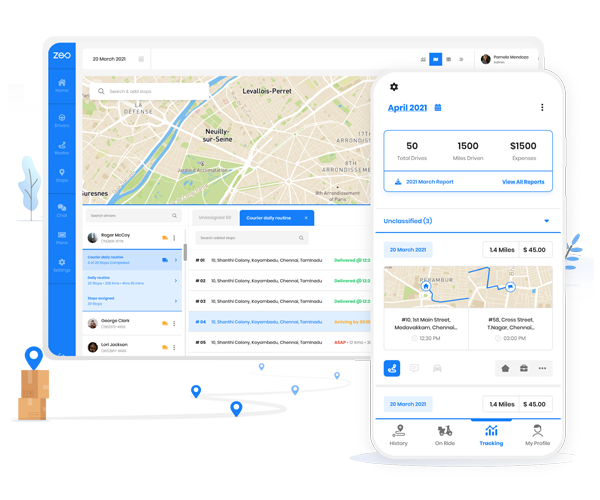
This is where Zeo works as one platform with two experiences: plan on the web, drive with the app.
Fleet managers use the Zeo web platform to build and assign routes. You can optimize stops across your entire team, assign based on driver skills or vehicle capacity, and set work hours and break times. Once routes are built, each driver automatically receives their optimized stops on the Zeo mobile app.
From there, drivers navigate turn-by-turn using whatever app they already prefer — Google Maps, Waze, or Apple Maps. They can capture proof of delivery with photos and signatures, collect delivery notes, and message you directly through in-app chat if something changes mid-route.
For businesses with recurring schedules, Scheduled/Recurring Routes save time by automatically rebuilding the same route pattern each week. If a driver calls in sick, Date Override lets you swap the assigned driver for a single day without disrupting the whole scheduled route. And if a route needs to pause entirely — holidays, slow seasons — Blackout Dates let you pause it without deleting the setup.
Real-time tracking also changes how you handle customer questions. Instead of calling drivers to ask “where are you,” you see live GPS location and ETA updates on a dashboard. Customers get the same visibility through live tracking links sent by SMS or email, cutting down on “where’s my delivery” calls.
Consider a field service company running 12 technicians across HVAC repair jobs. Without a system, the dispatcher spends an hour each morning manually assigning jobs by guessing drive times. With Zeo’s fleet platform, that same assignment — factoring in technician skills, job priority, and location — happens automatically, and each technician sees their day’s route the moment it’s published.
Free vs. Paid Route Planners: Pricing, Limits, and What You Actually Save
Free tools like Google Maps work fine for simple, single-driver trips. But they come with real limits once your business grows.
Free route planner limitations:
- Stop limits (Google Maps caps at 10 stops per route)
- No optimization — you set the stop order manually
- No time windows, priority stops, or capacity planning
- No driver assignment or team dispatching
- No proof of delivery or customer notifications
- No real-time tracking for managers or customers
What a paid route planner adds:
- Unlimited or high-volume stop optimization
- AI-powered route calculation (saves 2+ hours daily)
- Team dispatching and driver assignment
- Real-time GPS tracking and live ETAs
- Proof of delivery (photos, signatures, notes)
- Customer notifications and branded tracking pages
- Analytics and reporting on driver performance
- Integrations with Shopify, WooCommerce, and Zapier
The ROI math is straightforward. If a route planner saves each driver even 1 hour daily through better routing, that’s 20+ hours saved per month, per driver. For a 5-driver team, that’s 100+ hours monthly — time that goes back into completing more jobs instead of driving inefficient routes.
Fuel savings add up too. The EPA’s data on fuel-efficient driving notes that aggressive driving and poor route planning can lower fuel economy by up to 30% on stop-and-go routes. Cutting unnecessary mileage through optimization directly reduces fuel spend, which is often the second-largest operating cost after labor for delivery and field service businesses.
According to IBISWorld’s courier and delivery industry reports, fuel and labor combined account for a majority of operating costs in courier and local delivery businesses — meaning even small routing inefficiencies compound into significant annual losses.
A paid platform like Zeo typically costs far less than the fuel and labor waste it eliminates. For a small team, the subscription often pays for itself within the first month through fewer driving hours and lower fuel use alone.
Frequently Asked Questions About Route Planning
What’s the difference between a route planner and a GPS app?
A GPS app like Google Maps or Waze gives turn-by-turn directions for a trip you’ve already planned. A route planner calculates the best order to visit multiple stops before you start driving, then hands off navigation to your preferred GPS app.
How many stops can a route planner optimize?
This varies by tool. Free consumer apps cap around 10 stops, while business platforms like Zeo handle dozens of stops per route across multiple drivers at once, with scheduled and recurring route support for repeat jobs.
Do route planners work offline or in areas with poor signal?
Most route planners require an initial data connection to calculate optimized sequences, but many navigation apps used alongside them (like Google Maps or Apple Maps) offer offline map caching for areas with weak signal. Always download maps in advance if you’re routing through rural or low-coverage areas.
Can a route planner adjust automatically if a driver gets stuck in traffic or a job runs long?
Yes, platforms with dynamic route adjustment let you add, remove, or reorder stops mid-shift, and the system recalculates the optimal path in real time. This matters for field service teams handling same-day requests, delays, or urgent add-on jobs.
Is it worth paying for a route planner if I only have 2-3 drivers?
Yes, even small teams lose meaningful time manually assigning and sequencing stops every morning. A platform like Zeo’s AI-powered route optimization is built to save drivers 2+ hours daily regardless of fleet size, and the ROI typically shows up in reduced fuel and drive time within the first few weeks.
—
Manual route planning costs you time, fuel, and visibility — every single day. A real route planner solves all three by optimizing stop order automatically and giving you a live view of your entire operation.
Start a free Zeo trial to plan your first optimized multi-stop route in under 5 minutes — no credit card required. If you’re managing multiple drivers, book a free demo to see fleet dispatching and driver tracking in action.
Are you a fleet owner?
Want to manage your drivers and deliveries easily?
Grow your business effortlessly with Zeo Routes Planner – optimize routes and manage multiple drivers with ease.
increase fuel savings
Save 2 Hours on Deliveries, Everyday!
Optimize routes with our algorithm, reducing travel time and costs efficiently.
Get Started for Free