


Updated on: October 17, 2025
Reading Time: 4 minutes
TL;DR: Same-day delivery success requires coordinated inventory placement, demand forecasting, optimized routing, and real-time communication across all delivery touchpoints. Studies show 88% of consumers now expect same-day delivery options in major metropolitan areas. Route optimization tools like Zeo Route Planner address this with AI-powered route optimization and live ETA updates, helping logistics teams save 2+ hours daily.
Customers now expect same-day delivery. What was once considered a ‘premium add-on’ has now become a standard promise in ecommerce and urban logistics. Every click at checkout carries an assumption: the package will arrive in hours, not days.
For businesses, this creates both opportunity and strain. Costs will rise because the fleets can scramble to cover more stops in less time. Again, the labor shortages and complex routing can make operations more challenging to scale.
Urban growth and subscription commerce exacerbate this pressure, which may require managers to make more deliveries in a shorter timeframe.
Platforms like Zeo Route Planner simplify complex routing, automate dispatch, and update ETAs in real time. It’s something that helps businesses handle same-day expectations while keeping costs predictable and customers satisfied.
Core Pillars of Same-Day Delivery Strategy
Same-day delivery demands speeding up and remaining in sync with forecasting, inventory, routing, communication, and workforce planning so the system runs as one.
If any piece lags, the promise of “delivered today” breaks down. The key pillars supporting the same-day delivery model are outlined below.
Work on Inventory Placement & Micro-Fulfillment
The same-day delivery models can work well if the inventory remains closer to where the end-customers are. This is why many businesses prefer shifting stock closer to demand centers, with urban micro-warehouses becoming the backbone of faster fulfillment.
Ideally, the fastest-moving SKUs must be as close to the end customer as possible. So, when an order arrives, the products are picked and packed locally instead of being shipped from distant regional hubs.
For this strategy to work, there’ll be a need to:
- Put high-velocity SKUs in smaller hubs close to major cities
- Fill up micro-warehouses regularly from regional centers to keep them stocked
- Use order analytics to move SKUs dynamically across hubs based on demand shifts
Forecasting the Demand Alongside Cut-off Times
Accurately planning for the demand is the first way to prepare for same-day delivery. Which means, considering seasonal spikes, promotions, and local demand patterns such as weekends or holidays.
With this data, you can schedule the correct number of drivers, prepare vehicles, and stock inventory at levels that match the day’s workload.
And there are cut-off times that can help keep the process realistic. For instance, a warehouse team may need two hours to pick, pack, and load orders. There could also be orders that come in late and roll into the next cycle.
That’s one way you make sure that drivers leave on time with complete manifests and do not have to juggle with the last-minute add-ons.
The demand forecasting and order cut-offs require:
- Analyze 6–12 months of order data to model demand patterns
- Set daily cut-off times that reflect warehouse and driver readiness
- Sync forecasts with driver schedules
Route Optimization & Dispatching
A precise, automated routing solution like Zeo Route Planner can help provide successful same-day deliveries. When you use Zeo, there are minimal (to almost nil) wasted miles that could possibly eat up margins. Every delayed stop risks breaking the promise of same-day delivery.
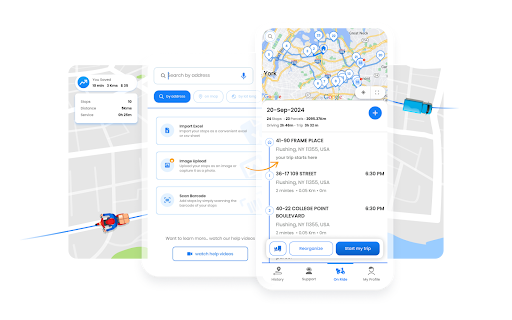
Zeo helps you with algorithm-driven route optimization so that the routes are optimized to hit delivery windows and leave space for mid-shift changes.
Automation is the real advantage here as dispatchers won’t need to drag pins across a map for hours. Instead, Zeo provides a system that’s built with balanced routes, auto-assigns stops to the right drivers, and refreshes plans instantly when order volumes shift.
How Zeo Route Planner helps:
- Create recurring routes for daily run, like subscriptions or milk rounds
- Auto-assign routes to the drivers with stops distributed across the fleet in seconds
- Live ETAs that update as drivers progress
Real-Time Tracking & Customer Communication
A much-needed aspect of the same-day delivery is its visibility. Which means, customers want to know where their package is and when it will reach them. Missing out on these updates may often lead to failed deliveries, repeat attempts, and unnecessary costs.
For operations teams, real-time tracking provides effective coordination among drivers, dispatchers, and end customers. In that case, when every leg of the route is visible, issues such as late arrivals or misplaced orders become easy to correct before they turn into service failures.
Optimize routes with our algorithm, reducing travel time and costs efficiently.
increase fuel savings
Hassle Free Deliveries & Pickups!

Zeo Route Planner supports this with live route tracking, automated delivery updates, and stop-level precision using unique IDs.
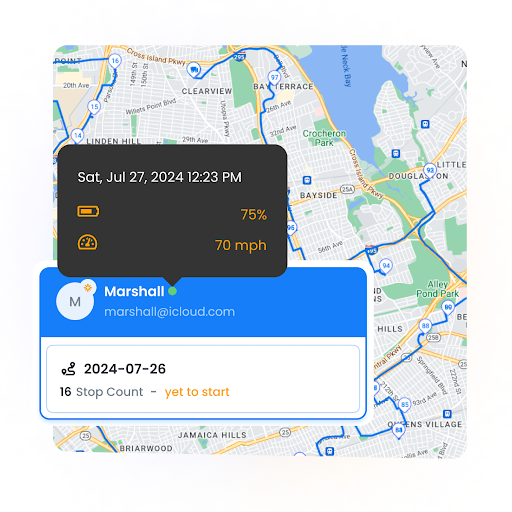
That means dispatchers stay in sync with drivers, while customers get accurate updates without extra manual effort.
This part of the strategy will require:
- Tracking driver movement live and surface delays early
- Automating customer alerts at milestones: dispatched, nearby, delivered
- Tying proof of delivery directly to each stop for quick resolution
- Using the stop-level tracking to avoid duplicate or missed deliveries
Managing Multiple Delivery Types and Constraints
Same-day delivery operations often handle diverse order types with different requirements. Some deliveries need special handling, have specific time windows, or require particular vehicle types. Managing this complexity while maintaining speed requires sophisticated planning systems that can account for multiple variables simultaneously.
Time window constraints pose the biggest challenge for same-day operations. According to the U.S. Bureau of Transportation Statistics, deliveries with narrow time windows see 23% higher failure rates when not properly coordinated. Priority stops marked as ASAP must be balanced against normal deliveries to maintain service levels across all customers.
Vehicle capacity planning becomes critical when handling mixed order sizes. Weight and volume limits must be respected while maximizing vehicle utilization. Large item deliveries requiring two-person teams need special coordination to ensure the right drivers and equipment are allocated efficiently.
Driver skill matching adds another layer of complexity. Some deliveries require specialized knowledge, certifications, or equipment familiarity. The most efficient route becomes meaningless if the assigned driver lacks the proper qualifications for specific stops.
Adapting to Mid-Day Changes and Exceptions
Same-day delivery operations rarely proceed exactly as planned. Customer requests change, urgent orders arrive after dispatch, and unexpected delays require immediate route adjustments. The ability to adapt quickly while maintaining delivery promises separates successful operations from those that struggle.
Dynamic route adjustments become essential when new orders arrive or existing orders get modified. Traditional static routes break down when flexibility is required. Modern systems must recalculate optimal paths while drivers are already on the road, ensuring minimal disruption to existing schedules.
Communication systems need to support real-time coordination between dispatchers and drivers. When changes occur, both parties must stay informed instantly. In-app messaging and live updates prevent confusion and ensure everyone operates from the same information.
Exception handling protocols should be established for common scenarios: customer unavailable, address issues, vehicle breakdowns, or traffic delays. Having predetermined responses speeds up decision-making and reduces the impact of disruptions on overall operations.
Frequently Asked Questions
How far in advance should same-day delivery cut-off times be set?
Cut-off times should account for your warehouse processing speed plus average route duration. Most operations need 2-4 hours between order cut-off and delivery start to allow for picking, packing, and route optimization. Factor in peak demand periods when processing may take longer.
What vehicle capacity utilization rate should same-day operations target?
Aim for 75-85% vehicle capacity utilization for same-day operations. Higher utilization risks delivery failures if urgent orders arrive, while lower rates increase per-delivery costs. Balance depends on your order variability and service level commitments.
How can route optimization reduce same-day delivery costs?
Intelligent route optimization eliminates wasted miles, balances driver workloads, and respects delivery time windows automatically. AI-powered systems like Zeo Route Planner save operations 2+ hours daily by auto-assigning stops and providing live ETA updates that reduce failed delivery attempts.
What proof of delivery methods work best for same-day operations?
Digital proof works most efficiently for same-day operations because it provides instant confirmation. Photo capture, digital signatures, and delivery notes create immediate documentation that dispatchers can verify without waiting for paperwork. This speeds up the confirmation process and reduces disputes.
How do businesses handle driver scheduling for fluctuating same-day demand?
Successful operations use demand forecasting based on historical data to predict daily volume ranges. Modern route planning systems help by managing driver work hours and break times while providing performance analytics to optimize scheduling decisions based on actual delivery data.
Conclusion
Same-day delivery is becoming increasingly a baseline expectation. If your business wants to meet it consistently, then it’d take more than just the speed. It demands taking control across forecasting, inventory, routing, and communication.
Are you ready to stitch these pillars together, gain predictability in operations, and confidence with customers?
If so, you’d need platforms like Zeo Route Planner that can help fleets cut wasted miles, balance workloads, and keep delivery windows honest without burying dispatchers in manual work.
Sign up for a 7-day free trial and discover how same-day delivery can operate at scale without eroding your margins.

Are you a fleet owner?
Want to manage your drivers and deliveries easily?
Grow your business effortlessly with Zeo Routes Planner – optimize routes and manage multiple drivers with ease.
increase fuel savings
Hassle Free Deliveries & Pickups!
Optimize routes with our algorithm, reducing travel time and costs efficiently.
Get Started for Free



















