Reading Time: 4 minutes
TL;DR: Reoptimizing routes with skipped stops requires automated systems that combine missed deliveries with pending stops to create new efficient routes. Fleet managers using manual reoptimization typically lose 2-4 hours daily on replanning tasks. Route optimization tools like Zeo Route Planner address this with dynamic route adjustments mid-shift and mandatory stop completion features, helping delivery teams save 2+ hours daily.
Just when you think the entire delivery process is going on seamlessly, and your fleet operations are well under control, you are hit with an unexpected barrier. A skipped stop!
The reasons can be plenty – the customer was not available to receive the package, the stop was inaccessible, or your driver was just finding a shortcut, hoping you wouldn’t notice. This one skipped stop can potentially derail your entire delivery efficiency and severely hamper the customer experience. And let’s not forget the furry of complaints
and bad reviews that can hurt your brand’s reputation.
If you are a fleet manager handling multiple deliveries daily, you are well aware of the importance of every single stop and the frustration that comes from disrupted routes. But, is there a solution to ensure drivers can’t complete by skipping a few stops?
Can you ensure mandatory stop completion and consider skipped stops for reoptimization, and provide a new route to your drivers?
With Zeo Route Planner, the answer is – YES!
Before we understand how Zeo helps you make stop completion mandatory with skipped stop reoptimization, let’s know why this is crucial for delivery excellence.
The Skipped Stop Hiccups
The delivery was scheduled, the driver was on time, but when they arrived—nobody was home. Or maybe the location was suddenly inaccessible, or there was no way to safely deliver the package. The driver had no choice but to skip the stop and move on.
At first, it might seem like just one small hiccup in the day. But these skipped stops can spiral into much bigger headaches. For one, they leave customers waiting, frustrated, and unsure of what went wrong. Some may even take their business elsewhere, feeling let down by a service they trusted.
But that’s not all. Skipped stops disrupt the entire delivery operation. Drivers have to circle back or double back to complete the stop later, burning more fuel and adding unnecessary labor costs. Routes become tangled and disorganized, and your team wastes time trying to manually adjust schedules. According to the Bureau of Transportation Statistics, inefficient routing and delivery disruptions contribute to over $87 billion in annual logistics waste across the transportation sector. Suddenly, what started as one missed stop snowballs into delayed deliveries, higher expenses, and strained resources.
Every skipped stop chips away at your brand’s credibility and eats into your margins. It’s no longer enough to just move on when a delivery doesn’t go as planned. You need a smarter, faster, and more automated way to handle skipped stops, so you can keep your customers happy, protect your reputation, and drive your business forward.
Understanding the True Cost of Manual Reoptimization
When skipped stops occur, many fleet managers resort to manual replanning – a process that’s both time-consuming and error-prone. The typical manual reoptimization process involves pulling up spreadsheets, calculating distances, considering driver availability, and then communicating new routes to drivers in the field.
This approach creates several hidden costs. First, dispatchers spend valuable time on administrative tasks rather than focusing on customer service or strategic planning. Second, drivers often wait for new instructions, leading to idle time and reduced productivity. Third, the lack of real-time optimization means suboptimal routes that increase fuel consumption and extend delivery windows.
Research from the U.S. Department of Transportation shows that poor route planning can increase vehicle miles traveled by 20-30%, directly impacting both operational costs and environmental sustainability. Modern delivery operations require automated solutions that can instantly recalculate optimal routes when disruptions occur.
How Zeo Makes Skipped Stops a Thing of the Past
At Zeo, we believe delivery challenges shouldn’t hold your business back. They should push you to find smarter solutions. That’s why we’ve built a robust system that not only handles skipped stops but turns them into an opportunity to enhance performance and customer experience.
With Zeo’s Mandatory Stop Completion feature, your drivers can’t complete a route without checking off every stop planned in the route. Additionally, you can also merge the skipped stops with the pending ones to reoptimize the route for them. This means you’re always in control, with full visibility into every delivery attempt. No more wondering what went wrong or chasing down missed stops.
Zeo Route Planner’s advanced route optimization engine handles the heavy lifting, recombining skipped and pending stops into a streamlined new route. No manual re-planning, no wasted time. Just a faster, more efficient way to get deliveries back on track.
This feature means:

increase fuel savings
Hassle Free Deliveries & Pickups!
Optimize routes with our algorithm, reducing travel time and costs efficiently.
Get Started for Free
- You eliminate delivery gaps that frustrate customers and hurt your reputation.
- You save time and resources with automated route optimization.
- You keep drivers productive, even when issues arise.
- You deliver a secure delivery experience that builds trust and loyalty.
- You gain a competitive edge by handling delivery disruptions with confidence and efficiency.
Strategic Benefits of Automated Route Recovery
Beyond the immediate operational advantages, implementing automated reoptimization for skipped stops delivers strategic business benefits. Customer satisfaction scores typically improve when businesses can provide accurate ETAs for rescheduled deliveries and maintain transparent communication throughout the process.
Driver morale also benefits from having clear, optimized routes rather than scrambling to figure out the most efficient path to remaining stops. When drivers have confidence in their routing system, they can focus on customer service and safe driving practices rather than navigation concerns.
For growing businesses, scalable route recovery systems become essential. Government operations have demonstrated that systematic route optimization approaches deliver measurable ROI improvements, particularly when handling service disruptions across large territories.
How to Make Stop Completion Mandatory to Avoid Skipped Stops
Here’s a simple step-by-step guide to set up and use this powerful feature:
Step 1: Log into your Zeo account and open the dashboard.
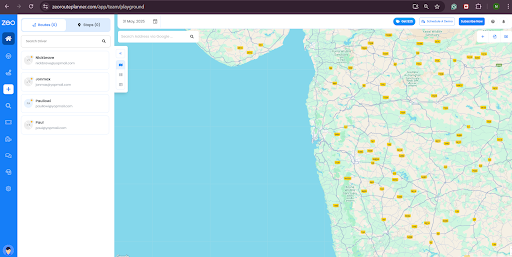
Step 2: Click on the Settings button.
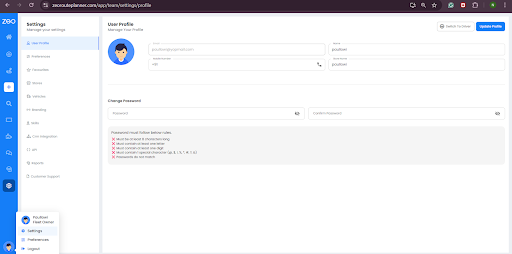
Step 3: Go to the Preferences section.
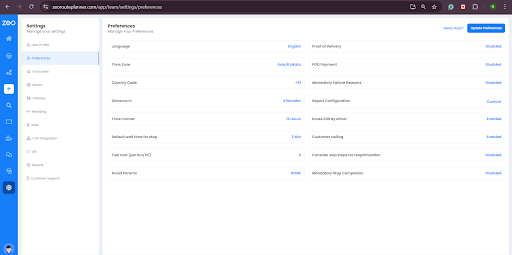
Step 4: Under the ‘Manage your Preferences’ section, look for ‘Mandatory Stop Completion.’
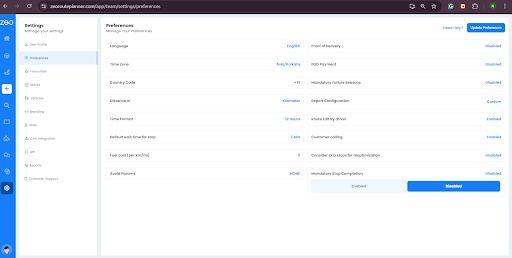
Step 5: The feature will be disabled. Click on it to enable. This will make it mandatory for drivers to complete each route without skipping any stops.
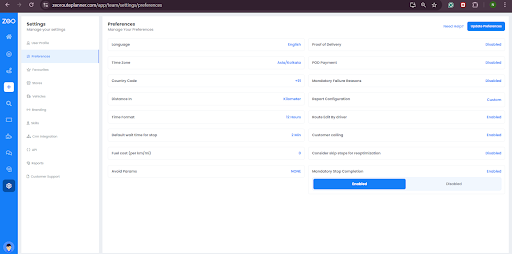
Step 6: Right above this feature, you will find – ‘Consider skip stops for reoptimization.’ Enable this as well to optimize routes with pending stops and skipped stops.
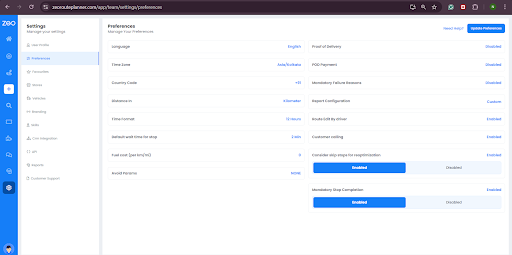
This process makes handling skipped stops seamless, cutting down on delays and keeping customers happy.
Industry Applications for Route Recovery Systems
Different delivery industries face unique challenges when handling skipped stops, but the principles of automated reoptimization apply across sectors. Furniture delivery operations often deal with access issues and customer availability problems that require flexible rescheduling capabilities.
Service industries like field repairs or installations benefit from route recovery systems that can accommodate time-sensitive callbacks while maintaining efficient travel patterns. The ability to dynamically adjust routes mid-shift becomes particularly valuable when dealing with emergency service requests or high-priority customer situations.
For businesses managing both deliveries and pickups, integrated route recovery ensures that skipped delivery attempts don’t disrupt scheduled pickup operations, maintaining overall service reliability across all customer touchpoints.
Final Word
A good fleet manager knows that every stop matters. A great fleet manager leverages tools to ensure every stop is completed.
With Zeo Route Planner, you can ensure no stop is skipped and the delivery routes are completed with integrity and efficiency. Yes, drivers might be obligated to skip a few stops for reasons beyond their control, but you can’t compromise the customer experience by simply avoiding those stops.
With Zeo’s Mandatory Stop Completion feature, you enhance your delivery integrity and efficiency while prioritizing
customer experience.
You are just one step away from achieving delivery excellence and providing a seamless customer experience. Schedule a demo to get started.
Frequently Asked Questions
What causes drivers to skip scheduled delivery stops?
Common reasons include customer unavailability, inaccessible delivery locations, vehicle breakdowns, traffic delays, or package damage during transit. Weather conditions and safety concerns can also force drivers to skip certain stops temporarily.
How do skipped stops impact overall delivery costs?
Skipped stops typically increase operational costs by 15-25% due to return trips, additional fuel consumption, and extended labor hours. Manual replanning and customer service calls for missed deliveries also add administrative overhead that compounds the total impact.
What information should drivers collect when skipping a stop?
Drivers should document the specific reason for skipping, time of arrival attempt, customer contact efforts, and photos of delivery conditions when relevant. This information helps dispatchers make informed decisions about rescheduling and route adjustments.
Can route optimization software prevent stops from being skipped entirely?
While software cannot eliminate all skip scenarios, advanced route planners significantly reduce skips through better scheduling and communication. Zeo Route Planner’s real-time GPS tracking and customer notifications help coordinate successful deliveries, while mandatory stop completion features ensure accountability across 150+ countries of operations.
How quickly should skipped stops be rescheduled for optimal customer satisfaction?
Industry best practices recommend rescheduling within 2-4 hours of the initial skip, with customer notification within 30 minutes. Automated reoptimization systems can immediately incorporate skipped stops into new routes, maintaining service quality while minimizing customer wait times.

Are you a fleet owner?
Want to manage your drivers and deliveries easily?
Grow your business effortlessly with Zeo Routes Planner – optimize routes and manage multiple drivers with ease.
increase fuel savings
Save 2 Hours on Deliveries, Everyday!
Optimize routes with our algorithm, reducing travel time and costs efficiently.
Get Started for Free