




Updated on: July 21, 2025
In banking logistics, the efficient movement of high-value assets is crucial. Banks are unable to tolerate delays, human mistakes, or security failures in logistics. Transporting cash, documents, cheques, ensuring timely cash replenishments at ATMs, are really challenging task. Thus, managing these operations manually or outdated system can lead to delay.
Simplifying banking logistics entails combining automation, technology, and more intelligent route planning software can save expenses, increase security, and enhance service quality.
Zeo’s fleet management solution is designed to address the problems of banking logistics and ensure that every delivery is on time. It efficiently streamlines the banking operations in most easiest and simplest way.
How Zeo Route Planner Streamlines Fleet Management
Zeo’s fleet management solutions are built with the complexities of banking logistics in mind. Here’s how its powerful features enhance operations in this highly regulated and high-stakes industry:
#1. Live Route Tracking
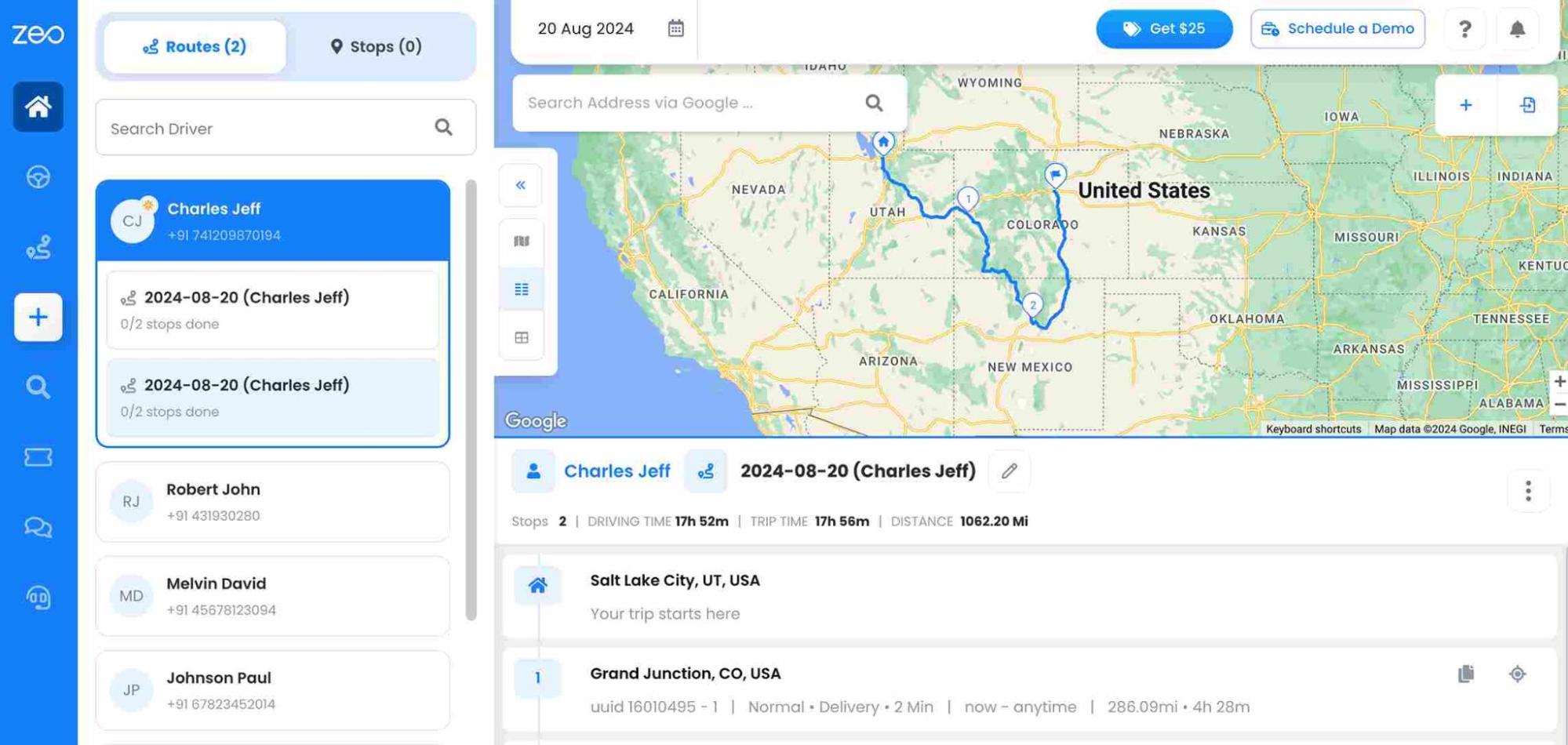
Live route tracking of Zeo provides real-time visibility for banking logistics ensuring that assets are on track and on time. Zeo’s live route tracking shows vehicle locations, route progress, ETAs, delays, etc. With this feature, you will get the full delivery process of banking logistics and ensure assets are on safe mode.
The level of transparency helps in the prevention of theft, hold-ups, and unapproved deviations. Furthermore, all parties may receive real-time information, which gives customers greater confidence.
#2. Route Optimization
Zeo is a tool that optimizes cash van and courier routes, reducing fuel costs and improving on-time performance by automatically generating efficient routes. Zeo’s route optimization feature minimizes delays based on priority, time windows, security zones, access timings, and calculates the fastest and safest routes. It ensures that every delivery arrives on time, boosting customer satisfaction while also improving fuel efficiency.
#3. Driver Management
Managing a fleet of drivers efficiently is critical to banking logistics. With Zeo, banks can easily assign drivers to specific tasks to sensitive routes, monitor their performance. It also sets security protocols for high-value trips that can reduce internal risk and improve accountability on sensitive cargo. The driver behavior helps to identify top-performing drivers and thus ultimately enhances the overall quality of service.
#4. Automated Delivery Updates
Banks should provide accurate and timely updates to maintain customer trust. Zeo’s automated delivery updates ensure the information is updated in real time and provide details, whether it is the delivery of sensitive documents or the delivery of a scheduled cash drop.
Zeo’s automated alerts provide the clients with all the delivery status updates and the estimated time of arrival. At every stage of the delivery process, this feature enhances the customer experience.
#5. Collect Proof of Delivery

increase fuel savings
Save 2 Hours on Deliveries, Everyday!
Optimize routes with our algorithm, reducing travel time and costs efficiently.
Get Started for Free
In banking logistics, keeping the documents of assets is very important. At each point, Zeo’s proof of delivery feature allows drivers to capture digital proof of delivery. Thus, the financial companies can secure and access it whenever needed. It also helps prevent disputes and inaccuracies in asset tracking, ensuring that all transfers are well-recorded and properly validated.
#6. Route Analytics
For banking logistics, data-driven decision-making is essential to improve performance. Zeo’s route analytics feature compiles data from all routes taken. It gives insights into all delivery stops as well as the areas that may require any optimization in the future.
By analyzing data, the banks can find recurring delays and adjust the route accordingly, thereby reduce operational costs, and enhance overall performance.
#7. Mobile App for Drivers
In banking logistics, the drivers need instant communication with the team, which enables quick problem-solving whenever issues occur. Here comes Zeo’s mobile app for drivers that manages deliveries seamlessly.
Using this mobile app, drivers can access route details, proof of delivery, and real-time updates directly from their phones. Every banking sector needs a smoother, faster, and more secure delivery process in high-demand situations or during peak periods.
For More: Top Seven Trends Set to Shape Banking Logistics in 2026
Conclusion
Zeo is a transformative tool for banking logistics, bringing precision, security, and efficiency to every step of the process. With real-time tracking, route optimization, and intelligent fleet management, Zeo empowers financial institutions to streamline their operations, reduce costs, and ensure timely deliveries.
Its robust features not only improve day-to-day logistics but also provide long-term growth benefits, giving banks a competitive edge. Ready to see how Zeo can optimize your banking logistics?
Schedule a demo today and unlock a smarter way to manage your fleet.

Are you a fleet owner?
Want to manage your drivers and deliveries easily?
Grow your business effortlessly with Zeo Routes Planner – optimize routes and manage multiple drivers with ease.
increase fuel savings
Hassle Free Deliveries & Pickups!
Optimize routes with our algorithm, reducing travel time and costs efficiently.
Get Started for Free



















