

Updated on: November 22, 2026
“`html
TL;DR: Maximizing efficiency in commercial food equipment services comes down to smarter routing and real-time schedule adjustments, not just faster driving. Unplanned service calls and wide service areas are the biggest time drains for technicians in this industry. Route optimization tools like Zeo Route Planner address this with AI-powered route optimization and dynamic route adjustments mid-shift, helping field service teams save 2+ hours daily.
Restaurants, cafeterias, and food service establishments depend on their equipment to serve meals efficiently. Imagine the chaos if an oven breaks down during dinner service or a refrigerator stops working before a busy weekend. This is where technicians from commercial food equipment services come in, fixing and maintaining crucial equipment to keep kitchens running smoothly. Along with the traditional restaurants, dark kitchens also require these services.
The Importance of Commercial Food Equipment Services
The commercial food equipment services industry plays a crucial role in maintaining and repairing essential kitchen equipment for restaurants, cafeterias, and other food service establishments. This industry ensures that vital appliances like ovens, refrigerators, dishwashers, and ice machines are in optimal working condition. Technicians are dispatched to various locations to perform routine maintenance, emergency repairs, and equipment installations.
This industry demands maximizing efficiency and reliability as any downtime can significantly impact the operations and profitability of food service businesses. The technicians must be equipped with the right tools, parts, and an efficient route-planning system to manage their tasks effectively. This will empower them to provide timely and quality service to their clients. According to the U.S. Bureau of Labor Statistics, demand for appliance and equipment repair technicians remains steady as commercial kitchens increasingly rely on specialized maintenance to avoid costly downtime.
Challenges for the Commercial Food Equipment Services
The commercial food equipment services industry faces unique challenges that can hinder their potential of maximizing efficiency. A tool like Zeo Route Planner can help technicians overcome these challenges and perform their jobs with perfection.
- Unpredictable Service Calls
Technicians often receive emergency repair requests that need immediate attention. These unpredictable calls can disrupt pre-planned schedules, leading to delays and increased travel time. For example, a technician might be on their way to a scheduled maintenance job when they receive an urgent call from a restaurant with an immediate requirement. This delays the current job and causes a ripple effect on the rest of the day’s appointments. - Vast Service Areas
Technicians typically cover large geographic areas, making it difficult to plan efficient routes. Long travel distances between service calls can lead to wasted time and higher fuel costs. For instance, a technician might have to drive across town multiple times in a day due to poor route planning, which is both time-consuming and costly. - Unexpected Traffic and Delays
Navigating through heavy traffic or dealing with unexpected road closures can significantly impact service times. Delays caused by traffic affect the technician’s schedule and reduce the number of service calls they can complete in a day, ultimately affecting business growth. The Federal Highway Administration notes that traffic congestion is one of the leading causes of lost productivity for mobile service fleets across the country. - Equipment and Part Availability
Ensuring that technicians have the right parts and tools for each job is crucial. Inefficient inventory management can lead to situations where technicians arrive at a job site without the necessary parts, causing further delays and necessitating additional trips. - Customer Expectations
Customers in the food service industry rely heavily on their equipment and expect quick, reliable service. Delays or multiple visits can lead to dissatisfaction and harm the business’s reputation. For example, a restaurant that has to wait longer for a repair may experience downtime, affecting its operations and customer service.
Maximizing Efficiency with Zeo Route Planner
To tackle these challenges, the Zeo Route Planner offers a suite of features designed specifically for maximizing efficiency in the commercial food equipment services industry.
- Real-Time Updates
Zeo Route Planner provides real-time GPS tracking and live ETA updates, allowing technicians to adjust their routes on the fly and avoid delays. This feature helps in maximizing efficiency and ensures that technicians can respond quickly to emergency calls without significantly disrupting their schedules. For example, if a technician receives an urgent call while en route to another job, Zeo’s dynamic route adjustments mid-shift help minimize additional travel time. - Route Optimization
By using AI-powered algorithms, Zeo Route Planner optimizes routes to reduce travel time and fuel costs, saving technicians 2+ hours daily. This ensures that technicians can cover more service calls in a day. An optimized route can significantly cut down on unnecessary travel, allowing a technician to efficiently navigate multiple service calls spread across a large area. - Efficient Scheduling
Zeo also offers a Mobile Route Planner that helps in scheduling appointments strategically, minimizing downtime between calls, and grouping nearby jobs together using capacity-based routing and time window constraints. This efficient scheduling ensures that technicians spend more time working and less time driving. For instance, if a technician has several maintenance jobs in one part of the city, Zeo will schedule these jobs back-to-back, reducing travel time. Priority stops also let dispatchers flag ASAP service calls so urgent equipment breakdowns get addressed first. - Scheduled and Recurring Routes
Zeo’s scheduled and recurring routes feature allows businesses to set up routine maintenance visits in advance, while blackout dates make it easy to pause a scheduled route for holidays or closures without deleting the entire plan. This reduces the manual work of rebuilding routes every week and keeps recurring maintenance contracts organized. Day plan and date override features also let managers assign a different technician to a single day without disrupting the rest of the schedule. - Customer Communication and Accurate ETAs
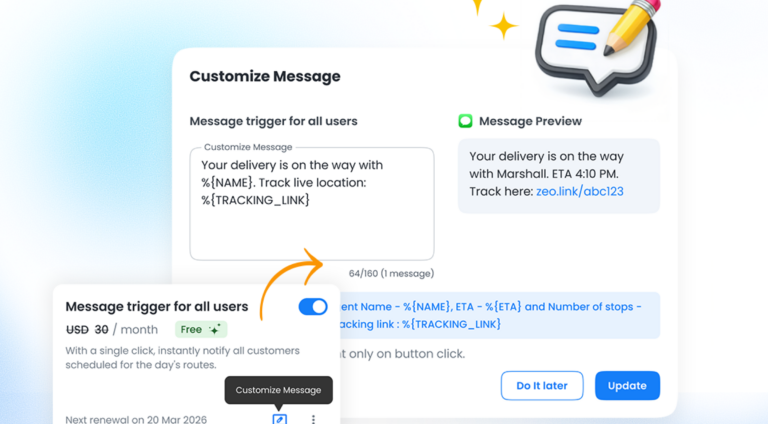
Zeo offers real-time communication features, including in-app chat between managers and technicians, allowing them to update their status and provide real-time updates to customers. Clients receive accurate live ETA notifications via SMS, email, or a branded tracking link, improving transparency and customer satisfaction. This feature ensures that customers are well-informed about the technician’s arrival, enhancing the overall customer experience.
Documenting Service Visits for Accountability
Beyond routing and scheduling, documentation matters just as much in commercial food equipment services. Technicians often need proof that a repair was completed correctly, parts were installed, or a customer signed off on the work. Zeo’s proof of service features, including photo capture, digital signature collection, and delivery notes, help technicians document each visit without extra paperwork. For businesses that collect payment on-site, COD tracking also provides a simple way to record payments against each completed job.
This kind of documentation is especially useful for warranty claims, dispute resolution, and internal quality checks. Rather than relying on a technician’s memory or a paper log that can get lost, managers can review service history directly tied to each stop on the route.
Conclusion – Why Choose Zeo?
Choosing the right route planner is crucial for maximizing efficiency in commercial food equipment services. Zeo Route Planner stands out with its comprehensive features tailored to the unique challenges of this industry. From route optimization and effective scheduling to real-time communication and updates, Zeo ensures technicians can perform their jobs effectively, enhancing both business growth and customer satisfaction. Zeo Route Planner is trusted by numerous organizations in the commercial food equipment services industry.

increase fuel savings
Save $200 on fuel, Monthly!
Optimize routes with our algorithm, reducing travel time and costs efficiently.
Get Started for Free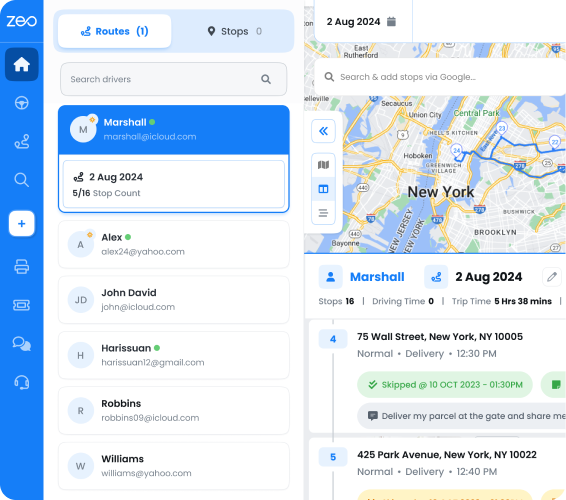
Ready to maximize efficiency with Zeo Route Planner? Schedule a demo with our experts to understand how it can transform your commercial food equipment service operations.
Frequently Asked Questions
How often should commercial kitchen equipment be serviced?
Most commercial kitchens should schedule preventive maintenance on major equipment like ovens, refrigeration units, and dishwashers at least once every three to six months, depending on usage intensity. High-volume kitchens or those operating around the clock often need monthly inspections to catch wear before it causes a breakdown. Following manufacturer guidelines and local health code requirements also helps extend equipment lifespan and avoid unexpected service calls.
What causes the most downtime for food service equipment technicians?
Unplanned emergency service calls are the leading cause of schedule disruption, since they force technicians to abandon or delay previously planned appointments. Long travel distances between job sites and heavy traffic further compound the problem, cutting into the number of service calls a technician can realistically complete in a day. Poor part availability is another major factor, often requiring a second visit once the correct component is sourced.
How can field service businesses reduce fuel and travel costs?
Grouping nearby jobs together and minimizing backtracking across a service area are the most effective ways to cut fuel spend for mobile technicians. Route optimization software like Zeo Route Planner uses AI-powered route optimization to sequence stops efficiently, which saves technicians 2+ hours daily that would otherwise be lost to inefficient driving. Reducing idle time between appointments also lowers wear on vehicles and overall maintenance costs.
What should a restaurant do if kitchen equipment breaks down during service hours?
The first step is to isolate the affected equipment safely and switch to backup procedures if available, such as alternate cooking methods or temporary storage for refrigerated items. Restaurants should then contact their commercial food equipment service provider immediately and clearly describe the issue so the right parts and technician skill set can be dispatched. Keeping a record of past repairs and serial numbers on hand also speeds up diagnosis when the technician arrives.
How do technicians keep customers informed about arrival times?
Many commercial food equipment service providers now use live tracking and automated notifications instead of manual phone calls to update customers. Zeo Route Planner supports this with live ETA updates and customer notifications sent via SMS, email, or a branded tracking link, so restaurant managers know exactly when a technician will arrive. This transparency reduces the back-and-forth calls that typically slow down a technician’s day.
“`
Are you a fleet owner?
Want to manage your drivers and deliveries easily?
Grow your business effortlessly with Zeo Routes Planner – optimize routes and manage multiple drivers with ease.
increase fuel savings
Save $200 on fuel, Monthly!
Optimize routes with our algorithm, reducing travel time and costs efficiently.
Get Started for Free