Mobile App
The Mobile App Built for the Road
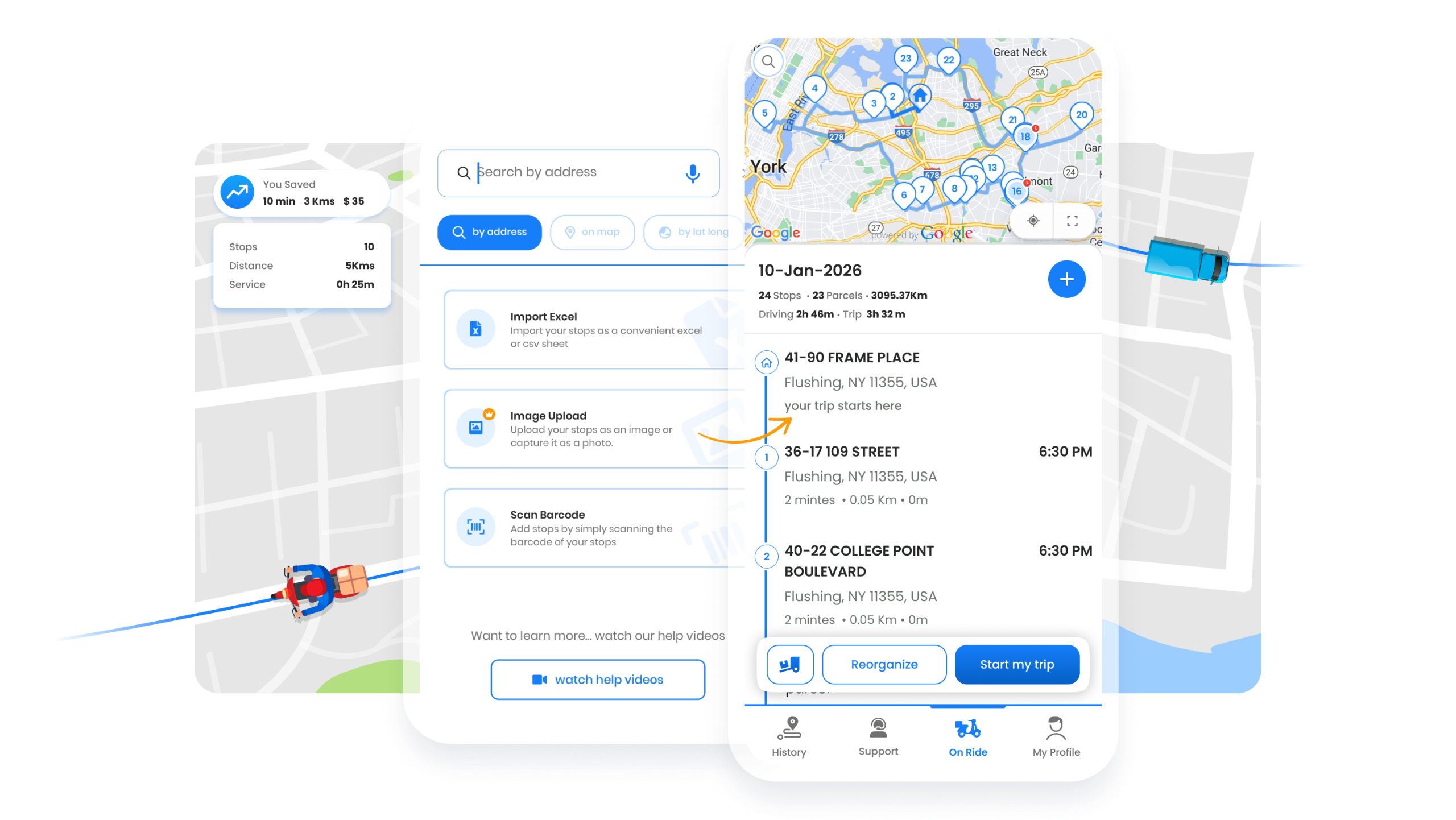
Everything drivers and technicians need: optimized routes, turn-by-turn navigation, stop details,
and proof of service capture. Works offline in dead zones.



Everything drivers and technicians need: optimized routes, turn-by-turn navigation, stop details,
and proof of service capture. Works offline in dead zones.
App Store rating
Downloads
Offline capable
Nav apps supported
Purpose-built tools for efficient route execution

Launch navigation in your preferred app with one tap. Supports Google Maps, Apple Maps, Waze, HERE WeGo, and built-in navigation.
 KEY DIFFERENTIATOR
 Keep working when you lose signal. Routes, stop details, and proof capture all work offline—syncs automatically when connected.

All the information needed for each stop at a glance. Customer name, address, phone, notes, time windows, and special instructions.

Capture irrefutable evidence of service completion. Signatures, photos, notes, and barcode scanning—all from the mobile app.

Personalize the app experience. Language preferences, notification settings, default behaviors, and accessibility options.
One tap to launch navigation in the app your team prefers

Real-time traffic and familiar interface
Native iOS integration with CarPlay

Community-powered traffic alerts

Offline maps for remote areas
The difference a route-optimized app makes


Built for drivers and field technicians across industries
Drivers receive their optimized route each morning, tap to navigate each stop, and capture photo proof of delivery. In areas with poor cell coverage, offline mode keeps them moving. Dispatch sees real-time progress without drivers calling in.
Technicians see service history and treatment notes for each property before arriving. After service, they capture photos of treated areas and get customer signatures. Notes sync to the office for billing and compliance records.
A mobile app built specifically for drivers and field technicians
The driver app is free to download. On Fleet plans, each driver seat includes full app access. Single-driver users get full app functionality with their subscription.
When you have internet, the app caches your route data. If you lose signal, you can still view stops, navigate (with downloaded maps), and capture proof of service. Everything syncs automatically when you're back online.
Depending on your fleet settings, drivers can reorder stops, add new stops, or skip stops with a reason. Administrators control what modifications are allowed through permission settings.
The app runs on iOS 13+ and Android 8+. It works on phones and tablets. For best experience, we recommend devices with GPS and a camera for proof of service capture.
The Zeo Driver App lets drivers receive routes, check in to stops, capture proof, and update status in real time.
Yes. The app caches routes so drivers can view details even without connectivity.
Absolutely. Drivers can launch navigation and choose according to their mapping software preference via built-in options to reach stops efficiently.
Yes. Drivers can mark stops as completed, delayed, or skipped with notes and proof.
Yes. The app allows photos, signatures, and notes to validate service completion.
Yes. The app supports communication between fleet owners and drivers for quick updates.
Explore our blog for insightful articles, expert advice, and inspiring content that keeps you informed.

Reading Time: 8 minutesLearn legal document delivery optimization strategies to cut mileage, reduce missed attempts, and build court-ready proof of service records.

Reading Time: 8 minutesLearn how to run secure, compliant financial document delivery with route optimization, live tracking, and proof-of-delivery for every stop.

Reading Time: 8 minutesCompare the best route planner apps of 2026 by price, stop limits, and offline mode. Get an honest, criteria-based guide before you buy.
Revolutionising deliveries
with Zeo Route Planner

It is a very good application, and I’m genuinely impressed by how accurate the trip timings are. The only area I feel could be improved is the location/navigation feature. When I mark one stop as “Done,” it automatically takes me to the next stop, which is great. However, when Zeo sends the next destination to Google Maps, it does not always communicate the exact address accurately. Improving this would make the experience even better.
Being a courier this app is great value. Although a few points….. doing 100+ stops a day, it would be great if pressing the done button had a bit of a delay. Sometime accidently press it twice without noticing and then find out i missed a few stops at the end of the day and have to go back. Also s…
I get scan and voice search 90-100 stops a night with my job and have to route it my self. Zeo Route Planner makes it easy thankyou Zeo Route Planner best app for deliveries routes and optimzation routes
The best of the top routing apps, all of which I have tried. Amazingly slick functioning. Works perfectly well at all times and for all purposes that I have come across. Provides unlimited cloud storage!
I am an essential worker doing health deliveries and this app has been a great support. Time is of essence in my job and the app saves hours everyday, helping in essential deliveries earlier and faster.
We run a small business. We usee Zeo Route Planner for our 1st delivery run. It was fantastic super useful. Would highly recommend!!!! Currently I am not able to update the app and it’s stuck any help to make it work again would be great. Problem fixed 🙂 after the update thanks
A wonderfully designed app which takes care of all route mapping needs for drivers and businesses who need to stop at multiple locations in a trip. Thank you for this. Also, your subscription plans are really great
Excellent routing app! I’m able to expedite my routes so much more efficiently since I began using the Zeo route planer app. Saves time and gives you peace of mind and confidence that you are routes are organized in the most optimal order.
A wonderfully designed app which takes care of all route mapping needs for drivers and businesses who need to stop at multiple locations in a trip. Thank you for this. Also, your subscription plans are really great
The perfect routing app for me! I praise the developers and all those involved for keeping this app free at 15 deliveries. I usually have about 12 deliveries daily. I am new to the delivery business and this app makes things so simple that I may take on more work and gladly pay the yearly fee for the 500 deliveries tier. I think of this app as my coplilot, truly a joy to use daily. 6 stars!!!
Installed and used this app while performing disaster assessment for a large national non profit asstance agency during the New Jersey hurricane Ida disaster. The job required that I drive to various addresses all over the state on a daily basis. The app allowed me to get to more destinations while minimizing driving time, hence speeding assistance to the clients.




















Copyright © 2026, Zeo Route Planner. All Rights Reserved. Powered By Expronto