Reading Time: 4 minutes
Fleet Platform

Manage Your Team
From One Dashboard

Everything you need to administer drivers, technicians, and field teams. Skills,
schedules, permissions, vehicles — all in one place. Easy onboarding, powerful controls.
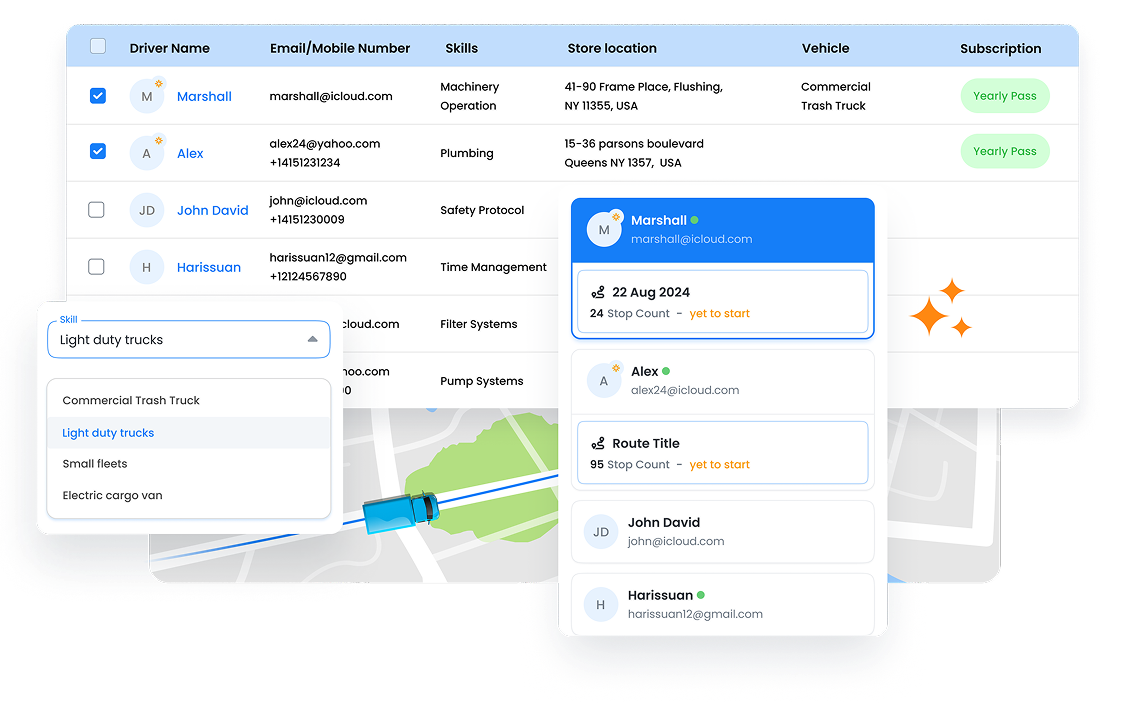
Zeo Driver Management, Zeo Route Planner
  • 2min

    Onboard a new team member

  • Unlimited

    Skills and certifications

  • Flexible

    Permission levels

Team Management
Features

Complete administration for drivers, technicians, and field teams.

Frame 1707478314 10, Zeo Route Planner

Easy Onboarding

Add new team members in minutes. Send app invitations via email or SMS. They download the app, log in, and they’re ready to receive routes.

Group 11880 12, Zeo Route Planner

Driver Profiles

Store contact info, emergency contacts, license details, and notes. Everything you need about each team member in one profile.

Frame 1707478314 9, Zeo Route Planner

Skills & Certifications

Define skills (HVAC certified, Spanish-speaking, hazmat license) and assign to team members. Route optimization uses skills for smart matching.

Frame 1707478314 2, Zeo Route Planner

Shifts & Schedules

Set working hours, days off, and shift patterns. Optimization respects schedules so routes fit within working hours.

Frame 1707478314 3, Zeo Route Planner

Permission Controls

Define what each role can do: view-only dispatchers, full admin access, or drivers with limited self-service. Granular control.

Frame 1707478314 22 1, Zeo Route Planner

Seat Management

Manage licenses and seats across your team. Add or remove users as your team changes. Clear visibility into usage.

Frame 1707478314 24, Zeo Route Planner

Bulk Import

Add multiple team members at once via spreadsheet upload. Include skills, vehicles, and contact info in one import.

Vehicle Management Management

Link vehicles to drivers and set constraints for accurate routing.

Frame 1707478315 1, Zeo Route Planner

Vehicle-Driver Assignment

Link drivers to their assigned vehicles. When assigning routes, the system knows which vehicle they’re using.

Frame 1707478314 21, Zeo Route Planner

Capacity Settings

Set weight, volume, and item limits per vehicle. Optimization won’t overload vehicles and splits routes when needed.

Frame 1707478314 16, Zeo Route Planner

Vehicle Type Routing

Some stops require specific vehicle types (refrigerated, box truck, van). Match stops to appropriate vehicles.

Group 11880 12, Zeo Route Planner

Cost Parameters

Set per-mile and per-hour costs for each vehicle. Get accurate route cost estimates and optimize for cost efficiency.

How Businesses
Use Team Management

From small teams to large fleets.

DELIVERY

Growing Delivery Team

A meal delivery startup scales from 5 to 25 drivers in 3 months. Bulk import onboards 10 new drivers in one afternoon. Skills track who’s trained for catering vs. individual meals.

FIELD SERVICE

Certified Technician Matching

An HVAC company tracks certifications per technician: EPA 608, NATE, manufacturer-specific. When a job requires specific certs, only qualified techs are assigned.

DELIVERY

Vehicle Capacity Planning

A furniture delivery company tracks each truck’s weight and volume limits. Routes automatically split when a truck is full, preventing overloading and returns.


FIELD SERVICE

Shift-Based Scheduling

A 24/7 security patrol company manages three shifts of guards. Each shift has defined working hours, and routes are created to fit within shift boundaries.

Group 1707478361, Zeo Route Planner

Streamline Your Team Management

Get your team set up and routing in minutes. 7-day free trial.

Group 1707478363, Zeo Route Planner

Zeo Questionnaire

Frequently
Asked
Questions

Know More

Zeo Driver Management

How do drivers access the system?

Drivers download the Zeo Driver App (iOS or Android) and log in with credentials you provide. They receive routes, navigate, and capture proof of service through the app. No web access needed for drivers.

Can I limit what drivers can see or do?

Yes. Permissions control whether drivers can: see customer phone numbers, modify their routes, add stops on-the-fly, skip stops without reason, and more. Configure per role or per individual.

What happens if a driver leaves?

Deactivate their account with one click. They immediately lose access to the app and any assigned routes. Their historical data remains for your records. The seat becomes available for a new team member.

Can one driver use multiple vehicles?

Yes. While each driver has a default vehicle assignment, they can be assigned a different vehicle for specific routes. This is common for companies where vehicles are shared.

Zeo Blogs

Explore our blog for insightful articles, expert advice, and inspiring content that keeps you informed.

2026 01 06 Pool Service Route Scheduling Software Featured, Zeo Route Planner

Pool Service Route Scheduling Software: Complete Guide 2026

Reading Time: 8 minutesTransform your pool service operations with route scheduling software. Cut 2-3 hours of daily planning, handle seasonal demand, and optimize multi-crew routes.

2026 01 06 Multiple Delivery Runs Optimization Auto Parts Featured, Zeo Route Planner

Multiple Delivery Runs Optimization for Auto Parts Distributors

Reading Time: 9 minutesTransform chaotic multiple delivery runs into streamlined auto parts operations. Cut costs 25-30% with smart optimization strategies for urgent deliveries.

2026 01 06 How To Reduce Auto Parts Delivery Times Featured, Zeo Route Planner

How to Reduce Auto Parts Delivery Times by 40% in 2026

Reading Time: 6 minutesDiscover proven strategies to reduce auto parts delivery times by 40%. Learn route optimization, emergency handling, and tech solutions for faster deliveries.