Reading Time: 3 minutes
TL;DR: Free SMS packages boost business by eliminating communication gaps that cause lost customers and failed deliveries. Studies show that 73% of customers point to experience as an important factor in purchasing decisions. Route optimization tools like Zeo Route Planner address this with customer notifications (SMS, email, live tracking links), helping delivery teams save 2+ hours daily.
Remember the time when you eagerly waited for a package but had no clue whatsoever about its current delivery status or even the ETA? Being in the dark and clueless about the delivery progress is a frustrating experience, right?
So, why would you want your customers to experience the same daily? Unclear and delayed communication has the power to turn loyal customers into frustrated users who might never turn to you again.
Today, lack of transparency and instant communication can prove to be the difference between retaining customers and losing them.
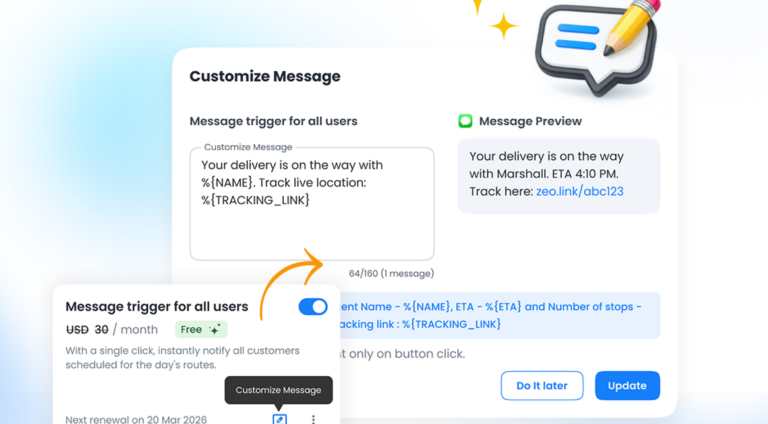
Zeo already offers various automated message alerts to help you establish a seamless and transparent communication channel with your customers. However, to further strengthen your communication, Zeo is now offering 250 free SMS with every seat you purchase.
This is a great boost to your efforts in keeping customers informed and happy.
Why Your Customers Deserve Better Communication
These days, customers expect to know exactly when their delivery will arrive. If your drivers are delayed or a package is missed, they don’t want to be kept in the dark. A simple update, just a quick SMS, can turn frustration into understanding. Clear communication helps you provide that clarity.
With every seat you buy, you’ll receive 250 free SMS that let you:
- Notify customers when a route starts.
- Provide accurate delivery ETAs.
- Alert them when the driver is nearby.
- Remind them about upcoming stops.
- Send a heads-up a day in advance.
- Confirm that the stop is completed.
When customers feel informed, they feel valued. And when they feel valued, they’ll stick with your business.
The Cost of Poor Communication
Poor delivery communication impacts your bottom line more than you might realize. Failed first-delivery attempts cost businesses an average of $3.3 billion annually across retail, largely due to customers not being home when they expected deliveries.
Beyond the immediate costs, communication gaps create lasting damage:
- Customer service calls increase when people don’t know delivery status
- Missed deliveries require expensive re-delivery attempts
- Frustrated customers leave negative reviews that impact future sales
- Driver productivity decreases when they can’t reach customers
The solution isn’t complex technology or expensive systems. Often, a simple SMS update prevents these cascading problems entirely.
How the Free SMS Pack Boosts Your Business
Here’s how it works.
Each seat you buy gives you 250 free SMS to use right away. This means you can start sending updates without any extra cost. Every SMS sent counts against your balance, and once you hit 250, sending stops. But don’t worry. You can easily buy more messages from the addons section if you need them.
You can always keep track of how many SMS you have left from the Notifications or Billing panel. This way, you’re in full control. For example:
- Buy one seat, get 250 free SMS.
- Buy two seats, get 500 free SMS.
- Need extra? Purchase a message pack and get back to keeping customers updated.
When you buy an additional automated message pack from the addons section, the 250 free SMS pack is added automatically. For instance, if you buy a message pack of 500 SMS, you eventually get access to 750 SMS.
The best part? The messages help reduce customer service calls, missed deliveries, and driver confusion. With proper communication tools, you’re not just saving time. You’re saving relationships with your customers.
Beyond SMS: Building Complete Communication Systems
While SMS updates form the backbone of customer communication, successful delivery operations layer multiple touchpoints. Modern customers expect options – some prefer text messages, others want email updates, and many appreciate live tracking links they can check at their convenience.

increase fuel savings
Save $200 on fuel, Monthly!
Optimize routes with our algorithm, reducing travel time and costs efficiently.
Get Started for Free
The most effective communication strategies combine:
- Proactive notifications before problems occur
- Real-time updates when situations change
- Multiple contact methods to reach different customer preferences
- Branded communication that reinforces your professional image
Smart businesses also use communication data to improve operations. When you track which messages generate the most customer responses, you learn what information matters most to your clients. This insight helps refine delivery windows, adjust staffing, and optimize route planning for maximum efficiency.
Why Communication Matters More Than Ever
The delivery world is competitive. A missed delivery or a confused customer can quickly turn into a lost sale. Modern communication features, combined with intelligent route optimization, make it easier to keep customers in the loop and cut down on Skipped Stops. Happy customers mean better reviews, more repeat business, and a reputation for reliability.
Think about it. Each delivery is a chance to show customers you care. A simple SMS update can change their whole experience from stressful to seamless.
The competitive advantage extends beyond individual transactions. Companies known for excellent delivery communication build stronger customer relationships, command premium pricing, and see higher customer lifetime values. In 2026’s market, transparency isn’t optional – it’s essential for growth.
Measuring Communication Success
Smart delivery operations track communication effectiveness through key metrics:
- First-delivery success rates increase when customers receive advance notifications
- Customer service call volume decreases with proactive status updates
- Customer satisfaction scores improve with transparent communication
- Driver efficiency increases when customers are prepared for deliveries
These improvements compound over time. Better communication leads to smoother operations, which creates capacity for growth without proportional increases in overhead costs. Organizations that optimize their communication and routing see measurable ROI improvements within the first quarter of implementation.
How to Get Started with Your Free SMS Pack
Here’s how you can take advantage of this offer:
- Purchase a seat in Zeo Route Planner to unlock your 250 free SMS.
- Activate the notification features to start sending updates.
- Monitor your SMS balance from the Notifications or Billing panel.
- If you run out of messages, add more from the addons section.
That’s it. No complicated steps, just an easy way to provide better communication and improve your delivery process.
Conclusion
Customer communication is cornerstone to your business success. A happy customer will always bring your repeat business. Along with providing robust technology to enhance your route optimization process, effective communication tools also help you improve customer experience.
This free SMS pack is set to streamline your automated customer alerts process. You can instantly update them and keep them informed about the delivery status. Transparency in customer communication goes a long way in building trust and loyalty.
Frequently Asked Questions
How many SMS messages does a typical delivery business need per month?
Most small to medium delivery operations send 2-4 SMS messages per stop (arrival notification, ETA update, completion confirmation, and occasional delays). With 20-50 daily stops, businesses typically use 1,200-6,000 SMS monthly. The exact number depends on your communication strategy and customer preferences.
What types of delivery notifications have the highest customer satisfaction impact?
ETA updates and “driver approaching” notifications generate the highest customer satisfaction scores because they allow recipients to prepare for delivery. Delay notifications, while sometimes frustrating, actually improve satisfaction compared to no communication because customers appreciate transparency over uncertainty.
Can automated SMS notifications reduce failed delivery attempts?
Yes, proactive SMS notifications can reduce failed deliveries by 30-50% by ensuring customers are available when drivers arrive. The most effective notifications include specific time windows, driver contact information, and clear instructions for rescheduling if needed.
How does SMS delivery tracking compare to email notifications?
SMS messages have 98% open rates compared to 20-25% for emails, making them more reliable for time-sensitive delivery updates. However, emails work better for detailed information like tracking links or delivery instructions. Zeo Route Planner’s customer notifications support both SMS and email, helping businesses reach 1.5M+ users across 150+ countries with their preferred communication method.
What’s the ROI of investing in delivery communication tools?
Delivery communication tools typically pay for themselves within 2-3 months through reduced re-delivery costs, fewer customer service calls, and improved operational efficiency. Companies often see 15-25% improvement in first-delivery success rates and significant reductions in customer complaints. Advanced route optimization platforms with integrated communication features deliver the highest ROI by addressing multiple operational challenges simultaneously.

Are you a fleet owner?
Want to manage your drivers and deliveries easily?
Grow your business effortlessly with Zeo Routes Planner – optimize routes and manage multiple drivers with ease.

increase fuel savings
Hassle Free Deliveries & Pickups!
Optimize routes with our algorithm, reducing travel time and costs efficiently.
Get Started for Free