
Updated on: October 27, 2026
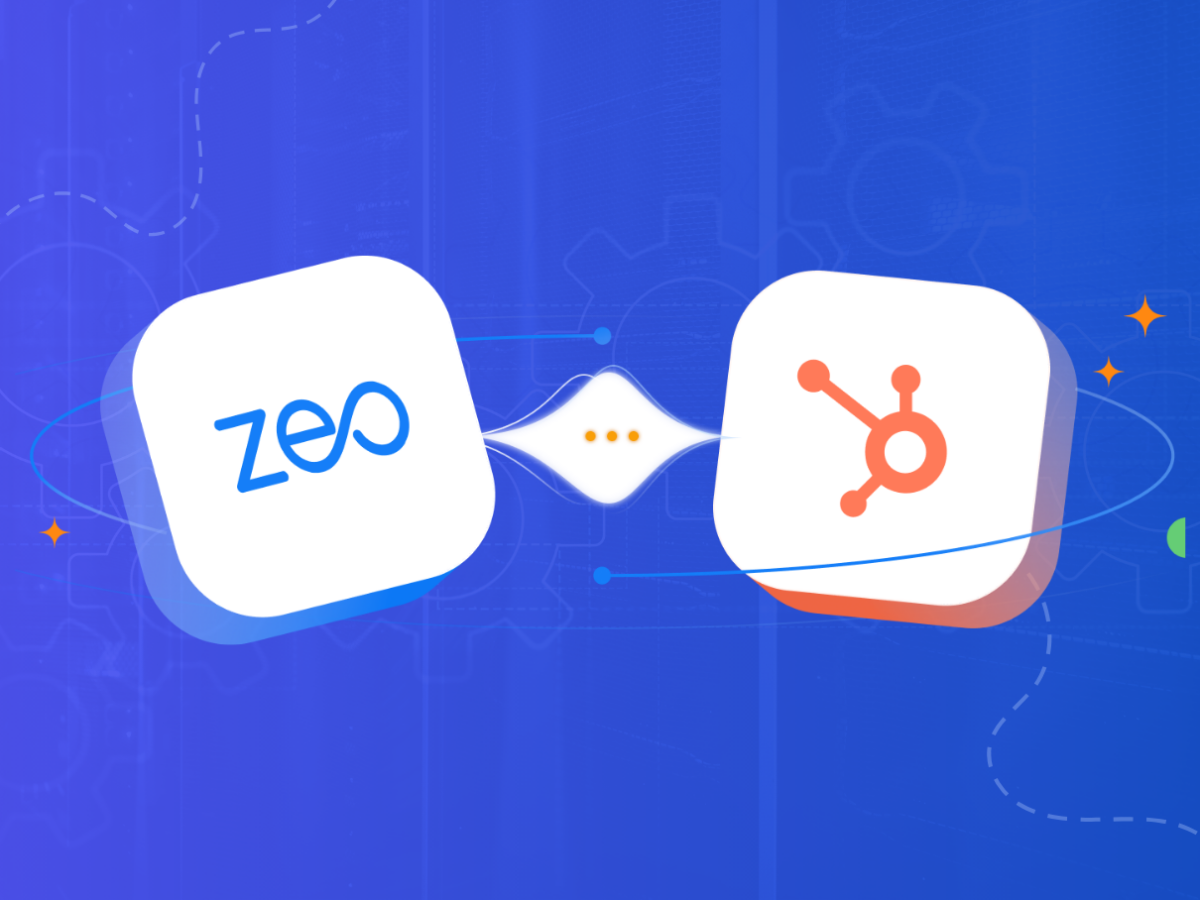
TL;DR: Yes, Zeo Route Planner integrates directly with HubSpot CRM, letting fleet managers pull customer and address data straight into route optimization without manual entry. This eliminates duplicate data work and reduces routing errors caused by manual address mapping. Zeo’s HubSpot integration pairs CRM records with AI-powered route optimization, helping logistics and field service teams save 2+ hours daily.
The technology evolution has impacted every industry and the logistics industry is no exception. Logistics success is a byproduct of effective strategy and smart use of tools. Having the technology stack working together in smooth harmony also becomes crucial for seamless operations.
Fleet managers are looking for effective ways to make their CRM systems and route planners work hand-in-hand and leverage their coupled capabilities for better process efficiency.
Can Zeo Route Planner offer this?
Can it seamlessly integrate with the most popular CRM, Hubspot? What are the steps to do it? And what are the benefits of doing so?
Want to find answers to all these questions? Stay with us till the end of this article.
What are the Benefits of Integrating Zeo Route Planner with HubSpot?
The Zeo and HubSpot integration is the answer to the need of automating tedious and repetitive tasks. It paves the way for smarter logistics. Integrating Zeo Route Planner with HubSpot brings together customer information, request details, and route optimization to enhance service efficiency. Here are some more benefits of the Zeo and HubSpot integration:
- Quick and Hassle-free Setup
Quite often, when businesses add a new tool to their tech stack, they have to undergo complicated setups, processes, and tutorials to make the integration successful. However, that is not the case with Zeo and HubSpot integration.
The process of integrating Zeo Route Planner with HubSpot is designed for simplicity. The setup requires no technical skills or the need to undergo complex tutorials or trainings. It is quick, it is easy, it is intuitive.
Moreover, businesses can start using the combined power of Zeo and HubSpot to streamline their route planning process and eliminate the need for manual data entry and reduce the admin workload considerably. This frees up the admins and fleet managers to focus more on strategic business growth.
- Smarter Route Optimization with CRM Data
Manual processes for route planning are outdated, inefficient, and highly error-prone. Not to mention the amount of time and effort it takes for fleet managers to map the customer information and stop details while planning the routes.
Integrating Zeo Route Planner with HubSpot eliminates the need for these manual interventions. Fleet managers can easily automate the entire process and instantly find the fastest and most efficient route for the given stops and delivery addresses.With the Zeo and HubSpot integration, you can easily pull the customer information and address details from the CRM and feed them to Zeo’s AI algorithms. These algorithms consider various factors like the number of stops, delivery timelines, priorities, vehicle capacity, and also driver availability before presenting the most efficient delivery route.
- Better Fleet Visibility with Real-Time Tracking
Constantly keeping an eye on fleet progress is a crucial aspect of successful logistics management. Fleet managers need the right tools to monitor driver progress and performance and ensure seamless customer experience.
The integration of Zeo Route Planner with HubSpot leverages the CRM platform and its data to enable real-time fleet tracking through the route planner. With GPS tracking and navigation, fleet managers can dynamically adjust routes to cater to last-minute route changes.
The Zeo and HubSpot integration makes sure you don’t waste any time in rerouting delivery paths from scratch and just update them dynamically. This helps the drivers complete their deliveries without any disruptions and enhance the overall customer satisfaction.
- Better Resource Management
For every fleet manager, drivers and delivery vehicles are the most cherished and valuable resources. Consequently, effective driver and vehicle management become critical factors that dictate logistics success.
The Zeo and HubSpot integration enables fleet managers to streamline driver and vehicle management. They can set predefined limits on vehicle use, capacity, allowed weights, volumes, and number of stops per driver.
This helps in streamlining resource optimization to ensure no drivers and vehicles are either overused or underutilized. Managing workloads of drivers ensures they don’t burn out and maintain the desired levels of performance and efficiency.
- Accurate Mile Tracking and Performance Reports
You can’t improve what you don’t measure. Route analytics and performance tracking provide crucial insights into the improvement areas to streamline the delivery process. Zeo and HubSpot integration provides automated routing reports linked with the records from HubSpot CRM.
Fleet managers can easily analyze fuel consumption, delivery patterns, driver performance, and vehicle utilization to identify any inefficiencies in the process and make data-backed decisions to improve performance. According to the U.S. Bureau of Labor Statistics, delivery driver roles continue to grow, making operational efficiency tools increasingly important for fleet managers scaling their teams.
A Stepwise Guide to Integrate Zeo Route Planner with HubSpot
Now that we’ve explored the benefits of integrating Zeo Route Planner with HubSpot, let’s lay out the steps to do so. For this integration to be successful, you will need a HubSpot Business account.

increase fuel savings
Save $200 on fuel, Monthly!
Optimize routes with our algorithm, reducing travel time and costs efficiently.
Get Started for Free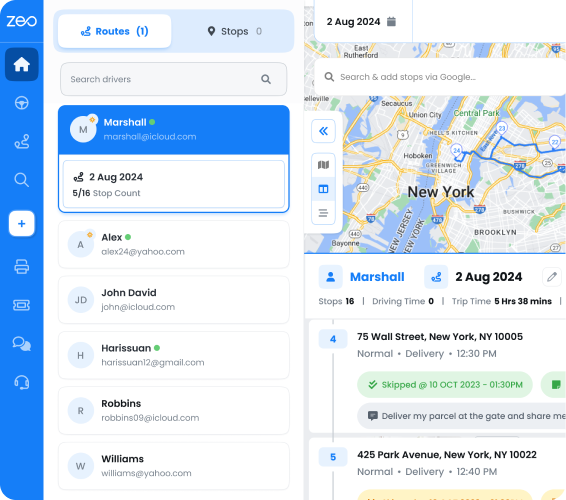
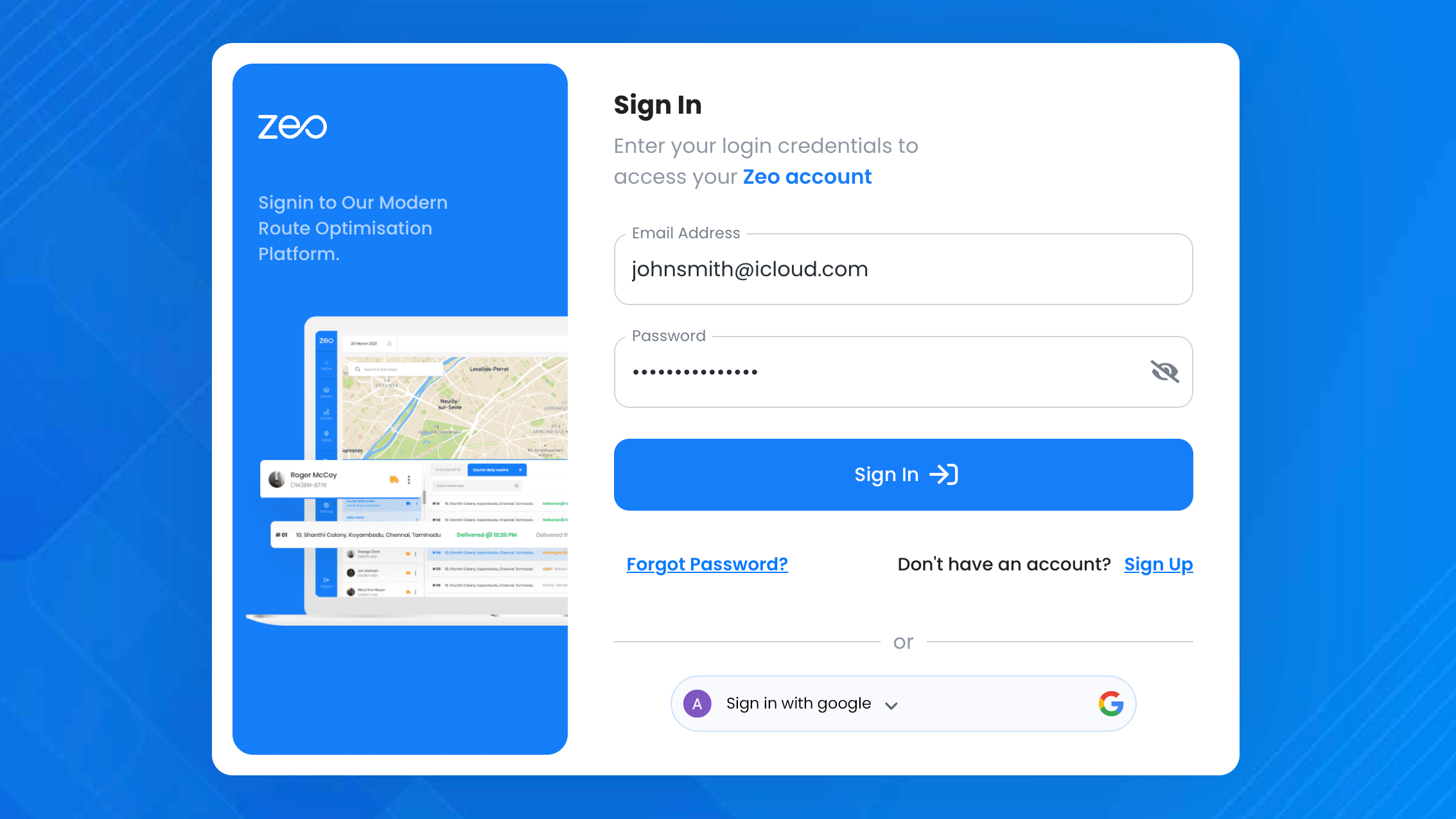
- Sign Up/Log In
- For first-time users, click on the “Sign Up” button on the login page and enter your email ID.
- Complete the sign-up/sign-in process to access the Zeo Playground page, where you can view details about routes, drivers, and more.
- Access CRM Integration Settings
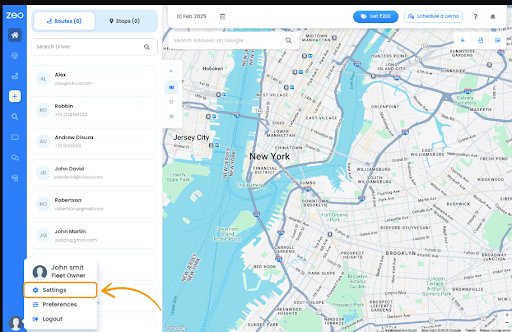
- Click on your profile icon (bottom-left corner) and go to Settings.
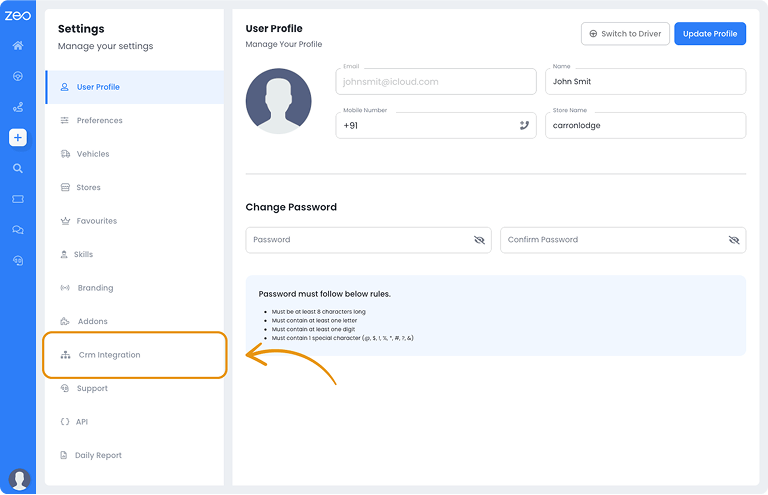
- Select the “CRM Integration” tab. This page allows you to connect Zeo to major platforms, including HubSpot.
- Click on your profile icon (bottom-left corner) and go to Settings.
- Connect to HubSpot CRM
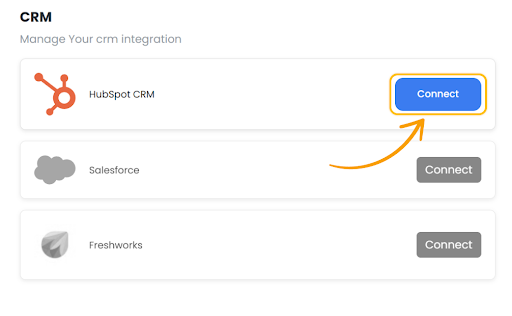
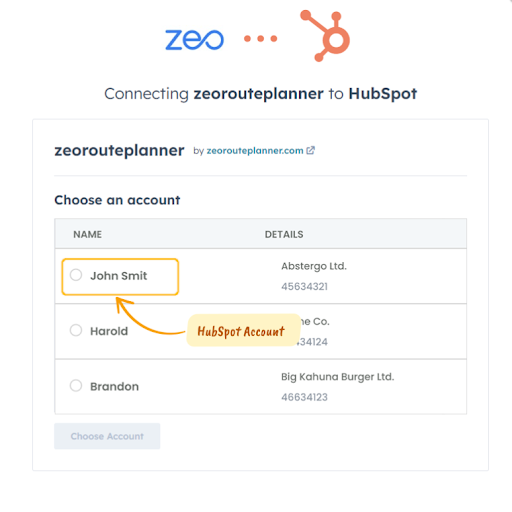
- Click the Connect button for HubSpot CRM.
- You will be redirected to HubSpot, where you’ll be prompted to select your HubSpot account.
- Grant Permissions
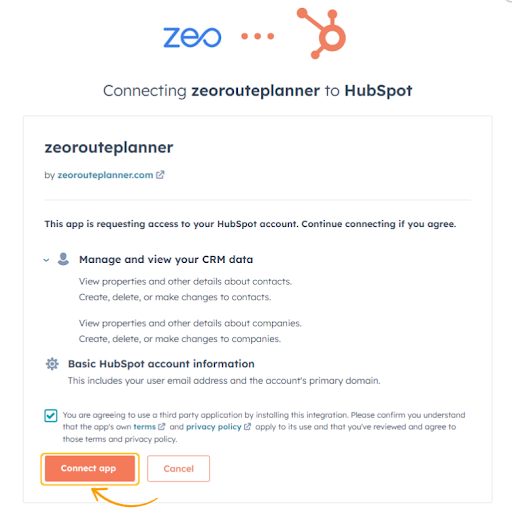
- On the Access Permission page, Zeo will request access to your HubSpot data.
- Click on Connect App to finalize the integration.
- On the Access Permission page, Zeo will request access to your HubSpot data.
- Integration Complete
- Your Zeo account is now successfully connected to HubSpot.
- You’re ready to create your first route using the Zeo-HubSpot integration.
Integrating Zeo Route Planner with HubSpot is fairly simple – no complex steps, no coding required. By combining the CRM capabilities of HubSpot with the smart route optimization features of Zeo, you can enhance your delivery efficiency, cut down operational costs, and improve customer experience.
Why CRM-to-Route Planner Integrations Matter for Growing Fleets
As delivery and field service businesses scale, the number of disconnected tools in their tech stack tends to grow right alongside them. A CRM holds customer records, a spreadsheet holds delivery addresses, and a separate app handles driver communication. This fragmentation creates friction at every handoff point, and friction costs time.
The U.S. Department of Transportation has long emphasized that operational efficiency in freight and last-mile logistics depends heavily on reducing non-value-added steps like redundant data entry and manual coordination. When CRM data flows directly into a route planner, fleet managers remove one of the most common sources of error: mistyped addresses, missed customer notes, and outdated contact details that get duplicated across systems.
For teams handling dozens or hundreds of stops daily, this isn’t just a convenience — it changes how fast new routes can be built. Instead of exporting CRM data, cleaning it, and re-uploading it into a separate planning tool, the integration keeps information in sync, which reduces the lag between a customer request coming in and a driver being dispatched.
Getting the Most Out of Your Integrated Workflow
Once the Zeo and HubSpot integration is live, there are a few practices that help fleet managers extract maximum value from it. First, keep HubSpot contact records clean and up to date — address accuracy on the CRM side directly impacts routing accuracy on the Zeo side. Second, take advantage of capacity-based routing and time window constraints so that CRM-sourced orders are automatically matched to the right vehicle and driver.
Third, use the in-app chat and live tracking link features to keep both dispatchers and customers informed without needing to jump back into HubSpot for every status update. Finally, review route analytics and performance reports regularly. Since these reports are tied to the same CRM records, they offer a clearer picture of how specific customer segments or regions are performing operationally, not just from a sales perspective.
So what are you waiting for? Leverage the Zeo and HubSpot integration to scale your business growth.
Frequently Asked Questions
What is the difference between a CRM and a route planner?
A CRM like HubSpot manages customer relationships, contact history, and sales or service records, while a route planner focuses on organizing stops, optimizing driving sequences, and tracking delivery progress. The two tools serve different purposes but work best together when customer data feeds directly into route planning without manual re-entry.
How do delivery businesses reduce manual data entry errors?
Most manual data entry errors happen when addresses or customer details are copied between systems, such as from a CRM into a spreadsheet and then into a separate routing tool. Connecting systems through direct integrations or automation platforms like Zapier removes these extra steps and keeps information consistent across every tool in the stack.
Does Zeo Route Planner support other integrations besides HubSpot?
Yes, Zeo Route Planner integrates with Shopify for automatic order imports, WooCommerce, Zapier for connecting to thousands of other apps, and offers an API for custom integrations. This flexibility lets businesses connect their existing tech stack rather than replacing it, and route optimization through Zeo helps teams save 2+ hours daily on planning.
What should a business look for before integrating two software platforms?
Before connecting any two platforms, confirm that both tools support native integration or a shared automation layer like Zapier, and check whether the setup requires technical/developer involvement. It’s also worth verifying what data syncs automatically (contacts, addresses, order details) versus what still needs manual updates.
How does route optimization impact delivery costs?
Route optimization reduces unnecessary mileage, idle time, and missed delivery windows, all of which directly affect fuel costs and labor hours. Zeo’s AI-powered route optimization factors in vehicle capacity, time windows, and driver availability, which is used by fleet teams managing 1.5M+ routes to cut down on wasted driving time.
If you want to understand how Zeo can help you enhance route planning, schedule a free demo.
Are you a fleet owner?
Want to manage your drivers and deliveries easily?
Grow your business effortlessly with Zeo Routes Planner – optimize routes and manage multiple drivers with ease.

increase fuel savings
Hassle Free Deliveries & Pickups!
Optimize routes with our algorithm, reducing travel time and costs efficiently.
Get Started for Free