



Updated on: April 14, 2026
Reading Time: 3 minutes
TL;DR: Seamless navigation combined with AI-powered route optimization eliminates driver confusion and saves significant time on daily delivery operations. Fleet operations using integrated navigation solutions report saving 2+ hours daily while reducing fuel costs and delivery delays. Route optimization tools like Zeo Route Planner address this with multiple navigation app support (Google Maps, Waze, Apple Maps) and real-time GPS tracking, helping fleet teams save 2+ hours daily.
It wouldn’t be an overstatement if we say seamless navigation is your guide to seamless deliveries! When drivers don’t have to think about their next turn and simply follow the navigation instructions from a reliable tool, they tend to perform better.
No driver wants complicated routes, poor navigation support, or even constant app-switching between route optimization tools and navigation apps. This is a recipe for inefficiency, increased fuel costs, and delayed deliveries.
But what is the solution?
Zeo Mobile Route Planner App!
Seamless Navigation for Fleet Success
Zeo Route Planner is designed to be the ultimate navigation guide for your drivers. Let’s find out how it ensures driver excellence:
-
Stress-free Navigation to Boost Efficiency
If drivers have to spend time understanding the navigation paths and figuring out their next turn, they are going to waste their valuable time.
Instead of switching between apps, getting confused, or wasting time, they want a tool that tells them just what needs to be done.
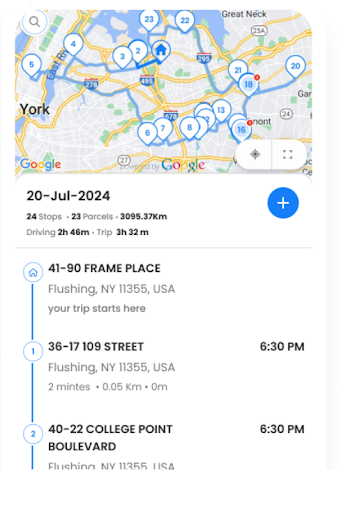
Zeo eliminates the need to switch between navigation apps and dashboards. The strategic in-app navigation support guides drivers through every turn until they reach their destination.
This seamless navigation support translates into faster deliveries, better customer experience, and most importantly, happy and high-performing fleet drivers.
-
Navigate Using your Favorite Map Tools with Zeo
The not-one-size-fits-all principle applies to the use of app tools as well. Different drivers prefer a different app tool. If they are deprived of the flexibility to use their favorite app tool, they feel uneasy and confused about using a new tool.
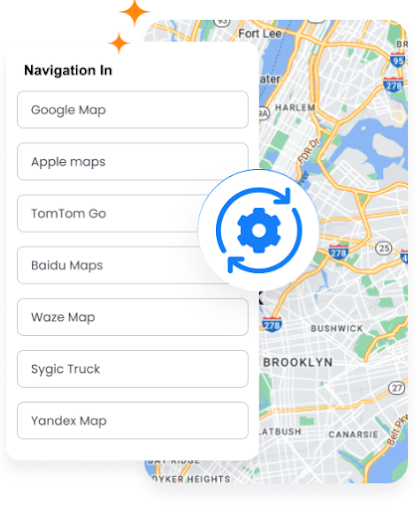
Zeo Route Planner understands the importance of providing flexibility to drivers. Google Maps, Apple Maps, Waze, TomTom Go, Baidu Maps, Sygic, Yandex Maps, and more – Zeo Route Planner offers easy integration with all the popular and most used map tools.
You can simply choose your preferred maps tool to navigate and you are set for a stress-free travel. You get precise directions and navigation support while benefiting from Zeo’s dynamic route optimization capabilities.
-
Single-View Access to Navigation Details
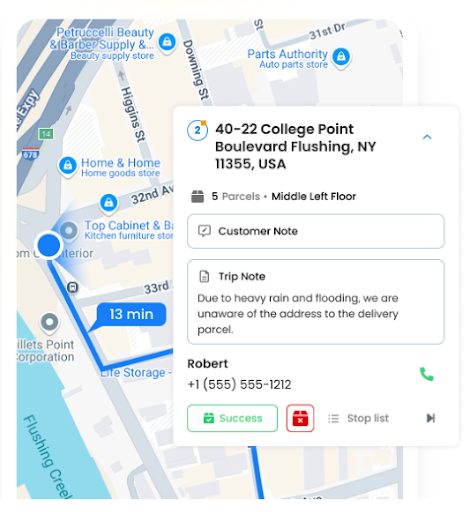
While drivers don’t want to switch between dynamic route optimization apps and map tools, they also don’t feel comfortable with complex navigation dashboards. If drivers have to constantly switch between apps or screens to keep track of multiple stops and routes, they become inefficient, confused, and frustrated.
Zeo Route Planner avoids this with a single-view access to navigation details. Drivers don’t have to wonder or search for the next steps, they get complete route details in one view without having to switch between dashboards or app screens.
As drivers get all the information in one place, they can focus on completing deliveries and improving delivery efficiency. They can prioritize customer experience rather than juggling between different dashboards and apps.
Real-time GPS Tracking for Enhanced Fleet Visibility
Modern fleet operations require more than just basic navigation support. Fleet managers need comprehensive visibility into their operations to make informed decisions and respond quickly to changing conditions.
Real-time GPS tracking provides fleet managers with live location data, enabling them to monitor driver progress, identify potential delays, and provide accurate ETAs to customers. According to the U.S. Bureau of Transportation Statistics, effective fleet visibility systems contribute significantly to reducing operational costs and improving delivery reliability.
This level of visibility also enables dynamic route adjustments mid-shift when unexpected situations arise. Whether it’s traffic congestion, last-minute delivery changes, or vehicle breakdowns, fleet managers can quickly redistribute stops and optimize routes to maintain service levels.
Communication Tools That Keep Teams Connected
Effective communication between fleet managers and drivers is critical for operational success. When drivers encounter issues on the road or need clarification about deliveries, they need instant access to support without compromising safety.

increase fuel savings
Save $200 on fuel, Monthly!
Optimize routes with our algorithm, reducing travel time and costs efficiently.
Get Started for Free
Modern route planning solutions address this need with integrated communication features. In-app chat functionality allows drivers to communicate with dispatchers without switching applications or making phone calls while driving. This streamlined communication helps resolve issues faster and keeps operations running smoothly.
Customer notifications also play a crucial role in the delivery experience. Automated SMS and email updates with live tracking links keep customers informed about their delivery status, reducing customer service calls and improving satisfaction rates. Research from the U.S. Department of Transportation indicates that proactive customer communication significantly reduces delivery-related complaints and improves overall service quality.
Integration Capabilities for Streamlined Operations
Fleet operations don’t exist in isolation. They’re part of larger business ecosystems that include e-commerce platforms, CRM systems, and various business applications. Seamless integration between these systems eliminates manual data entry and reduces errors.
Modern route planners integrate with popular e-commerce platforms like Shopify and WooCommerce, automatically importing order data and creating optimized routes. This automation saves significant administrative time and ensures that all orders are captured accurately. For businesses looking to guarantee efficient delivery, these integrations are essential for maintaining operational efficiency as order volumes grow.
API capabilities and webhook integrations allow businesses to connect their route planning tools with custom applications and existing workflows. This flexibility ensures that route optimization becomes a seamless part of the overall business process rather than an isolated function.
Final Word: Navigate to Success with Zeo Route Planner
If dynamic route optimization is not accompanied by seamless navigation support, you might still fall short in the quest to improve the overall delivery experience for your customers.
If you wish to enhance your delivery operations, you can no longer rely on outdated navigation support. It won’t just cost you time and money but also put you at risk of losing customers and repeat business.
While this might sound daunting, you can easily overcome this hurdle with smart route planners like Zeo. It is your answer for streamlining navigation support and boosting driver performance.
Designed for optimal efficiency, Zeo provides an all-in-one navigation experience along with dynamic route optimization.
The all-in-one navigation experience is designed for optimal efficiency.
By combining dynamic route optimization with seamless navigation support, Zeo empowers you to stay ahead of your competition and enhance your delivery operations. For comprehensive guidance on modern fleet solutions, explore our route planner app complete business guide. Start your journey towards success with Zeo.
Frequently Asked Questions
How do route optimization algorithms improve fleet navigation efficiency?
Route optimization algorithms analyze multiple variables including traffic patterns, delivery time windows, vehicle capacity, and driver availability to create the most efficient routes. These algorithms can process thousands of potential route combinations in seconds, identifying paths that minimize travel time and fuel consumption while meeting all delivery constraints.
What are the main causes of driver inefficiency in fleet operations?
The primary causes include poor route planning, excessive app switching between navigation and management tools, unclear delivery instructions, and lack of real-time communication with dispatchers. Studies show that drivers spend up to 25% of their time on non-driving activities, much of which can be eliminated with proper route optimization and navigation tools.
How does real-time GPS tracking benefit fleet managers?
Real-time GPS tracking provides fleet managers with complete visibility into their operations, enabling them to monitor driver progress, identify delays before they impact customers, and make data-driven decisions about route adjustments. This visibility also improves customer service by providing accurate delivery ETAs and enables quick response to emergency situations or route changes.
What navigation app integrations should fleet managers prioritize?
Fleet managers should prioritize solutions that support multiple navigation apps including Google Maps, Waze, and Apple Maps to accommodate driver preferences. Having flexibility in navigation app choice reduces driver resistance to new technology and leverages the navigation tools drivers are already comfortable using, leading to faster adoption and better performance.
Can route planning software integrate with existing business systems?
Modern route planning solutions offer extensive integration capabilities through APIs and direct connections to popular platforms like Shopify, WooCommerce, and HubSpot CRM. These integrations eliminate manual data entry, reduce errors, and create seamless workflows between order management, route planning, and customer communication systems, significantly improving operational efficiency.

Are you a fleet owner?
Want to manage your drivers and deliveries easily?
Grow your business effortlessly with Zeo Routes Planner – optimize routes and manage multiple drivers with ease.
increase fuel savings
Save $200 on fuel, Monthly!
Optimize routes with our algorithm, reducing travel time and costs efficiently.
Get Started for Free 


















