




Updated on: June 3, 2026
Reading Time: 4 minutes
TL;DR: Google Maps doesn’t offer a built-in radius tool, but third-party mapping tools like Map Developers allow you to draw precise distance circles for any location. Fleet managers use these radius tools to define delivery zones, assign territories, and plan routes more efficiently. Route optimization tools like Zeo Route Planner address this with AI-powered route optimization and capacity-based routing, helping delivery teams save 2+ hours daily.
You want to know if a particular road or stop is within a five-mile radius of another place. You hop onto Google Maps, enter the address, but wait, you can’t draw a distance circle!
Talking about a business use case, as a fleet manager, you would want to know how far your delivery team can travel within a ten-mile radius of your store or warehouse. Being able to draw a distance circle on Google Maps would really make your life easier.
Unfortunately, it doesn’t offer a map radius tool to draw a distance circle. However, with the right tips and tools, you can easily draw a circle and understand the proximities of any address stops.
How to Draw a Distance Circle on Google Maps:
Let’s take a look at the simple steps you need to follow to draw a distance circle on Google Maps:
- Step: Go to Google Maps.
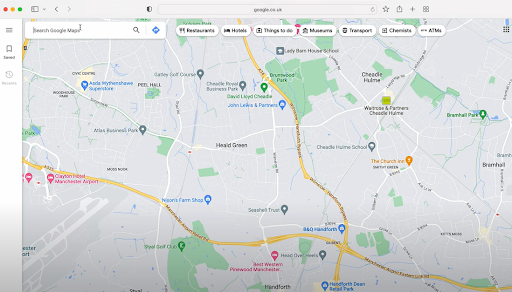
- Step: Enter the address around which you want to draw the radius. You’ll realize there is no built-in feature to directly draw circles with a specific distance in Google Maps.
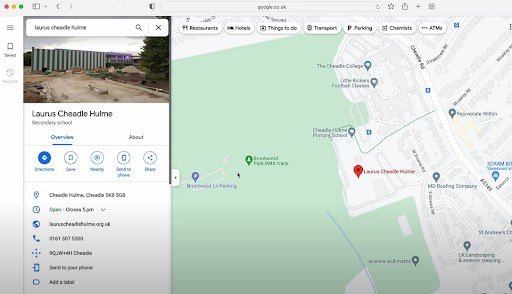
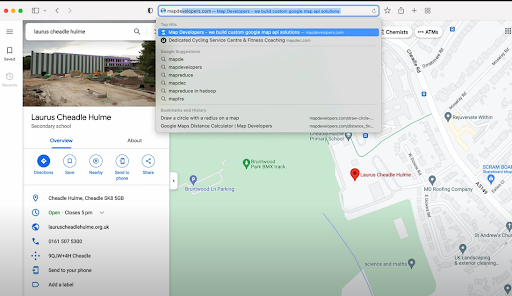
- Step: Go to the Map Developers website.
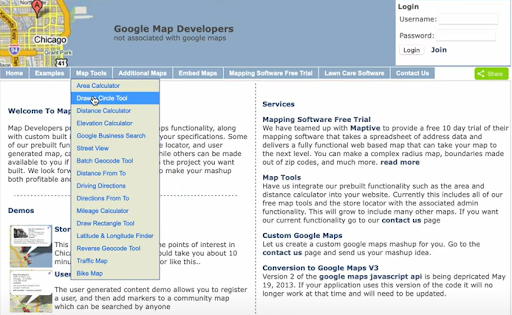
- Step: Head to the Map Tools option in the menu bar and select the Draw Circle Tool.
- Step: In the Address bar, type in the location name along with the desired radius of the circle.
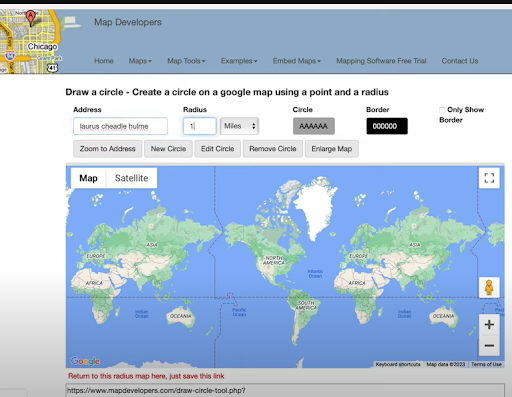
- Step: After you’ve put in the required details, click the New Circle button.
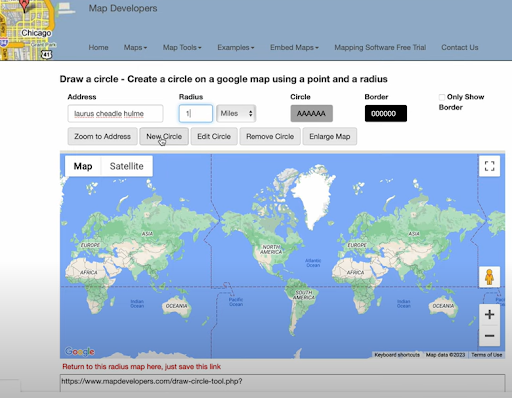
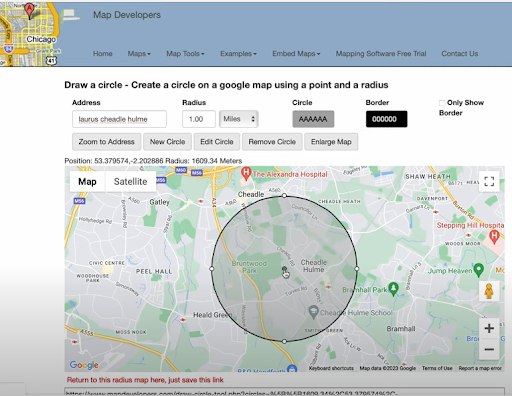
- Step: You can see the distance circle around the location you wanted.
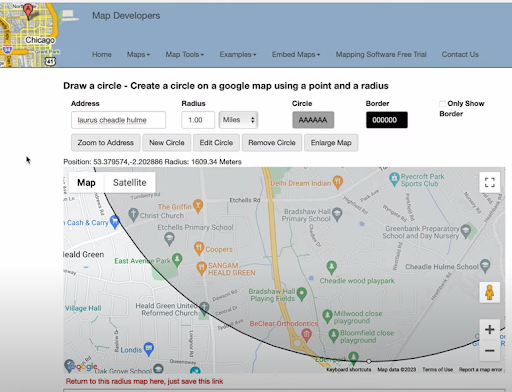
- Step: You can zoom in and check if a particular road or location falls within the given circle.
Also Read: How to use Google Maps Route Planner For Deliveries?
When Would You Need to Draw a Distance Circle?
Adding a distance radius to your Google Maps view helps visualize geographic limits. You can figure out the proximities of a particular location. Drawing a distance radius helps remove the guesswork. With a clear visual, you can make better, faster decisions.
Here are a few practical use cases:
- Delivery Route Planning
Drawing a distance radius helps you define delivery zones based on distance from a warehouse or store. You can instantly identify all stops within a 5, 10, or 15-mile radius and plan multiple drop-offs more efficiently, reducing unnecessary miles and fuel usage. - Territory Assignment
Fleet managers can assign drivers based on coverage zones. With a clear map radius, it’s easy to ensure routes don’t overlap, each driver has a balanced workload, and no area is left uncovered. - Emergency Dispatch and Quick Turnaround Jobs
When time-sensitive jobs come in, you can quickly see which driver is closest within a set radius. This helps assign urgent tasks faster and improves overall response times. - Service Availability Checks
Before accepting a new job or service request, check if it falls within your operational radius. This keeps delivery promises realistic and avoids last-minute cancellations due to distance issues. - Strategic Expansion Planning
Planning to add a new depot or warehouse? Distance radius tools help assess potential coverage areas from new locations and decide if the investment will effectively support your growth goals.
Advanced Zone Management Strategies
Beyond basic radius drawing, fleet managers can leverage zone-based strategies to optimize their operations. According to the U.S. Bureau of Transportation Statistics, businesses that implement structured delivery zones can reduce transportation costs by up to 20%.
Effective zone management involves creating overlapping radius circles to account for traffic patterns, customer density, and driver capacity. This approach ensures balanced workloads across your fleet while maintaining consistent service quality. Consider factors like peak traffic hours, road conditions, and seasonal variations when defining your delivery zones.
For businesses managing complex delivery operations, professional route planning tools provide automated zone assignment and real-time adjustments. These systems can factor in vehicle capacity, driver skills, and time windows to create optimal delivery territories that adapt to changing business needs.

increase fuel savings
Save $200 on fuel, Monthly!
Optimize routes with our algorithm, reducing travel time and costs efficiently.
Get Started for Free
Measuring Success with Distance-Based Planning
The effectiveness of distance circle planning can be measured through key performance indicators. EPA data shows that optimized route planning can reduce vehicle emissions by 10-15% annually through decreased mileage and improved fuel efficiency.
Track metrics such as average miles per delivery, driver idle time, and customer satisfaction scores to evaluate your zone-based approach. Regular analysis of these metrics helps identify opportunities for further optimization and ensures your distance planning strategy delivers measurable results.
Many successful delivery operations combine distance radius tools with advanced analytics to continuously refine their service areas. This data-driven approach helps businesses maintain competitive delivery times while controlling operational costs. Learn more about proven optimization strategies in our route optimization case studies.
Conclusion:
Drawing a distance radius on Google Maps is a small step that delivers big insights. Whether you’re organizing deliveries, analyzing service zones, or simply planning your travel, it adds a layer of clarity to your map.
With the help of a trusted Map Radius Tool, you can instantly visualize your reach and make location-based decisions with confidence. It’s a smart way to turn basic navigation into meaningful planning. For businesses ready to scale beyond basic radius planning, comprehensive route planning solutions provide the advanced features needed to manage complex delivery operations efficiently.
Frequently Asked Questions
Can I draw multiple distance circles on the same map?
Yes, most third-party mapping tools including Map Developers allow you to create multiple circles on the same map. This feature is particularly useful for comparing coverage areas between different locations or creating overlapping service zones.
What’s the difference between driving distance and straight-line radius circles?
Distance circles show straight-line measurements (as the crow flies), while actual driving distances account for roads, traffic, and route restrictions. Driving distances are typically 20-40% longer than straight-line distances in urban areas due to road networks and traffic patterns.
How do delivery companies determine optimal service radius sizes?
Most delivery companies analyze factors like vehicle capacity, driver shift length, traffic patterns, and customer density to determine service radius. Professional route optimization tools like Zeo Route Planner use AI-powered algorithms with capacity-based routing to automatically assign stops within optimal zones, helping delivery teams manage 1.5M+ users across 150+ countries.
Are there mobile apps that can draw distance circles for field workers?
While basic mapping apps don’t offer radius tools, specialized business applications provide this functionality. Field service teams often use route planning apps with built-in territory management features that include distance visualization and real-time GPS tracking for mobile workforce coordination.
How accurate are distance circle measurements for business planning?
Distance circles provide reliable straight-line measurements with accuracy within 1-2% for planning purposes. However, businesses should factor in local geography, road conditions, and traffic patterns when making operational decisions based on radius calculations.

Are you a fleet owner?
Want to manage your drivers and deliveries easily?
Grow your business effortlessly with Zeo Routes Planner – optimize routes and manage multiple drivers with ease.

increase fuel savings
Save 2 Hours on Deliveries, Everyday!
Optimize routes with our algorithm, reducing travel time and costs efficiently.
Get Started for Free 


















