Updated on: October 24, 2026
TL;DR: HVAC technicians save the most time and money by using route optimization to cut drive time between service calls, not just by scheduling appointments in order. Industry data shows field service techs lose significant portions of their day to windshield time and inefficient routing. Route optimization tools like Zeo Route Planner address this with AI-powered route optimization and capacity-based routing, helping HVAC teams save 2+ hours daily.
In the fast-paced world of HVAC services, time is money. Technicians are constantly on the move, navigating through traffic, rushing to appointments, and trying to meet customer expectations. Imagine a typical day for an HVAC technician: a packed schedule with multiple service calls scattered across town, unpredictable traffic jams, and the constant pressure to be punctual. These challenges not only make the job stressful but also eat into the profits due to high fuel costs and inefficient routes. This is where route optimization software comes into play.
Zeo Route Planner helps HVAC technicians by offering immense benefits of route planning. It is a game-changer for HVAC technicians, helping them manage their routes efficiently and making their workday more productive. Let’s delve into the top five benefits of using Zeo Route Planner for HVAC technicians.
Benefits of Using Zeo Route Planner
Efficient route planning is essential for any HVAC technician. The Zeo Route Planner benefits are plenty – from boosting productivity to saving costs and enhancing customer satisfaction.
-
Increased Productivity
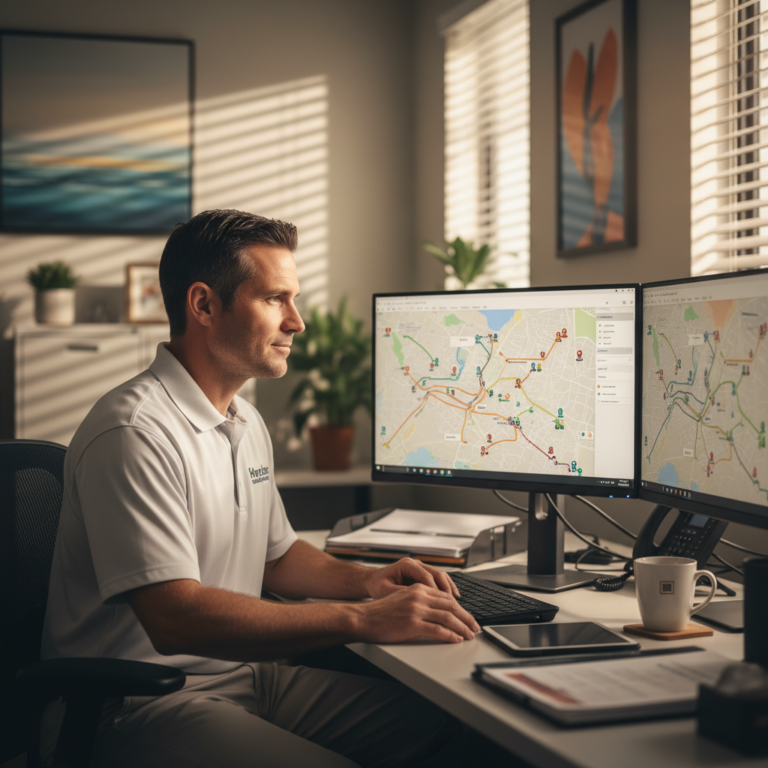
One of the primary benefits of route planning with Zeo is increased productivity. Optimized routes reduce travel time, allowing technicians to handle more appointments in a single day. This efficiency means that technicians can focus more on their tasks rather than worrying about navigation. An HVAC technician can enjoy Zeo route planner benefits with a well-optimized route. They can complete more service calls in a day compared to one with a poorly planned route. This translates into more jobs completed and more satisfied customers, directly impacting the business’s bottom line. Using the right HVAC technician tools, like Zeo, can significantly enhance daily productivity. According to the U.S. Bureau of Labor Statistics, demand for HVAC technicians continues to grow, meaning techs who can fit in more calls per day have a direct competitive advantage over those stuck in inefficient routes.
-
Cost Savings
Fuel and vehicle maintenance costs can significantly affect an HVAC business’s profitability. One of the key benefits of route planning with Zeo is the substantial cost savings it offers. By reducing travel time and minimizing unnecessary mileage, Zeo helps lower fuel consumption and maintenance expenses. For example, an HVAC technician who adopts Zeo’s route optimization software can reduce fuel costs substantially. This saving can be redirected towards other business expenses or even result in increased profits. By leveraging route optimization software, HVAC technicians can see a noticeable drop in operational costs. Zeo’s built-in miles tracking also makes it easier for HVAC businesses to maintain accurate records for expense and tax purposes, removing the guesswork from mileage logs. For a deeper look at how optimized routing translates into real-world savings, this breakdown of delivery optimization success stories shows verified results across multiple service industries.
-
Enhanced Customer Satisfaction
Timely service is crucial in the HVAC industry, especially during peak seasons. Customers rely on prompt and efficient service, and delays can lead to dissatisfaction and negative reviews. Zeo Route Planner benefits HVAC technicians by enabling quick and prompt service capabilities. It enhances customer satisfaction by providing real-time tracking and accurate ETA updates. With Zeo’s real-time tracking, customers are informed about the technician’s arrival time, reducing the uncertainty and anxiety of waiting. This transparency builds trust and encourages repeat business. Route optimization software like Zeo ensures that customers receive timely and efficient service, enhancing overall satisfaction. Customer notifications via SMS, email, and a branded tracking link also mean fewer “where’s my technician” phone calls interrupting the office staff’s day, freeing up time for scheduling and dispatch.
-
Better Work-Life Balance for Technicians
Long hours and unpredictable schedules can lead to technician burnout. HVAC technician tools help in efficient route planning. Zeo Route Planner benefits by reducing the stress of long travel times and erratic schedules, contributing to a better work-life balance for technicians. With optimized routes, technicians can complete their workdays more predictably and avoid late appointments, leading to higher job satisfaction and a healthier personal life. HVAC technician tools like Zeo make it easier to manage daily schedules and improve work-life balance. Features like work hours and break time settings also help HVAC business owners plan realistic routes that respect technician downtime rather than overloading a single driver’s day. The Occupational Safety and Health Administration notes that fatigue and long driving hours are significant contributors to on-the-job vehicle incidents, making predictable, well-planned routes a safety issue as much as a productivity one.
-
Ease of Use and Integration
Zeo Route Planner is designed with user-friendliness in mind, making it one of the perfect HVAC technician tools for technicians to plan their routes without hassle. The software integrates seamlessly with other tools and systems used by HVAC businesses, streamlining operations and improving efficiency. For example, HVAC businesses can quickly integrate Zeo with their existing systems, navigation software, or other applications. This allows technicians to plan and adjust routes effortlessly. This also saves time and reduces the complexity of managing multiple tools. Zeo also supports multiple navigation apps, including Google Maps, Waze, and Apple Maps, so technicians can stick with the app they’re already comfortable using. The Zeo Route Planner benefits are clear when it comes to ease of use and integration with existing HVAC technician tools. Businesses looking to formalize their route planning process may find this guide to planning smarter routes in 2026 useful for structuring day-to-day operations beyond just software setup.

increase fuel savings
Save 2 Hours on Deliveries, Everyday!
Optimize routes with our algorithm, reducing travel time and costs efficiently.
Get Started for Free
Conclusion
The HVAC industry is challenging and demands efficiency at every step. Effective route planning is crucial for improving productivity, saving costs, and enhancing customer satisfaction. Zeo Route Planner offers these benefits and more, making it an invaluable tool for HVAC technicians. By investing in route optimization software like Zeo, HVAC businesses can achieve greater operational efficiency, increase their profitability, and provide better service to their customers.
Are you ready to experience the benefits of route planning with Zeo? Try Zeo Route Planner today with a free trial or demo and see how it can transform your HVAC business. The path to more efficient, cost-effective, and customer-friendly operations starts here.
Frequently Asked Questions
How many service calls can an HVAC technician realistically complete in a day?
Most HVAC technicians complete between 4 and 8 service calls per day, depending on job complexity, travel distance, and whether repairs or installations are involved. Technicians using optimized routing to minimize windshield time between stops typically fit in more calls without extending their workday.
What’s the biggest cause of wasted time for HVAC technicians during the day?
Unplanned or inefficient driving routes are the single biggest time drain for HVAC technicians, often consuming hours that could otherwise go toward billable service work. Poor sequencing of appointments, last-minute schedule changes, and backtracking across town all add up over a full workweek.
How does route optimization software decide the best order for HVAC stops?
Route optimization software factors in stop locations, time windows, technician skills, and vehicle capacity to calculate the most efficient sequence of appointments. Zeo Route Planner’s AI-powered route optimization and skill-based driver assignment ensure the right technician reaches the right job with minimal backtracking, helping HVAC teams save 2+ hours daily.
Should HVAC businesses track mileage for tax purposes?
Yes, tracking mileage is important for HVAC businesses since vehicle expenses are often deductible and required for accurate tax records. The IRS requires detailed logs of business-related mileage, so using a tool that automatically tracks miles driven on each route reduces manual record-keeping errors.
Can route planning tools handle last-minute emergency HVAC calls?
Modern route planning tools support dynamic route adjustments mid-shift, allowing dispatchers to insert priority or ASAP stops into an existing technician’s route without rebuilding the entire schedule. This is especially useful for HVAC businesses that need to fit emergency no-heat or no-AC calls into an already full day without disrupting every other appointment.

Are you a fleet owner?
Want to manage your drivers and deliveries easily?
Grow your business effortlessly with Zeo Routes Planner – optimize routes and manage multiple drivers with ease.
increase fuel savings
Hassle Free Deliveries & Pickups!
Optimize routes with our algorithm, reducing travel time and costs efficiently.
Get Started for Free