




Updated on: January 23, 2026
The better you plan your business processes, the higher the chances of success. The same principle applies when it comes to the truck dispatching operations. A truck dispatcher has to overcome various challenges and handle the entire process while ensuring no disruptions.
While it sounds like a complex job, the right planning, strategy, and tools can make your life easier. We have listed down the top seven proven tips for truck dispatchers that will help them enhance their operational efficiency.
7 Tips for Truck Dispatchers to Stay Ahead of the Game
Truck dispatching is about controlling moving parts before they turn into problems. These tips for truck dispatchers focus on decision-making, truck route planning, and maintaining control when schedules, drivers, and loads are constantly shifting.
- Prioritize Loads Based on Impact, Not Just Deadlines
Not all urgent loads carry the same business value. Experienced truck dispatchers look at customer importance, penalties, driver hours, and delivery windows together. One of the most important tips for truck dispatchers is learning which loads truly need immediate action and which can be adjusted without consequences. This approach helps protect revenue while keeping drivers productive and stress levels lower. - Think in Routes, Not Individual Loads
Assigning loads one by one often leads to empty miles and wasted driver hours. Truck dispatchers should look at the full day or shift and plan and optimize truck routes that connect pickups and drop-offs logically. This approach is one of the most effective tips for truck dispatchers to improve utilization and reduce unnecessary mileage. Over time, this leads to lower fuel costs and more predictable schedules. - Match Loads to Drivers Strategically
Every driver has different strengths, preferences, and limits. Some are better with tight schedules, others with long hauls or multi-stop runs. Smart truck dispatching means aligning the right driver with the right load, which is one of the most overlooked tips for truck dispatchers aiming for consistency and fewer issues. When drivers feel assignments fit their skills, performance, and retention improve. - Communicate Clearly and Early With Drivers
Problems often come from missing or unclear information. Truck dispatchers should share load details, pickup instructions, and special requirements upfront. Clear communication is one of the most practical tips for truck dispatchers because it prevents delays, repeat calls, and on-road confusion. It also builds trust between dispatchers and drivers over time. - Build Flexibility Into Every Schedule
Schedules that look perfect on paper often fail in real-world conditions. Experienced truck dispatchers leave buffer time between loads and avoid packing the day too tightly. Planning for change is one of the smartest tips for truck dispatchers who want to stay in control when plans shift. Flexibility allows quick adjustments without disrupting the entire operation. - Track Progress Throughout the Day, Not Just at the End
Waiting until a delivery is late to react is already too late. Truck dispatchers should monitor driver progress continuously and adjust assignments when needed. Real-time awareness is one of the most valuable tips for truck dispatchers working with multiple drivers and routes. Early visibility helps solve small issues before they turn into major delays. - Review Dispatch Decisions and Learn From Them
Strong truck dispatchers reflect on what worked and what did not. Reviewing missed deadlines, idle time, and route gaps helps improve future planning. Continuous improvement is one of the long-term tips for truck dispatchers who want to stay ahead in a competitive environment. Even small adjustments can lead to better efficiency over time.
How Zeo Route Planner Helps Truck Dispatchers
Truck dispatchers need visibility, control, and the ability to make fast decisions when plans change. Zeo Route Planner is one of the best truck route planning software built to support dispatchers at every stage of the day, from planning routes to tracking progress and improving future performance.
- Live Route Tracking
Live route tracking allows truck dispatchers to see exactly where each truck is at any moment. This makes it easier to assign urgent loads, adjust schedules, and respond quickly when a driver is running late. With real-time visibility, dispatchers no longer have to rely on constant check-in calls.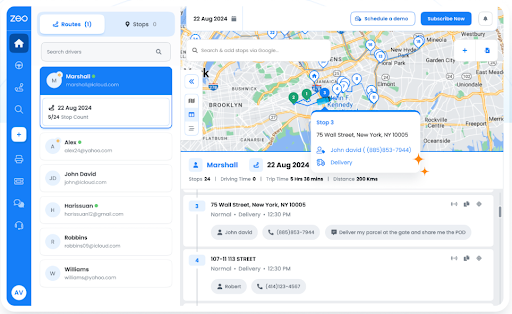
- Route Optimization
Zeo automatically sequences stops to create the most efficient routes for drivers. This helps truck dispatchers reduce empty miles, avoid unnecessary detours, and fit more deliveries into a single shift. Optimized routes lead to better driver utilization and lower operational costs.
- Driver Management
Zeo gives truck dispatchers a clear view of driver assignments, workload, and availability. This makes it easier to balance work fairly and avoid overloading certain drivers. Strong driver management helps improve performance, reduce burnout, and keep operations organized.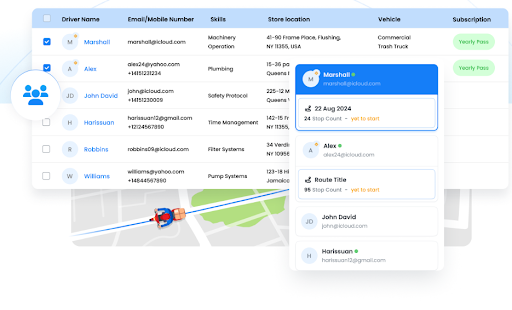
- Recurring Routes
Many truck dispatch operations involve regular routes that repeat daily or weekly. Zeo allows dispatchers to save and reuse these routes instantly. This reduces planning time and ensures consistency across repeat deliveries or fixed lanes.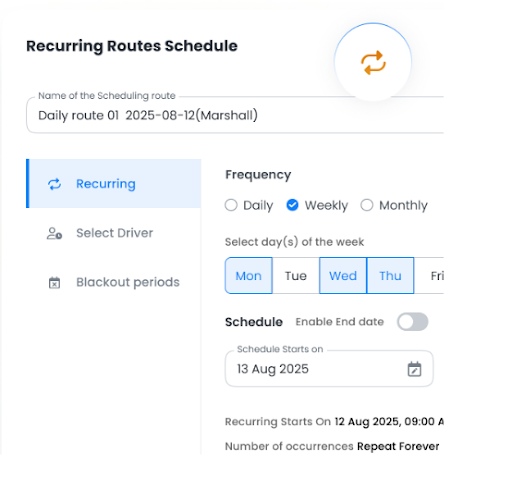
- Global Search
Truck dispatchers often need to find specific loads, routes, or stops quickly. Zeo’s global search lets them locate any route, customer, or address in seconds. This saves time and helps truck dispatchers respond faster to driver or customer queries.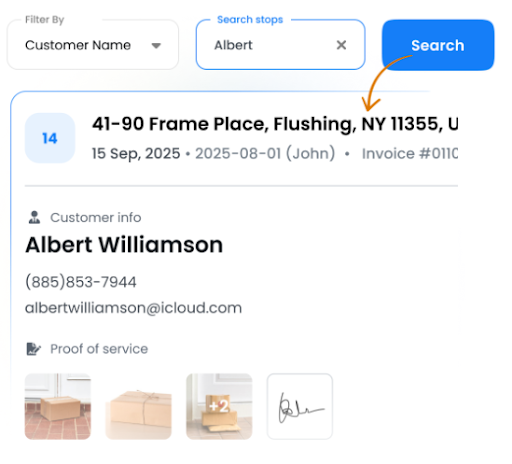
- Route Analytics
Zeo provides data on route performance, travel time, and efficiency. Truck dispatchers can use these insights to identify patterns, spot inefficiencies, and improve future planning. Analytics turn everyday dispatch data into actionable improvements.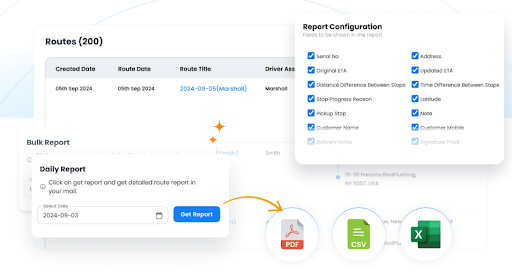
- Automated Customer Updates
Zeo sends automatic updates to customers about delivery status and arrival times. This reduces the number of inbound calls dispatchers need to handle. Automated communication keeps customers informed while freeing truck dispatchers to focus on operations.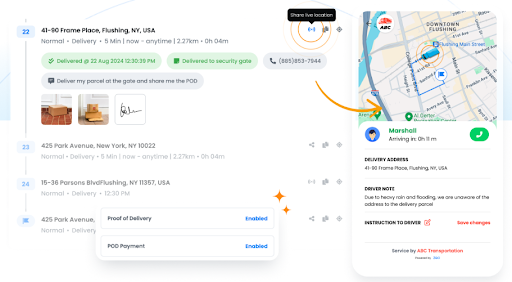
Conclusion
Truck dispatching requires constant coordination, quick judgment, and the ability to stay ahead of problems before they escalate. Applying the right tips for truck dispatchers can help streamline routing, improve communication, and keep drivers productive throughout the day. Small improvements in planning and visibility often lead to significant gains across the entire operation.

increase fuel savings
Hassle Free Deliveries & Pickups!
Optimize routes with our algorithm, reducing travel time and costs efficiently.
Get Started for Free
Zeo Route Planner gives dispatchers the control and insights they need to manage drivers, routes, and deliveries with confidence. From real-time tracking to performance analytics, Zeo supports smarter dispatching at every stage.
Sign up for Zeo Route Planner today and take control of your truck dispatch operations.

Are you a fleet owner?
Want to manage your drivers and deliveries easily?
Grow your business effortlessly with Zeo Routes Planner – optimize routes and manage multiple drivers with ease.
increase fuel savings
Hassle Free Deliveries & Pickups!
Optimize routes with our algorithm, reducing travel time and costs efficiently.
Get Started for Free 










