




Updated on: May 27, 2026
Reading Time: 3 minutes
TL;DR: Your USPS tracking number appears on your receipt, typically printed just below the barcode and labeled as “Tracking Number” or “USPS Tracking”. This 20-22 digit code serves as your package’s unique ID for monitoring delivery progress. Businesses managing multiple shipments often use route optimization tools like Zeo Route Planner with real-time GPS tracking and customer notifications to save 2+ hours daily on delivery logistics.
Ever sent a package and then immediately wondered, “How do I check if it’s actually on its way?”
You’re not the only one. Whether you’re shipping an online order, returning a product, or sending a gift, being able to track that package is crucial. The good news is that USPS makes this easy. The only thing you need is the tracking number, which you’ll find printed right on your USPS receipt.
But where exactly is it? What does it look like? And what do you do once you have it? That’s what we’re here to break down. Let’s walk through how to find your USPS tracking number and why it plays such an important role in smooth parcel management.
What is a USPS Tracking Number?
A USPS tracking number is your package’s unique ID. It’s usually a 20 to 22-digit code that gets generated when you send a parcel. You’ll find it printed on your receipt after a USPS transaction.
This number allows you to check the status of your shipment through USPS Order Tracking. You’ll be able to see when your package was accepted, when it’s in transit, and when it reaches the destination. This simple code gives you and your recipient real-time updates and peace of mind.
Understanding USPS Receipt Formats in 2026
USPS has streamlined their receipt system, but tracking numbers appear consistently across all formats. Whether you use a traditional counter service, self-service kiosk, or receive an electronic receipt, the tracking information follows standardized placement guidelines established by the United States Postal Service.
The tracking number typically appears as a series of digits, sometimes grouped in sets of four for easier reading. In 2026, USPS has also enhanced their receipt formatting to make tracking numbers more prominent, reducing customer confusion and support inquiries.
Where to Find the Tracking Number on the USPS Receipt
Right after you finish shipping your package at the counter, USPS hands you a receipt. That small piece of paper might look unimportant, but it holds the key to tracking your package.
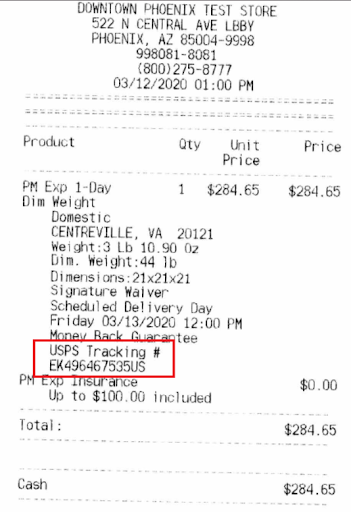
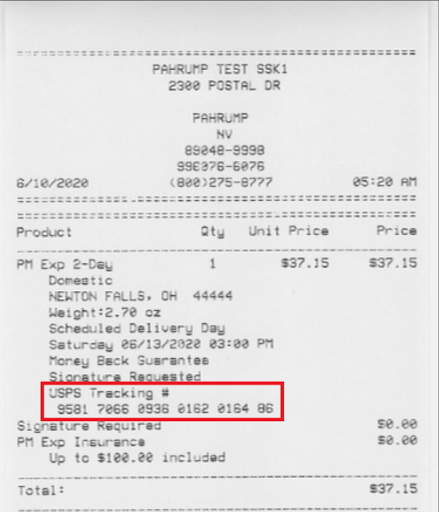
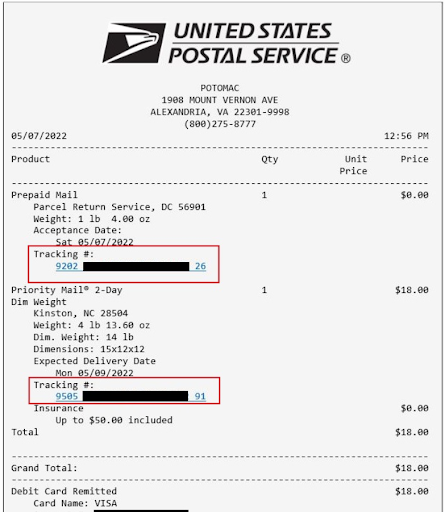
To locate the tracking number, look toward the bottom of the receipt. It usually appears just under the barcode and is labeled something like “Tracking Number” or “USPS Tracking”. It may look like a long string of numbers, sometimes broken into chunks for easier reading.
Make sure to keep that receipt safe. Snap a photo of the tracking number or store it digitally. If you lose it, there’s no easy way to retrieve it later.
Printed retail receipt
Printed receipt from a Self-Service Kiosk
eReceipt (email)
How to Verify Your Tracking Number Format
USPS tracking numbers follow specific patterns that can help you confirm you’ve found the correct code. Most tracking numbers are 20-22 digits long and may include letters. Common formats include numbers starting with “9400” for Priority Mail Express, “9205” for Priority Mail, or “9400” for First-Class Package Service.

increase fuel savings
Save $200 on fuel, Monthly!
Optimize routes with our algorithm, reducing travel time and costs efficiently.
Get Started for Free
If your number doesn’t match these patterns, double-check the receipt. Sometimes customers mistake other reference numbers or postal codes for tracking numbers. The actual tracking number will always be clearly labeled on the receipt.
Why You Should Save That Receipt
Think of your USPS receipt as your backup plan. That tracking number printed on it does more than just help you check if a package has shipped. Here’s why it’s a critical part of reliable parcel management:
- It Confirms Your Shipment Was Sent
The tracking number serves as official proof that USPS accepted your package. If anything goes wrong along the way, this number is your first line of defense when following up or filing a claim. - It Keeps Your Customers in the Loop
If you run a business, customers expect visibility. Sharing USPS Order Tracking numbers shows your customers you’re organized and proactive. It cuts down on “where’s my package” messages and builds trust. - It Helps You Stay Organized
When you have multiple shipments, tracking each one without a system can be chaotic. Saving each tracking number and linking it to your internal order records improves how you manage your parcels and keeps your logistics clean and traceable. - It Supports Faster Problem Solving
Packages get delayed. Addresses sometimes confuse delivery staff. Having the tracking number lets you quickly identify where something went wrong so you can respond to customers with confidence and clarity.
Digital Receipt Management Best Practices
In 2026, many businesses have moved beyond paper receipts to digital tracking systems. If you’re managing multiple shipments regularly, consider implementing a digital receipt management system. This approach reduces the risk of losing important tracking information and makes it easier to share updates with customers.
For businesses handling high-volume shipping, integrated solutions become essential. Many companies now use route planner applications that connect with shipping services to streamline both delivery planning and tracking management.
Bonus: USPS Order Tracking is Free and Easy to Use
You don’t need to download an app or create an account. Just go to the USPS website, enter your tracking number, and you’ll get instant updates. This is one of the simplest yet most powerful tools in day-to-day parcel management.
According to Department of Transportation logistics data, businesses that maintain organized tracking systems report 40% fewer customer service inquiries related to delivery status. This efficiency improvement directly translates to better customer satisfaction and reduced operational overhead.
Final Thoughts: Small Receipt, Big Impact
The next time you walk away from a USPS counter with a receipt in hand, don’t treat it like scrap paper. That receipt holds your tracking number, and with it, your ability to stay in control of the delivery process.
USPS Order Tracking doesn’t just help you know where your package is. It helps you run smoother operations, serve your customers better, and manage parcels with far less stress.
For anyone juggling multiple deliveries or trying to scale a small business, tracking numbers are more than just digits. They are your logistics lifeline. For businesses coordinating their own delivery operations alongside USPS shipments, route planning solutions help optimize the entire delivery workflow. So hang on to that receipt, and let it work for you.
Frequently Asked Questions
How long does it take for a USPS tracking number to start showing updates?
USPS tracking numbers typically begin showing updates within 2-4 hours after your package enters the postal system. The first scan usually occurs when your package is processed at the origin facility, though initial acceptance may appear sooner if scanned at the counter.
Can I get a replacement tracking number if I lose my USPS receipt?
Unfortunately, USPS cannot regenerate tracking numbers once a receipt is lost. The tracking number is only printed on the original receipt and any shipping labels you may have kept. This is why it’s essential to photograph or digitally store your receipt immediately after shipping.
What should I do if my USPS tracking number isn’t working on the website?
If your tracking number isn’t working, first verify you’ve entered all digits correctly and check that you’re using the tracking number (not a reference number) from your receipt. Wait 24 hours if the package was just shipped, as it may take time to enter the system. If problems persist, contact USPS customer service with your receipt.
How can businesses manage multiple USPS tracking numbers efficiently?
Businesses shipping high volumes benefit from centralized tracking systems that consolidate all shipment data in one place. Route optimization platforms like Zeo Route Planner integrate tracking management with delivery planning, helping logistics teams save 2+ hours daily through automated customer notifications and real-time tracking updates.
Are USPS tracking numbers the same length for all service types?
Most USPS tracking numbers are 20-22 digits long, but the format varies by service type. Priority Mail Express typically starts with “9400”, while Ground Advantage and First-Class Package Service use different prefixes. The length remains consistent within each service category, making it easier to identify the correct tracking code on your receipt.

Are you a fleet owner?
Want to manage your drivers and deliveries easily?
Grow your business effortlessly with Zeo Routes Planner – optimize routes and manage multiple drivers with ease.

increase fuel savings
Hassle Free Deliveries & Pickups!
Optimize routes with our algorithm, reducing travel time and costs efficiently.
Get Started for Free



















