...
Reading Time: 4 minutes
Fleet Platform
Mobile App

Recurring Routes:
Set Once, Automate Forever

Stop recreating the same routes every day. Schedule daily, weekly,
or monthly routes once and let Zeo handle the rest — with unique features
like blackout dates and per-day driver overrides that competitors don’t offer.
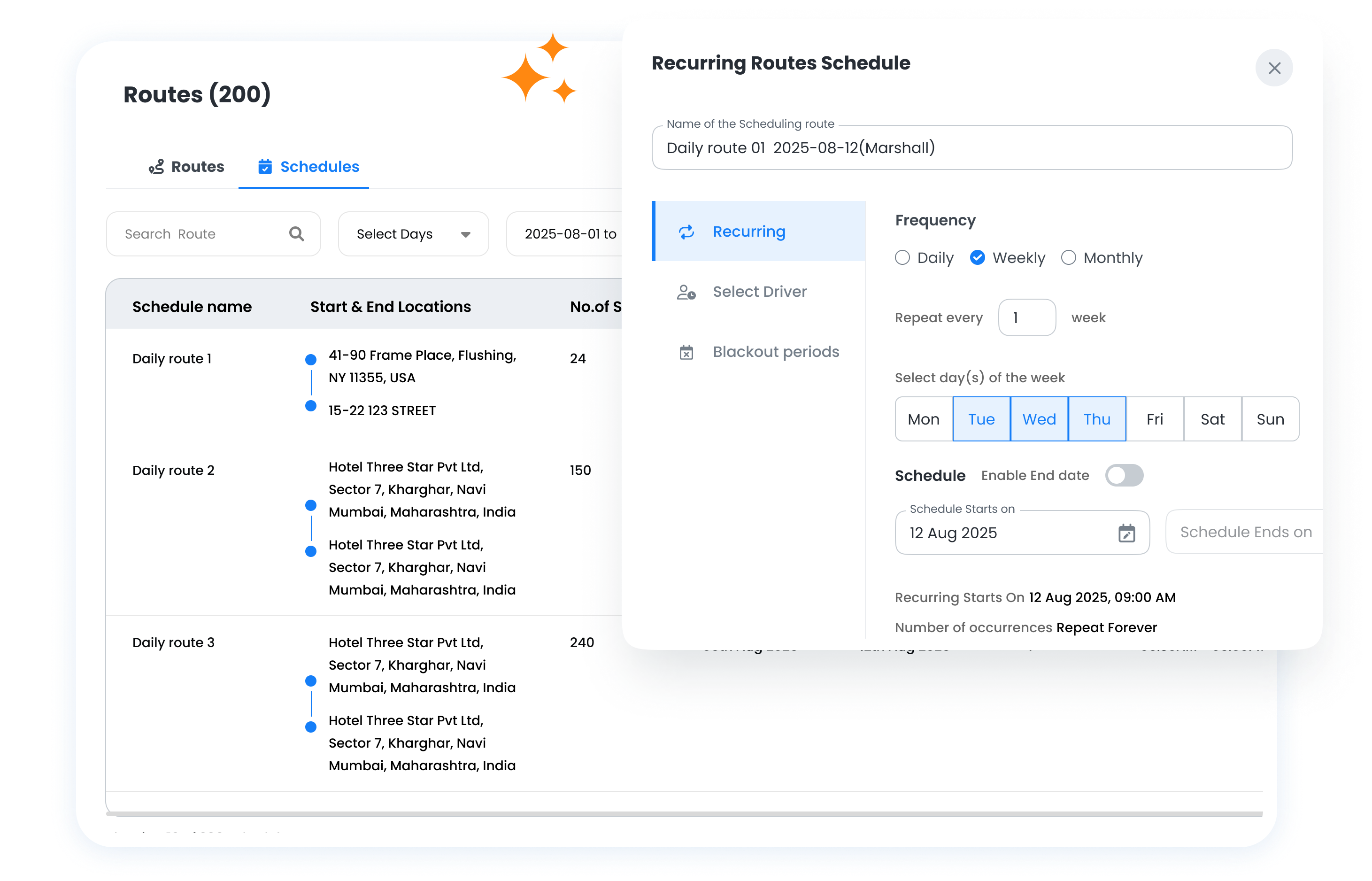
Recurring Routes & Scheduling, Zeo Route Planner
  • 90%

    Less time planning recurring routes

  • Set Once

    Routes auto-create on schedule

  • Zero

    Missed routes from holidays

Recurring Route Capabilities

Features that make Zeo’s recurring routes more powerful than alternatives.

  • Frame 1707478314 12 1, Zeo Route Planner

    Flexible Scheduling Options

    Create routes for any frequency pattern your business needs.

    • Daily (every business day)
    • Specific days (Mon, Wed, Fri)
    • Weekly (same day each week)
    • Bi-weekly
    • Monthly (1st, 15th, last day, etc.)
  • UNIQUE TO ZEO
    Frame 1707478314 11, Zeo Route Planner

    Blackout Date Management

    Automatically skip holidays and company closures without manual intervention.

    • Mark dates when routes won’t run
    • Set annual holidays once
    • Add ad-hoc closures anytime
    • Routes auto-skip blackout dates
  • UNIQUE TO ZEO
    Frame 1707478314 8 1, Zeo Route Planner

    Driver Override by Day of Week

    Different team members for different days — built into the schedule.

    • Set default driver/technician
    • Override for vacation coverage
    • Plan ahead for known absences
    • Keep schedule intact after override
  • Frame 1707478314 21, Zeo Route Planner

    Store/Hub Assignment

    Route work through specific depots, warehouses, or branch locations. Optimize for pickup points and inventory availability.

    • “Alex handles this route Mon-Wed”
    • “Jordan covers Thu-Fri”
    • Part-time schedule support
    • No duplicate route creation needed
  • Frame 1707478314 22, Zeo Route Planner

    Schedule Preview

    See exactly when routes will run before committing.

    • Calendar view of upcoming routes
    • See blackout dates highlighted
    • Verify driver assignments
    • Catch conflicts before they happen
  • Frame 1707478314 22, Zeo Route Planner

    One-Time Modifications

    Make changes to a single instance without affecting the series.

    • Add extra stops for one day
    • Skip a stop just this once
    • Change time window for one occurrence
    • Series continues unchanged after

How Recurring Routes Work

Set up once, and Zeo automatically creates optimized routes on your schedule.

1

Define Your Stops

Add the stops that repeat — regular customers, service locations, or delivery addresses.

2

Set the Schedule

Choose frequency: daily, specific days of week, weekly, bi-weekly, or monthly.

3

Assign Team Members

Set default assignments and override for specific days if needed (unique to Zeo).

4

Routes Auto-Create

Zeo automatically generates optimized routes and assigns them on schedule.

What Our Customers Say

Real results shared by teams who use us every day

Recurring Routes & Scheduling, Zeo Route Planner

“The blackout date feature alone saves me hours. Before Zeo, I had to manually cancel routes for every holiday. Now I set them once at the start of the year and forget about it. The routes just work.”

Recurring Routes & Scheduling, Zeo Route Planner Rachel Chen
Operations Manager, FreshBox Meal Delivery

Recurring Routes & Scheduling, Zeo Route Planner

“We have different technicians for different days of the week due to part-time schedules. Other tools made us create separate routes for each person. Zeo lets us have one route with day-based overrides. Much cleaner.”

Recurring Routes & Scheduling, Zeo Route Planner Marcus Johnson
Owner, ClearWater Pool Services

How Businesses Use Recurring Routes

From weekly meal prep deliveries to monthly pool maintenance schedules.

DELIVERY

Meal Prep Delivery Service

A meal prep company delivers to the same 200 subscribers every Monday and Thursday. Recurring routes auto-create the night before, fully optimized. Blackout dates ensure no routes are created on holidays when the kitchen is closed.

FIELD SERVICE

Weekly Pool Maintenance

A pool service company visits each client weekly on the same day. Different technicians handle different zones: Mike does the north routes Mon-Wed, Sarah does south Thu-Fri. Driver-by-day override makes this seamless.

DELIVERY

Pharmacy Prescription Refills

Patients on regular medications get monthly refill deliveries. Routes are scheduled for the same day each month. When a driver is on vacation, date-specific overrides ensure coverage without disrupting the regular schedule.

FIELD SERVICE

Commercial Cleaning Contracts

An office cleaning company has contracts for 3x weekly service. Each building is on a recurring route. When New Year’s Day falls on a scheduled day, blackout dates automatically skip it — no manual intervention needed.

Group 1707478361, Zeo Route Planner

Automate Your Recurring Routes

Stop recreating the same routes. Set up once and let Zeo handle the rest.

Group 1707478363, Zeo Route Planner

Zeo Questionnaire

Frequently
Asked
Questions

Know More

Recurring Routes & Scheduling

What happens if a blackout date falls on a scheduled route day?

The route simply doesn't get created for that day. No manual intervention needed. The schedule resumes normally on the next scheduled day. Customer notifications (if enabled) won't be sent for blackout days.

Can I change a single occurrence without affecting future routes?

Yes. You can modify any single instance — add stops, remove stops, change driver assignment — without affecting the recurring schedule. The series continues as configured after that one-time change.

How far in advance are routes created?

By default, routes are auto-created the night before (around midnight). You can configure this to create routes further in advance if you need more planning time. Routes are always optimized when created.

Can a stop be on multiple recurring routes?

Yes. A customer location can be part of different recurring routes with different schedules. For example, a restaurant might get deliveries on Mondays (via Route A) and Thursdays (via Route B).

What if a driver calls in sick on a recurring route day?

Use the date-specific driver override to reassign that day's route to another team member. The override only affects that one date; future occurrences remain assigned to the regular driver.

Zeo Blogs

Explore our blog for insightful articles, expert advice, and inspiring content that keeps you informed.

2026 01 14 How To Reduce Auto Parts Delivery Time Featured, Zeo Route Planner

How to Reduce Auto Parts Delivery Time by 40% in 2026

Reading Time: 8 minutesDiscover how auto parts distributors are cutting delivery times by 40% while handling 2x more emergency orders. Proven strategies for faster deliveries.

2026 01 14 Vending Machine Uptime Sla Management Featured, Zeo Route Planner

Vending Machine Uptime SLA Management: Meeting 99.5% Requirements

Reading Time: 7 minutesMaster vending machine uptime SLA management with route optimization and preventive maintenance to eliminate violations and protect profits.

8 Tips Every HVAC Dispatcher Should Know, Zeo Route Planner

8 Tips Every HVAC Dispatcher Should Know

Reading Time: 5 minutesThe secret behind every efficient and smooth HVAC operation is coordination with technicians, scheduling visits, planning routes, communicating with customers,