Updated on: May 5, 2026
Reading Time: 4 minutes
TL;DR: Zeo’s Multiple SKUs feature automatically groups multiple deliveries to the same address under one optimized stop, eliminating redundant trips and route clutter. This approach can reduce delivery time by up to 30% when handling multiple orders to apartment complexes or office buildings. Route optimization tools like Zeo Route Planner address this with auto-assignment of stops and AI-powered route optimization, helping delivery teams save 2+ hours daily.
If you’ve ever looked at your route and thought, “Didn’t I just deliver to this place?” – welcome to the club. You’re not imagining it. When five different customers in the same building place orders, your map gets messier.
Delivering multiple packages to the same location but logging them as separate stops can clog your route, waste time, and drain your patience.
That’s exactly why we built Zeo’s Multiple SKUs feature. It lets you group multiple stops with the same address automatically and keep your route clean, efficient, and stress-free.
Whether you’re delivering to a high-rise apartment block or an office building with ten different recipients, this feature takes the chaos out of delivery route optimization.
The Cost of Same-Location Delivery Inefficiency
Multiple stops at the same address create more than just minor inconveniences. According to the U.S. Bureau of Transportation Statistics, inefficient routing can increase delivery costs by 20-40% due to wasted fuel, extended driver hours, and vehicle wear. When you’re making multiple trips to the same location, these costs compound rapidly.
Consider the hidden expenses: additional fuel consumption from repeated trips, extended driver hours for the same delivery volume, increased vehicle maintenance from unnecessary mileage, and reduced customer satisfaction due to delayed deliveries. For businesses handling 50+ deliveries daily, these inefficiencies can cost thousands of dollars monthly in operational waste.
Why Zeo Introduced the Multiple SKUs Feature
Let’s say you’re delivering to 45 stops. Five of them are in the same apartment complex, same gate, same building, maybe even the same floor. But your route planner treats them as five different stops. What happens next?
- You loop around the same block multiple times.
- Your map looks more complex.
- You lose precious time and effort.
This is what we call the same location stop chaos, and it adds up fast on busy delivery days.
We understand the frustration drivers face, going back and forth to the same place, repeatedly. The root cause? Most route planners don’t recognize that multiple deliveries at the same latitude and longitude should be treated as one location.
So we built the Multiple SKUs feature into Zeo Route Planner. It detects these same location stops with the same latitude and longitude, bundles them under one pin, and lets you still deliver and track each order separately.
Let’s understand how it will make your life easier.
How Smart Address Grouping Works in Modern Route Planning
Smart address grouping goes beyond simple address matching. Advanced systems analyze GPS coordinates, recognize when multiple orders share the same latitude and longitude, and automatically cluster them under a single stop. This technology accounts for variations in address formatting, apartment numbers, and suite designations that might otherwise create separate stops.
The process involves geocoding verification, duplicate location detection, and intelligent clustering algorithms. When implemented correctly, businesses typically see 25-35% reduction in total route time and significant improvements in driver productivity. This approach particularly benefits companies serving dense urban areas, apartment complexes, and office buildings where multiple customers frequently share the same physical location.

increase fuel savings
Save 2 Hours on Deliveries, Everyday!
Optimize routes with our algorithm, reducing travel time and costs efficiently.
Get Started for Free
Step-wise Guide: Group Multiple Stops with the Same Address using Zeo’s Multiple SKUs Feature
Follow these simple steps, and you will never face any frustration and confusion while delivering multiple parcels in the same location.
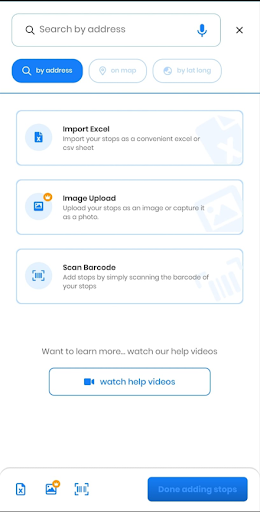
- On the Zeo app, click on ‘+Add New Route’ and add all your stops to create the route.
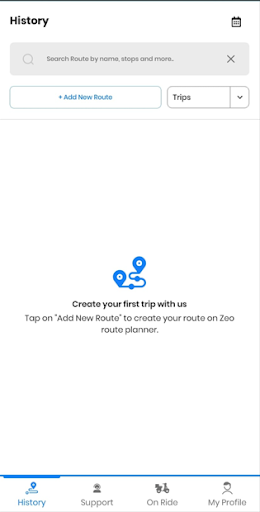
- You can search the stop by address, on the map or by latitude and longitude. Additionally, you can also import the stops from an Excel sheet, upload an image with the stops, or simply scan the barcode of your stops. For detailed guidance on manual route creation, check out our guide on creating routes manually in Zeo.
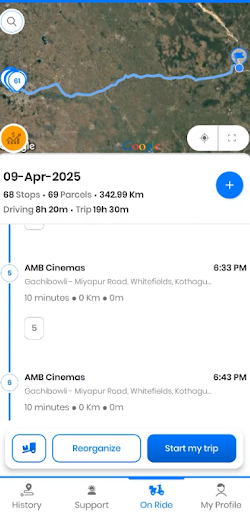
- Initially, the route will show multiple stops with the same address.
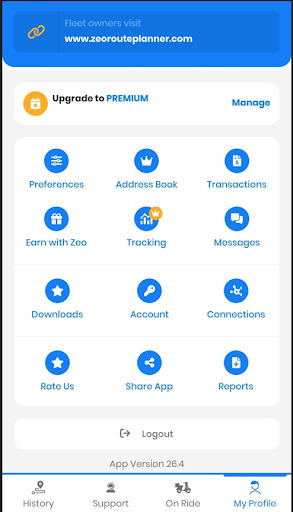
- Go to ‘My Profile’ and click on ‘Preferences’.
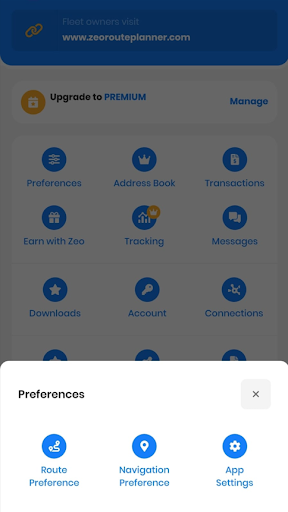
- From the pop-up that appears, select ‘Route Preferences’.
- All the route-specific features will appear. Scroll down to the end and click on ‘Group same addresses.’
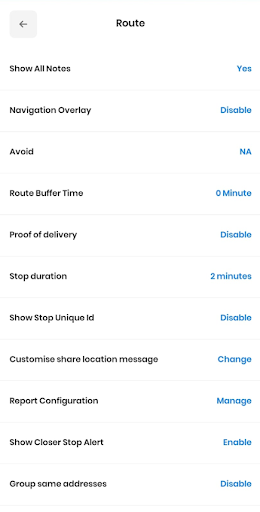
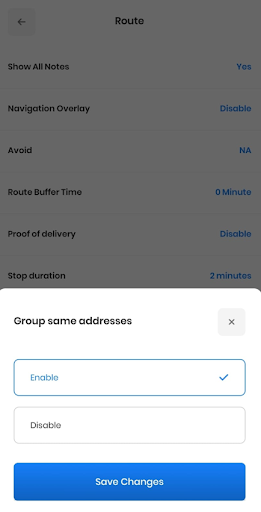
- Choose the ‘Enable’ option and click on ‘Save Changes’.
- Go back to the route and click on the ‘Edit’ option and then select ‘Update & Optimize Route.’
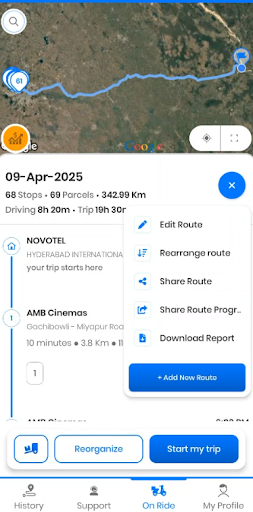
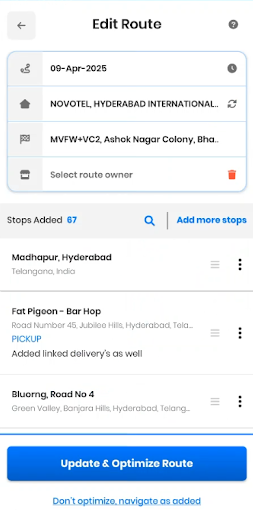
- All the stops with the same address will be clubbed together. Click on ‘Start my trip.’
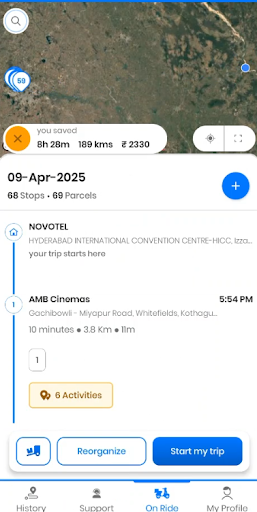
- Under the main stop, click on ‘6 activities.’ The list of sub stops will be displayed. These activities denote the number of sub-stops under the same address (latitude and longitude).
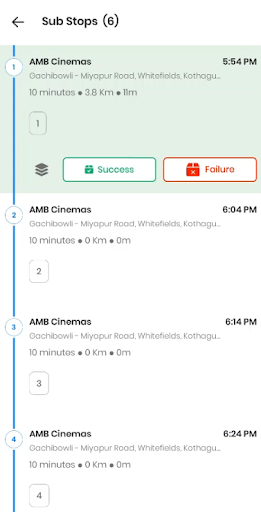
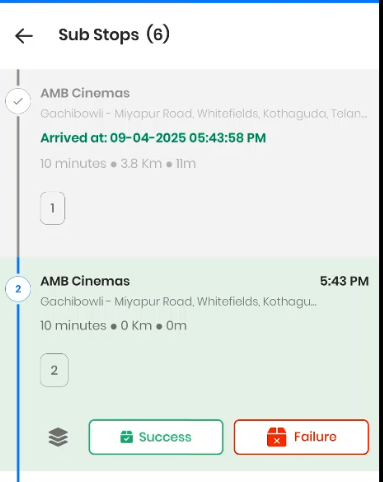
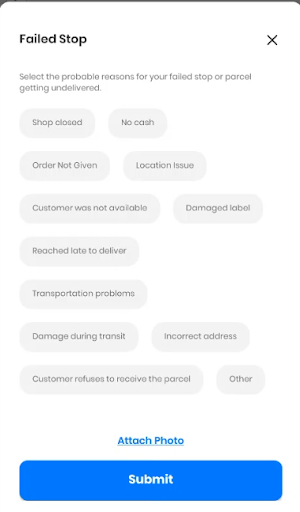
- Mark the stop as success or failure upon completion. You can also select the reason from the list in case of delivery failure. For businesses looking to streamline their upload process further, explore our comprehensive guide on planning routes with upload stops in Zeo.
Best Practices for Managing Grouped Deliveries
Successfully managing grouped deliveries requires strategic planning beyond just technological solutions. Organize packages by floor or unit number before departure to minimize sorting time on-site. Use clear labeling systems that allow quick identification of each individual order within the grouped stop.
Consider timing factors when multiple recipients are involved. Office buildings may have specific delivery windows, while residential complexes might require coordination with building management. Communicate clearly with customers about delivery timing, especially when multiple orders are being delivered simultaneously to avoid confusion.
Documentation becomes crucial for grouped deliveries. Department of Transportation research shows that proper delivery documentation reduces disputes by up to 60%. Ensure each individual delivery within a grouped stop receives proper proof of delivery, whether through photos, signatures, or delivery notes.
Conclusion
Here’s the obvious truth – in the delivery business, time is money, and efficiency beats everything. Zeo’s Multiple SKUs feature isn’t just a nice-to-have tool. If used strategically, it has the potential to become your secret weapon against wasted trips, messy maps, and delivery-day chaos.
When you group the multiple stops with the same address, you eliminate the noise, speed up your routes, and make every step count. Whether you’re handling apartment drops or office bundles, this tool brings serious efficiency to your performance.
So go ahead, let Zeo turn those same location stops into a single, optimized drop-point and take your delivery route optimization to the next level. For more insights on route optimization across different industries, explore our complete guide to business route planning beyond Google Maps.
Frequently Asked Questions
How do I handle multiple packages for different customers at the same address?
Organize packages by apartment or unit number before leaving your depot, and use clear labeling systems for quick identification. Create a delivery checklist for each address to ensure no packages are missed, and consider using delivery bags or containers to separate orders while keeping them grouped for efficiency.
What’s the average time savings from grouping same-address deliveries?
Businesses typically see 25-35% reduction in total route time when properly grouping same-address deliveries. The exact savings depend on route density and the frequency of multiple orders per address in your delivery area.
Can route optimization software automatically detect duplicate addresses?
Yes, advanced route optimization platforms use GPS coordinates and geocoding to identify deliveries at the same location automatically. Zeo Route Planner’s Multiple SKUs feature detects same-location stops and groups them under one pin while maintaining separate tracking for each individual delivery, helping teams save 2+ hours daily.
How do I ensure accurate delivery tracking with grouped stops?
Use individual proof of delivery for each package within a grouped stop, including photos, digital signatures, and delivery notes for each recipient. Maintain separate delivery confirmations even when packages are delivered simultaneously to prevent confusion or disputes.
What should I do if customers at the same address have different delivery time requirements?
Coordinate with all recipients before grouping deliveries, or create separate stops if time windows don’t align. Consider the most restrictive time window when scheduling grouped deliveries, and communicate clearly with customers about expected delivery timing to manage expectations effectively.

Are you a fleet owner?
Want to manage your drivers and deliveries easily?
Grow your business effortlessly with Zeo Routes Planner – optimize routes and manage multiple drivers with ease.
increase fuel savings
Hassle Free Deliveries & Pickups!
Optimize routes with our algorithm, reducing travel time and costs efficiently.
Get Started for Free