...
Reading Time: 5 minutes

Plan Smarter Routes,
Complete More Stops Daily

AI-powered route planning for delivery teams and field service businesses.
Reduce drive time, save fuel, and get more done — whether you’re delivering packages or completing service calls.
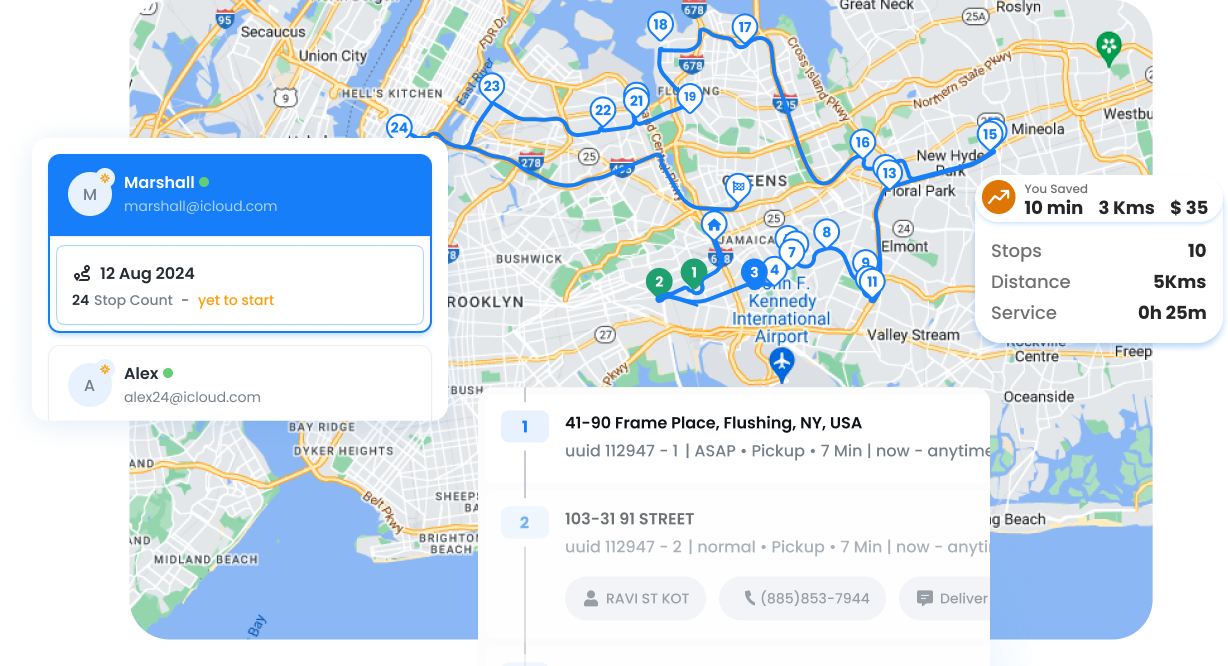
Zeo Route Optimization, Zeo Route Planner
  • 30%

    Less drive time per route 

  • 25%

    Fuel cost savings

  • 50%

    More stops completed daily

Everything You Need to Optimize Your Routes.

From one-time route planning to recurring schedules,
Zeo handles the complexity so you can focus on your business.

  • Group 11880, Zeo Route Planner

    Route Creation Methods

    6 ways to add stops: spreadsheet import, OCR document scanning, Google search, voice input, contacts quick-add, and API import. Get stops into your route fast.

    Learn More

  • Group 11880 1, Zeo Route Planner

    Optimization Engine

    AI-powered routing with 10+ constraint types: time windows, vehicle capacity, driver skills, priority stops, pickup-delivery pairs, and more. Handles 500+ stops.

    Learn More

  • Group 11880 2, Zeo Route Planner

    Auto-Assignment

    Automatically distribute stops across your team based on location, skills, vehicle capacity, and workload. Smart matching for the right person for each job.

    Learn More

  • Group 11880 3, Zeo Route Planner

    Recurring Routes

    Set up daily, weekly, or monthly routes once and let them run automatically. Includes blackout dates and per-day driver overrides — unique to Zeo.

    Learn More

  • Frame 1707478314, Zeo Route Planner

    Contacts

    Save customers and their addresses for quick route creation. Organize by groups and build routes from your regular customers in seconds.

    Learn More

Trusted by Delivery Teams
and Service Businesses.

Real results shared by teams who use us every day

Zeo Route Optimization, Zeo Route Planner

“We went from spending 2 hours each morning planning routes to having optimized routes ready in 5 minutes. Our drivers complete 40% more deliveries now, and customers love the accurate ETAs.”

Zeo Route Optimization, Zeo Route Planner Maria Rodriguez
Operations Manager, Fresh Eats Delivery

Zeo Route Optimization, Zeo Route Planner

“As a pool service company, we have specific equipment needs at each stop. Zeo’s skill-based routing ensures the right technician with the right equipment visits each pool. Game changer.”

Zeo Route Optimization, Zeo Route Planner James Chen
Owner, Crystal Clear Pools

Additional Capabilities

More powerful features to handle real-world routing challenges

Route Modification & Control

Routes rarely go exactly as planned. Zeo gives you full control to modify routes on-the-fly while keeping everything optimized.

G543 1, Zeo Route Planner
Add/Remove Stops Mid-Route

Insert priority stops or remove cancellations without disrupting the entire schedule.

G543, Zeo Route Planner
Re-Optimize Active Routes

Trigger re-optimization at any point to account for new conditions or changes.

Gps 1, Zeo Route Planner
Navigate as Added

Option to navigate to newly added stops in order added, without full re-optimization.

Drag And Drop 1, Zeo Route Planner
Drag-and-Drop Reordering

Manually adjust stop sequence when you know something the algorithm doesn’t.

G2199, Zeo Route Planner
Driver Edit Controls

Configure which modifications drivers can make vs. dispatcher-only changes.

Route Planning
Without vs. With Zeo

See how Zeo transforms your daily route planning from
hours of frustration to minutes of efficiency.

No, Zeo Route Planner
Without Zeo

  • Hours spent manually planning routes each morning
  • Drivers criss-crossing the same areas
  • Missed time windows and upset customers
  • No visibility into who’s where
  • Wasted fuel and overtime costs
  • Guessing which team member should take which stops

Yes, Zeo Route Planner
With Zeo

  • Routes optimized in seconds, not hours
  • Efficient paths with minimal backtracking
  • Time windows respected automatically
  • Real-time tracking of every team member
  • 30% fuel savings on average
  • Smart assignment based on skills and location

How Businesses Use Route Optimization

From local delivery companies to national service providers, see how different industries benefit.

DELIVERY

Local Bakery Delivery

A craft bakery delivering 60 custom orders across the city optimizes routes to ensure fresh delivery within specific time windows. They’ve reduced delivery time by 40% while ensuring pastries arrive fresh.

FIELD SERVICE

Pool Maintenance Company

A pool service company plans efficient routes for 30 daily service calls, factoring in equipment requirements and chemical supplies. Route optimization cut their drive time by 2 hours daily.

DELIVERY

Pharmacy Prescription Delivery

A local pharmacy delivers 100+ prescriptions daily with strict time-of-day requirements for certain medications. Zeo ensures temperature-sensitive items are delivered within safe windows.

FIELD SERVICE

HVAC Service Provider

An HVAC company with 25 daily appointments uses skill-based routing to ensure certified technicians handle specialized equipment. Priority emergency calls are inserted without disrupting the entire schedule.

Group 1707478361, Zeo Route Planner

Ready to Optimize
Your Routes?

Join thousands of businesses saving time and money with smarter route planning.

Group 1707478363, Zeo Route Planner

Zeo Questionnaire

Frequently
Asked
Questions

Know More

How do I add stop by typing and searching? Web

Follow these steps to add a stop by typing and searching:

  • Go to Playground Page. You will find a search box in top left.
  • Type in your desired stop and it will show search results as you type.
  • Select one of the search results to add the stop to list of unassigned stops.

How do I import stops in bulk from an excel file? Web

Follow these steps to add stops in bulk using an excel file:

  • Go to Playground Page.
  • In top right corner you will see import icon. Press on that icon & a modal will open.
  • If you already have an excel file, press the "Upload stops via flat file" button & a new window will open up.
  • If you don't have an existing file, you can download a sample file and input all your data accordingly, then upload it.
  • In the new window, upload your file and match the headers & confirm mappings.
  • Review your confirmed data and add the stop.

How do I import stops from an image? Mobile

Follow these steps to add stops in bulk by uploading an image:

  • Go to Zeo Route Planner App and open On Ride page.
  • Bottom bar has 3 icons in left. Press on image icon.
  • Select the image from gallery if you already have one or take a picture if you don't have existing.
  • Adjust the crop for the selected image & press crop.
  • Zeo will automatically detect the addresses from the image. Press on done and then save & optimize to create route.

How do I add a stop using Latitude and Longitude? Mobile

Follow these steps to add stop if you have Latitude & Longitude of the address:

  • Go to Zeo Route Planner App and open On Ride page.
  • You will see a icon. Press on that icon & press on New Route.
  • If you already have an excel file, press the "Upload stops via flat file" button & a new window will open up.
  • Below search bar, select the "by lat long" option and then enter the latitude and longitude in the search bar.
  • You will see results in the search, select one of them.
  • Select additional options according to your need & click on "Done adding stops".

How do I add stops using QR Code? Mobile

Follow these steps to add stop using QR Code:

  • Go to Zeo Route Planner App and open On Ride page.
  • You will see a icon. Press on that icon & press on New Route.
  • Bottom bar has 3 icons in left. Press on QR code icon.
  • It will open up a QR Code scanner. You can scan normal QR code as well as FedEx QR code and it will automatically detect address.
  • Add the stop to route with any additional options.

How do I delete a stop? Mobile

Follow these steps to delete a stop:

  • Go to Zeo Route Planner App and open On Ride page.
  • You will see a icon. Press on that icon & press on New Route.
  • Add some stops using any of the methods & click on save & optimize.
  • From the list of stops that you have, long press on any stop that you want to delete.
  • It will open window asking you to select the stops that you want to remove. Click on Remove button and it will delete the stop from your route.

Zeo Blogs

Explore our blog for insightful articles, expert advice, and inspiring content that keeps you informed.

8 Tips Every HVAC Dispatcher Should Know, Zeo Route Planner

8 Tips Every HVAC Dispatcher Should Know

Reading Time: 5 minutesThe secret behind every efficient and smooth HVAC operation is coordination with technicians, scheduling visits, planning routes, communicating with customers,

Delivery Company Names: How to Choose the Right One for Your Courier Business?, Zeo Route Planner

Delivery Company Names: How to Choose the Right One for Your Courier Business?

Reading Time: 4 minutesThe famous quote by Shakespeare, “What’s in the name?”, can’t hold a lot of relevance in the business world. Though

2026 01 14 How To Reduce Vending Machine Service Costs Featured, Zeo Route Planner

How to Reduce Vending Machine Service Costs by 40% in 2026

Reading Time: 8 minutesLearn how to reduce vending machine service costs through smart routing, data-driven scheduling, and mobile tech. Cut operational costs by 30-40%.