




Updated on: January 2, 2026
AI is at the core of every aspect of our lives – entertainment, education, and also delivery transportation.
If utilized strategically, AI has the potential to completely transform your delivery process and logistics operations. The question no longer is whether you use AI in your delivery operations, the question is – How effectively you use it?
Without AI-powered route optimization, you risk falling behind your competitors. AI solves various delivery problems around accuracy, efficiency, and automates repetitive tasks to save time and effort. It is truly shaping the delivery industry.
What Is AI-Powered Route Optimization
AI-powered route optimization is the process of using artificial intelligence to find the most efficient and cost-effective delivery routes. It goes beyond basic route planning by learning from data such as route patterns, delivery timings, vehicle capacity, and driver performance. The system then uses this information to plan routes that save time and reduce operational costs.
How AI Improves Delivery Efficiency
Artificial intelligence is reshaping how businesses plan and execute deliveries. By analyzing data and learning from real-world conditions, AI helps fleets work smarter, reduce delays, and increase productivity across every delivery route.
- Real-Time Decision Making
AI continuously monitors data such as delivery patterns, driver location, and delivery status. It instantly updates routes whenever conditions change, ensuring that deliveries stay on schedule. This adaptability helps drivers avoid congestion and reach destinations faster, improving overall delivery performance. - Predictive Analysis for Smarter Planning
AI can anticipate potential delays or disruptions before they happen. By studying patterns from past data, it identifies areas that need faster deliveries. This predictive approach allows businesses to plan, reducing wasted time and improving on-time delivery rates. - Load and Resource Optimization
AI helps balance workloads across drivers and vehicles by analyzing capacity, distance, and delivery priorities. It assigns the right deliveries to the right vehicles for maximum efficiency. This reduces unnecessary trips and ensures that vehicles operate at their best capacity throughout the day.. - Automation and Scalability
AI-powered systems can manage large fleets with minimal manual input. Automated route scheduling and dynamic updates help delivery teams handle hundreds of stops with accuracy. As the business grows, AI scales effortlessly, maintaining consistency and precision across every route.
Key Benefits of AI-Powered Route Optimization for Businesses
AI-powered route optimization helps businesses grow faster, operate more profitably, and deliver a better experience to their customers. These benefits show why adopting AI in route planning has become essential for success in 2026.
- Lower Operational Costs
AI reduces wasted travel, fuel consumption, and overtime costs. By planning the most efficient routes and reducing idle time, businesses save money on every trip. Over time, these small savings add up to a major reduction in operating expenses. - Improved Fleet and Driver Productivity
AI helps managers assign deliveries more effectively and track performance. Drivers spend less time planning and more time completing deliveries. This balance increases daily output and ensures that resources are used to their full potential. - Enhanced Customer Experience
Accurate ETAs, faster deliveries, and proactive updates make customers feel informed and valued. When clients can track their orders in real time, trust increases. Satisfied customers are more likely to stay loyal and recommend the service to others. - Smarter Business Decisions
AI systems provide valuable data about delivery times, route performance, and fuel usage. Businesses can use these insights to plan better, improve scheduling, and set realistic performance goals. This data-driven approach helps companies grow strategically and stay competitive in the long term.
How Zeo’s AI Algorithm Redefines Route Optimization
Zeo Route Planner uses advanced AI algorithms that make delivery planning faster, smarter, and more reliable. Each feature is designed to help businesses improve delivery speed, accuracy, and overall efficiency.

increase fuel savings
Hassle Free Deliveries & Pickups!
Optimize routes with our algorithm, reducing travel time and costs efficiently.
Get Started for Free
- Smart Route Planning
Zeo’s AI system analyzes delivery locations, priorities, and distances to create the best possible route automatically. It studies real-world data like the number of stops, travel times, driver availability, vehicle capacity, and more to optimize each trip. This helps drivers complete more deliveries in less time while reducing fuel use and unnecessary mileage.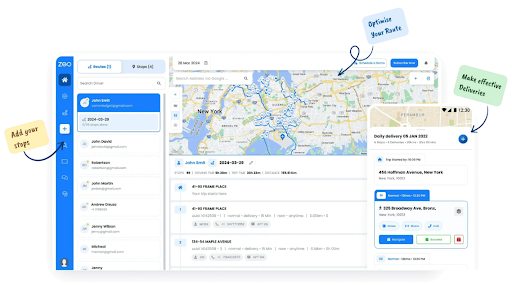
- Live Tracking and Dynamic Adjustments
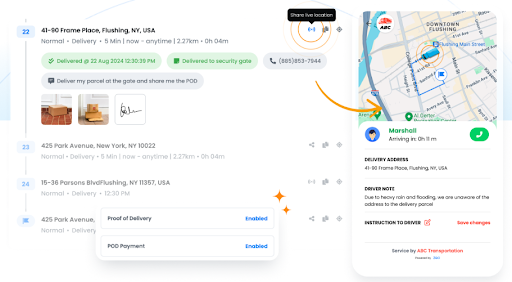
With AI-driven live tracking, Zeo provides real-time visibility for managers and dispatchers. The system can detect route changes, delays, or diversions instantly and update the plan automatically. This helps businesses stay in control and ensures that deliveries remain on time, even when conditions change unexpectedly.
- Delivery Automation & Customer Updates
AI helps Zeo automate key delivery processes such as scheduling, route assignment, and customer notifications. It learns delivery progress and predicts when updates need to be sent, ensuring customers are informed at every stage of the journey.These automated updates improve communication, reduce manual effort, and build trust with clients. By combining smart scheduling with real-time visibility, Zeo keeps operations smooth for managers and transparent for customers.
- Driver Management
AI in Zeo monitors driver performance, average delivery times, and route completion accuracy. It identifies areas where drivers can improve and provides managers with insights for training or performance optimization. This data-driven feedback loop helps maintain higher productivity and safer driving standards.
- Recurring Routes
For regular or repeat deliveries, Zeo’s AI recognizes patterns and automates route creation for recurring schedules. It fine-tunes these routes over time based on real delivery data, making each run more efficient. This consistency is ideal for businesses handling routine deliveries such as eCommerce, retail, or healthcare logistics.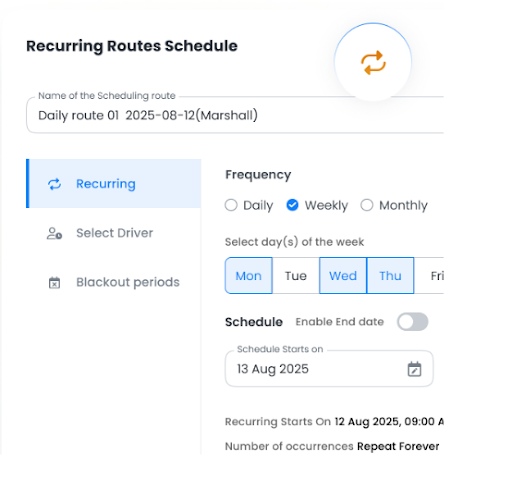
- Route Analytics and Insights
Zeo’s AI-powered route analytics process vast amounts of delivery data to reveal trends and performance metrics. It identifies what’s working well and where improvements are needed. These insights help managers make smarter business decisions, reduce costs, and continuously improve delivery speed and reliability.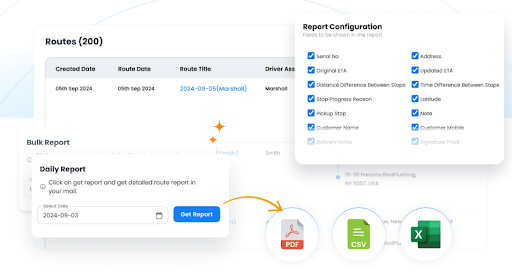
Conclusion
AI is transforming how delivery and transport operations work. It helps businesses plan routes faster, cut costs, and deliver with greater accuracy. With tools like Zeo Route Planner, companies can harness the power of AI to automate deliveries, track fleets in real time, and make smarter decisions every day. Zeo’s AI algorithm brings reliability, speed, and insight to every trip.
Sign up for Zeo Route Planner today and start building a smarter, more efficient delivery network for 2026 and beyond.

Are you a fleet owner?
Want to manage your drivers and deliveries easily?
Grow your business effortlessly with Zeo Routes Planner – optimize routes and manage multiple drivers with ease.
increase fuel savings
Hassle Free Deliveries & Pickups!
Optimize routes with our algorithm, reducing travel time and costs efficiently.
Get Started for Free 










