



Updated on: March 1, 2026
Reading Time: 4 minutes
TL;DR: Success in defining store service areas requires mapping geographic boundaries based on capacity constraints, customer density, and operational efficiency to optimize resource allocation. Strategic service area planning can reduce operational costs by 20-30% while improving customer satisfaction through faster delivery times. Route optimization tools like Zeo Route Planner address this with capacity-based routing and auto-assignment of stops to drivers, helping retail teams save 2+ hours daily.
Defining service areas for stores is paramount in optimizing delivery operations, enhancing customer satisfaction, and gaining a competitive edge in today’s dynamic marketplace. By defining specific geographic boundaries and parameters, businesses can ensure efficient resource allocation, streamline logistics, and tailor services to meet localized demand.
Imagine you own a chain of retail stores spread across different neighborhoods in a city. Each store serves its surrounding area, delivering products to customers within a certain radius. By defining service areas for each store using Zeo, you can ensure efficient delivery operations tailored to the specific needs of each location
Why Defining Service Areas Matters
Defining service areas is crucial for businesses as it directly impacts the customer experience by enabling businesses to tailor services to specific geographic regions, enhancing convenience and satisfaction.
- Efficient Resource Allocation: By defining service areas, businesses can optimize their resource allocation, ensuring that drivers and vehicles are deployed strategically to cover high-demand regions efficiently. This prevents the wastage of resources on unnecessary routes or areas with low customer density, thereby reducing operational costs and maximizing profitability.
- Enhanced Customer Experience: Clear and well-defined service areas enable businesses to provide a more personalized and efficient customer experience. Customers within these designated areas receive faster and more reliable service, as delivery routes are optimized to minimize delivery times and streamline operations. This not only improves customer satisfaction but also fosters loyalty and repeat business.
- Strategic Market Penetration: Defining service areas allows businesses to strategically target and penetrate key market segments. By focusing on specific geographic regions or customer demographics, businesses can tailor their services and marketing efforts to meet the unique needs and preferences of these segments. This targeted approach increases the effectiveness of marketing campaigns, improves customer acquisition, and strengthens brand presence in the marketplace.
- Competitive Advantage: Clearly defined service areas give businesses a competitive edge by enabling them to deliver superior service and value to their customers. By optimizing delivery routes and ensuring timely and efficient service within designated areas, businesses can differentiate themselves from competitors and position themselves as industry leaders.
Key Factors to Consider When Defining Service Areas
Successful service area definition requires careful analysis of multiple variables that directly impact operational efficiency and customer satisfaction. Understanding these factors enables businesses to create realistic boundaries that support sustainable growth while maintaining service quality.
Customer Density and Demand Patterns: Areas with higher customer concentration justify tighter service boundaries, while sparse regions may require expanded coverage zones to maintain profitability. Analyzing historical order data helps identify peak demand locations and optimal service radiuses for each store location.
Vehicle Capacity and Driver Capabilities: Service areas must align with actual delivery capacity limitations. According to the Bureau of Transportation Statistics, effective capacity utilization can improve delivery efficiency by up to 25%. Factors include vehicle weight limits, cargo volume, and driver work hour restrictions.
Geographic and Traffic Constraints: Natural barriers, traffic congestion patterns, and road infrastructure significantly impact service area viability. Urban areas may require smaller, more concentrated zones due to traffic density, while suburban regions can support larger geographic coverage with fewer stops per route.
Competition and Market Dynamics: Service areas should consider competitor presence and market saturation levels. Overlapping coverage zones may indicate opportunities for market share growth or signal the need for service differentiation strategies.
How to Define Service Areas for your Stores using Zeo
- Sign in to your Zeo account and access your Zeo dashboard by logging in with your credentials.
- Go to the Preferences settings section and click on – Stores.
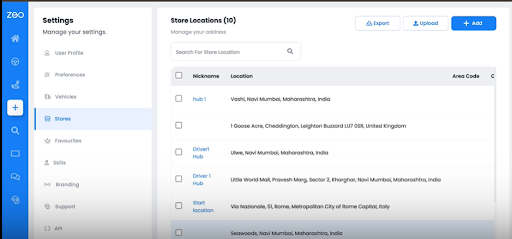
- Click on the Add button to add a new store location.
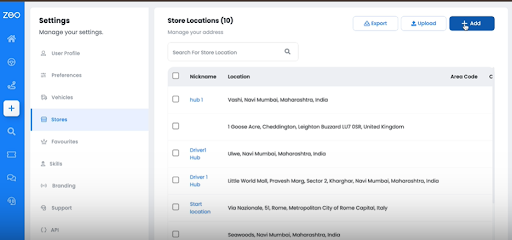
- In the Store Locations popup window, add the Stop Address.
- Enter the location name, area code and other required information.
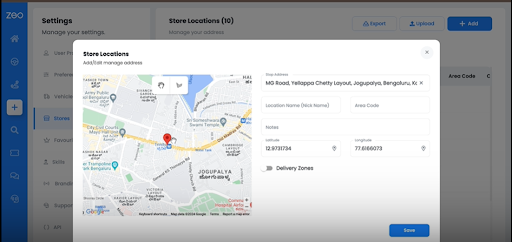
- Switch on the Delivery Zone.
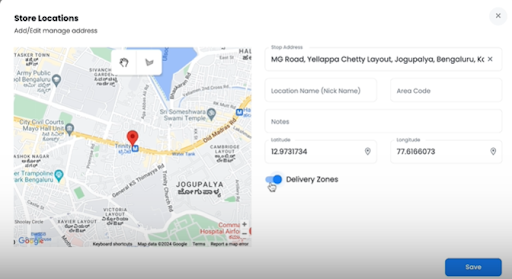
- Mark the delivery zone on the map alongside.
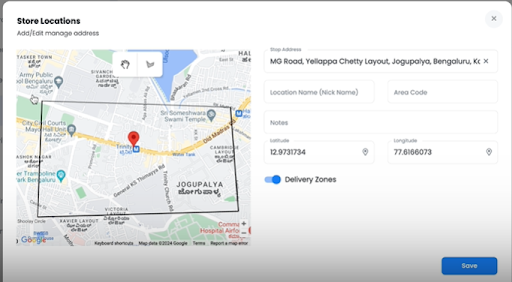
- Click on save.
Common Challenges in Service Area Management
Even well-planned service areas face operational challenges that require ongoing monitoring and adjustment. Understanding these common issues helps businesses prepare proactive solutions and maintain service quality as they scale.
Seasonal Demand Fluctuations: Service areas that work effectively during regular periods may become strained during peak seasons or promotional events. U.S. Census Bureau retail data shows seasonal variations can increase delivery volumes by 40-60% during holiday periods, requiring flexible boundary adjustments.
Driver Availability and Scheduling: Service areas must account for driver capacity limitations, especially during high-demand periods or when dealing with unexpected absences. Effective planning includes buffer capacity and cross-training programs to maintain coverage consistency.
Customer Expectation Management: Clearly defined service areas help set realistic delivery expectations, but businesses must communicate boundaries effectively to avoid customer disappointment. Transparency about coverage zones and delivery timeframes reduces service complaints and improves customer satisfaction.
Benefits of Using Zeo for Defining Service Areas:
Defining service areas with Zeo brings forth a host of advantages that empower businesses to optimize their operations and deliver unparalleled service to their customers.
Optimize routes with our algorithm, reducing travel time and costs efficiently.
increase fuel savings
Save 2 Hours on Deliveries, Everyday!

- Flexibility and Customization: Zeo offers flexible tools for defining service areas, allowing businesses to tailor their geographic boundaries and parameters according to specific needs and preferences.
- Real-Time Updates and Modifications: With Zeo, service area definitions can be updated and modified in real-time, ensuring that businesses can adapt to changing market conditions, customer preferences, and operational requirements.
- Efficient Route Optimization: By accurately defining service areas, Zeo’s route optimization algorithms can generate more efficient and optimized delivery routes. This minimizes travel time, reduces fuel costs, and enhances overall operational efficiency.
- Analytics and Insights: Zeo provides valuable analytics and insights into service area performance, allowing businesses to track key metrics such as delivery times, customer satisfaction, and resource utilization. This data-driven approach enables informed decision-making and continuous improvement.
Measuring Service Area Performance
Successful service area management requires continuous monitoring of key performance indicators that reveal operational efficiency and customer satisfaction levels. Regular analysis of these metrics enables data-driven adjustments that improve overall delivery performance.
Track delivery completion rates, average delivery times, and cost per delivery within each service area to identify optimization opportunities. Monitor customer satisfaction scores and complaint patterns to ensure service quality remains consistent across all coverage zones. For comprehensive insights into optimizing delivery operations, explore our Complete Delivery Route Planner Guide for 2026.
Analyze driver utilization rates and route efficiency metrics to determine if service area boundaries align with operational capacity. Areas with consistently low efficiency may require boundary adjustments or additional resources to maintain service standards.
Regular performance reviews help identify trends and patterns that inform strategic decisions about service area expansion, contraction, or restructuring. Businesses looking to implement systematic improvements should consider route optimization best practices that have proven effective across various industries.
Conclusion
Zeo, with its innovative functionality, empowers businesses to define service areas effectively by providing intuitive tools and features. From customizable mapping options to real-time updates and analytics, Zeo offers comprehensive solutions that enable businesses to precisely delineate service areas and optimize their delivery operations. With Zeo’s assistance, businesses can strategically define service areas to maximize efficiency, minimize costs, and deliver exceptional service to their customers.
Understanding how to implement business route optimization strategies ensures your service area definitions translate into measurable operational improvements and sustainable competitive advantages.
Frequently Asked Questions
What factors should I consider when determining optimal service area size for my retail locations?
Consider customer density, vehicle capacity, driver work hours, traffic patterns, and competitor presence when determining service area size. Areas with high customer concentration can support smaller, more intensive service zones, while sparse regions require larger coverage areas to maintain profitability.
How often should service area boundaries be reviewed and adjusted?
Review service area boundaries quarterly and adjust them based on performance data, seasonal demand patterns, and operational capacity changes. Major adjustments should be made annually during strategic planning cycles, while minor tweaks can be implemented monthly based on delivery metrics and customer feedback.
What are the most common mistakes businesses make when defining service areas?
Common mistakes include overestimating delivery capacity, ignoring traffic patterns and geographic barriers, failing to account for seasonal demand fluctuations, and not aligning service areas with actual customer density patterns. These errors often result in missed delivery commitments and increased operational costs.
How can route optimization software help with service area management?
Route optimization software like Zeo Route Planner streamlines service area management through AI-powered route optimization and auto-assignment of stops to drivers, helping businesses save 2+ hours daily. The platform’s capacity-based routing ensures service areas align with actual vehicle and driver limitations while maintaining optimal delivery efficiency.
What metrics should I track to measure service area effectiveness?
Track delivery completion rates, average delivery time per service area, cost per delivery, customer satisfaction scores, driver utilization rates, and route efficiency metrics. Monitor complaint patterns and late delivery frequencies to identify service areas requiring boundary adjustments or additional resources.
If you are looking to maximize efficiency through route optimization, get in touch with our experts today!

Are you a fleet owner?
Want to manage your drivers and deliveries easily?
Grow your business effortlessly with Zeo Routes Planner – optimize routes and manage multiple drivers with ease.
increase fuel savings
Hassle Free Deliveries & Pickups!
Optimize routes with our algorithm, reducing travel time and costs efficiently.
Get Started for Free



















