




Updated on: December 9, 2025
A good route planner app on iPhone does more than just help you find the right way or schedule deliveries. What you want is an app that can successfully handle the chaos behind deliveries. The one that keeps you on schedule, trims the miles, and lets you focus on what matters: getting there faster and stress-free.
In 2026, the best iPhone apps for route planning will be the ones that run smoother, blend GPS accuracy, offer voice guidance, and get real-time updates right into Apple’s ecosystem.
Below, we’ve rounded up six of the most innovative, most reliable route planner apps for iPhone that have been tested for speed, design, and everyday usability.
Route Planner Apps for iPhone
The best iPhone route planners would be those that provide seamless experiences. From drag-and-drop stops to instant traffic alerts, these apps turn complex deliveries into simple tap-and-go actions.
What separates the top ones is how effortlessly they sync with iOS — fast navigation, clear voice guidance, and full use of Apple’s native strengths like location precision and on-screen responsiveness.
Check out these if you’re on the lookout!
-
Zeo Route Planner
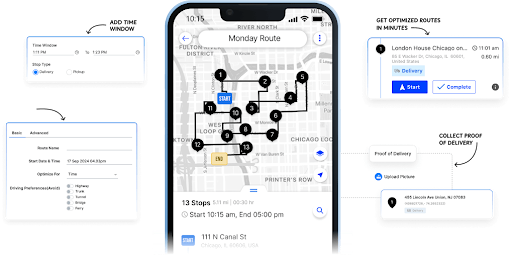
Zeo Route Planner is built for iPhone users who want clarity, speed, and absolute control over their routes. This app comes with powerful optimization algorithms with an interface that feels distinctly Apple — clean, fast, and intuitive.
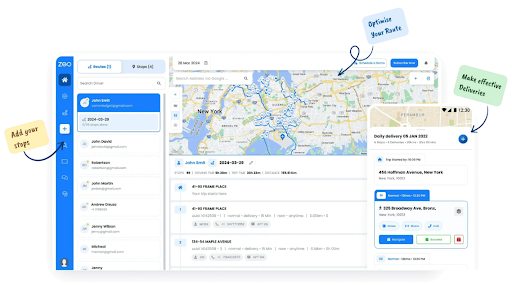
No matter you’re looking to manage a fleet or planning your own delivery rounds, Zeo helps you cut miles, save fuel, and reach every stop on time.
Key Features (Optimized for iPhone Experience)
- Plan and optimize routes in seconds without any complex setup
- Track every delivery in real time and share accurate ETAs right from your iPhone
- Capture proof of delivery on the spot using your iPhone camera
- Manage time-sensitive deliveries effortlessly with smart time-slot scheduling
- Assign drivers automatically based on who’s available and closest to the route.
Go for Zeo if you’re a nerd for fluid gestures, clean visuals, and lightning-fast map rendering.
-
Apple Maps
If you’re an iPhone loyalist, Apple Maps has matured into far more than a navigation tool and has become a reliable route companion that syncs intuitively across your entire Apple ecosystem.
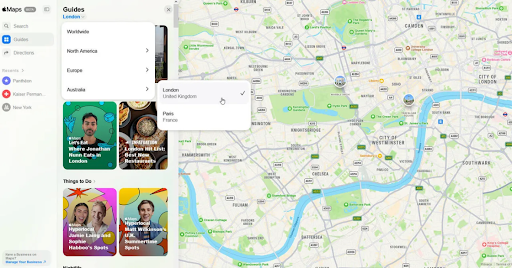
Apple Maps handles commuting, planning multi-stop errands, or navigating deliveries across city blocks with ease. With every iOS update, it edges closer to professional-grade logistics — minus the learning curve.
Key Features (Optimized for iPhone Experience)
- Quick and easy integration across iPhone, iPad, Mac, Apple Watch, and CarPlay
- Turn-by-turn voice navigation enhanced by Siri for truly hands-free control
- Real-time traffic intelligence and alternate route suggestions that adapt as you drive
- Dynamic city views and Look Around for visually intuitive navigation
- Offline routing support for uninterrupted journeys even in low-network zones
- Multi-stop trip planning to help you layer errands or deliveries in one flow
Go for Apple Maps if you value refinement, reliability, and that unmistakable Apple touch.
-
Circuit Route Planner
Circuit Route Planner works wonders for those who need simplicity wrapped in intelligence. It’s built to plan and execute multi-stop routes exceptionally well without overcomplicating the process.
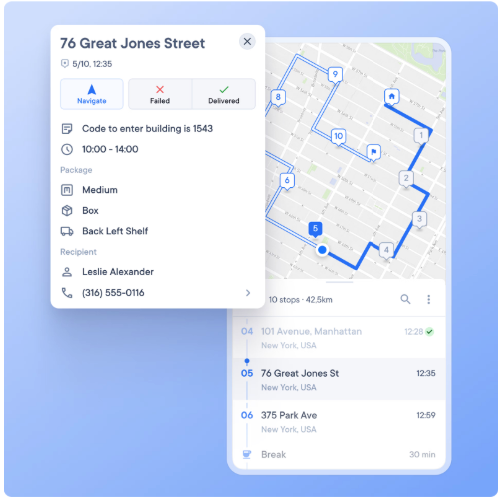
If you’re a driver, courier, or small business owner, Circuit turns your iPhone into a logistics command center. Routes load in seconds, deliveries reorder automatically, and the app quietly recalculates if traffic gets in the way.
Key Features

increase fuel savings
Save 2 Hours on Deliveries, Everyday!
Optimize routes with our algorithm, reducing travel time and costs efficiently.
Get Started for Free
- Instant route optimization for up to hundreds of stops per day
- On-device speed that processes routes without constant cloud dependency
- Drag-and-drop stops reordering directly from the iPhone map view
- Live progress tracking and real-time ETA updates for dispatchers and clients
- Proof of delivery via photos, notes, and digital signatures captured instantly
Choose Circuit if you prefer an app that feels light but performs like a powerhouse.
-
Roadtrippers
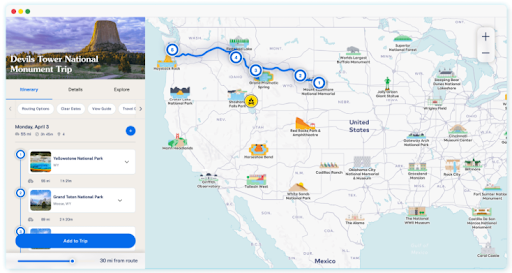
If planning routes feels like a chore, Roadtrippers makes it feel like an adventure. This one doesn’t just woo couriers and delivery pros; it also adds value to those who love the road, whether driving across town or across the country.
 Road Trippers” class=”alignnone size-full wp-image-12895″ />
The iPhone app lets you discover what’s along the way — fuel stops, diners, scenic detours, and more. For small business owners who spend half their lives on the road, it’s the perfect blend of function and fun.
Key Features (Built for iPhone Travelers)
- Map out up to 150 stops with pinch-and-zoom simplicity
- Discover cool detours — landmarks, pit stops, or hidden gems nearby
- Save and share your trips with teammates or friends through iCloud
- Use Apple CarPlay support for safe, hands-free navigation
- Download maps for offline access when signal fades mid-route
If you love the open road and want an app that feels less corporate, more human — Roadtrippers is your kind of vibe.
-
Upper Route Planner
Upper is for planners who want neat, visual, and built-to-make multi-stop delivery planning. It has an iPhone app that’s fast and reliable. You can tell it was made for people who want their routes sorted before the coffee cools down.
Instead of juggling spreadsheets or web tabs, you can create an entire delivery route right from your phone, see every stop on the map, and rearrange them in seconds.
Key Features (Refined for iPhone Use)
- Set up daily delivery routes with drag-and-drop ease
- Preview and tweak routes visually right on your iPhone map
- Assign tasks or deliveries to your team in a few taps
- Analyze your routes with built-in performance reports
Upper is a powerful app that hits the right spot, sitting between business and usability.
-
Route4Me
Route4Me has earned its reputation as one of the most stable and field-tested route planners on iOS. The iPhone app focuses on planning routes, making adjustments, and tracking your team in real time without wading through menus.

You can import a list of addresses, hit optimize, and Route4Me automatically sequences stops based on time, distance, or custom preferences.
Key Features (Refined for iPhone Use)
- Create and optimize routes in seconds with advanced sequencing algorithms
- Add stops manually or import address lists from Excel, CSV, or clipboard
- Live traffic data from Apple Maps integration for accurate ETAs
- Proof of delivery via photos, signatures, and notes is uploaded instantly
Route4Me on iPhone is dependable, well-supported, and fast enough for daily use across industries like logistics, courier services, and maintenance teams.
Conclusion
Choosing the right route planner app for your iPhone depends on how you move through your day. If you’re a delivery driver balancing dozens of stops, a field technician tracking routes, or just someone planning a cross-city run, each app here solves a different problem.
Zeo stands out because it feels purpose-built for iPhone, with a more powerful route-planning engine. You get an app that’s light, responsive, and fast. You can plan routes, track deliveries, and capture proof all in one place without juggling extra tools.
Sign up for Zeo Route Planner and experience it yourself.

Are you a fleet owner?
Want to manage your drivers and deliveries easily?
Grow your business effortlessly with Zeo Routes Planner – optimize routes and manage multiple drivers with ease.
increase fuel savings
Save 2 Hours on Deliveries, Everyday!
Optimize routes with our algorithm, reducing travel time and costs efficiently.
Get Started for Free 










