




Updated on: December 16, 2025
Every delivery is time-sensitive. A delayed delivery package frustrates customers, but it’s still acceptable in certain cases. However, a delay in the medical courier delivery can cause some serious health implications for patients. A lab sample that arrives late or medical equipment that was supposed to be handed over hours ago can disrupt some medical procedures and negatively affect human well-being.
For delivery businesses handling medical couriers, the importance of delivery accuracy and efficiency grows tenfold. You must prove your reliability and win customer trust through consistent service. The most effective way to win customer trust is by acquiring medical courier contracts.
Understanding The Growing Importance of Medical Courier Contracts
Medical courier contracts are agreements between healthcare organizations and courier companies for the secure and timely delivery of medical items. Such contracts form the backbone of modern healthcare logistics, where the efficiency of emergency medical courier services directly impacts patient outcomes. They are growing in importance for the following reasons.
- Guaranteed and Steady Business Revenue
Unlike one-time delivery jobs, medical courier contracts provide ongoing work with predictable income. This stability helps businesses plan resources effectively and sustain long-term operations even during market fluctuations. - Long-Term Client Relationships
Reliable service builds trust, and trust often leads to renewals or expanded coverage areas. Maintaining consistent service quality helps courier businesses grow their reputation and secure additional healthcare clients over time. - High Level of Industry Credibility
Working with hospitals or laboratories adds credibility to a courier business. Successfully managing a medical courier contract demonstrates that your company meets high industry standards and can be trusted with sensitive or regulated deliveries. - Essential Role in Healthcare Operations
Every delivery under a medical courier contract plays a critical role in patient care. Whether it is transporting test samples or delivering lifesaving medication, timeliness and accuracy are crucial. By meeting these expectations consistently, courier companies contribute directly to better healthcare outcomes. - Growth and Scalability Opportunities
Securing initial medical courier contracts can position a company for rapid expansion. Once a business proves its efficiency and compliance, larger healthcare networks often seek partnerships. This creates opportunities to scale operations, hire more drivers, and expand to new service regions.
Step-by-Step Guide: Qualify and Win Medical Courier Contracts
Once you become a medical courier, getting contracts requires preparation, professionalism, and the ability to meet strict healthcare standards. These steps will help you build credibility, meet compliance requirements, and approach potential clients with confidence.
- Research Potential Clients and Opportunities
Identify hospitals, laboratories, and pharmacies that outsource delivery services. Understand their needs and delivery volumes. This will help you target opportunities where your services can add real value and strengthen your proposal. - Register Your Business and Meet Compliance Standards
Before applying, ensure your business is legally registered, licensed, and insured. Healthcare deliveries often require HIPAA compliance, background-checked drivers, and secure vehicles. - Start Small and Build a Track Record
Work with smaller clients such as clinics or pharmacies to prove your reliability and professionalism. Once you have experience and testimonials, it becomes easier to compete for larger contracts with hospitals and laboratories. - Create a Strong Proposal
Your proposal should clearly communicate your company’s strengths, including delivery processes, safety measures, and driver screening protocols. Highlight how you handle time-sensitive deliveries with accuracy and care. - Use Technology to Strengthen Operations and Credibility
Healthcare organizations value precision and transparency. Tools like Zeo Route Planner offer route optimization and other key features that demonstrate operational readiness. Using technology shows clients that your business is reliable, efficient, and ready to handle sensitive medical deliveries.
How Zeo Route Planner Helps You Win Medical Courier Contracts
To win and manage medical courier contracts successfully, courier businesses need to deliver with accuracy, speed, and consistency. Zeo Route Planner’s features ensure timely deliveries, clear communication, and complete visibility for healthcare clients. This increased delivery efficiency and accuracy will help you attract more clients and win more contracts.

increase fuel savings
Hassle Free Deliveries & Pickups!
Optimize routes with our algorithm, reducing travel time and costs efficiently.
Get Started for Free
- Route Optimization for Faster Deliveries
Zeo automatically creates the most efficient delivery routes based on distance and delivery priorities. This helps drivers save time, minimize fuel costs, and avoid unnecessary travel. For medical deliveries, optimized routes mean faster and safer transport of lab samples, test kits, and essential supplies.
- Live Tracking for Full Visibility
With live route tracking, managers can see exactly where every driver is and how each delivery is progressing. This real-time visibility allows quick responses to delays or changes. Clients also gain confidence knowing their medical items are being tracked and handled responsibly.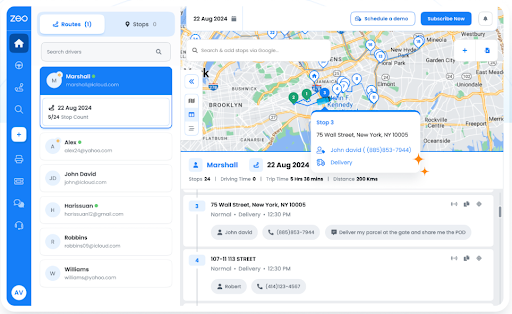
- Proof of Delivery for Accuracy and Accountability
Zeo allows drivers to capture photos or digital signatures once a delivery is complete. This verification ensures accuracy and protects against disputes. Hospitals and labs rely on this level of proof because it adds transparency and trust to every delivery transaction.
- Automated Updates for Better Communication
Zeo automatically sends delivery updates to clients when deliveries are in progress or completed. These instant notifications reduce the need for manual calls or emails and keep healthcare staff informed at every stage. Better communication helps build stronger and longer partnerships.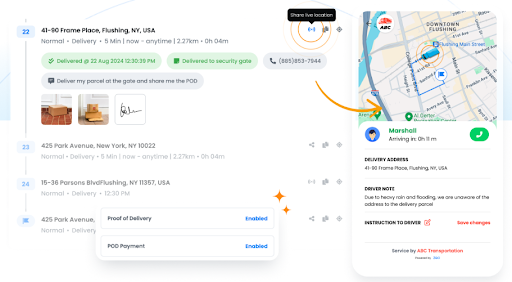
- Driver Management for Better Control
Zeo helps courier managers assign deliveries, monitor driver performance, and track on-road efficiency. It ensures each driver follows their route properly and maintains professionalism. This level of control helps businesses maintain compliance and reliability when handling medical courier contracts.
- Recurring Routes for Regular Deliveries
Many healthcare deliveries follow a fixed schedule, such as daily specimen pickups or pharmacy restocks. Zeo’s recurring route feature allows businesses to automate these regular trips, saving time on planning while maintaining consistency. This reliability keeps clients satisfied and encourages contract renewals.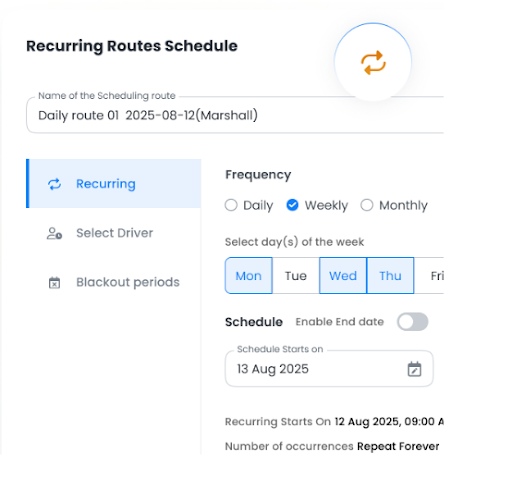
- Route Analytics for Continuous Improvement
Zeo provides detailed insights into delivery performance, travel time, and efficiency. Managers can use this data to identify weak points and improve operations over time. Continuous analysis helps maintain the high delivery standards required in the healthcare industry.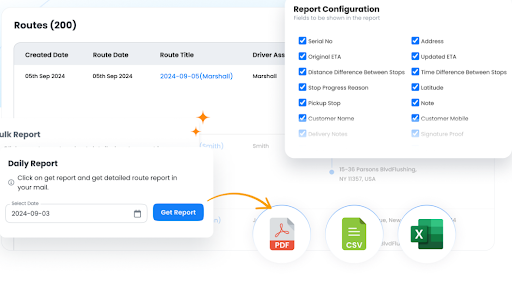
Conclusion
Winning and managing medical courier contracts requires not only compliance and reliability but also the ability to deliver consistently every single day. You need robust route planners to ensure efficiency, accuracy, and reliability in your delivery service. Zeo Route Planner helps courier businesses achieve that standard. It simplifies operations and builds the reliability that healthcare clients expect.
Sign up for Zeo Route Planner today to manage your medical deliveries with confidence and grow your business with long-term medical courier contracts.

Are you a fleet owner?
Want to manage your drivers and deliveries easily?
Grow your business effortlessly with Zeo Routes Planner – optimize routes and manage multiple drivers with ease.

increase fuel savings
Save $200 on fuel, Monthly!
Optimize routes with our algorithm, reducing travel time and costs efficiently.
Get Started for Free










