Reading Time: 4 minutes
Fleet Platform
Mobile App

Build Routes from
Saved Contacts in Seconds

Save your customers with their addresses for one-click route building.
Build routes instantly instead of entering addresses every time.
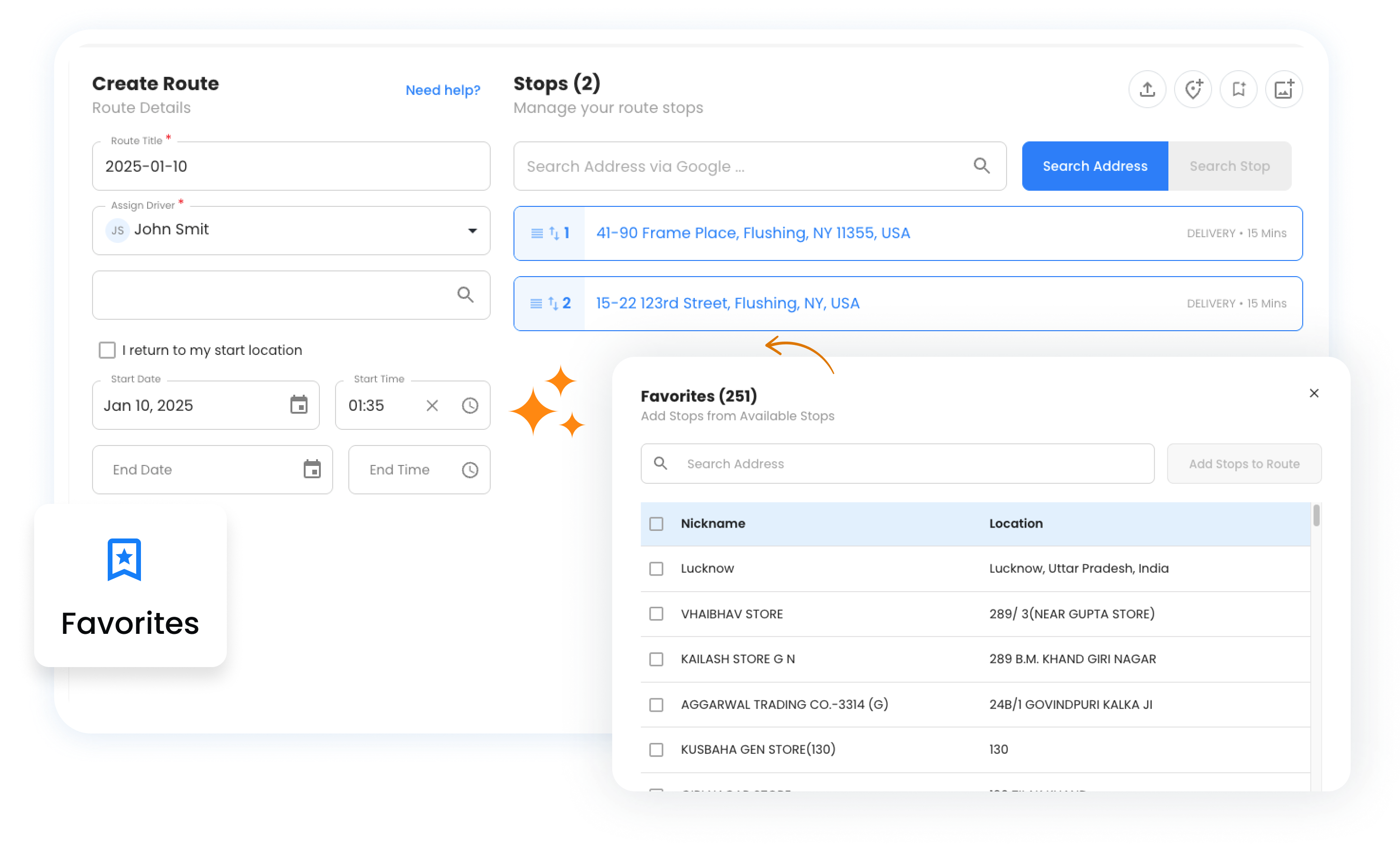
Favorites Management, Zeo Route Planner
  • 90%

    Faster route creation

  • 0

    Address typos or errors

  • 1-Click

    Add stops from library

5 Ways to Manage Your Contacts

Build and organize your customer library for lightning-fast route creation.

  • Frame 1707478314 1, Zeo Route Planner

    Create & Save Contacts

    Save any customer with their address, notes, and custom attributes. Build your library as you work.

    • Save from completed routes automatically
    • Add manually with full details
    • Include phone, email, and notes
    • Custom fields for your business
  • Frame 1707478314 22 1, Zeo Route Planner

    Bulk Import

    Upload your entire customer database at once. Import from spreadsheets with addresses, contact info, and custom data.

    • CSV/Excel file upload
    • Column mapping wizard
    • Address validation on import
    • Duplicate detection
  • Frame 1707478314 21 1, Zeo Route Planner

    Groups & Categories

    Organize contacts into logical groups—by region, customer type, service day, or any category that fits your workflow.

    • Unlimited custom groups
    • Color-coded for visual clarity
    • Contacts can belong to multiple groups
    • Filter and search within groups
  • Frame 1707478315 1 1, Zeo Route Planner

    Day-Specific Contacts

    Tag contacts for specific days of the week. Build Monday routes from Monday customers with one click.

    • Assign days to each contact
    • Filter by today’s day
    • Weekly rotation support
    • Bi-weekly and monthly options
  • Frame 1707478314 20 1, Zeo Route Planner

    Quick Route Building

    Select contacts and create optimized routes instantly. No more typing addresses or searching for customer info.

    • Multi-select contacts to add to route
    • Select entire groups at once
    • All customer details transfer automatically
    • Combine with manual stops seamlessly

How Contacts Speed Up Your Workflow

From hours of data entry to seconds of route building

1

Import Once

Upload your customer database or save locations as you complete routes

2

Organize

Group by region, day, customer type, or any category that makes sense

3

Build Routes

Select favorites, click create, and your optimized route is ready

Manual Entry vs. Contacts Library

See the difference a saved contacts library makes

Favorites Management, Zeo Route Planner
Manual Entry Every Time


  • Re-type customer addresses daily
  • Look up phone numbers and notes
  • Risk typos and wrong addresses
  • Forget special instructions
  • Hours wasted on data entry

Favorites Management, Zeo Route Planner
Contacts Library


  • One-click add from saved contacts
  • All details transfer automatically
  • Validated, accurate addresses
  • Notes and instructions included
  • Build routes in under a minute

How Businesses Use Contacts

Save time across any industry with repeat customers

DELIVERY

Meal Prep Company Weekly Routes

A meal prep service imports 200 weekly subscribers as contacts, grouped by delivery zone. Each Sunday, they select “Zone A” contacts and create an optimized route in seconds. Customer dietary notes and gate codes are always attached.

FIELD SERVICE

Pool Service Regular Customers

A pool cleaning company organizes 150 customers into day-of-week groups. Monday contacts, Tuesday contacts, etc. Each morning, they load that day’s group and create routes instantly. Equipment notes and access instructions travel with each stop.

Group 1707478361, Zeo Route Planner

Stop Re-Typing the Same Addresses

Build your contacts library and create routes in seconds, not hours

Group 1707478363, Zeo Route Planner

Zeo Questionnaire

Frequently
Asked
Questions

Know More

Favorites Management

How many contacts can I save?

There's no limit to the number of contacts you can save. Businesses commonly have hundreds or thousands of saved customers without any performance issues.

Can I update contact details after saving?

Yes, contacts can be edited anytime. Update addresses, phone numbers, notes, or group assignments. Changes apply to future routes—past routes keep their original data.

Do contacts sync between mobile and web?

Yes, contacts sync across all devices in real-time. Save a contact on the web platform and it's immediately available on mobile, and vice versa.

Can team members share contacts?

On Fleet plans, contacts are shared across your organization. All team members can access the same contacts library, ensuring consistency and reducing duplicate entries.

Zeo Blogs

Explore our blog for insightful articles, expert advice, and inspiring content that keeps you informed.

How to Become a DoorDash Driver?, Zeo Route Planner

How to Become a DoorDash Driver?

Reading Time: 4 minutesWhen it comes to work, we all expect flexibility and freedom. The exploding gig economy is a true testament to

2026 01 14 Home Inspection Scheduling Software Featured, Zeo Route Planner

Home Inspection Scheduling Software: Scale Your Business 2026

Reading Time: 5 minutesDiscover how home inspection scheduling software can increase daily capacity by 30% while reducing travel time and costs for multi-inspector teams.

2026 01 14 How To Reduce Auto Parts Delivery Time Featured, Zeo Route Planner

How to Reduce Auto Parts Delivery Time by 40% in 2026

Reading Time: 8 minutesDiscover how auto parts distributors are cutting delivery times by 40% while handling 2x more emergency orders. Proven strategies for faster deliveries.