



Updated on: October 5, 2025
Reading Time: 4 minutes
TL;DR: Distribution focuses on delivering finished products to customers while logistics encompasses the entire supply chain from sourcing to delivery. Understanding this distinction helps businesses optimize the right processes – logistics for overall efficiency and distribution for last-mile performance. Route optimization tools like Zeo Route Planner address both needs with AI-powered route optimization, helping operations teams save 2+ hours daily.
There’s a huge difference between distribution and logistics.
Sure, they do appear to function similarly, but there are differences in how they both operate within the supply chain-heavy business.
Now, the difference between distribution and logistics:
Distribution refers to how (the manner in which) finished products reach your customer. Logistics caters to a bigger picture that includes planning, storage, transportation, and coordination, which makes distribution even possible.
Why does the distinction matter?
Because scaling, customer satisfaction, and cost control hinge on knowing where distribution ends and logistics begin. One is tactical; the other is strategic.
Both are essential, but you can’t manage what you blur together.
Let’s break down the differences, show how they connect, and explain why getting this right sets the foundation for business success in 2026 and beyond.
What is Logistics?
Logistics is the process that involves planning, coordinating, and moving goods from origin to destination. It deals with everything that happens between sourcing raw materials and delivering finished products to the customer.
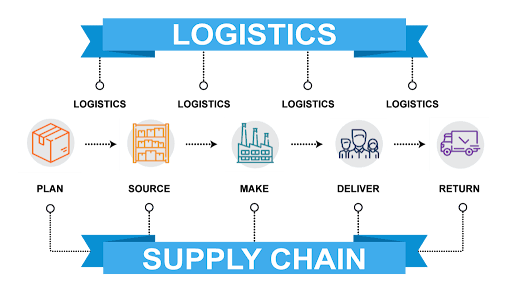
A strong logistics system will include:
- Procurement to source raw materials or goods
- Warehousing that stores inventory until it’s needed.
- Inventory control to monitor stock levels in real time
- Transportation that defines the movement of goods via road, air, sea, or rail
- Delivery management, which requires scheduling and tracking shipments to customers
For example, an e-commerce brand will have logistics in place to handle incoming shipments from suppliers, organize them in warehouses, track stock across regions, and manage outbound fleets to fulfill customer orders.
According to the U.S. Bureau of Labor Statistics, logistics activities account for approximately 8.5% of the gross domestic product, highlighting the critical role these systems play in economic efficiency.
What is Distribution?
Distribution is a part of a larger supply chain system that is responsible for delivering finished goods to customers or retailers. The focus is on the order fulfillment and delivery rather than production or sourcing.
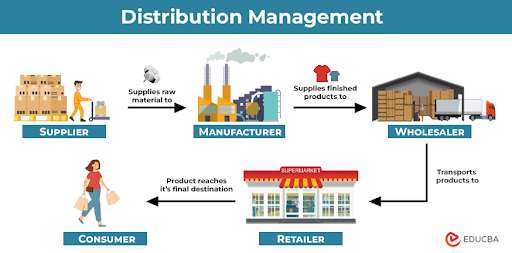
The major part of the distribution involves:
- Order processing to confirm, packing, and labeling products
- Transportation that moves goods from the warehouse to the customer or retail outlets
- Channel management needs to choose whether products go through wholesalers, retailers, or direct-to-consumer.
- Delivery tracking to make sure the orders reach the right place at the promised time.
Modern distribution networks have become increasingly complex, with freight transportation moving over 12 billion tons of goods annually in the United States alone. This complexity requires sophisticated planning and execution to maintain service levels while controlling costs.
Key Differences Between Logistics and Distribution
The terms overlap, but logistics and distribution operate at very different levels of the supply chain. When leaders fail to separate the two, they risk over-investing in the wrong systems, mismanaging resources, or losing visibility in the last mile.
- The Bigger Picture vs. the Final Step
Logistics stretches from supplier to customer. It covers procurement, inbound freight, customs, inventory control, warehousing, fleet scheduling, and outbound transport.Distribution is a part of the larger network with a focus on the “last handoff” right from the storage points to retailers, wholesalers, or direct buyers.
For example, the logistics of a furniture company may source wood from Asia and ship it to North America. They may also store items in regional warehouses, arranging long-haul trucking. Now, that’s logistics.But, distribution begins when the final leg, say, a sofa from the warehouse to a local showroom, is complete.
- Efficiency vs. Speed
Logistics looks at the big picture: syncing suppliers, warehouses, and transport so the entire chain runs smoothly. The goal is efficiency, which is possible with fewer bottlenecks, less idle stock, and better use of every mile traveled.Distribution is all about efficiency for the last, final stretch. Utmost attention goes into speed, accuracy, and coverage. It’s about whether the package reaches the right shelf, doorstep, or clinic at the promised time.
For businesses, this matters a lot because a logistics manager might measure success by freight consolidation savings. Distribution proves its worth in two places: how often deliveries land on time, and whether customers rate the experience well enough to come back - Behind the Scenes vs. At the Doorstep
Logistics has its roots in processes like demand forecasting, order management, warehouse slotting, fleet planning, and transportation optimization.
increase fuel savings
Save 2 Hours on Deliveries, Everyday!
Optimize routes with our algorithm, reducing travel time and costs efficiently.
Get Started for Free
Meanwhile, the processes for distribution funnel into order picking, packing, labeling, dispatching, and delivery confirmation.
In practice, an e-commerce operation may use logistics to decide how many SKUs go to which warehouse. But the distribution determines how the next-day delivery package leaves the warehouse and lands at the customer’s door. - Planning Engines vs. Customer Tools
In logistics, technology sits behind the scenes. Tools like route optimization, inventory tracking, and forecasting engines help keep the entire chain running with fewer delays and less waste.The tech part for distribution is often useful to customers. Think about how end-users get notified via ETA alerts, proof of delivery, driver messaging, or dashboards that track the package in real time.
Again, both these layers rely on software, but differ in the end-users: one informs supply chain leaders, the other reassures end customers.
How Technology Bridges Logistics and Distribution Gaps
The line between logistics and distribution continues to blur as technology enables better integration across the supply chain. Modern businesses need solutions that handle both strategic planning and tactical execution without creating data silos.
Route optimization represents one area where this integration proves most valuable. While logistics teams use these tools for capacity planning and fleet utilization, distribution teams rely on the same technology for real-time delivery updates and customer communication. The best systems serve both needs without forcing companies to manage multiple platforms.
For businesses managing their own delivery fleets, this dual capability becomes essential. A comprehensive route planning approach addresses both the strategic logistics question of optimal territory coverage and the tactical distribution challenge of daily route execution.
Zeo Route Planner: For Logistics and Distribution
For logistics, Zeo offers route optimization and capacity-based planning. This helps fleets cut wasted miles, balance workloads, and align schedules without endless manual edits.
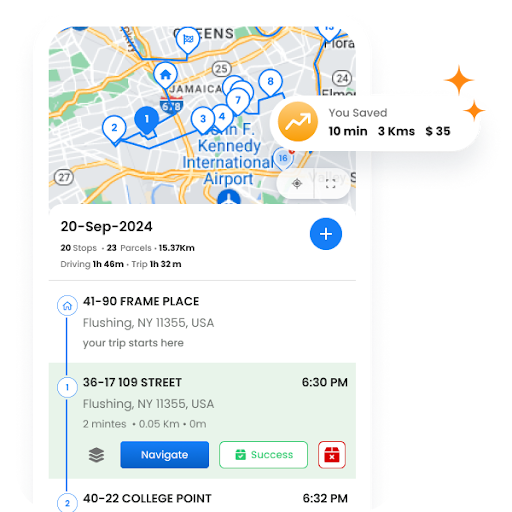
And for the distribution side, Zeo shifts to the last mile with more customer-facing features. You get real-time ETAs, proof of delivery, and auto-assigning drivers.
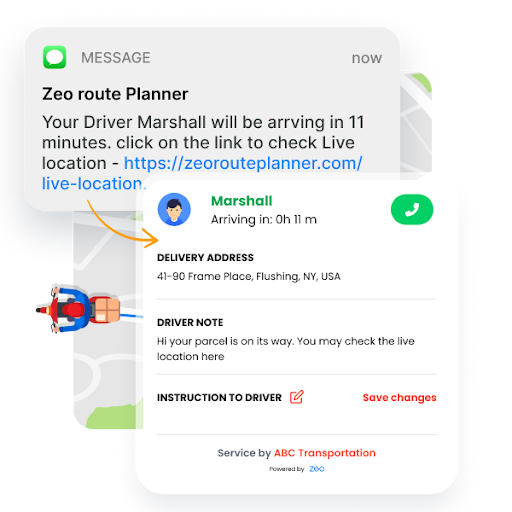
This way, you keep the routes predictable and customers updated.
A big plus?
Small and mid-sized operators can manage both planning and execution inside one platform, without paying for enterprise systems built for Fortune 500 giants.
Experience the best of both worlds!
Cost Impact Analysis: Strategic vs Tactical Decisions
Understanding where logistics ends and distribution begins directly impacts cost management. Logistics costs typically involve longer-term investments in infrastructure, technology, and partnerships. These strategic decisions affect operations for months or years.
Distribution costs are more immediate and variable. Daily route efficiency, fuel consumption, and driver overtime all fall into this tactical bucket. While logistics planning might save thousands annually through better supplier relationships, distribution optimization can save hundreds weekly through better route execution.
Smart businesses measure both. They track logistics metrics like inventory turns and supplier performance alongside distribution KPIs such as on-time delivery rates and cost per mile. This dual perspective reveals where investments deliver the highest returns.
For service-based businesses, this distinction becomes even more critical. Route planning technology can address both levels: strategic territory planning for long-term growth and daily route optimization for immediate cost control.
Frequently Asked Questions
Which departments typically handle logistics vs distribution in a company?
Logistics usually falls under supply chain management, procurement, or operations leadership, focusing on vendor relationships, inventory planning, and transportation strategy. Distribution is typically managed by fulfillment, shipping, or customer service teams who handle order processing, last-mile delivery, and customer communication.
Can small businesses benefit from separating logistics and distribution planning?
Yes, even small operations gain clarity by distinguishing strategic logistics decisions (like supplier selection and inventory levels) from tactical distribution choices (like daily route planning and delivery scheduling). This separation helps prioritize investments and identify which problems need strategic solutions versus operational fixes.
How do logistics costs compare to distribution costs in most businesses?
Logistics costs are typically higher overall but more predictable, involving warehousing, inventory carrying costs, and long-haul transportation. Distribution costs are smaller per transaction but vary significantly based on delivery density, route efficiency, and service level commitments like same-day or next-day delivery.
What metrics should companies track for distribution performance?
Key distribution metrics include on-time delivery rate, cost per delivery, average delivery time, customer satisfaction scores, and route efficiency measures like miles per stop. Zeo Route Planner’s real-time GPS tracking and route analytics help businesses monitor these KPIs while maintaining the 150+ countries of coverage their users rely on.
How does route optimization impact both logistics and distribution?
Route optimization serves logistics by improving overall fleet utilization, reducing fuel costs, and enabling better capacity planning across territories. For distribution, it ensures faster deliveries, more accurate ETAs, and better customer communication. Platforms like Zeo address both needs with AI-powered route optimization and live ETA updates for customers.

Are you a fleet owner?
Want to manage your drivers and deliveries easily?
Grow your business effortlessly with Zeo Routes Planner – optimize routes and manage multiple drivers with ease.
increase fuel savings
Hassle Free Deliveries & Pickups!
Optimize routes with our algorithm, reducing travel time and costs efficiently.
Get Started for Free











