




Cities and towns are filled with cars, bikes, and buses for public and personal travel. What about the commercial vehicles? Trucks carrying tons of loads can’t run on the same roads used for small and medium vehicles. It can lead to congestion and, in some cases, accidents.
To keep the transportation running smoothly, dedicated truck routes become crucial. The movement of heavy goods across locations requires a great deal of planning. Drivers have to abide by strict regulations. Having dedicated routes for them makes things easier.
What Are Dedicated Truck Routes?
Dedicated truck routes are specific roadways designed to guide commercial vehicles along the safest and most efficient paths. These routes are planned to handle the weight, size, and movement patterns of large trucks.
These routes are created by local or state authorities to improve safety, protect infrastructure, and ensure trucks move through communities in a controlled and predictable way.
Why Dedicated Truck Routes Matter?
Dedicated truck routes play a major role in creating safer, smoother, and more organized transportation systems. When trucks follow these designated paths, everyone benefits, from drivers to logistics companies to everyday commuters.
- Improved Road Safety
Dedicated truck routes help separate heavy vehicles from regular road patterns, which reduces the chance of accidents. These routes are designed to support larger turning radii, wider lanes, and safer intersections. Drivers feel more confident when they know they are on roads meant for their vehicle size. - Lower Infrastructure Damage
Heavy trucks put significant stress on roads that are not designed for them. Dedicated truck routes are built to support this weight, which protects smaller roads from cracks, potholes, and long-term structural damage. This helps cities reduce repair costs and maintain safer streets. - Faster and More Predictable Deliveries
Following dedicated truck routes helps drivers avoid restricted zones and unnecessary detours. This makes travel times more predictable and reduces delays caused by road limitations. Logistics companies benefit from tighter schedules and more reliable delivery windows. - Compliance With Local Regulations
Many cities require commercial vehicles to stick to the routes to avoid fines. Staying within these designated paths ensures drivers remain compliant and avoid costly penalties. Compliance also helps maintain strong operating relationships with local authorities. - Better Fuel Efficiency and Cost Savings
Dedicated truck routes are typically designed to keep trucks moving with fewer stops and interruptions. This helps reduce fuel consumption and lowers operating costs over time. Consistent routing also cuts down on unnecessary mileage. - Smoother Urban Mobility for Everyone
By guiding large vehicles onto truck routes, cities create a more organized system for all road users. This improves safety for cyclists, pedestrians, and smaller vehicles. It leads to a more balanced and efficient flow of transportation across the region.
How Drivers Can Stay Compliant With Truck Route Rules
Staying compliant with truck route rules is essential for avoiding fines, protecting your vehicle, and keeping deliveries on schedule. Drivers need to be aware of all posted signs, since cities clearly mark where trucks are permitted or restricted.

increase fuel savings
Save 2 Hours on Deliveries, Everyday!
Optimize routes with our algorithm, reducing travel time and costs efficiently.
Get Started for Free
Reviewing official maps and local regulations before each shift also ensures you know exactly which roads are designated as dedicated truck routes. A few minutes of preparation can prevent unexpected detours that slow down your day.
Why Every Truck Driver Must Use Zeo Route Planner
For truck drivers who need accuracy, efficiency, and full control on the road, Zeo Route Planner offers features designed specifically to support heavy-vehicle operations. It simplifies compliance with dedicated truck routes and removes the stress of managing complex delivery schedules.
- Route Optimization
Zeo creates clean, efficient routes that help truck drivers avoid unnecessary distance and wasted fuel. It places stops in the best order, reducing backtracking and keeping your schedule steady. Route optimization is especially useful when following truck routes, because you stay on approved roads while reaching your destinations faster.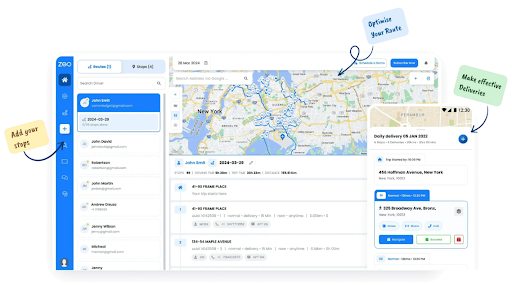
- Live Route Tracking
Fleet managers can view a truck’s movement in real time, which helps coordinate schedules and avoid delays. Live route visibility builds trust between drivers and dispatch teams because everyone knows the exact progress of each load. It also ensures the truck stays aligned with dedicated truck routes throughout the trip.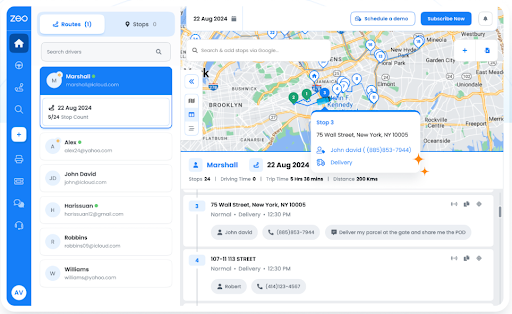
- Route Analytics
Zeo provides performance insights that help truck drivers understand their driving patterns and delivery efficiency. Route analytics highlight where time is being lost, which stops take longer, and how routes can be improved. These insights allow drivers and businesses to refine future trips and make smarter planning decisions.
- Proof of Delivery
Drivers can capture signatures, photos, or notes directly in the app once the delivery is completed. This creates a clear, verifiable record that protects drivers from disputes or miscommunication. It ensures every handoff is documented professionally and securely.
- Automated Delivery Updates
Zeo sends customers timely updates about order status, arrival times, and completion. This reduces the number of support calls drivers receive and keeps customers informed without extra effort. Automated communication makes the delivery experience smoother for both sides.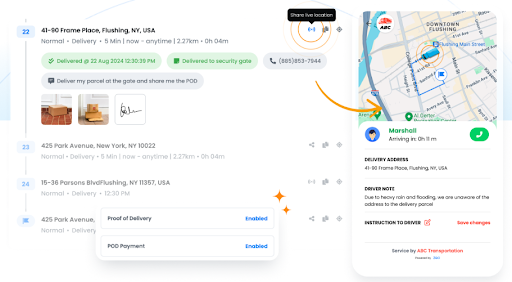
- Recurring Routes
For drivers who follow the same paths regularly, Zeo allows you to save and reuse recurring routes. This eliminates the need to rebuild schedules manually and ensures consistency day after day. It is especially helpful for fixed delivery lanes or scheduled freight runs.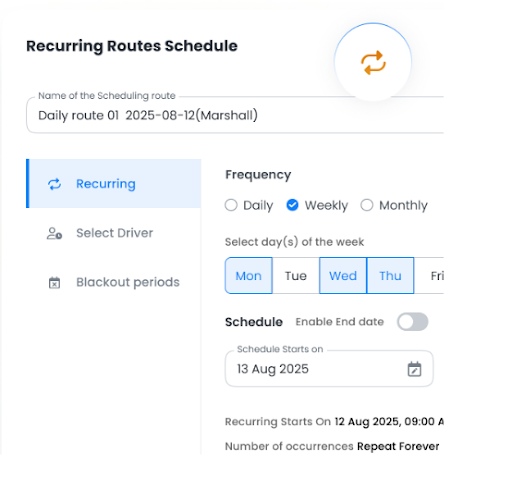
- Global Search
Zeo’s global search feature lets drivers instantly locate any stop, customer, address, or route inside the system. This saves time during busy shifts when quick access to information is essential. With everything searchable in seconds, drivers stay organized and avoid delays.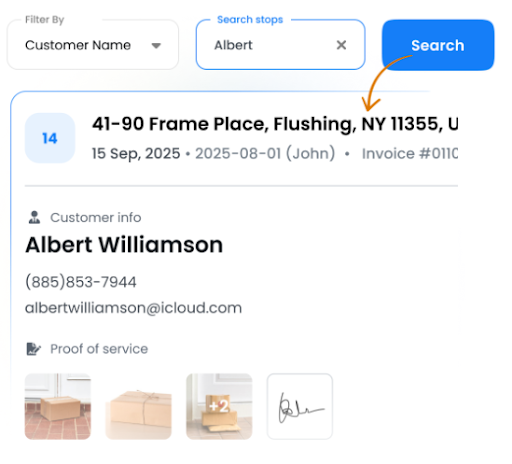
Conclusion
Dedicated truck routes make travel safer, smoother, and more predictable for truck drivers, and having the right tools makes following these routes even easier. Zeo Route Planner gives you the structure, clarity, and precision needed to stay compliant, reduce delays, and keep every trip on schedule.
If you want a smarter and more reliable way to plan your routes, sign up for Zeo today and experience a more efficient driving routine.

Are you a fleet owner?
Want to manage your drivers and deliveries easily?
Grow your business effortlessly with Zeo Routes Planner – optimize routes and manage multiple drivers with ease.
increase fuel savings
Hassle Free Deliveries & Pickups!
Optimize routes with our algorithm, reducing travel time and costs efficiently.
Get Started for Free










