




Every business flourishes on customer trust. When your customers believe in your services and trust your brand, growth becomes inevitable. Every business must take all the necessary steps to gain, build, and maintain the customer trust.
In the delivery and logistics landscape, misplaced or delayed or missed deliveries can really hamper trust. Depending on manual documentation to prove delivery can be error-prone and time-consuming. Plus, the chances of malpractices can’t be ignored. However, digital signatures resolve those concerns easily.
What Do Digital Signatures Mean for Delivery and Logistics Businesses?
In delivery and logistics businesses, a signature is more than a formality. It confirms that a package was delivered, a pickup was completed, or a job was finished as planned. Digital signatures replace handwritten sign-offs with secure, electronic confirmation captured directly on a mobile device.
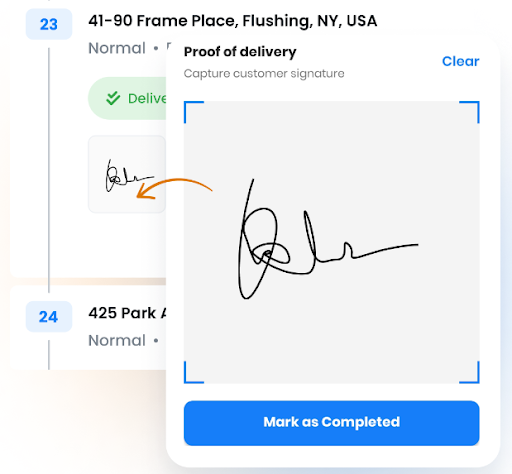
Instead of carrying paperwork or collecting physical signatures, drivers can record recipient approval instantly at the delivery location. These signatures are time-stamped and linked to the job, making records easy to access for dispatch, billing, or customer support. For logistics teams, this means faster job closure, fewer disputes, and no delays caused by missing or damaged paperwork.
What Challenges Do Logistics Businesses Face Without Digital Signatures?
As delivery operations grow faster and more complex, manual processes struggle to keep up. Without digital signatures, logistics teams face delays, disputes, and operational blind spots that slow down routes and impact customer trust.
- Delayed Proof of Delivery and Pickup Confirmation
Paper-based signatures slow down job closure and delay access to delivery confirmation and order fulfillment. Drivers often carry paperwork until the end of their shift, leaving dispatch and billing teams waiting. This gap creates bottlenecks and slows down follow-up actions. - Increased Delivery Disputes and Claims
Missing, damaged, or unclear paper signatures make it hard to prove that a delivery was completed. Customers may raise disputes when confirmation is not readily available. Resolving these issues takes time and often leads to unnecessary back-and-forth. - Lack of Real-Time Visibility for Operations Teams
When confirmations are handled manually, operations teams do not get instant updates. Dispatchers must wait for drivers to return paperwork before knowing a job is complete. This limits visibility and makes it harder to adjust schedules or respond to issues quickly. - High Administrative Workload
Manual handling of signed documents requires scanning, filing, and data entry. These repetitive tasks increase the chances of errors and consume valuable time. Back-office teams end up managing paperwork instead of focusing on operational improvements. - Compliance and Record-Keeping Risks
Logistics businesses must maintain accurate delivery records for audits and customer agreements. Paper documents can be misplaced or inconsistently stored. This creates risk during compliance checks and makes long-term record management difficult.
Key Benefits of Digital Signatures for Businesses
As delivery volumes increase, businesses need proof of delivery tools that remove friction instead of adding steps. Digital signatures help logistics teams operate faster, reduce errors, and maintain clear accountability across every delivery and pickup.
- Faster Job Closure for Drivers
With digital signatures, drivers can complete jobs the moment a delivery or pickup is done. There is no need to manage paperwork or revisit stops for missing sign-offs. Faster job closure keeps drivers moving and improves overall route efficiency. - Fewer Disputes and Delivery Delays
Clear, recorded confirmation helps prevent disputes about whether a delivery was completed. Digital signatures provide a reliable record that can be accessed instantly when questions arise. This reduces delays caused by verification issues and customer complaints. - Improved Accountability Across Routes
Every signed delivery is tied to a specific time, location, and job. This creates transparency for drivers, dispatchers, and customers. Clear accountability helps teams identify issues quickly and maintain consistent service quality. - Reduced Paperwork and Manual Errors
Paper forms can be lost, damaged, or filled incorrectly. Digital signatures eliminate these risks by capturing accurate information at the point of delivery. This leads to cleaner records and fewer follow-ups for missing details. - Better Coordination Between Field and Office Teams
Once a signature is captured, the information becomes immediately available to office teams. Dispatch, billing, and support teams no longer need to wait for paperwork to arrive. This improves coordination and speeds up downstream processes.
How Zeo Enables Digital Signatures With Proof of Delivery
Zeo makes digital signatures a natural part of the delivery process through its built-in Proof of Delivery feature. Drivers can capture signatures directly on their mobile device at the delivery location, eliminating the need for paper forms.
Each signature is linked to the specific stop, ensuring accurate and reliable confirmation. This helps close deliveries instantly and keeps documentation clean and consistent.

increase fuel savings
Save 2 Hours on Deliveries, Everyday!
Optimize routes with our algorithm, reducing travel time and costs efficiently.
Get Started for Free
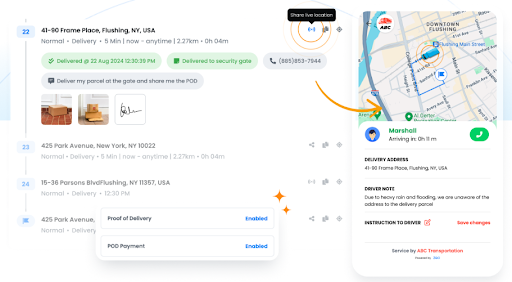
Once a signature is captured, the delivery status updates in real time for dispatch and operations teams. Proof of delivery records are stored digitally and can be accessed anytime for customer verification, billing, or audits.
This reduces disputes, removes administrative delays, and keeps both field and office teams aligned. With Zeo, digital signatures become an integrated part of efficient delivery workflows rather than an extra step.
Conclusion
As delivery and logistics operations continue to scale in 2026, relying on manual paperwork creates unnecessary delays, disputes, and operational gaps. Digital signatures help businesses move faster, improve accountability, and maintain clear records across every delivery and pickup. They are no longer just a convenience but a core requirement for efficient logistics workflows.
Zeo brings digital signatures directly into day-to-day operations through its Proof of Delivery feature, making confirmation simple for drivers and instantly visible for operations teams.
If you want to reduce paperwork, close deliveries faster, and strengthen delivery accountability, sign up for Zeo today and modernize your delivery workflows.

Are you a fleet owner?
Want to manage your drivers and deliveries easily?
Grow your business effortlessly with Zeo Routes Planner – optimize routes and manage multiple drivers with ease.
increase fuel savings
Hassle Free Deliveries & Pickups!
Optimize routes with our algorithm, reducing travel time and costs efficiently.
Get Started for Free










