




Updated on: December 15, 2025
The success of every delivery business is dictated by efficiency, accuracy, and reliability. If your customers aren’t happy with your service and question your reliability, they are most likely to switch to your competitors. When it comes to auto parts delivery, the truth is no different.
Every delay in shipping automotive parts will frustrate your customers. You need a proper delivery strategy, process, and the right tools to meet customer expectations and ensure timely deliveries.
But are auto parts deliveries really straightforward? What are the challenges that you must overcome for efficient delivery? What are the best practices and the role of route planning tools in this? Let’s find out!
Understanding the Challenges of Shipping Automotive Parts
Auto parts delivery involves transporting a wide range of vehicle components, including small electrical sensors, heavy engines, and delicate accessories, to workshops, retailers, and customers.
Businesses that depend on auto parts delivery face unique challenges that directly affect cost, reliability, and long-term growth. Understanding these challenges is the first step toward building a system that ensures lasting success.
- Managing Size, Weight, and Fragility
Automotive parts come in a wide range of sizes and materials, from small electronic sensors to large engines and bumpers. Each part demands specific packaging and handling methods to prevent damage during transit. Companies that ship automotive parts must invest in protective packaging and proper stacking techniques to ensure safe deliveries. - Balancing Cost and Speed
Auto parts delivery operations must find the right balance between fast turnaround and affordable costs. Rising fuel prices, maintenance expenses, and long delivery routes can quickly reduce profit margins. Without proper planning and route optimization, even a small delay can impact productivity and customer satisfaction. - Handling Compliance and Safety Regulations
Many automotive components contain hazardous or regulated materials such as oils, batteries, or chemicals. Businesses that ship automotive parts must follow strict carrier and safety rules for packaging and labeling. Ignoring these regulations can lead to costly fines, damaged goods, or even shipment rejections. - Coordinating Multiple Deliveries Daily
Auto parts delivery often involves managing several stops in one route to serve workshops, dealers, and individual customers. Doing this manually can cause scheduling errors or missed deliveries. A structured delivery process supported by the right technology helps businesses stay organized and deliver parts on time, every time. - Meeting Customer Expectations for Accuracy
In the automotive industry, accuracy is everything. The right part, delivered at the right time, keeps repair operations running smoothly. Businesses that focus on reliable auto parts delivery not only reduce operational stress but also earn repeat customers and stronger partnerships.
Best Practices for Safe and Efficient Auto Parts Delivery
Businesses that handle auto parts delivery efficiently combine strong processes, reliable communication, and the right technology. These best practices help ensure better performance in automotive logistics.
- Maintain a Preventive Maintenance Schedule
Vehicles used to ship automotive parts must always be in good condition. Regular maintenance reduces the risk of breakdowns and delivery delays. Check engine health, tires, and load safety before dispatching to make sure every trip runs smoothly and predictably. - Plan Routes with Data and Insight
Smart planning is essential for efficiency. Using route planning tools like Zeo Route Planner helps identify the most time-saving paths, reduce fuel consumption, and avoid unnecessary detours. Data-driven route optimization gives companies greater control over auto parts delivery operations and ensures drivers stay productive throughout the day. - Prioritize Communication and Real-Time Updates
Keeping customers informed builds trust and transparency. Share automated delivery updates, estimated arrival times, and any route changes proactively. When businesses that ship automotive parts use automated notifications and live tracking, customers stay confident and better prepared to receive their shipments. - Ensure Proper Handling and Storage
Auto parts vary from lightweight accessories to heavy components that require safe lifting and storage. Train your delivery teams on correct handling techniques and use the right tools for loading and unloading. Careful handling prevents damage and protects your reputation for reliable auto parts delivery service. - Review Performance and Use Analytics
Every delivery provides valuable data. Regularly review delivery times, driver performance, and customer feedback to identify trends and areas for improvement. Businesses that ship automotive parts can use analytics from Zeo Route Planner to refine their operations and build long-term efficiency.
Using Route Planning Tools to Simplify and Scale Auto Parts Delivery
Managing multiple deliveries, drivers, and customer expectations manually can quickly become overwhelming. This is where route planning tools like Zeo Route Planner transform operations by turning complex delivery schedules into efficient, trackable, and fully automated systems. The importance of route optimization in automotive logistics is increasing exponentially.

increase fuel savings
Save 2 Hours on Deliveries, Everyday!
Optimize routes with our algorithm, reducing travel time and costs efficiently.
Get Started for Free
Zeo helps businesses that ship automotive parts plan smarter, faster routes with real-time visibility and complete control. It automates route creation, assigns tasks to drivers, and ensures every order is delivered on time. With Zeo, businesses can handle large delivery volumes, reduce operational stress, and deliver a better experience for both customers and teams.
Key Features of Zeo Route Planner for Auto Parts Delivery
Zeo is designed for efficiency, accuracy, and growth. The following features will help streamline auto parts delivery.
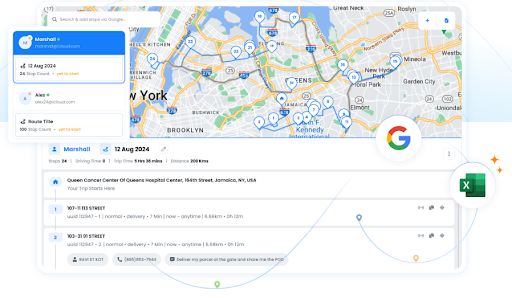
- Route Optimization: Zeo automatically finds the best possible route for each delivery run, helping businesses reduce travel time and fuel use. This feature ensures urgent or high-priority parts are always delivered without any delay.
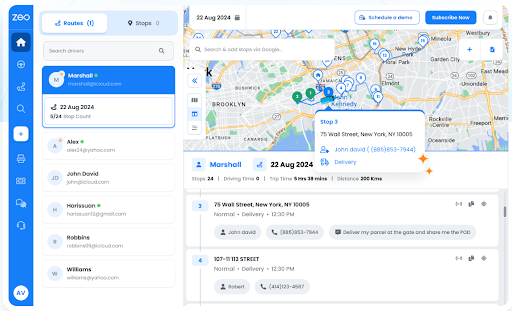
- Live Route Tracking: Managers can track every vehicle and driver in real time. This visibility allows quick decision-making, rerouting when necessary, and full transparency throughout the delivery process.
- Automated Delivery Updates: Customers receive instant updates about their deliveries. These notifications improve communication, reduce support calls, and build trust with clients waiting for critical parts.
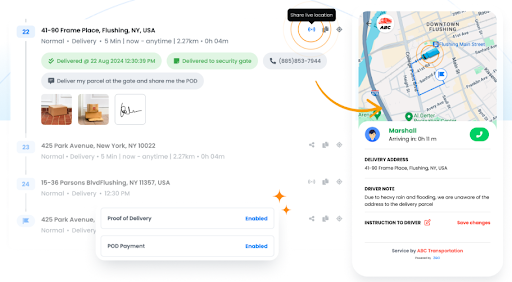
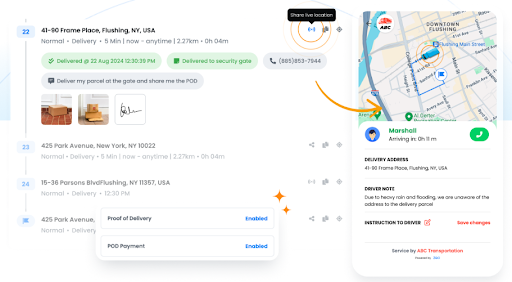
- Proof of Delivery: Zeo allows drivers to capture photos or digital signatures once a delivery is complete. This feature provides accountability and accurate delivery records.
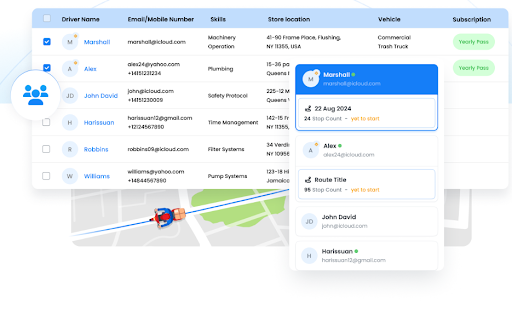
- Driver Management: Assign deliveries, track driver performance, and ensure schedules are balanced. Zeo helps delivery teams stay organized and motivated every day.
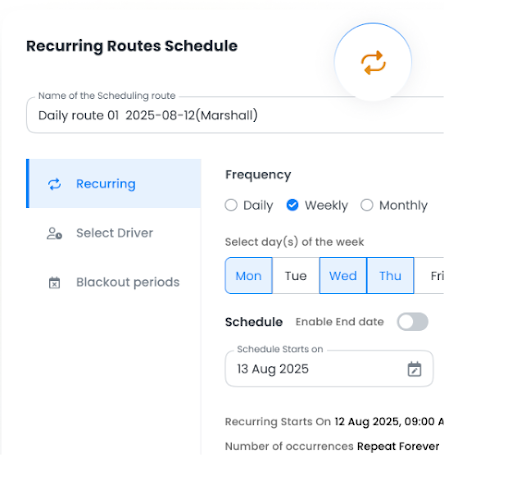
- Recurring Routes: Ideal for businesses that ship automotive parts to workshops or retailers regularly. Zeo can automatically repeat saved routes to save time and reduce planning errors.
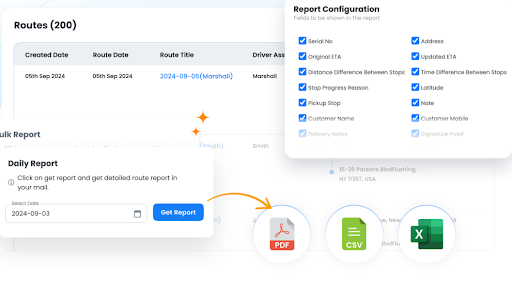
- Route Analytics and Insights: Detailed analytics reveal delivery times, delays, and trends. Businesses can use this data to continuously improve auto parts delivery operations and make smarter decisions.
Conclusion
The future of automotive logistics will be driven by AI-powered route planners. With smart planning and the right tools, you can reduce costs, improve accuracy, and build customer trust. Zeo Route Planner makes auto parts delivery simpler with optimized routes, live tracking, and automated updates. It helps teams stay efficient and consistent every day.
Sign up for Zeo Route Planner today and take full control of your auto parts delivery operations.

Are you a fleet owner?
Want to manage your drivers and deliveries easily?
Grow your business effortlessly with Zeo Routes Planner – optimize routes and manage multiple drivers with ease.
increase fuel savings
Hassle Free Deliveries & Pickups!
Optimize routes with our algorithm, reducing travel time and costs efficiently.
Get Started for Free



















