



Updated on: February 22, 2026
Reading Time: 2 minutes
TL;DR: Zeo Route Planner’s direct messaging feature enables businesses to communicate instantly with customers through customizable trip notifications and location sharing. This streamlines customer communication by eliminating phone tag and reducing delivery inquiries. Route optimization tools like Zeo address this with real-time GPS tracking and customer notifications via SMS, email, and live tracking links, helping delivery teams save 2+ hours daily.
Introduction:
In today’s fast-paced business world, effective communication with customers is more important than ever. With Zeo Route Planner’s latest addition, the direct messaging feature, businesses can now communicate with their customers in a quick, convenient and efficient manner. This feature streamlines the communication process, making it easier for businesses to keep their customers informed and up-to-date.
The Impact of Poor Customer Communication
Poor communication during deliveries and service calls creates significant challenges for businesses. According to the U.S. Bureau of Labor Statistics, customer service issues account for a substantial portion of business operational costs, particularly in service-based industries where timing is critical.
When customers don’t receive timely updates about their deliveries or service appointments, they often resort to calling customer service departments repeatedly. This creates a cascade of inefficiencies: customer service representatives spend more time handling “where is my order?” calls, drivers get interrupted with phone calls while on the road, and customers become frustrated with uncertainty about their deliveries.
The traditional approach of reactive communication—waiting for customers to call when they have questions—no longer meets modern expectations. Customers expect proactive updates, real-time information, and the ability to track their orders or service appointments just like they would track a package from major shipping companies.
Benefits of Proactive Customer Messaging
Implementing proactive customer communication strategies delivers measurable benefits across multiple business areas. Companies that invest in real-time customer updates typically see reduced call volumes to customer service departments, as customers receive the information they need without having to inquire about it.
Driver productivity also improves significantly when customer communication is automated. Instead of fielding phone calls throughout the day asking “when will you arrive?”, drivers can focus on their routes and service delivery. This leads to more efficient route completion and better time management.
Customer satisfaction scores consistently improve when businesses provide transparent, real-time communication. Research from the Department of Transportation indicates that transparency in logistics and transportation services correlates with higher customer retention rates and positive reviews.
How it Works:
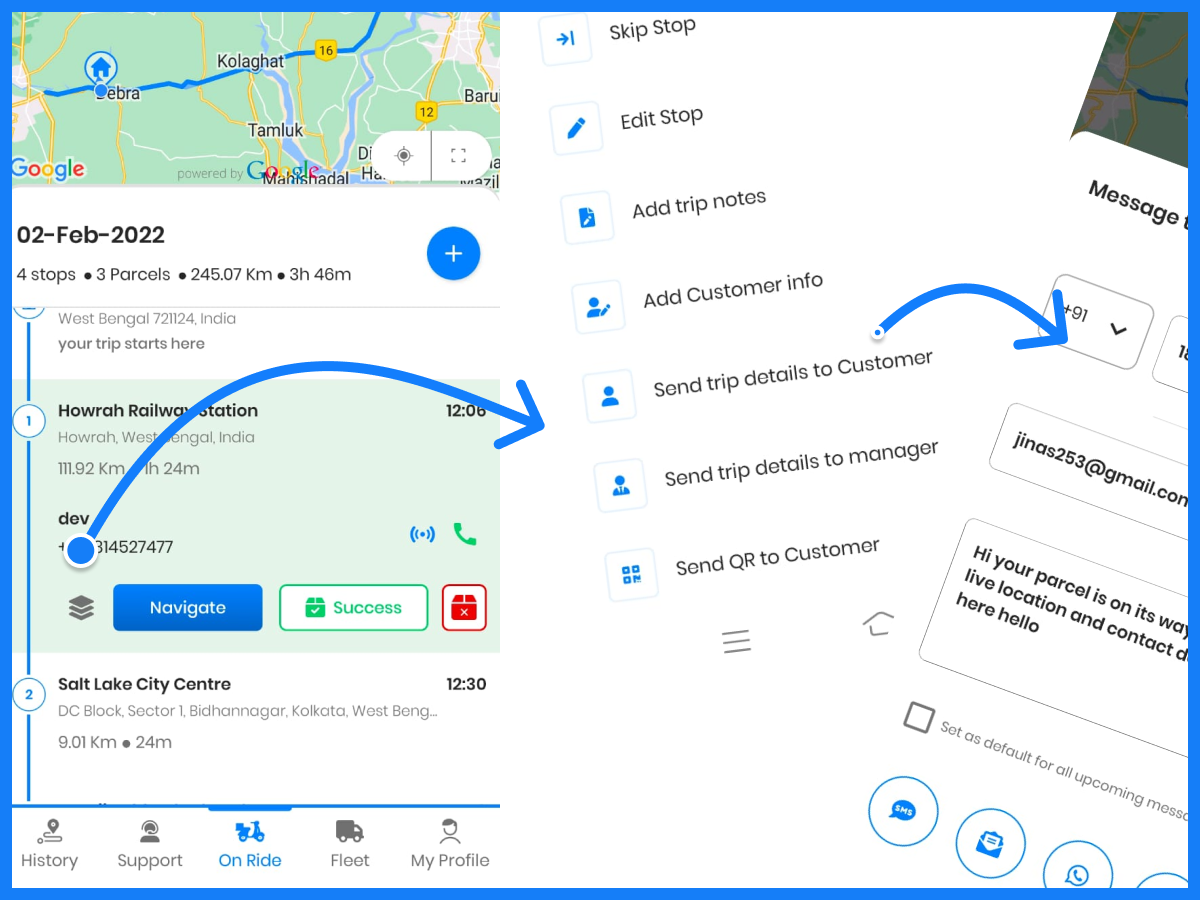
- A step-by-step guide on how to use the direct messaging feature:
- Please ensure that the customer details are added for your stops- to know how to do that refer to this blog.
- Go to the on-ride section in your zeo app and tap on the stacker icon for the customer’s stop who you want to message.

- Click on send trip details to customer.

- A dialogue box will pop up with customer details already present. If you haven’t added customer details yet, you have the option to input them here as well.
- The message can be set default for all users and can be changed as per your requirement.
- You can share your message on mail, whatsapp, messaging or any other platform you prefer.

- Send messages to your customers, share live location with them and ensure deliveries are done on time with Zeo. Opt for a free trial today and start planning your routes better.
Best Practices for Customer Communication
Effective customer messaging requires more than just the right technology—it demands strategic implementation and consistent execution. The most successful businesses establish clear communication protocols that define when and how customers receive updates throughout the service process.
Timing plays a crucial role in customer communication effectiveness. Sending notifications too early can create anxiety if delays occur, while sending them too late defeats the purpose of proactive communication. The optimal approach involves sending initial confirmations within 24 hours of scheduling, followed by day-of-service notifications with estimated arrival windows.

increase fuel savings
Save $200 on fuel, Monthly!
Optimize routes with our algorithm, reducing travel time and costs efficiently.
Get Started for Free
Message personalization significantly impacts customer perception and engagement. Generic, template-based messages often feel impersonal and may be ignored by recipients. The most effective customer communications include specific details about the scheduled service, the assigned technician or driver, and clear contact information for questions or changes. For businesses handling specialized services like mobile grooming or insurance adjusting, customized messaging becomes even more critical for building trust and managing expectations.
Integration with Route Planning
The true power of customer messaging emerges when it integrates seamlessly with route optimization and planning systems. Modern route planning platforms can automatically trigger customer notifications based on real-time route progress, traffic conditions, and estimated arrival times.
This integration eliminates the manual effort traditionally required for customer updates. Instead of drivers or dispatchers manually sending messages throughout the day, the system automatically keeps customers informed as routes progress and circumstances change. This automation proves particularly valuable for businesses managing complex logistics operations, such as delivery services or field service companies with multiple daily appointments.
Route-integrated messaging also enables more accurate and reliable customer communications. When messaging systems access real-time GPS data and traffic information, they provide customers with genuinely accurate arrival estimates rather than static time windows that may become obsolete due to unexpected delays or route changes.
Frequently Asked Questions
How can businesses reduce customer service calls related to delivery inquiries?
Proactive communication strategies significantly reduce customer service call volumes by providing customers with the information they seek before they need to ask for it. Businesses that implement automated SMS notifications, email updates, and live tracking capabilities typically see 40-60% fewer “where is my order?” calls. The key is establishing communication touchpoints at critical moments: order confirmation, dispatch notification, en-route updates, and delivery completion.
What information should be included in delivery notifications to customers?
Effective delivery notifications should include the estimated arrival time window, driver or technician name, contact information for questions, and specific details about the scheduled service or delivery. Additional valuable information includes any preparation instructions for customers, potential access requirements, and clear next steps if the customer needs to reschedule. Including a live tracking link allows customers to monitor progress in real-time without requiring additional communication.
How do real-time customer updates impact driver productivity?
Real-time customer updates dramatically improve driver productivity by eliminating interruptions from customer phone calls and reducing time spent on manual communication tasks. Drivers can focus entirely on route execution and service delivery rather than fielding calls about arrival times or delivery status. This streamlined approach typically results in 15-25% faster route completion times and improved service quality.
What are the most effective communication channels for route-based businesses?
SMS text messaging consistently delivers the highest open and engagement rates for time-sensitive communications, with over 95% of messages read within three minutes of receipt. Email works well for detailed information and confirmations, while live tracking pages provide ongoing visibility without requiring active communication. Route optimization platforms like Zeo Route Planner support multiple communication channels simultaneously, with real-time GPS tracking and customer notifications via SMS, email, and branded tracking pages used by 1.5M+ users across 150+ countries.
How can small businesses implement automated customer messaging without significant IT investment?
Small businesses can implement automated customer messaging through cloud-based route planning platforms that include built-in communication features. These solutions require no additional hardware or technical expertise, as they operate entirely through web browsers and mobile apps. The most cost-effective approach involves choosing platforms that combine route optimization with integrated messaging capabilities, eliminating the need for multiple software subscriptions and complex system integrations.

Are you a fleet owner?
Want to manage your drivers and deliveries easily?
Grow your business effortlessly with Zeo Routes Planner – optimize routes and manage multiple drivers with ease.

increase fuel savings
Save 2 Hours on Deliveries, Everyday!
Optimize routes with our algorithm, reducing travel time and costs efficiently.
Get Started for Free 










