



Updated on: February 20, 2026
Reading Time: 3 minutes
TL;DR: Route optimization software enhances customer service by enabling precise delivery windows, real-time tracking, and proactive communication that keeps customers informed throughout the entire service process. Studies show that businesses with optimized routing achieve up to 95% on-time delivery rates compared to 75% for manual scheduling. Route optimization tools like Zeo Route Planner address this with real-time GPS tracking and automated customer notifications, helping service teams save 2+ hours daily.
For a successful business, you need to keep this one person happy: your customer!
You don’t want to leave out any chance of adding to your customer’s delight. If your business requires making last-mile deliveries or fulfilling client-service requests then that’s a touch-point you should be leveraging to provide exceptional customer service.
Reviews and recommendations from satisfied customers help in increasing sales. It’s also more cost-effective to retain customers than to keep acquiring new ones. According to Bureau of Labor Statistics data, customer acquisition costs continue rising across industries, making retention even more critical. Excellent customer service helps you stand out from the competition.
To keep your customers happy, book a demo call now or sign up for a free trial of Zeo Route Planner!
Find out how route optimization software like Zeo Route Planner can help your business improve customer service.
1. Add customer’s preferred time slots
Your customers may want the delivery/service request to be fulfilled in a specific time slot considering their busy schedules. Reaching the customer at any other time may lead to missed deliveries and unhappy customers. You can add the preferred time slot of the customer while planning the route.
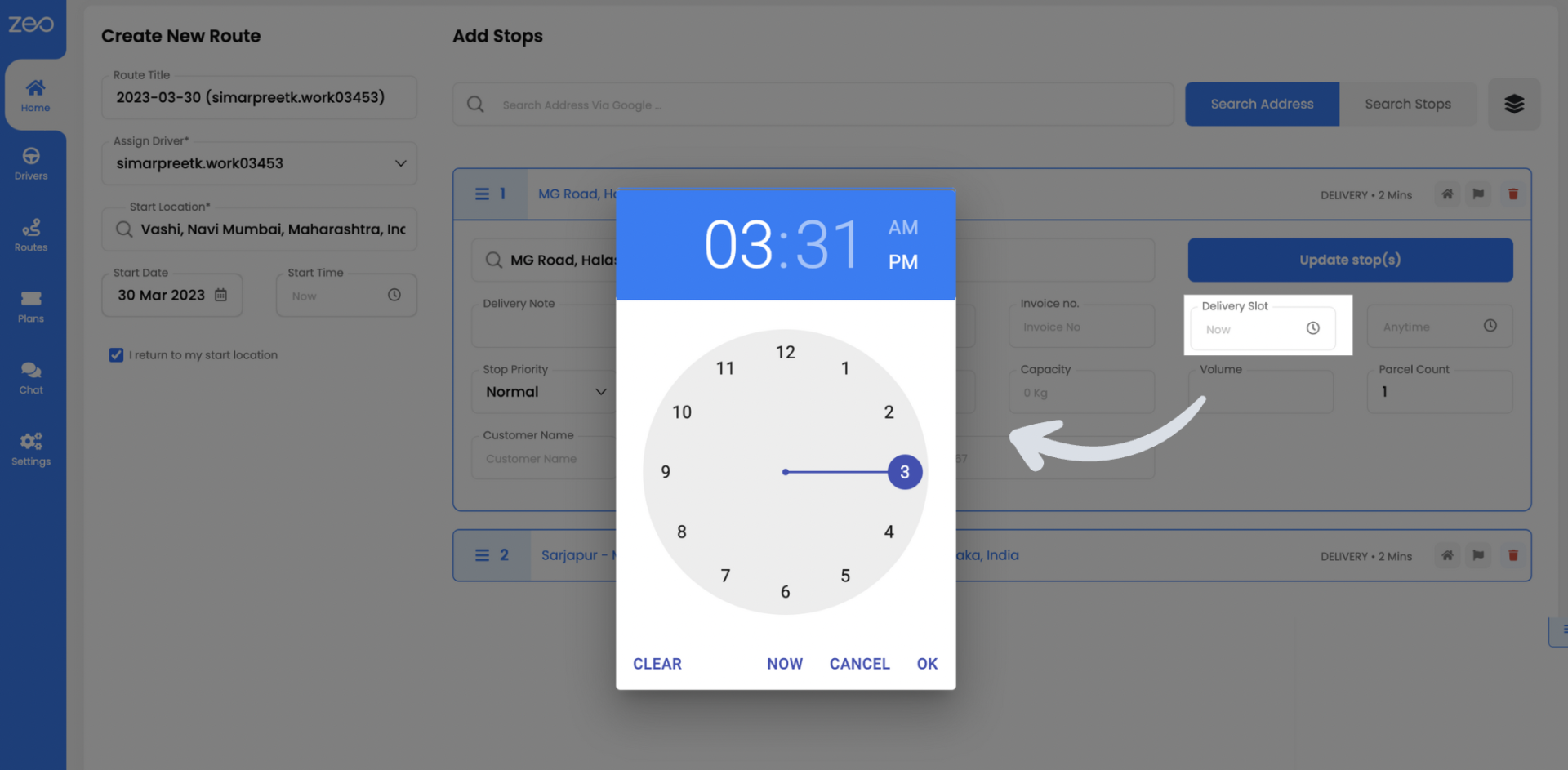
Time window constraints ensure your drivers arrive within the customer’s preferred window, reducing the frustration of missed appointments and rescheduling hassles. This feature is particularly valuable for service industries where customers arrange their schedules around your arrival.
2. Share trip details with the customer
Our driver app lets the drivers share trip details directly with the customer. This can be used to send the live location and the contact details of the driver to the customer. Live location helps in keeping the customer updated of the accurate delivery time. Check out our blog to learn how to share trip details with customers.
Real-time communication eliminates the guesswork for customers. Instead of wondering “Where is my delivery?” customers receive proactive updates that build trust and reduce support calls to your business.
3. Add trip notes to accommodate customer’s requests
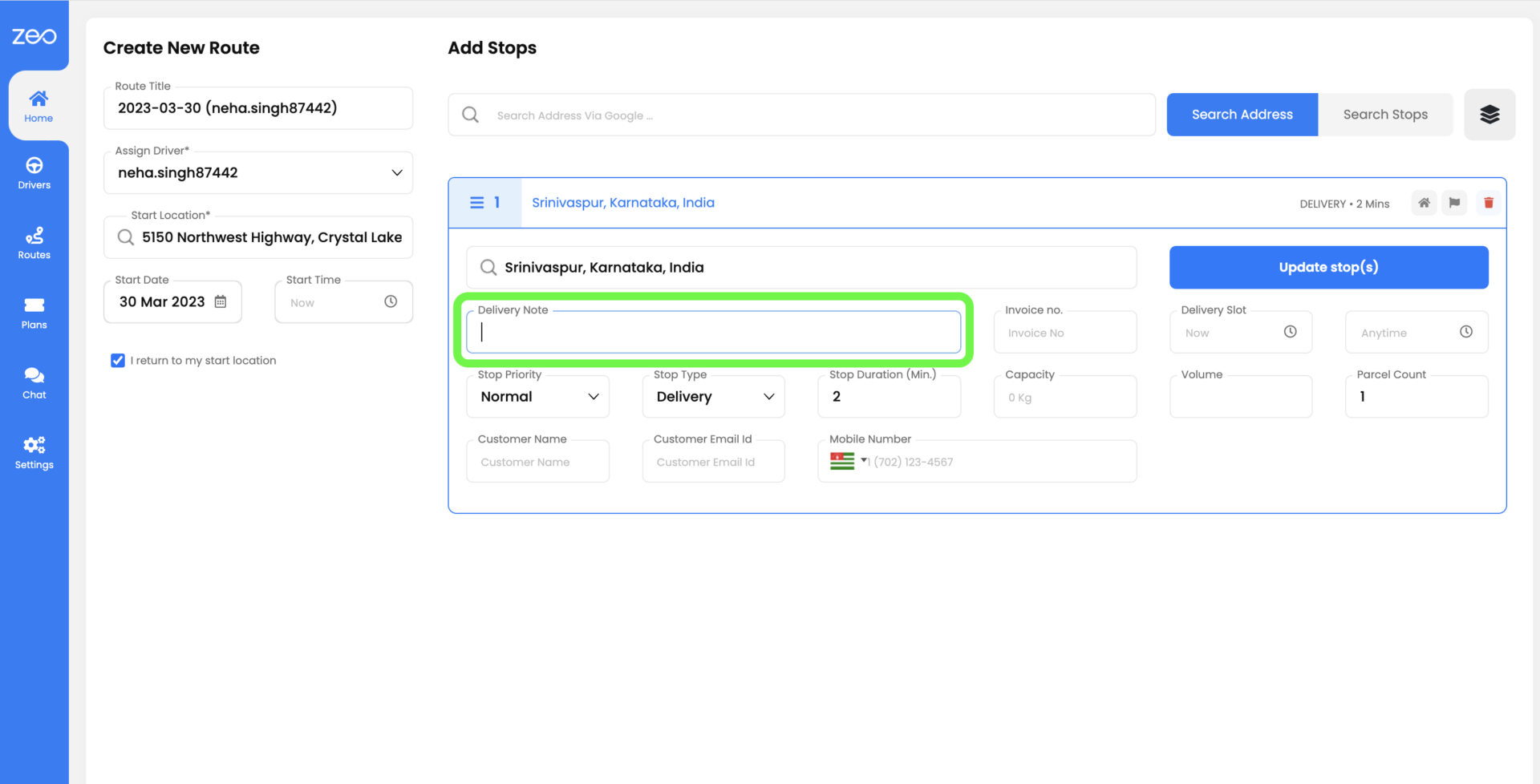
Sometimes the customers may have specific requests like the delivery person should ring the bell instead of calling or keep the box at the door. You can add trip notes for the drivers while adding customer details. This helps in tailoring the delivery experience as per customers’ requirements.
4. Proof of delivery
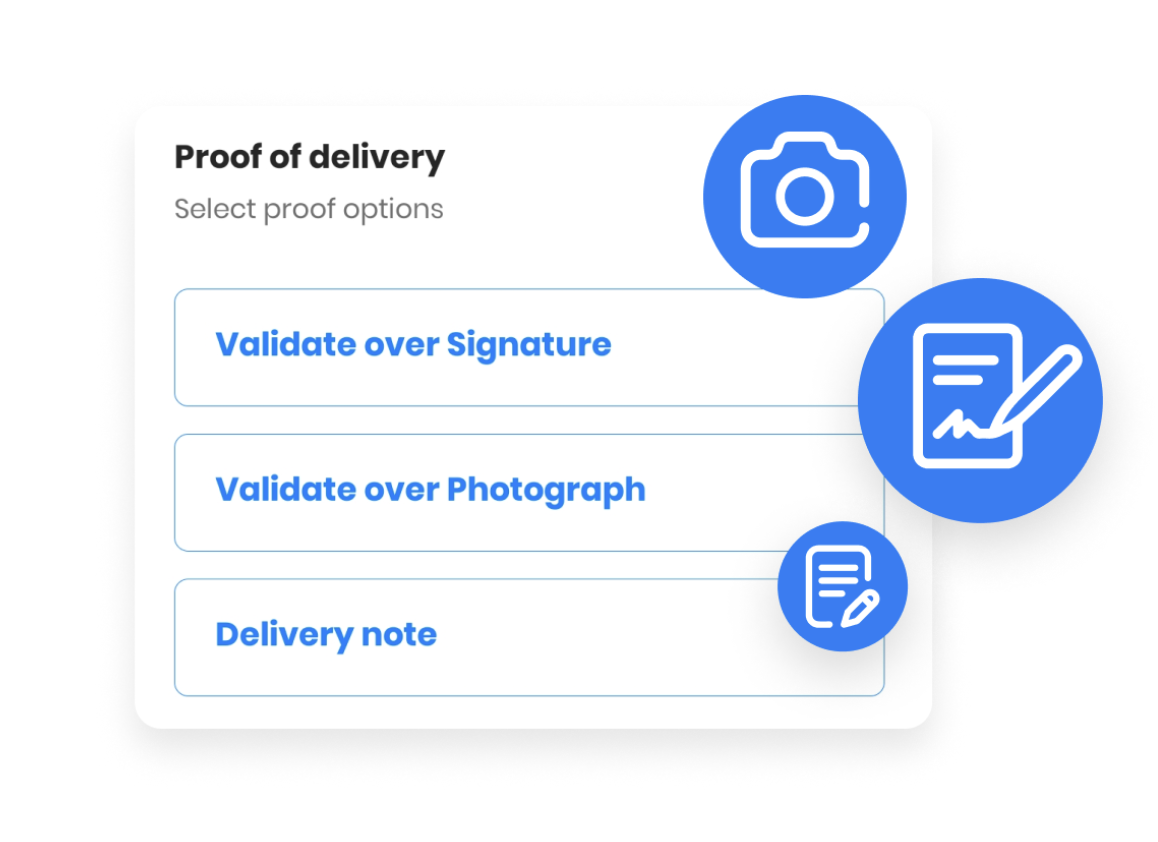
Using the driver app, the driver can collect proof of delivery in 2 ways: collecting the digital signature of the customer and if the customer is not available then clicking a picture of the package after leaving it at a safe place. The picture is shared with the customer. This helps in reducing the to-and-fro communication between the customer and the business in case the customer has any concerns regarding the delivery.
5. Real-time updates to the route
Let’s say your driver is on the way to make the delivery or a customer service request. There’s an unanticipated increase in traffic due to an accident or ongoing construction on the driver’s route. The route planner helps by updating the route in real-time to provide the driver with an alternative optimised route and ensures that customer delivery doesn’t get delayed.

increase fuel savings
Save 2 Hours on Deliveries, Everyday!
Optimize routes with our algorithm, reducing travel time and costs efficiently.
Get Started for Free
Dynamic route adjustments keep service promises intact even when unexpected disruptions occur. This flexibility demonstrates professionalism and helps maintain the trust customers place in your delivery commitments.
6. Skill-based driver allocation
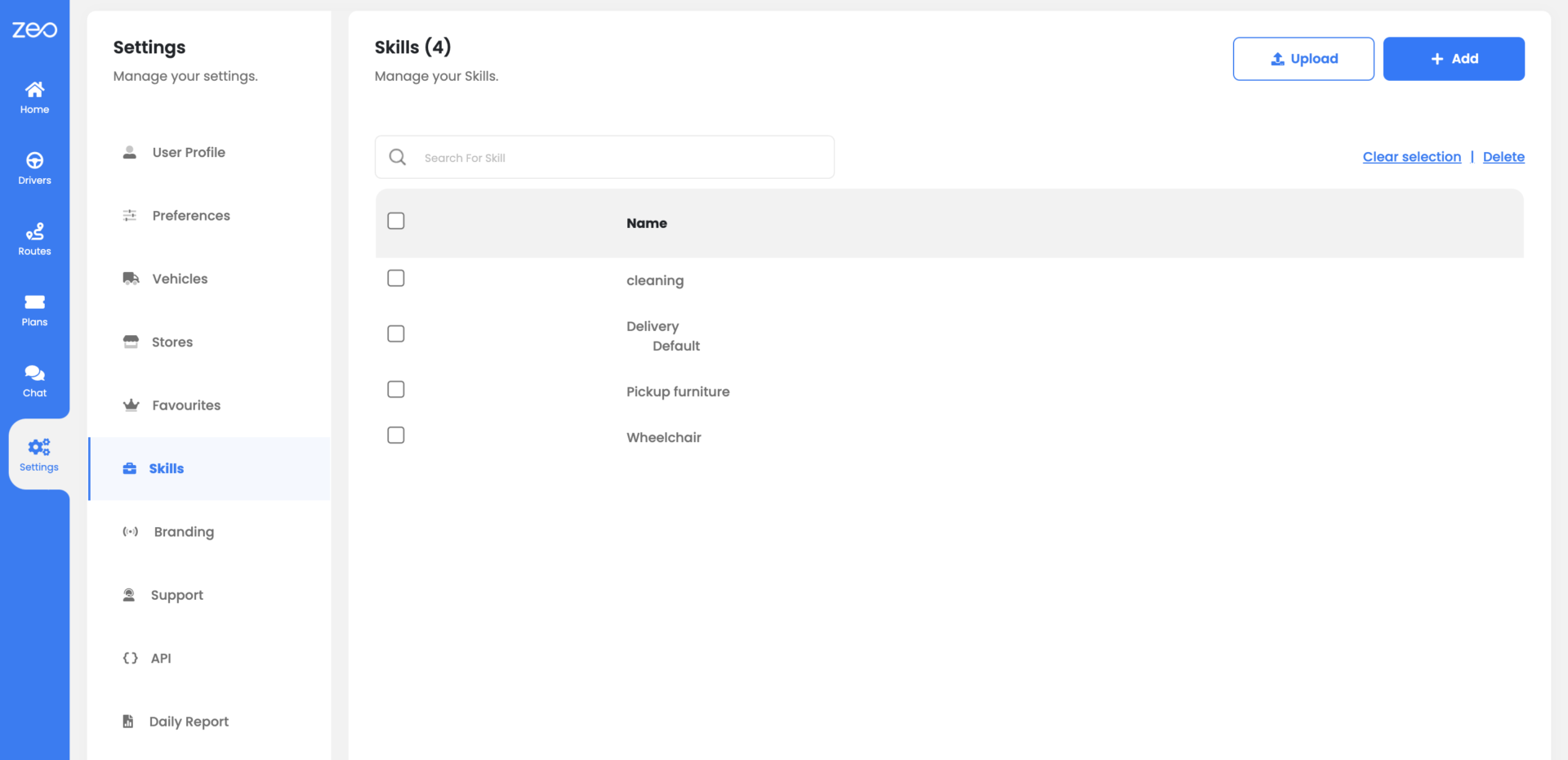
Route planner comes in handy if you are in a business that requires a job to be done in a sequence by people with different levels of skills (for example construction & maintenance) or the array of services require different jobs to be performed by people with different skills (for example health care). You can map specific skills to the drivers. While adding stops, the skill requirement at a stop can be added. Zeo Route Planner will optimise the route by sending the driver with the required skill set to the right stop and enhance customer satisfaction. Read our blog to learn more about skill-based optimization.
How Customer Communication Reduces Service Complaints
Research from the Department of Transportation shows that poor communication during delivery is the top cause of customer complaints in last-mile services. When customers don’t know when to expect their delivery or service appointment, frustration builds quickly.
Proactive communication changes this dynamic entirely. Automated notifications keep customers informed at every stage – when the driver starts their route, when they’re approaching, and when the service is complete. This transparency builds confidence and reduces the anxiety that leads to negative reviews.
For businesses handling multiple service calls per day, this communication becomes even more critical. Technical service companies, for example, benefit significantly from optimized routing strategies that improve both efficiency and customer satisfaction.
How Priority Scheduling Improves Emergency Response
Not all service calls carry the same urgency. Emergency repairs, rush deliveries, and time-sensitive appointments require different handling than routine visits. Priority stops functionality allows dispatchers to mark urgent requests as “ASAP” while keeping regular appointments as “Normal” priority.
This capability proves invaluable for service industries where emergency calls can disrupt planned routes. Instead of manually reshuffling the entire schedule, route optimization automatically adjusts to accommodate high-priority stops while minimizing disruption to other customers.
To Sum-up
Customer satisfaction is key to your business and you should take advantage of Zeo route planner for enhanced customer service. Our route planner helps in making deliveries as per customers’ preferred time slots, sharing trip details with the customer, adding trip notes, recording proof of delivery, skill-based optimisation and even updating the routes in real-time.
Frequently Asked Questions
How do you handle customer complaints about late deliveries?
The best approach is prevention through accurate time estimates and proactive communication. Set realistic delivery windows based on actual route data, then keep customers informed with real-time updates throughout the process. When delays do occur, immediate notification with updated ETAs helps maintain trust and reduces complaint volume.
What information should drivers share with customers during deliveries?
Drivers should share their name, estimated arrival time, and contact method for any delivery issues. Live location tracking and real-time ETA updates provide transparency without requiring constant phone calls. Clear communication about any special delivery instructions or requirements also prevents misunderstandings.
How can route planning software reduce customer service issues?
Route optimization addresses the root causes of most delivery complaints – late arrivals, missed time windows, and poor communication. Zeo Route Planner’s real-time GPS tracking and automated customer notifications have helped 1.5M+ users maintain better customer relationships. Features like time window constraints and live ETA updates eliminate the guesswork that leads to frustrated customers.
What’s the best way to collect proof of delivery when customers aren’t home?
Photo documentation with detailed delivery notes provides the strongest proof when customers are unavailable. Take pictures showing the package placement, any relevant landmarks, and timestamp information. Digital signature collection works best for in-person deliveries, while photo capture serves contactless and unattended deliveries effectively.
How do you manage different skill requirements across service appointments?
Map specific qualifications to each team member, then assign jobs based on required expertise rather than just geographic proximity. This prevents situations where customers receive technicians who can’t complete their specific service needs. Skill-based routing ensures the right person arrives for each job, reducing callbacks and improving first-visit resolution rates.

Are you a fleet owner?
Want to manage your drivers and deliveries easily?
Grow your business effortlessly with Zeo Routes Planner – optimize routes and manage multiple drivers with ease.

increase fuel savings
Save $200 on fuel, Monthly!
Optimize routes with our algorithm, reducing travel time and costs efficiently.
Get Started for Free 




















