# The Complete Route Planner App Guide: Why Google Maps Fails Multi-Stop Business Operations
> TL; DR: Professional route planner apps optimize multi-stop routes automatically while Google Maps cannot, typically reducing business drive time by 20-30% compared to manual planning. According to the Lupon ng Pananaliksik sa Transportasyon, manual route planning results in 20-25% more driving time than optimized routes. AI-powered solutions like Zeo Route Planner address this with intelligent route optimization and real-time tracking, helping field service teams save 2+ hours daily.
Managing a team of drivers or technicians with basic GPS apps feels like coordinating chaos. You spend hours every morning figuring out who goes where, drivers call constantly asking for directions to their next stop, and customers complain about missed time windows. A proper route planner app changes everything.
The difference between Google Maps and a business route planner app is like comparing a calculator to accounting software. Both do math, but only one runs your business.
Why Basic GPS Apps Fail for Multi-Stop Business Operations
GPS apps like Google Maps work perfectly for getting from Point A to Point B. They fail spectacularly when your day involves 15 stops, three drivers, and customers who need deliveries between 9 AM and 11 AM.
Walang Multi-Stop Optimization
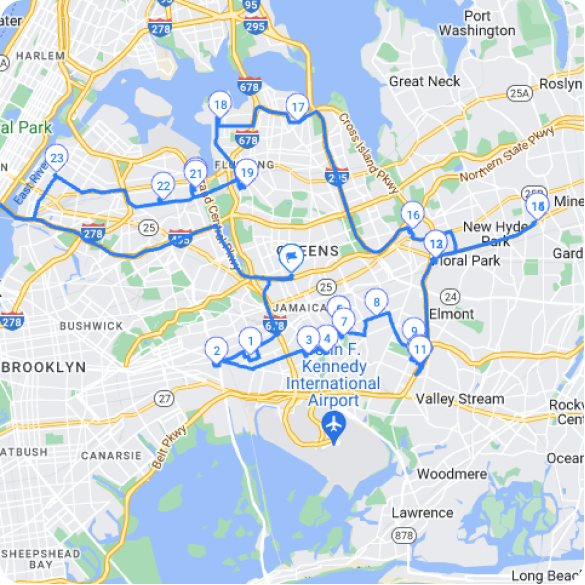
Google Maps lets you add multiple stops, but it doesn’t optimize the order. It assumes you know the best sequence, which you probably don’t. Research from the Transportation Research Board shows that manual route planning typically results in 20-25% more driving time than optimized routes.
Zero Business Context
Your HVAC technician needs to know that Mrs. Johnson’s appointment is a priority call, the equipment weighs 200 pounds, and she specifically requested your most experienced tech. Google Maps shows an address. That’s it.
No Accountability or Tracking
When your driver says they “couldn’t find the address,” you have no proof either way. When customers ask where their delivery is, you’re calling drivers instead of checking real-time locations. Professional software sa pagsubaybay ng driver eliminates this guesswork with live GPS monitoring and automatic status updates.
Communication Nightmare
Every route change means phone calls or texts to multiple drivers. Update addresses, add urgent stops, or handle cancellations, and you’re playing telephone tag instead of running your business.
Route Optimization Algorithm Breakdown: How Different Apps Actually Calculate Your Best Route
Not all route optimization works the same way. Understanding the difference helps you pick the right tool and set realistic expectations.
Basic Nearest-Neighbor Algorithm
Simple route planners use the nearest-neighbor approach: go to the closest unvisited stop, then the closest remaining stop. It’s fast but creates obviously bad routes, especially with time windows or capacity constraints.
Advanced Algorithms Consider Real Variables
Professional route planner apps use algorithms that factor in:
- Real-time traffic patterns throughout the day
- Vehicle capacity limits (weight, volume, number of items)
- Time windows for deliveries or appointments
- Mga kasanayan at sertipikasyon sa pagmamaneho
- Priority levels for different customers
- Service time at each location
Ang Pakinabang ng AI
Modern AI-powered routing learns from historical data. It knows that downtown deliveries take longer during lunch hours, that certain neighborhoods have parking challenges, and that your best technician handles complex jobs 30% faster than average.
Zeo Route Planner uses AI optimization that considers all these factors simultaneously, reducing total drive time by an average of 20-30% compared to manual planning.
Mga Mahahalagang Tampok na Dapat Mayroon ang Bawat Business Route Planner App
Your route planner app needs to solve real business problems, not just provide directions. Here are the non-negotiable features:
Multi-Stop Route Optimization
The app should optimize routes for multiple stops automatically. You input addresses and constraints; it outputs the most efficient sequence and assigns stops to drivers based on capacity, skills, and geography.
Real-Time na Pagsubaybay at Komunikasyon
See where every driver is right now. Get automatic notifications when they complete stops, run behind schedule, or encounter problems. Send route updates instantly without phone calls.
Proof of Service Capabilities
Collect photos, signatures, and notes at each stop. This protects you from false claims and provides documentation for insurance or warranty issues. For service businesses, it’s essential for quality control. Learn more about implementing patunay ng paghahatid systems for your operations.
Mga Tool sa Komunikasyon ng Customer
Automatically send customers delivery windows, live tracking links, and arrival notifications. According to Bureau of Labor Statistics delivery research, 83% of customers want proactive delivery updates.
Pamamahala ng Oras
Some stops are flexible; others must happen within specific hours. Your app should respect these constraints while still optimizing overall efficiency.
Mga Kakayahang Pagsasama
Your route planner should connect with your existing CRM, e-commerce platform, or field service management system. Manual data entry defeats the purpose of automation.
Industry-Specific Route Planning: Why HVAC Teams Need Different Features Than Food Delivery
Different industries have wildly different routing needs. A one-size-fits-all approach leaves gaps that hurt your business.
Food Delivery: Speed and Capacity
Food delivery prioritizes speed and order accuracy. Routes change constantly as new orders come in. Key features include:
- Real-time route adjustments for new orders
- Capacity planning for hot/cold items
- Customer communication with precise ETAs
- Proof of delivery with photos
HVAC and Field Services: Skills and Equipment
HVAC, plumbing, and electrical work requires matching technicians to jobs based on skills and equipment. Critical features include:
- Skill-based assignment (who’s certified for commercial refrigeration?)
- Equipment and parts inventory tracking
- Longer service windows for complex jobs
- Customer communication about technician arrival and service completion
Specialized Pagpaplano ng ruta ng HVAC solutions address these unique requirements with industry-specific optimizations.
Healthcare and Home Services: Compliance and Scheduling
Home healthcare, pharmacy delivery, and similar services need strict scheduling and documentation:
- Precise time windows for medication delivery or care visits
- Compliance documentation and photo verification
- Patient/client communication protocols
- Route optimization that considers caregiver certifications
Ayon sa OSHA fleet safety guidelines, proper documentation and route planning significantly reduce compliance risks for healthcare service providers.
Zeo Route Planner handles industry-specific needs through customizable fields, skill-based driver assignment, and flexible time window settings that adapt to your business requirements.
Cost-Benefit Analysis: Calculating Your Exact ROI from Route Planning Software
Route planning software costs money. Poor routing costs more. Here’s how to calculate the real impact:
Pagkalkula ng Pagtitipid ng Oras
Average time spent on manual route planning: 60-90 minutes per day for a 10-driver operation. Software sa pag-optimize ng ruta reduces this to 10-15 minutes.

dagdagan ang pagtitipid sa gasolina
Makatipid ng 2 Oras sa Paghahatid, Araw-araw!
I-optimize ang mga ruta gamit ang aming algorithm, binabawasan ang oras ng paglalakbay at mga gastos nang mahusay.
Magsimula para sa Libre
Daily time savings: 60 minutes
Annual savings: 240 hours (60 minutes × 5 days × 48 weeks)
Value at $25/hour: $6,000 annually
Pagbawas sa Gastos ng gasolina
Optimized routes typically reduce total driving distance by 15-25%. For a fleet driving 100,000 miles annually:
Distance reduction: 20,000 miles
Fuel savings at $3.50/gallon, 20 MPG: $3,500 annually
Mga Nadagdag sa Kahusayan sa Paggawa
Better routes mean more stops per driver per day. Increasing daily productivity from 12 to 15 stops per driver (25% improvement) across 10 drivers:
Additional daily capacity: 30 stops
Annual additional capacity: 7,200 stops
Revenue impact (varies by industry): $50,000-$150,000+ annually
Kasiyahan at Pagpapanatili ng Customer
Professional communication and on-time performance improve customer retention. A 5% improvement in retention for a business with $500,000 annual revenue equals $25,000 in retained business.
Total Annual Benefit: $84,500-$184,500
Typical Software Cost: $3,000-$6,000 annually
ROI: 1,400%-3,000%
How the Best Route Planner Apps Work for Both Managers and Drivers
The most effective route planning solutions work seamlessly for office managers and field teams. Here’s how the process should flow:
Manager Planning Phase
Operations managers use a web-based platform to input stops, set constraints, and optimize routes. They can see the big picture: all drivers, all routes, capacity constraints, and time windows. The system automatically assigns optimized routes to appropriate drivers based on skills, vehicle capacity, and geographic efficiency.
Driver Execution Phase
Drivers receive their optimized routes directly on mobile devices. The app provides turn-by-turn navigation, customer contact information, special instructions, and tools for proof of delivery. No paper routes, no confusion about priorities or sequence.
Real-Time na Koordinasyon
Managers track progress in real-time and make adjustments as needed. Add urgent stops, handle cancellations, or reassign routes without phone calls. Drivers receive updates instantly on their mobile devices.
Pag-uulat sa Pagtatapos ng Araw
Both managers and drivers see performance metrics: routes completed, time saved, customer feedback, and areas for improvement.
Mabisa field service route management requires this seamless integration between planning and execution phases.
Zeo Route Planner exemplifies this two-platform approach. Fleet managers use the web platform to plan and assign routes to multiple drivers, while those drivers receive and navigate their routes through the Zeo mobile app. This creates seamless coordination between office and field operations.
Example: HVAC Company Daily Workflow
Morning: Manager imports service calls, sets priority levels, and assigns routes to four technicians based on skills and equipment needs. Routes optimize automatically.
9:00 AM: Technicians receive routes on their phones with customer details, service history, and navigation to first appointments.
11:30 AM: Emergency call comes in. Manager adds it to the appropriate technician’s route, and the driver gets the update instantly.
Throughout day: Manager tracks progress, customers receive automatic updates, and technicians submit proof of service with photos and signatures.
End of day: Automatic reporting shows completed jobs, drive time savings, and customer satisfaction scores.
Mga Madalas Itanong
Q: How much can a business save by switching from manual route planning to a route planner app?
Businesses typically save 15-25% on fuel costs and 60-90 minutes daily on planning time by switching to automated route optimization. With software sa pag-optimize ng ruta, companies with 10+ vehicles often see $50,000-$150,000 in annual productivity gains through increased daily capacity and reduced operational costs.
Q: What’s the difference between Google Maps and professional route planner apps for businesses?
Google Maps provides basic directions but doesn’t optimize multi-stop routes, handle time windows, or provide business features like proof of delivery and customer notifications. Professional route planners use algorithms that consider vehicle capacity, driver skills, service times, and real-time constraints to create truly optimized routes for business operations.
Q: Can route planner apps work for field service businesses with specific skill requirements?
Yes, advanced route planner apps include skill-based assignment features that match technicians to jobs based on certifications and expertise. Zeo Route Planner’s skill-based driver assignment ensures that specialized jobs like commercial HVAC or electrical work are automatically assigned to qualified technicians, improving first-time fix rates and customer satisfaction.
Q: How do route planner apps handle last-minute changes and emergency calls?
Professional route planners offer real-time route adjustments that instantly update driver routes when new orders come in or cancellations occur. The best apps push updates directly to driver mobile devices without requiring phone calls, maintaining operational efficiency even during busy periods or emergency situations.
Q: What proof of delivery features should businesses look for in a route planner app?
mahalaga patunay ng paghahatid features include photo capture, digital signature collection, delivery notes, and timestamp documentation. These features protect businesses from false delivery claims and provide documentation for insurance or warranty issues while maintaining professional customer service standards.
The right route planner app transforms field operations from daily chaos into systematic efficiency. The time savings alone justify the investment, but the improvements in customer service, team productivity, and business growth create lasting competitive advantages.
Start your free trial of Zeo Route Planner to see how much time and money you can save with intelligent route optimization.

Ikaw ba ay may-ari ng fleet?
Nais na madaling pamahalaan ang iyong mga driver at paghahatid?
Palakihin ang iyong negosyo nang walang kahirap-hirap gamit ang Zeo Routes Planner – i-optimize ang mga ruta at pamahalaan ang maraming driver nang madali.
dagdagan ang pagtitipid sa gasolina
Hassle Free Delivery at Pickups!
I-optimize ang mga ruta gamit ang aming algorithm, binabawasan ang oras ng paglalakbay at mga gastos nang mahusay.
Magsimula para sa Libre