

# Jak efektivně naplánovat vyzvednutí kontejnerů
> TL; DR: Efficient roll-off container pickup scheduling requires centralized request management, zone-based routing, and 24-48 hour advance planning to minimize delays and maximize truck utilization. Poor scheduling wastes 2-3 driver hours daily and increases operational costs by 15-20% annually. Route optimization tools like Zeo Route Planner address this with AI-powered scheduling and real-time GPS tracking, helping waste management teams save 2+ hours daily on manual planning while improving on-time performance.
Roll-off container pickup scheduling can make or break your waste management operation. Poor scheduling leads to frustrated customers, wasted fuel, and drivers spending extra hours on inefficient routes.
The good news? A systematic approach to how to schedule roll-off container pickups transforms chaos into smooth operations. You’ll reduce customer wait times, maximize truck utilization, and keep your drivers productive.
Let’s dive into the proven strategies that top waste management companies use to streamline their pickup operations.
The Hidden Costs of Poor Roll-Off Pickup Scheduling
Manual scheduling costs more than you think. Every missed pickup window creates a ripple effect across your entire operation.
Customer impact hits hard. Construction sites can’t start new phases when containers aren’t picked up on time. Retail locations face health code violations when dumpsters overflow. According to the Národní asociace pro odpad a recyklaci, customer retention in waste management drops by 23% when service reliability falls below expectations.
Driver efficiency plummets with poor routing. Your drivers waste 2-3 hours daily when routes aren’t optimized. They backtrack across town, hit the same neighborhoods multiple times, and burn unnecessary fuel. The Katedra dopravy reports that inefficient routing increases operational costs by 15-20% annually.
Truck utilization suffers from scheduling gaps. Empty trucks driving to scattered pickups means you’re paying for unproductive time. You might need more trucks than necessary, or worse, turn away profitable jobs because you can’t fit them into chaotic schedules.
Overtime costs spike during busy periods. When schedules fall behind, drivers work late to catch up. That overtime pay adds up quickly, especially during construction season when pickup requests surge.
Complete Roll-Off Container Pickup Scheduling Process (Step-by-Step)
Effective pickup scheduling starts with a clear process that handles every request consistently.
Step 1: Centralize all pickup requests. Create one system where customer calls, online requests, and field observations get logged. Include container size, location address, pickup urgency, and any access restrictions like narrow driveways or overhead wires.
Step 2: Assess pickup priority and constraints. Not all pickups are equal. Mark emergency requests (overflowing containers, permit deadlines) as high priority. Note time windows when customers need containers removed, like before 3 PM for retail locations or after 5 PM for busy construction sites.
Step 3: Group pickups by geographic zones. Divide your service area into logical zones based on travel time between locations. Aim for 10-15 minute drives between stops within the same zone. This prevents drivers from crisscrossing town unnecessarily.
Step 4: Match container types with appropriate trucks. Your 20-yard containers need different trucks than 40-yard containers. Check truck capacity and ensure drivers have the right equipment before assigning routes.
Step 5: Build daily pickup schedules 24-48 hours in advance. This gives you time to optimize routes and notify customers of pickup windows. Start with high-priority and time-sensitive pickups, then fill in regular maintenance pickups.
Step 6: Communicate pickup windows to customers. Send confirmation messages with 2-4 hour pickup windows. Include your company’s contact information and instructions for preparing containers (removing obstructions, ensuring access).
Here’s a real example: Metro Waste Services in Denver schedules construction site pickups between 6 AM and 10 AM to avoid traffic, while retail dumpster pickups happen between 10 AM and 2 PM when stores have fewer customers.
Route scheduling software can automate much of this process, reducing manual planning time while ensuring consistent scheduling protocols across your entire operation.
Optimal Route Planning for Maximum Pickup Efficiency
Smart route planning can cut your daily drive time by 25-30% while improving customer satisfaction.
Start routes from your facility’s location. Plan the most efficient path from your yard to the first pickup, through all scheduled stops, and back to the facility. Consider traffic patterns – morning routes should avoid school zones and rush hour corridors.
Sequence stops to minimize backtracking. Use the “nearest neighbor” approach as a starting point: after each pickup, move to the closest remaining container. But adjust this for traffic, one-way streets, and customer time windows.
Account for container weights and truck capacity. Heavy containers (concrete, dirt) fill trucks faster than light debris. Plan these pickups early in routes so trucks can return to dump before continuing with lighter containers.
Build in buffer time for unexpected delays. Allow 15-20% extra time in schedules for traffic, difficult container access, or customers who need to remove last-minute items. This prevents entire routes from falling behind.
Consider dump site locations when planning routes. If trucks need to visit the landfill or transfer station mid-route, position those trips strategically. Don’t force drivers to cross town twice to reach dump sites.
Factor in driver breaks and lunch periods. Plan natural break points near restaurants or rest areas, especially for longer routes. This keeps drivers productive and ensures compliance with DOT hours-of-service regulations.
Route optimization becomes much easier with the right tools. Zeo Route Planner uses AI-powered optimization to create efficient pickup routes automatically, saving operations managers 2+ hours daily on manual route planning while reducing total drive time by up to 30%.
Technology Solutions for Automated Scheduling and Real-Time Coordination
Modern waste management operations rely on technology to coordinate complex pickup schedules efficiently.
Route optimization software eliminates manual planning headaches. Instead of spending hours plotting routes on paper maps, you can input all pickup addresses and let algorithms create optimal sequences. The software considers traffic patterns, vehicle capacity, and time windows simultaneously.
GPS tracking provides real-time visibility into pickup progress. You’ll know exactly where each truck is and whether routes are running on schedule. When customers call asking about their pickup, you can provide accurate ETAs instead of vague promises. Sledování vozidel v reálném čase systems have become essential for maintaining customer satisfaction in competitive waste management markets.
Mobile apps streamline driver communication. Instead of radio calls back and forth, drivers can update pickup status, capture proof of service photos, and receive route changes directly on their phones. This reduces dispatcher workload and improves accuracy. Software pro sledování řidičů enables seamless coordination between office staff and field teams.
Customer notification systems keep clients informed automatically. Send pickup confirmations, arrival alerts, and completion notices without manual phone calls. Customers appreciate the communication, and it reduces “where’s my pickup?” calls to your office.
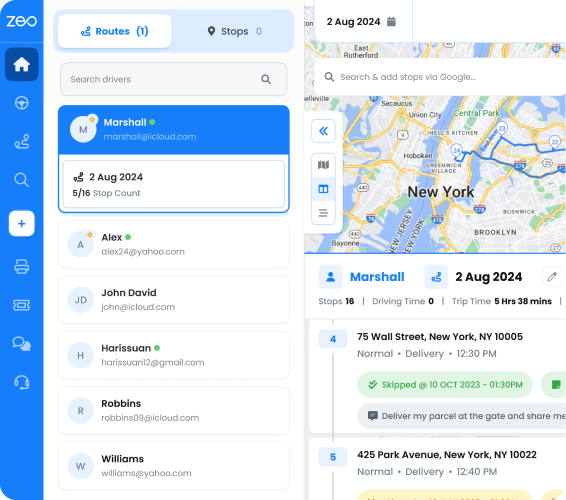
For waste management operations, drivers use the Zeo mobile app to receive optimized pickup routes, update pickup status in real-time, and capture proof of pickup with photos, while dispatchers manage the scheduling from the web platform. The system’s real-time GPS tracking and live ETA updates help customer service teams provide accurate pickup information when customers call.

zvýšit úsporu paliva
Bezproblémové dodání a vyzvednutí!
Optimalizujte trasy pomocí našeho algoritmu a efektivně zkraťte dobu cestování a náklady.
Začněte zdarma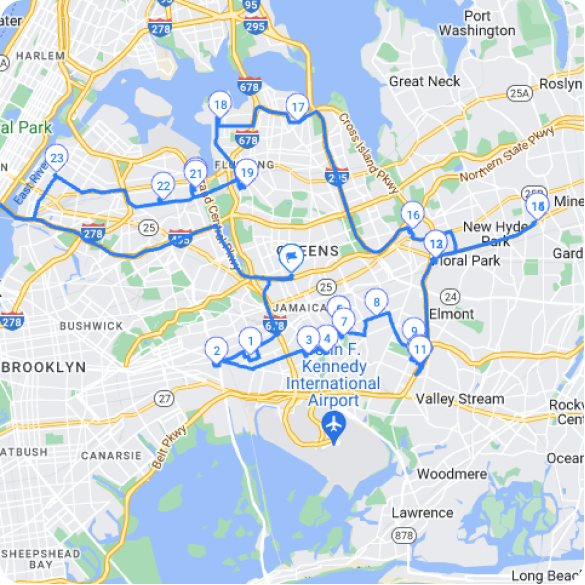
Integration capabilities connect scheduling with billing and customer management. When pickups are completed, the information flows automatically to invoicing systems. This eliminates double data entry and ensures billing accuracy.
Handling Schedule Disruptions: Emergency Pickups and Delays
Even the best schedules face disruptions. Your response system determines whether problems stay small or cascade into major issues.
Create clear emergency pickup protocols. Define what constitutes an emergency (overflowing containers, permit violations, health hazards) and establish response timeframes. Train dispatchers to assess urgency and identify which trucks can handle emergency additions.
Build flexibility into daily schedules. Reserve 10-15% of truck capacity for same-day requests and emergency pickups. This prevents you from turning away profitable urgent jobs or disappointing long-term customers.
Maintain communication during delays. When routes run behind schedule, notify affected customers immediately. Provide updated pickup windows and explanations. Proactive communication prevents frustrated customer calls and maintains trust.
Have backup plans for equipment failures. When trucks break down mid-route, you need systems to quickly reassign remaining pickups to other drivers. Keep updated contact lists for subcontractors who can handle overflow during busy periods.
Document disruption patterns to improve future scheduling. Track common delay causes (traffic locations, difficult access sites, customer preparation issues) and adjust future schedules accordingly. If certain pickup locations consistently cause problems, schedule them with extra time buffers.
Train drivers to handle schedule changes efficiently. Equip them with mobile devices to receive real-time route updates. Teach them to communicate delays and completion status promptly so dispatchers can adjust other routes as needed.
Efektivní nakládání s odpady operations require robust systems for handling both planned schedules and unexpected disruptions without compromising overall service quality.
Measuring Success: KPIs for Roll-Off Pickup Operations
Track the right metrics to identify improvement opportunities and demonstrate operational success.
On-time pickup percentage measures customer satisfaction. Aim for 95% of pickups completed within promised time windows. This metric directly correlates with customer retention and referral rates in the waste management industry.
Average route completion time shows efficiency trends. Monitor how long routes take compared to planned schedules. Improving efficiency here reduces overtime costs and increases daily truck capacity.
Fuel consumption per pickup reveals routing effectiveness. Calculate gallons used divided by containers picked up. Optimized routes should show steady improvement in this metric over time.
Customer complaint frequency indicates service quality issues. Track missed pickups, late arrivals, and access problems. These complaints often point to scheduling or communication gaps you can fix systematically.
Truck utilization rates show capacity optimization. Measure productive hours (driving to and performing pickups) versus total paid hours. Higher utilization means you’re maximizing your equipment investment.
Revenue per truck per day demonstrates overall operational health. This combines efficiency with profitability, showing whether improvements translate into better financial performance.
Zeo’s analytics and reporting features help waste management companies track these KPIs automatically, with detailed insights into driver performance, route efficiency, and customer satisfaction metrics across their entire fleet operation.
Driver satisfaction scores affect long-term success. Survey drivers about route fairness, workload balance, and schedule predictability. Happy drivers provide better customer service and stay with companies longer, reducing recruitment costs.
Často kladené dotazy
Q: What’s the difference between emergency and regular roll-off container pickups?
Emergency pickups involve overflowing containers, permit deadline violations, or health hazards requiring same-day response. Regular pickups are scheduled maintenance collections with flexible 2-4 hour time windows that can be planned 24-48 hours in advance.
Q: How do you handle multiple container sizes on the same pickup route?
Group containers by size and truck compatibility first, then optimize geographic routing. 20-yard containers require different equipment than 40-yard units, so ensure drivers have appropriate trucks before building routes to avoid equipment mismatches and delays.
Q: What factors cause the most delays in roll-off pickup schedules?
Traffic congestion, difficult container access (narrow driveways, overhead wires), customers adding last-minute items, and truck capacity issues are the primary delay causes. Zeo Route Planner’s real-time GPS tracking and route optimization helps identify these bottlenecks early, allowing dispatchers to adjust schedules proactively and maintain on-time performance rates above 95%.
Q: How much advance notice should customers receive for pickup windows?
Provide 24-48 hours notice with 2-4 hour pickup windows for regular collections. Emergency pickups need immediate communication with updated ETAs. Automated customer notification systems reduce dispatcher workload while keeping clients informed throughout the process.
Q: What’s the most efficient way to sequence pickup stops geographically?
Start from your facility and use zone-based routing to minimize backtracking between neighborhoods. Plan heavy container pickups early in routes so trucks can dump before continuing with lighter loads. Zeo’s AI-powered optimization automatically sequences stops while considering traffic patterns, customer time windows, and vehicle capacity constraints, typically reducing total route time by 25-30%.
Transform your roll-off pickup scheduling from chaotic to systematic. Start your free trial of Zeo Route Planner to streamline your pickup scheduling and routing, reduce customer wait times, and maximize your truck utilization.

Jste vlastníkem vozového parku?
Chcete snadno spravovat své ovladače a dodávky?
Rozvíjejte své podnikání bez námahy se Zeo Routes Planner – optimalizujte trasy a snadno spravujte více řidičů.
zvýšit úsporu paliva
Ušetřete 2 hodiny na dodávkách, každý den!
Optimalizujte trasy pomocí našeho algoritmu a efektivně zkraťte dobu cestování a náklady.
Začněte zdarma