

# Portable Toilet Delivery Scheduling Software Guide 2026
> TL; DR: Portable toilet delivery scheduling software eliminates manual route planning chaos by automatically optimizing deliveries, pickups, and maintenance visits across multiple construction sites and events. Companies typically reduce planning time by 80% and fuel costs by 20-30% through intelligent route sequencing. Advanced platforms like Zeo Route Planner use AI-powered optimization to handle complex constraints like vehicle capacity limits and strict construction site time windows, helping portable toilet rental businesses serve 1.5M+ users across 150+ countries.
Managing portable toilet deliveries across construction sites, events, and long-term rentals becomes overwhelming fast. When you’re coordinating 5-20 drivers handling deliveries, pickups, and regular servicing, manual scheduling quickly breaks down.
The right portable toilet delivery scheduling software transforms chaotic operations into streamlined systems. Companies typically reduce planning time by 80% while improving customer satisfaction and driver efficiency.
Why Manual Scheduling Fails for Growing Portable Toilet Businesses
Manual scheduling works when you have 2-3 drivers and predictable routes. But portable toilet operations face unique challenges that paper systems can’t handle.
Multiple Service Types Create Complexity
Your drivers handle three distinct service types: new deliveries, scheduled pickups, and routine maintenance visits. Each requires different time allocations and equipment. A delivery might take 15 minutes, while a full service could require 45 minutes.
Manual scheduling makes it nearly impossible to optimize these mixed routes. You end up with drivers zigzagging across town or arriving at job sites without proper equipment.
Construction Site Time Windows Are Rigid
Neffens de Associated General Contractors of America, 73% of construction projects face delays from coordination issues. Your portable toilet deliveries can’t add to these problems.
Construction sites often have strict delivery windows – typically 7-9 AM or 3-5 PM. Miss these windows and you’re dealing with angry contractors and rescheduling headaches.
Vehicle Capacity Constraints Get Ignored
Your trucks have weight and space limits. Some carry 8 units, others handle 12. Manual scheduling often ignores these constraints, leading to overloaded vehicles or multiple trips to the same area.
Emergency Requests Break Your Schedule
Event organizers call Friday afternoon needing 15 units by Saturday morning. Construction managers need immediate replacements for damaged units. Manual systems can’t quickly reorganize existing routes to accommodate emergencies.
No Real-Time Communication
When drivers are scattered across a 50-mile radius, communication breaks down. You don’t know if they’re running late, facing access issues, or completing services early. Customers start calling for updates you can’t provide.
Complete Guide: Scheduling vs Routing vs Fleet Management Software for Portable Restrooms
Understanding software categories helps you choose the right solution for your portable toilet business.
Basic Scheduling Software
Simple scheduling tools focus on calendar management. They show which drivers work when and track customer appointments.
Pros: Easy to learn, inexpensive
Cons: No route optimization, no real-time updates, limited capacity planning
Best for: Very small operations with predictable routes
Route Optimization Software
Rûteoptimalisaasje platforms like Zeo Route Planner use AI to create efficient delivery sequences. They consider traffic patterns, time windows, and vehicle capacity to minimize drive time.
Zeo’s AI-powered optimization saves portable toilet companies 2+ hours daily per driver. Your operations manager uploads addresses and service requirements, then the system creates optimal routes automatically.
Wichtige foardielen:
- Automatic route creation based on location clusters
- Time window compliance for construction sites
- Vehicle capacity management
- Real-time bestjoerder tracking
Ideaal foar: Companies with 5-20 drivers handling mixed delivery and service routes
Comprehensive Fleet Management Software
Fol fleet management software platforms include routing plus vehicle maintenance, driver management, and compliance tracking.
Pros: Complete operational oversight
Cons: Higher cost, longer implementation, potential feature overlap
Best for: Large operations with 20+ vehicles requiring detailed fleet oversight
Which Category Fits Your Business?
If you’re managing 5-20 drivers and struggling with manual route planning, route optimization software provides the best ROI. You get sophisticated scheduling without paying for features you don’t need.
ROI Calculator: How Automated Scheduling Cuts Costs and Boosts Revenue
Automated route planning delivers measurable returns through reduced labor costs and increased capacity.
Berekkening fan tiidbesparring
Tiid foar hânmjittige planning: Operations managers spend 2-3 hours daily creating routes
Automatisearre planningstiid: 15-20 minutes uploading stops and reviewing optimized routes
Daily Savings: 2.5 oeren
Weekly Savings: 12.5 oeren
Jierlikse wearde: $32,500 (assuming $50/hour manager wage based on Bureau of Labor Statistics datum)
Reduksje fan brânstofkosten
AI-rûteoptimalisaasje typically reduces daily mileage by 20-30%. For a 10-truck operation:
Current Weekly Mileage: 3,500 kilometer
Optimized Weekly Mileage: 2,625 miles (25% reduction)
Weekly Fuel Savings: $262 (assuming $3/gallon, 10 MPG)
Annual Fuel Savings: $13,624
Increased Service Capacity
Better routes allow each driver to complete 2-3 additional stops daily without overtime.
Additional Daily Stops: 25 (across 10 drivers)
Additional Weekly Revenue: $1,875 (assuming $15 average service fee)
Jierlikse ferheging fan ynkomsten: $97,500
Ferbetteringen fan klanttefredenheid
Neffens de Better Business Bureau, companies with real-time communication see 40% fewer customer complaints. Automated scheduling platforms provide:
- Accurate arrival time estimates
- Proactive delay notifications
- Bewiis fan tsjinstdokumintaasje
Fewer complaints mean less time handling customer issues and better online reviews driving new business.
Foarbyld fan totale jierlikse ROI
Costs Avoided: $46,124 (time + fuel savings)
Ferheging fan ynkomsten: $97,500
Software Cost: $ 2,400 jierliks
Net ROI: $141,224 (5,800% return)
Essential Features Your Portable Toilet Scheduling Software Must Have
Not all portable toilet delivery scheduling software handles operations effectively. Look for these specific capabilities.
Rûteplanning foar meardere tsjinsten
Your software must distinguish between deliveries, pickups, and servicing. Each service type requires different time allocations and affects route sequencing.
Zeo Route Planner handles this through priority stops and time window settings. Mark emergency services as ASAP priority while scheduling routine maintenance during normal windows.
Behear fan autokapasiteit
The system should track each truck’s weight and unit capacity. This prevents overloading and ensures drivers have necessary equipment.
Key capacity features:
- Weight limits by vehicle
- Unit count restrictions
- Equipment requirements by service type
- Automatic load balancing across drivers
Construction Site Time Windows
Construction sites operate on strict schedules. Your software must enforce delivery windows and optimize routes accordingly.
Essential time window capabilities:

fergrutsje fuel besparring
Besparje 2 oeren op leveringen, elke dei!
Optimalisearje rûtes mei ús algoritme, ferminderje reistiid en kosten effisjint.
Begjin fergees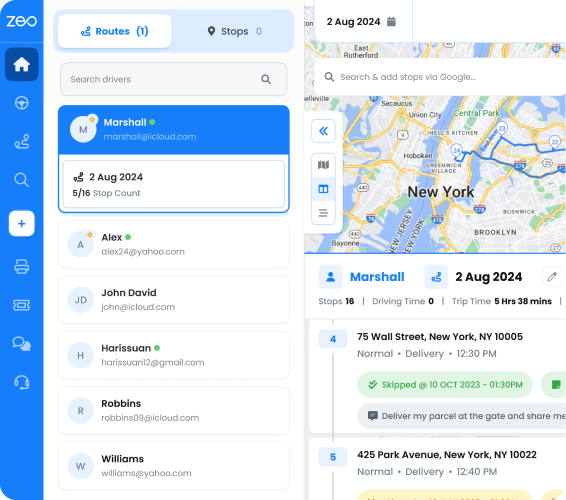
- Multiple windows per stop (morning and afternoon options)
- Buffer time for site access delays
- Automatic rescheduling when windows conflict
- Priority handling for time-sensitive deliveries
Kommunikaasje yn realtime bestjoerder
Once routes start, you need constant communication with drivers. Look for platforms that provide:
- Live GPS-tracking
- In-app messaging between dispatch and drivers
- Mooglikheden foar klantnotifikaasje
- Proof of service collection (photos, notes, signatures)
Emergency Route Adjustment
When urgent requests come in, your software should quickly reorganize existing routes to accommodate new stops efficiently.
Dynamic routing features include:
- Mid-day route optimization
- Automatic driver reassignment
- Customer communication about schedule changes
- Emergency priority handling
Customer Communication Tools
Modern customers expect delivery updates. Your scheduling software should automate these communications:
- Delivery window confirmation texts
- Live tracking links
- Completion notifications
- Service documentation sharing
Implementation Roadmap: Deploying Scheduling Software in Your Business
Successful software implementation requires careful planning and phased rollouts.
Phase 1: Data Preparation (Week 1-2)
Start by organizing your existing customer and route data.
Customer Database Cleanup:
- Standardize address formats
- Add delivery instructions and site access notes
- Document time window preferences
- Record special equipment requirements
Vehicle and Driver Information:
- Vehicle capacity specifications
- Driver skill certifications
- Work schedule preferences
- Geographic territory assignments
Historical Route Analysis:
- Track current route completion times
- Document problem locations or access issues
- Calculate baseline fuel consumption
- Record customer complaint patterns
Phase 2: Software Setup and Testing (Week 3-4)
Configure your chosen platform with clean data and test with pilot routes.
Inisjele konfiguraasje:
- Upload customer locations and service requirements
- Set vehicle capacity limits and driver assignments
- Configure time windows and priority settings
- Test route optimization with sample data
Pilot Testing:
- Run parallel systems for 5 days
- Compare automated vs manual routes
- Train 2-3 drivers on mobile app usage
- Gather feedback on route accuracy and timing
Phase 3: Driver Training and Rollout (Week 5-6)
Train your entire team on new processes and gradually transition operations.
Driver Training Components:
- Mobile app navigation and features
- Proof of service photo and signature collection
- Customer communication protocols
- Problem reporting procedures
Graduale útrolstrategy:
- Week 1: 50% of routes on new system
- Week 2: 75% of routes automated
- Week 3: Full automation with manual backup
- Week 4: Complete transition
Phase 4: Optimization and Fine-Tuning (Week 7-8)
Monitor performance and adjust settings based on real-world results.
Prestaasjemonitoring:
- Daily route completion times
- Klanttefredens skoares
- Driver feedback and issues
- Fuel consumption tracking
System Adjustments:
- Refine time estimates for different service types
- Adjust territory boundaries based on traffic patterns
- Update customer time windows based on feedback
- Optimize vehicle-driver assignments
Integration Hub: Connecting Scheduling with QuickBooks, CRM, and Customer Communication
Modern businesses run on integrated software systems. Your scheduling platform should connect seamlessly with existing tools.
QuickBooks Integration for Automated Billing
Manual invoicing wastes time and creates errors. Integration between your scheduling software and QuickBooks automates billing based on completed services.
Key Integration Benefits:
- Automatic invoice generation when services complete
- Accurate mileage tracking for expense records
- Service completion verification before billing
- Streamlined month-end financial processes
Look for platforms that sync service completion data directly to QuickBooks, eliminating double data entry.
CRM Connection for Customer Management
Your CRM contains valuable customer preferences and service history. Integrated scheduling platforms pull this information to optimize service delivery.
CRM Integration Capabilities:
- Automatic customer preference application
- Service history tracking and trend analysis
- Complaint pattern identification
- Upselling opportunity flagging
Zeo Route Planner integrates with HubSpot CRM, allowing customer service teams to track delivery status and proactively address issues.
Automatisearring fan klantkommunikaasje
Integrated communication tools eliminate manual customer updates and reduce service calls.
Automated Communication Features:
- Delivery window confirmation via SMS
- Live tracking links for real-time updates
- Service completion notifications with photos
- Rescheduling alerts for weather delays
These integrations typically reduce customer service calls by 50-60% while improving satisfaction scores.
API Connections for Custom Workflows
Growing businesses often need custom integrations. Look for platforms offering robust APIs that connect to:
- Custom billing systems
- Specialized CRM platforms
- Industry-specific compliance tools
- Warehouse behear systemen
Zeo’s API supports custom integrations, allowing businesses to create workflows specific to their operational requirements.
Faak Stelde Fragen
Q: How much does portable toilet delivery scheduling software typically cost?
Most portable toilet delivery scheduling software ranges from $15-50 per driver per month. Zeo Route Planner offers a free tier for smaller operations (up to 12 routes monthly) with premium plans starting at $15.99/month, making it accessible for growing portable toilet rental businesses.
Q: Can scheduling software handle emergency portable toilet requests?
Yes, modern scheduling platforms can quickly reorganize existing routes to accommodate urgent requests. The software automatically finds the most efficient way to add emergency stops while minimizing delays to scheduled deliveries and maintaining time window compliance.
Q: What’s the difference between basic scheduling and route optimization for portable toilets?
Basic scheduling only manages calendars and appointments, while route optimization uses AI to create the most efficient driving sequences. Route optimization considers factors like vehicle capacity, construction site time windows, and traffic patterns to reduce drive time by 20-30% compared to manual planning.
Q: How long does it take to implement portable toilet scheduling software?
Most businesses can fully implement portable toilet delivery scheduling software within 6-8 weeks. This includes data preparation (2 weeks), software setup and testing (2 weeks), driver training and gradual rollout (2 weeks), and system optimization (2 weeks). Zeo Route Planner’s intuitive interface often reduces this timeline.
Q: Does scheduling software integrate with existing billing systems like QuickBooks?
Yes, many scheduling platforms offer integrations with popular accounting software. These integrations automatically generate invoices when services are completed, track mileage for expense records, and eliminate double data entry between your scheduling and billing systems.
The right portable toilet delivery scheduling software transforms overwhelming logistics into manageable, profitable operations. Companies implementing fjild tsjinst behear solutions typically see immediate improvements in efficiency, customer satisfaction, and bottom-line results.
Ready to streamline your portable toilet operations? Start your free trial of Zeo Route Planner to see how automated scheduling can transform your business with AI-powered routing that saves 2+ hours daily while improving customer communication and driver efficiency.

Binne jo in fleeteigner?
Wolle jo jo sjauffeurs en leveringen maklik beheare?
Groei jo bedriuw sûnder muoite mei Zeo Routes Planner - optimalisearje rûtes en beheare meardere sjauffeurs mei gemak.
fergrutsje fuel besparring
Besparje 2 oeren op leveringen, elke dei!
Optimalisearje rûtes mei ús algoritme, ferminderje reistiid en kosten effisjint.
Begjin fergees